

An AI auto attendant suits most customer-facing businesses that want fewer missed calls and faster routing without hiring more staff. The best next step isn’t reading another spec sheet. Run a short trial or book a demo using your actual business FAQs and a live test call, the way vendors like Callable recommend, and see how a platform like Vadacom’s NextVoice handles it.
TL;DR:
- AI auto attendants offer better caller experience by understanding natural speech and intent, reducing menu frustration and improving call routing accuracy.
- Effective systems should support multi-language recognition, flexible call routing, seamless integrations, and clear fallback procedures for unanswerable questions.
- ROI from AI auto attendants includes fewer missed calls, faster resolution, shorter handling times, and increased bookings without additional staff costs.
- Choosing a vendor involves checking number portability, support uptime, data privacy, integration compatibility, and transparency in pricing and fallback features.
- Deployment is simplest when starting with a pilot program, training the system on actual caller data, and ensuring a reliable, locally supported platform.
Table of Contents
- What is an AI auto attendant and how is it different from a standard IVR?
- What core features should an AI auto attendant have?
- What ROI can businesses expect from an AI auto attendant?
- How do you choose the right AI auto attendant?
- How do you deploy an AI auto attendant, and what does it cost?
- Why does a locally supported platform matter for AI call handling?
- How secure is an AI auto attendant with sensitive calls?
- How do leading AI auto attendant providers compare?
- Author perspective: practical tips from implementing auto attendants
- How can Vadacom help you deploy an AI auto attendant?
- Sources
What is an AI auto attendant and how is it different from a standard IVR?
A traditional auto attendant makes callers press 1 for sales, 2 for support, 3 to wait forever on hold. An AI auto attendant skips the menu entirely. It listens to what the caller actually says, works out what they want, and acts on it immediately.
That distinction matters because it changes what callers experience. Instead of navigating a phone tree, they talk in plain language and the system routes, books, or answers based on intent, not keypad input.
In practice, an AI-driven receptionist can:
- Answer inbound calls and detect intent from natural speech, then route or book on the spot
- Connect to existing telephony and CRM systems so outcomes aren’t lost after the call ends
- Handle appointment booking, common FAQ answers, and call triage without a human touching the phone
Callable’s AI voice agent platform is one clear example of this menu-free approach, where the system connects directly to a business’s existing tools rather than sitting on top of a rigid phone tree.
What core features should an AI auto attendant have?
Not every “AI” phone system is built the same. Some are glorified voicemail with a chatbot bolted on. Others genuinely understand callers and act on what they hear. Here’s what separates the two.
- Accuracy: solid speech-to-text and intent detection, with real support for accents and multiple languages, not just US-trained models bolted on as an afterthought
- Routing flexibility: the ability to route to extensions, queues, or calendar bookings, and to leave voicemail with an automatic transcript when nobody’s available
- Integrations: CRM, calendar, ticketing, and webhook support so a call becomes a logged action, not a dead end
- Call intelligence: transcription, summaries, and sometimes sentiment or analytics as optional add-ons rather than forced extras
- Administration: how easily you can train the agent yourself, whether there’s a self-service dashboard, and what happens when the AI hits a question it can’t answer
That last point is where most buyers get caught out during a demo.
Pro Tip: Ask the vendor to show you the fallback path live. If the AI can’t confidently answer a question, watch exactly what happens next. If it stalls, guesses, or just hangs up, that’s a fixable feature gap now and a customer complaint later.
What ROI can businesses expect from an AI auto attendant?
The upside shows up in call handling, not just call answering. Businesses report fewer missed calls and expanded after-hours coverage without adding headcount, since the attendant doesn’t clock off at 5pm.
Routing improves too. When intent is detected upfront instead of guessed at through a menu, calls land with the right person faster, which tends to shorten average handling time. Industry data on AI adoption points to roughly 3.2x ROI for agencies that integrate AI properly into existing workflows, a pattern that holds for call handling as much as any other repetitive task.
Lead capture and appointment booking benefit directly, since a caller who books on the spot doesn’t have to call back or, worse, ring a competitor instead. There’s an operational saving too, measured against the cost of rostering extra staff to cover phones, plus richer data: transcripts and analytics feed straight back into CRM systems, giving managers a record of what callers actually ask for.
Track these KPIs after rollout: missed-call rate, average handle time, call-to-transfer ratio, and bookings generated directly from calls. If none of those move within the first month, something in the setup needs adjusting.
How do you choose the right AI auto attendant?
Vendor marketing all sounds the same. The differences show up in the demo, if you know what to ask.
Start with the checklist:
- Number portability — can you keep your existing business number, or does switching mean reprinting everything?
- SLA and uptime commitments — get a specific figure, not a vague assurance
- Local support hours — does support match your business hours, or a call centre on the other side of the world?
- Data residency and privacy — where are call recordings and transcripts actually stored?
- Integrations — does it connect to the CRM and calendar tools you already use?
- Pricing model — flat fee, per-seat, or something with per-minute surprises buried in the fine print?
During the demo itself, push for specifics rather than a scripted walkthrough:
- Ask the AI a genuinely awkward question and watch how it handles ambiguity
- Request a live transfer to a human and time how long it takes
- Have it connect to a CRM in real time and check whether the outcome logs correctly
- Pull up a call transcript and summary immediately after the test call
Watch for red flags: no clear human escalation path, uptime commitments that stay vague when pressed, or pricing that only becomes clear after you’ve signed. A small team mostly needs reliable routing and basic FAQ handling. A growing team wants CRM integration and analytics. An enterprise with contact-centre volumes needs governance, uptime guarantees, and proven scalability, which is exactly where a lot of lighter-weight tools start to strain.
How do you deploy an AI auto attendant, and what does it cost?
Rollout follows a fairly predictable path, and most vendors, including Callable’s setup process, collapse it into a handful of steps: describe your business, configure routing and questions, point your existing number at the new system, test, then go live.
- Choose pilot scope — pick one call type or one time window to start with, not the whole switchboard
- Configure greetings and FAQs — write the questions and answers the attendant needs to know cold
- Train the agent with sample utterances that reflect how your actual callers talk, not textbook phrasing
- Run test calls using a script of common intents, including local accent variations
- Iterate and go live, expanding coverage as accuracy improves
Timelines vary with integration complexity, but a pilot can often be running within days to a few weeks. Pricing usually falls into flat subscription tiers or per-seat/per-channel structures, with add-ons for transcription, analytics, or guaranteed human fallback priced separately.
Pro Tip: Build a 50-item test script covering your most common caller intents, including regional accents, before you ever go live. Benchmark the AI against it during the demo stage, not after you’ve already signed a contract.
Why does a locally supported platform matter for AI call handling?
Plenty of AI phone tools promise the world in a sales call. Fewer can back it up with local support when something breaks at 4pm on a Friday.
Vadacom’s NextVoice platform is built on telco-grade cloud architecture with multiple availability zones, the kind of infrastructure that matters when a dropped call means a lost customer, not just an inconvenience. Beyond the AI layer, a platform may cover the fundamentals buyers actually rely on daily:
- Extension dialling and call transfer, including announced transfer for smoother handoffs
- Voicemail and in-app call recording, so nothing gets lost between systems
- Configurable call flows that businesses can adjust themselves as needs change
- Optional AI Call Intelligence for call transcription and deeper analysis
For a buyer weighing uptime, integration depth, and whether there’s a real local helpdesk on the other end of the phone, those capabilities matter more than a flashy feature list. Vadacom’s cloud architecture is worth checking against your own SLA requirements before committing, and it’s worth asking any vendor for the same detail.
How secure is an AI auto attendant with sensitive calls?
Any system handling inbound calls touches personal information almost immediately, a name, a phone number, sometimes account details or medical history depending on the industry. That makes data handling a genuine procurement question, not a footnote.
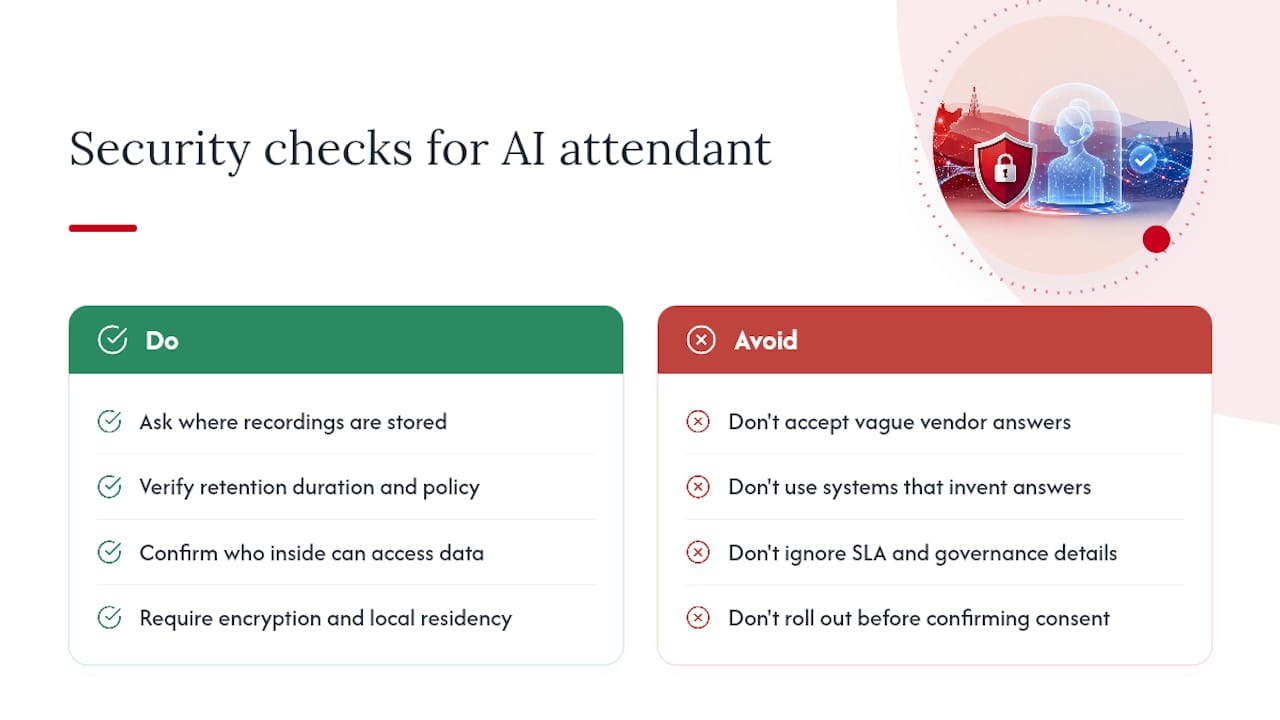
Ask where call recordings and transcripts are stored, how long they’re retained, and who inside the vendor’s organisation can access them. Governance around uptime, data handling, and service-level agreements is increasingly what separates a system suitable for a small team from one ready for enterprise-scale adoption, where regulatory exposure and call volume both climb.
A well-built AI attendant should also avoid inventing information. If a caller asks something outside its training or knowledge base, the system needs to say so and escalate, rather than guessing an answer that sounds plausible but is wrong. That’s a meaningful difference between a system trained tightly on a business’s own FAQs and one relying on more generic, general-purpose responses.
Encryption in transit and at rest, clear data residency (does it stay within the country it’s collected in, or route through offshore servers?), and a documented retention policy are the baseline. If a vendor can’t answer these clearly during a sales call, that’s worth treating as a warning sign rather than a detail to chase up later.
For businesses in regulated sectors, health, legal, financial services, the sensitivity bar is higher again. Confirm the vendor’s approach to call recording consent requirements in your jurisdiction before rollout, not after.
How do leading AI auto attendant providers compare?
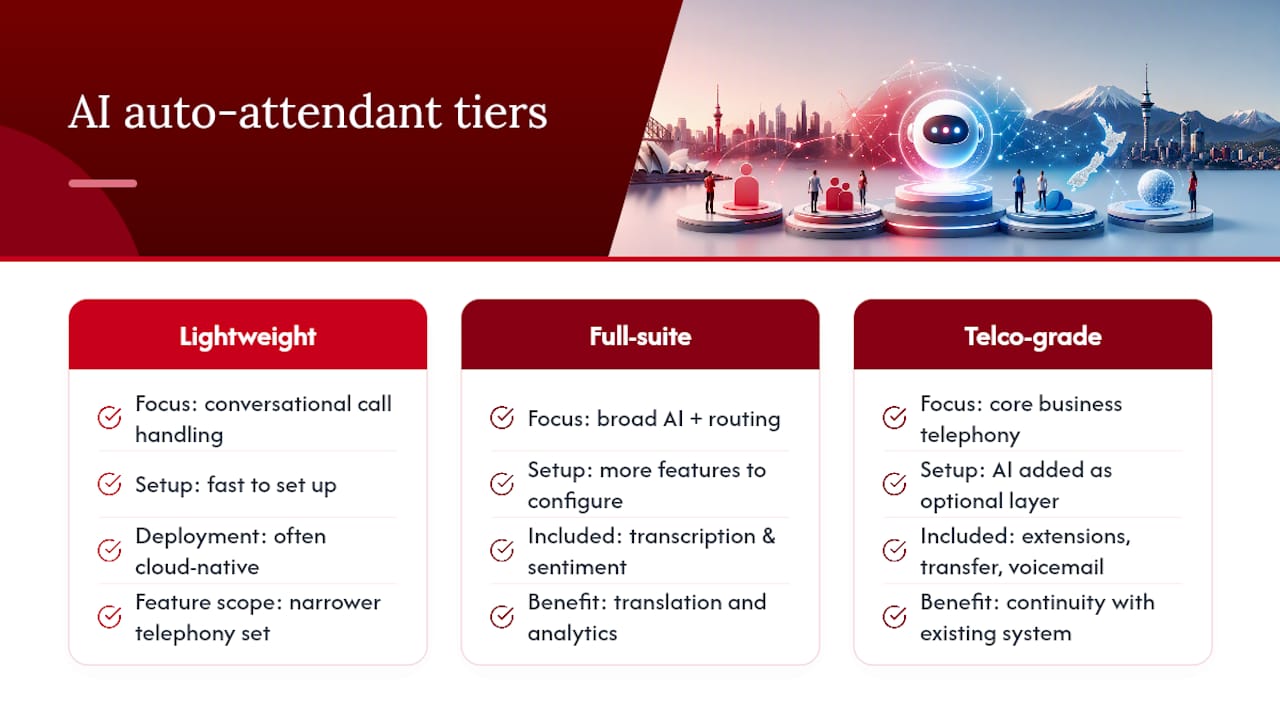
The market splits roughly into three tiers, and knowing which one you’re actually shopping in avoids a lot of wasted demo time.
Lightweight voice-AI specialists focus narrowly on conversational call handling. They tend to be fast to set up and often cloud-native by design, but they can lack the broader telephony features (extension management, transfer workflows, voicemail) a growing business already relies on day to day.
Full-suite AI voice platforms bundle transcription, sentiment analysis, and even translation alongside call routing. Hero’s AI voice offering, for instance, packages transcription and sentiment analysis directly into its feature set. The trade-off is usually cost and complexity: more features to configure means more that can go wrong without proper support.
Telco-grade business phone platforms with AI layered in, like Vadacom’s NextVoice, start from the core communications a business already depends on, extension dialling, transfer, voicemail, call recording, and add AI Call Intelligence as an optional layer rather than the whole product. The advantage here is continuity: you’re not replacing your phone system to get AI, you’re extending what you already have.
None of these is universally “best”. A five-person trades business doesn’t need the same platform as a fifty-seat clinic booking system. The right fit depends on whether you need AI as the entire product or as an add-on to phone infrastructure you’d need regardless of the AI question.
Author perspective: practical tips from implementing auto attendants
Two lessons come up again and again when businesses roll these systems out. First, start small. Route one call type or one time window to the AI, not the whole switchboard on day one, and spend real time testing sample utterances that match how your actual callers speak, not how a script writer imagines they speak.
Second, never remove the human fallback. The businesses that get burned are the ones that trust the AI completely before it’s earned that trust. A fast escalation path isn’t a weakness in the system, it’s what makes the rest of it safe to deploy. If you’re planning a pilot, structure it around a two-week window, a narrow slice of calls, and a daily review of transcripts. That’s enough to know if it’s working before you bet the whole reception desk on it.
— Stuart
How can Vadacom help you deploy an AI auto attendant?
If you’re weighing up a standalone voice-AI tool against a full business phone system, here’s the practical difference: Vadacom’s NextVoice gives you the phone infrastructure your business already needs, extension dialling, call transfer, voicemail, in-app recording, configurable call flows, with optional AI Call Intelligence layered in when you’re ready for transcription and deeper call analysis.
You’re not buying a bolt-on gadget and hoping it plays nicely with your existing setup. You’re extending a telco-grade cloud platform, built with local support behind it, so when something needs troubleshooting, there’s a real team who understands New Zealand and Australian businesses on the other end. If missed calls, after-hours gaps, or messy call routing are costing you customers, book a demo through Vadacom and test it against your own FAQs and real call scenarios before you commit to anything.