

A Busy Lamp Field (BLF) is a presence indicator that shows another extension’s real time status, whether idle, ringing, busy or on hold, so a colleague can route or answer a call without ever putting anyone through to voicemail by accident. It works through subscriptions between the phone and the call server, and it’s most valuable for receptionists, shared desks and any team that lives or dies by fast, accurate call handling.
TL;DR:
- Most BLF setups require proper licensing and firmware support to ensure reliable real-time status updates across all monitored extensions.
- Incorrect BLF status display often results from subscription or routing issues, misconfigured call search spaces, or outdated provisioning templates.
- Configuring BLF groups with sensible size limits and clear permissions prevents lag, missed updates, and privacy concerns during deployment.
- Colors and icons on BLF keys can vary by vendor, so verifying each handset manual avoids misinterpretation of status signals during daily use.
- Testing BLF with small groups before a full rollout helps identify and fix issues related to network, NAT, or template misconfigurations efficiently.
Table of Contents
- How does a busy lamp field work?
- What do the busy lamp field colours actually mean?
- Why busy lamp field functionality improves team efficiency
- Admin checklist: setting up busy lamp field monitoring properly
- Why does busy lamp field show the wrong status?
- Vadacom implementation notes and when to request local support
- Deployment priorities and privacy rules for busy lamp field
- Get busy lamp field configured properly with Vadacom
- Where to check platform specific busy lamp field settings
- Sources
- FAQ
How does a busy lamp field work?
A BLF light works because a phone or softphone quietly asks the phone system to keep it updated on someone else’s line status, and the system pushes updates back whenever that status changes. In technical terms, this is a subscription: the watching device sends a SIP SUBSCRIBE request for a specific extension, and the phone system responds with SIP NOTIFY messages every time that extension’s presence changes. Cisco’s own configuration documentation for Unified Communications Manager describes this exact mechanism, built around BLF presence groups and SUBSCRIBE calling search spaces that determine who is allowed to watch whom.
You’ll sometimes hear BLF called a busy lamp indicator, and both terms describe the same lamp field concept: a live presence signal, not a static label.
BLF shows up in a few different places, and each behaves slightly differently:
- IP desk phones — physical line keys with LEDs, often mapped through a phone button template.
- Softphones — an on screen presence icon next to a contact, doing the same job without hardware.
- Attendant consoles — dense grids of monitored extensions built for high call volume reception.
Cloud PBX platforms handle the same idea slightly differently again. PortaOne’s documentation on SIP subscription lifecycle and NOTIFY updates shows how a cloud system keeps lamps in sync as calls start and end, which is why two phones from different vendors can show the same extension’s status just a beat apart.
What do the busy lamp field colours actually mean?
Most BLF keys use a simple traffic light logic, though the exact colours depend on the handset. A green light usually means the extension is idle and free to receive calls, red or solid means it’s busy on an active call, and a blinking light almost always means it’s ringing right now. Amber or a slow pulse is commonly used for calls parked on hold, and a lamp that’s off, dim, or shows a question mark icon typically means the status is unknown, often because the device is offline or unregistered.
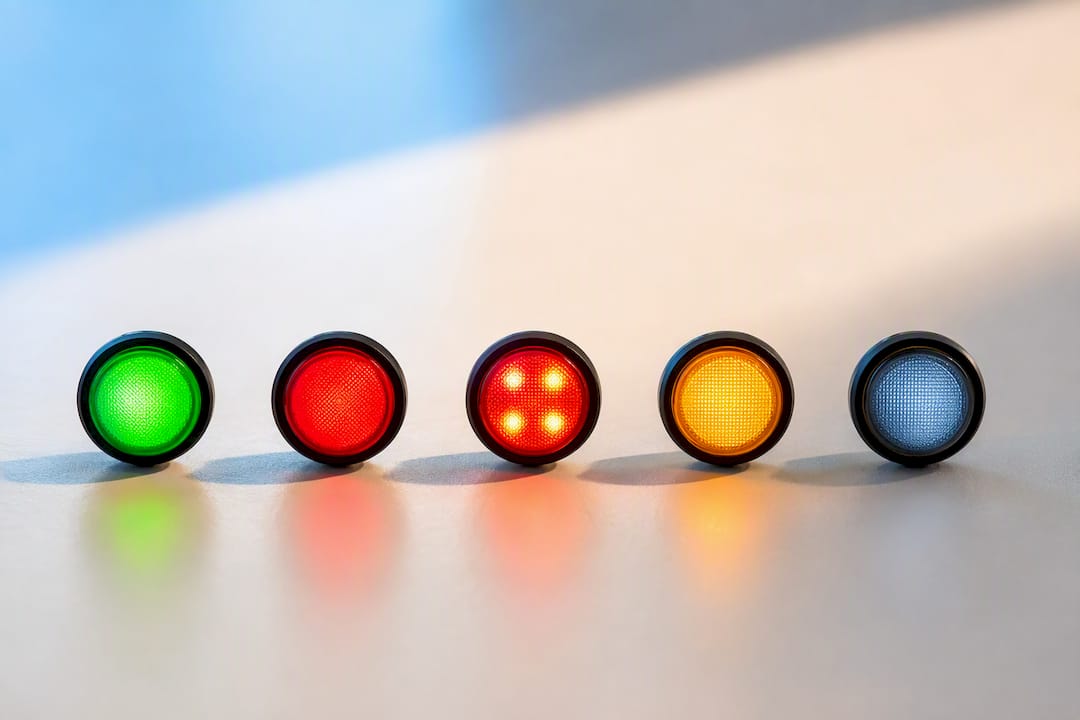
Avaya’s IP Office documentation lays out this exact legend, confirming that BLF indicators typically report states including available, busy, ringing, logged out and unknown. Where vendors diverge is in the finer detail, so always check the device manual before assuming a colour means the same thing across your whole estate.
Pro Tip: Before rolling BLF out to a whole floor, print the legend for your specific handset model and stick it near reception. Colour meanings drift enough between vendors that a five second glance at the wrong chart causes real hold-time blunders.
A watcher doesn’t just look at the lamp, they act on it:
- A green idle light means one touch to dial or transfer straight through.
- A blinking ringing light is the cue to pick up on behalf of a colleague, provided pickup permissions allow it.
- An amber on hold light often flags a parked call that needs retrieving, and some BLF keys double as one touch retrieve buttons for parked calls, turning a status light into an active shortcut rather than just information.
Why busy lamp field functionality improves team efficiency
The core value of BLF is speed. A receptionist who can see six extensions at a glance stops guessing who’s free and starts routing calls with certainty, which cuts unnecessary transfers and the awkward hold music that follows a wrong guess.
The efficiency gains show up in a few concrete ways:
- Fewer blind transfers because the person routing the call can see who’s actually available before dialling.
- Shorter hold times, since calls land with a free colleague on the first attempt rather than bouncing between busy extensions.
- Smoother shared desk workflows, where several staff cover the same set of lines and need to know instantly who’s on a call.
- Presence for hybrid teams, since a softphone BLF panel gives a remote worker the same visibility a receptionist gets from a desk phone, no matter where the monitored extension physically sits.
None of this requires guesswork once it’s set up properly. It requires the phone system to be told, explicitly, who is watching whom.
Admin checklist: setting up busy lamp field monitoring properly
Getting BLF working reliably is less about the phones and more about the permissions sitting behind them. Follow this order and you’ll avoid most first-time deployment headaches.
- Confirm device support and firmware. Not every handset supports BLF, and even models that do may need a firmware update before line keys behave correctly.
- Check licensing per user. BLF is frequently sold as an add-on feature rather than something bundled into every seat. BT’s Cloud Voice documentation is explicit that BLF often requires a specific add-on assigned per user in the admin portal, and hardware capability alone won’t switch that on.
- Set up BLF presence groups. Decide who is authorised to watch which extensions, and configure the SUBSCRIBE calling search space (or your platform’s equivalent) so those permissions are enforced server side, not just assumed.
- Map line keys or monitored entries. Whether you’re using a phone button template on a desk phone or a monitored contact list in a softphone, the order of keys should match how your team actually works, not just an alphabetical list.
- Align call pickup groups if directed pickup matters. Watching a lamp and being allowed to answer that line are two different permissions, and skipping this step is one of the most common reasons a receptionist can see a ringing call but can’t take it.
- Keep group sizes sensible. Vendor guidance suggests practical BLF groups top out around 50 monitored members before device or platform limits start causing lag or dropped updates.
Pro Tip: Test with one team before touching the whole business. A reception desk or a small support pod is the ideal pilot group, since problems surface fast and the blast radius is small if something’s misconfigured.
Why does busy lamp field show the wrong status?
Most BLF troubleshooting comes down to one of five causes, and working through them in order saves a lot of wasted time.
- No active subscription or missing licence. A phone can look BLF capable and still not work if the add-on was never assigned to that user, which is a genuinely common oversight.
- SUBSCRIBE/NOTIFY routing problems. Calling search space or partition ordering can determine which presentity actually supplies the status, and Cisco’s own guidance flags presence group and CSS ordering as a frequent cause of overlapping or incorrect presence in multi-partition environments.
- Mismatched provisioning templates. After any bulk update, phone button templates need reapplying, or line keys quietly stop mapping to the right extension.
- Network or NAT issues. Presence notifications can be blocked or delayed by firewall or NAT settings that never affect voice quality, which makes this failure mode easy to miss.
- Stale cache after a device swap. Replacing a handset without reprovisioning the monitored entries leaves the new device blind to updates it should be receiving.
When none of the obvious fixes work, the standard operating procedure is a SIP trace. Force a known ringing state on the monitored extension, then confirm whether a SUBSCRIBE was sent and a matching NOTIFY was returned. That single check tells you whether the fault sits on the device, the provisioning template, or the presence manager itself, and it’s far faster than guessing.
Vadacom implementation notes and when to request local support
Cloud provisioning generally gets BLF live faster than onsite configuration, since presence groups and device profiles can be pushed centrally rather than touched handset by handset. The trade-off is that a mistake in a central template also propagates faster, which is exactly why licensing needs checking early. Hardware support for BLF is not the same as a working BLF licence, and that gap catches out plenty of otherwise well planned rollouts.
The NextVoice platform supports monitored extensions as part of a broader call handling toolkit, alongside extension dialling, call transfer and configurable call flows, with available local support to assist with licence assignment during setup.
A few scenarios genuinely warrant a proper BLF audit rather than a DIY fix:
- Mixed firmware across desk phones from different purchasing rounds.
- Multi-site deployments where SUBSCRIBE routing has to work across locations, not just one office.
- Complex directed pickup requirements layered on top of standard presence monitoring.
Deployment priorities and privacy rules for busy lamp field
Roll BLF out to one team first, reception is usually the obvious candidate, and measure the effect before expanding further. Watch transfer rates and answer times; if they don’t move, something in the setup needs revisiting before you scale it business wide.
Authorise watchers deliberately rather than by default. BLF is a monitoring tool, and every extension added to a presence group is a small privacy decision, not just a technical one. Get that balance right early and the rollout stays trusted rather than resented.
— Stuart
Get busy lamp field configured properly with Vadacom
Getting BLF right isn’t really about buying the right handset, it’s about getting the licensing, presence groups and pickup permissions set up correctly the first time, which is exactly where DIY rollouts tend to stall. The NextVoice platform bundles monitored extension support alongside extension dialling, announced transfer and configurable call flows, so BLF sits inside a system built for it rather than bolted on as an afterthought.
Vadacom’s local team handles provisioning and licence assignment as part of setup, which matters most for businesses running mixed hardware or multiple sites where a single misconfigured presence group can quietly break monitoring for an entire floor. If your current BLF setup is patchy, or you’re planning a rollout and want it done right the first time, get in touch with Vadacom for a BLF audit or a NextVoice demo.
Where to check platform specific busy lamp field settings
For configuration details specific to your own phone system, these vendor resources cover the technical steps in full:
- Cisco’s BLF presence configuration guide for presence groups and phone button templates.
- Avaya’s BLF indicator reference for lamp state definitions.
- IT Start’s business phone systems articles for broader deployment considerations and device compatibility notes.
Sources
FAQ
What Does “Busy Lamp Field” Mean?
A busy lamp field is a presence feature that shows the real-time status—idle, busy, ringing or offline—of another phone extension on a lamp, key or screen icon so calls can be routed or answered faster.
What Does BLF Mean on a 3CX Phone System?
On 3CX and similar platforms, BLF works the same way it does elsewhere: a monitored key subscribes to another extension’s status and updates in real time, letting a user see and often pick up calls on that line directly from their own handset.
What Is BLF on a Yealink Phone?
On Yealink handsets, BLF keys are programmable line buttons that display another extension’s status through colour and blink patterns, and they’re configured either through the phone’s admin interface or pushed via a provisioning template from the phone system.
Why Does My BLF Light Show the Wrong Status?
The most common causes are a missing licence despite BLF capable hardware, a SUBSCRIBE routing issue tied to calling search space configuration, or a provisioning template that hasn’t been reapplied after a device change.
Does BLF Let Me Answer Someone Else’s Ringing Call?
Seeing a ringing status through BLF doesn’t automatically mean you can answer it. Directed pickup usually needs the watching extension to also belong to a call pickup group or have a directed pickup feature enabled alongside the monitoring itself.