

Voicemail-to-email delivers a caller’s voice message straight to a staff inbox as an audio file, a secure link, or a written transcript, replacing the need to dial into a phone system to check messages. It’s the difference between a lead sitting unheard on a handset overnight, and a rep replying from their laptop before their coffee’s cold. This guide covers the formats, the setup steps, greeting scripts, and the security checks IT managers actually need.
TL;DR:
- Voicemail messages are typically delivered via audio files, secure links, or transcripts, with many platforms providing a combination for searchability.
- Proper setup involves auditing extensions, configuring mailboxes, enabling forwarding, and testing transcript accuracy with varied call samples.
- Centralized voicemail-to-email enhances speed, visibility, and remote team support, significantly reducing staff response times.
- Common issues like missing attachments or garbled transcripts often stem from configuration errors or audio quality, requiring targeted troubleshooting.
- Choosing a provider with SLA guarantees, control over permissions, and integration options is crucial for reliable and secure implementation.
Table of Contents
- What is voicemail to email and how are messages delivered?
- How does a voicemail actually reach your inbox?
- Voicemail-to-email vs visual voicemail vs voicemail-to-text
- Why businesses adopt voicemail to email
- Setting up voicemail to email: a step-by-step checklist
- Voicemail greeting scripts that point callers to email
- Fixing common problems and keeping messages secure
- Where Vadacom fits into a voicemail-to-email setup
- Rolling this out without breaking your team’s workflow
- Get voicemail to email running with local support
- Sources
- FAQ
What is voicemail to email and how are messages delivered?
Voicemail-to-email takes a recorded message left on a business phone system and routes it into an email inbox rather than (or as well as) leaving it on the handset. Support pages from telephony providers and universities describe this as the standard method most systems now use, because it turns a voicemail into a document the whole team can search, forward, and file.
Messages typically arrive in one of three ways:
- Audio attachment, usually an MP3 or M4A file playable on any device.
- Secure link, which points to the message hosted on the provider’s servers rather than embedding it in the email.
- Transcript, a text version of the message either replacing the audio or sitting alongside it.
Many platforms send a combination: the audio file plus a transcript in the email body, with call metadata (caller ID, timestamp, duration) in the header. That combination is what makes voicemail genuinely searchable. Once a message exists as text in an inbox, it’s part of your audit trail, and any staff member can find it by searching a name or keyword instead of playing back a queue of recordings.
How does a voicemail actually reach your inbox?
The signal path has four stages, and each one is a place things can go wrong if it’s misconfigured.
- Call routing. An unanswered call hits the voicemail box or IVR menu attached to that extension, and the system starts recording.
- Recording and encoding. The audio is captured and saved, usually as a compressed file, ready to be attached or linked.
- Transcription. Some platforms transcribe locally on the phone system; most cloud platforms send the audio to a cloud automatic speech recognition (ASR) engine. Cloud ASR generally produces better accuracy on noisy calls, because the models are larger and retrained more often than anything running on local hardware.
- Email delivery. The system sends the message out, either through an SMTP relay to your mail server or via a secure link with metadata headers identifying the extension and caller.
On the admin side, you’re mapping each extension to a mailbox, deciding retention windows, and choosing whether transcription runs by default or on request. Microsoft’s own support threads show that transcript delivery behaviour differs by platform and configuration, so don’t assume every extension behaves the same way out of the box.
Pro Tip: Test transcription on a deliberately mumbled or accented voicemail before rollout. Accuracy on a clear message tells you nothing about how the system copes with the calls that actually matter.
Voicemail-to-email vs visual voicemail vs voicemail-to-text
These three terms get used interchangeably, but they solve different problems.
- Visual voicemail lives on the device. Android’s Phone app, for instance, lists messages directly in the app interface with settings to choose which service handles the voicemail, but it’s tied to that one handset.
- Voicemail-to-email is centralised. Messages route to a shared or individual inbox, which suits teams because multiple people can see, forward, and act on the same message.
- Voicemail-to-text usually refers to the transcription layer itself, whichever delivery method carries it.
Visual voicemail suits a solo operator checking their own phone. Centralised voicemail-to-email suits any business where more than one person needs visibility of incoming calls, because it supports multi-recipient routing that a handset can’t match.
Why businesses adopt voicemail to email
The case for switching usually comes down to speed and visibility. A missed call that sits as an unplayed voicemail is a missed call twice over: nobody follows up until someone happens to check the handset. Route that same message to an inbox, and it lands in front of a rep, a shared support queue, or a CRM record within seconds.
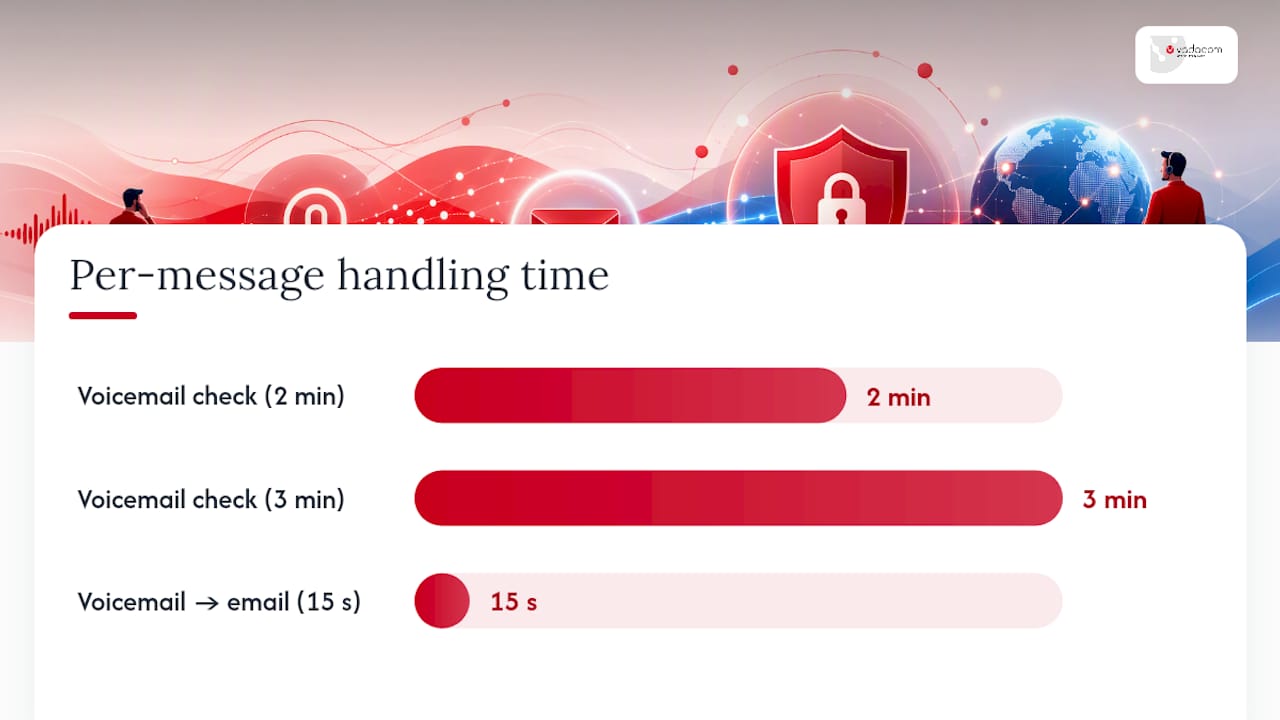
The maths is simple. If checking voicemail the old way costs a staff member two or three minutes per message (dialling in, entering a PIN, listening, taking notes), and email delivery cuts that to fifteen seconds of skimming a transcript, you’re recovering minutes per message across every missed call your business gets in a week. Multiply that across a sales team and it adds up to hours of staff time freed for actual follow-up.
Three practical gains follow from that:
- Faster response to leads, because the message is visible the moment it lands rather than at the next voicemail check.
- Searchable records, since a transcript in an inbox can be found by keyword, unlike audio sitting in a phone system.
- Better support for remote or hybrid teams, who never need to dial into a shared office handset to check messages.
Setting up voicemail to email: a step-by-step checklist
Rolling this out properly takes more than flicking a switch in the admin portal. Work through these steps in order.
- Audit your numbers and owners. List every extension and shared line, and confirm who is responsible for checking each one’s messages.
- Decide mailbox targets and retention. Choose whether voicemail goes to a personal inbox, a shared team inbox, or both, and set how long messages are retained before deletion.
- Enable forwarding or cloud voicemail routing. Turn on the voicemail-to-email feature in your phone system’s admin console, and confirm each extension has a correctly mapped destination address.
- Configure delivery method. Decide whether email carries an SMTP-relayed attachment or a secure link, and turn transcription on if your plan includes it.
- Integrate with CRM or helpdesk tools. Where possible, send a link to the recording with an API-triggered record into the contact’s file, rather than a large audio file, since that’s easier to store, index, and control access to than repeated attachments cluttering an inbox.
- Set permissions. Restrict who can view shared voicemail inboxes, particularly for lines that might carry sensitive customer information.
- Test and verify. Leave test messages across different accents, background noise levels, and call durations, then check transcript accuracy and confirm delivery timing before going live organisation-wide.
Pro Tip: Run the pilot on your busiest support line first, not your quietest. That’s where transcription errors and routing gaps show up fastest, and where fixing them matters most.
Voicemail greeting scripts that point callers to email
A good greeting does two jobs: sets expectations on callback timing, and steers urgent callers to the fastest channel. Industry guides on greeting structure recommend a short greeting that covers your name, the business, a callback window, and an alternative contact.
- General greeting: “You’ve reached [Name] at [Business]. I can’t take your call right now, but leave your name, number, and a brief message, and I’ll return your call within one business day. For a faster response, email [address] and I’ll see it immediately.”
- After-hours greeting: “You’ve reached [Business] outside our operating hours of [times]. Leave a message and we’ll respond the next business day, or email [address] for the quickest reply once we’re back online.”
- Urgent contact greeting: “This is [Name] at [Business]. If your matter is urgent, please email [address], as messages there reach me faster than voicemail. Otherwise, leave a message and I’ll call back shortly.”
If your system transcribes and stores messages using AI, say so on the greeting or in your privacy notice. Callers should know a transcript of what they say may be kept and shared internally.
Fixing common problems and keeping messages secure
Most voicemail-to-email faults trace back to one of a handful of causes, and most are quick to diagnose.
- Missing attachments usually mean an SMTP relay issue or a file-size cap on the receiving mail server, not a fault with the voicemail system itself.
- Garbled or incomplete transcripts often point to poor call audio quality rather than a weak ASR engine. Check the recording itself before blaming the transcription provider.
- Delayed delivery is frequently a mail queue backlog, worth checking on the receiving server before assuming the phone system has failed.
On governance, lock down who can access shared voicemail inboxes, set a clear retention and deletion policy, and confirm messages travel over TLS in transit with encryption at rest where the platform offers it. If you’re using AI transcription, disclose that in your greeting or privacy documentation, since transcripts of customer conversations carry the same sensitivity as any other stored customer communication.
Pro Tip: Keep the original audio attachment available even when transcripts are your default view. Tone and urgency get lost in text, and a curt written summary can misrepresent a call that was actually calm, or vice versa.
Where Vadacom fits into a voicemail-to-email setup
Vadacom has spent more than 20 years building and supporting business communications across New Zealand and Australia, and that experience shows in how NextVoice handles voicemail. The platform runs on cloud infrastructure across multiple availability zones, with voicemail, configurable call flows, and optional AI call intelligence available for teams that want deeper analysis of their call recordings.
When you’re evaluating any vendor for this feature, check four things: the service level agreement covering uptime, transcript accuracy claims and whether they’re backed by real figures, how much control admins get over mailbox routing and permissions, and whether the platform offers integration APIs for your CRM or helpdesk.
Rolling this out without breaking your team’s workflow
Pilot with one team before a full rollout. Watch how they actually use transcripts, tighten your greeting scripts based on real caller behaviour, and track response times before and after. Train staff on handling transcripts that may contain sensitive details, since a written record carries the same confidentiality obligations as the call itself.
— Stuart
Get voicemail to email running with local support
There are plenty of ways to bolt voicemail-to-email onto an existing setup, from carrier add-ons to standalone transcription tools. What most of them don’t offer is someone local to call when a mailbox stops routing correctly at 8am on a Monday. Vadacom’s NextVoice platform builds voicemail, call flows, and optional AI call intelligence into one cloud system, backed by a support team based across New Zealand and Australia that actually understands how your business phones are wired together.

If you’re weighing up whether to retrofit voicemail-to-email onto your current phone system or replace it with something built for the job, it’s worth talking to an experienced provider who can walk through your extension list and retention needs directly. Get in touch with Vadacom to see how NextVoice handles voicemail routing, transcription, and admin control for your team, or check the reseller program if you’re evaluating this on behalf of clients.
Sources
- Voicemail to Email — JMU
- Transcript of Voicemail sent via Email — Microsoft Q&A
- How to check your voicemail — Google Phone app Help
- How to convert voicemail to text automatically (2026 guide) — Heilo
FAQ
How can I send voicemail to my email?
Most business phone systems have a voicemail-to-email setting in the admin portal where you map an extension to an email address and choose whether to include audio, a transcript, or both.
Is there a free voicemail-to-email service available?
Some carriers and email providers include basic voicemail-to-email or voicemail-to-text at no extra cost, but transcription accuracy and features are usually limited compared to paid business platforms.
Can I forward iPhone voicemail to email?
Yes. iPhone voicemails can be shared as audio files through the Mail app, and Apple’s Live Voicemail feature can also store messages in iCloud for access across devices, though this isn’t the same as automatic server-side voicemail-to-email routing.
How do I forward voicemail to my Outlook email?
If your phone system supports voicemail-to-email, you set the destination mailbox to your Outlook address in the admin console; Microsoft’s own support documentation notes that exact delivery behaviour, including whether a transcript is attached, varies by platform and configuration.
Is voicemail-to-email transcription accurate enough for business use?
Business-focused transcription tools commonly reach accuracy in the mid-80s to low-90s percent range, which is generally reliable enough for triage but worth spot-checking on unclear or accented calls.