

For most businesses with reliable broadband, VoIP beats a traditional landline on cost, features and scalability. Landlines still earn their place where power resilience or regulatory continuity matters more than flexibility. Internet quality, feature needs, downtime tolerance and budget decide which way you go, and plenty of businesses land somewhere in between with a phased or hybrid setup.
TL;DR:
- VoIP call quality relies heavily on network bandwidth, proper configuration, and low packet loss, while landlines offer predictable quality through dedicated circuits.
- Cost differences over three years are substantial, with VoIP typically costing less due to lower subscription, hardware, and international calling fees, especially for multiple sites.
- VoIP systems introduce security risks like eavesdropping and toll fraud, requiring encryption, network segmentation, and strict access controls not needed for landlines.
- During outages, landlines often remain functional through power and network independence, whereas VoIP requires backup power and internet redundancy for reliability.
- Migrating to VoIP involves a phased approach, testing network readiness, running pilots, and planning for support, support, and rollback options to mitigate disruption risks.
Table of Contents
- VoIP vs landline: how the underlying technology actually differs
- Voip pros and cons vs landline: what actually matters for your business
- What does VoIP vs landline actually cost over three years?
- Is VoIP as reliable as a landline during an outage?
- Which features change once you move off a landline?
- What security and compliance checks does VoIP need?
- How do you migrate from landline to VoIP without disrupting calls?
- VoIP vs landline: how do you actually decide?
- What migrations like this actually teach you
- Where Vadacom NextVoice fits into this decision
- Sources
- FAQ
VoIP vs landline: how the underlying technology actually differs
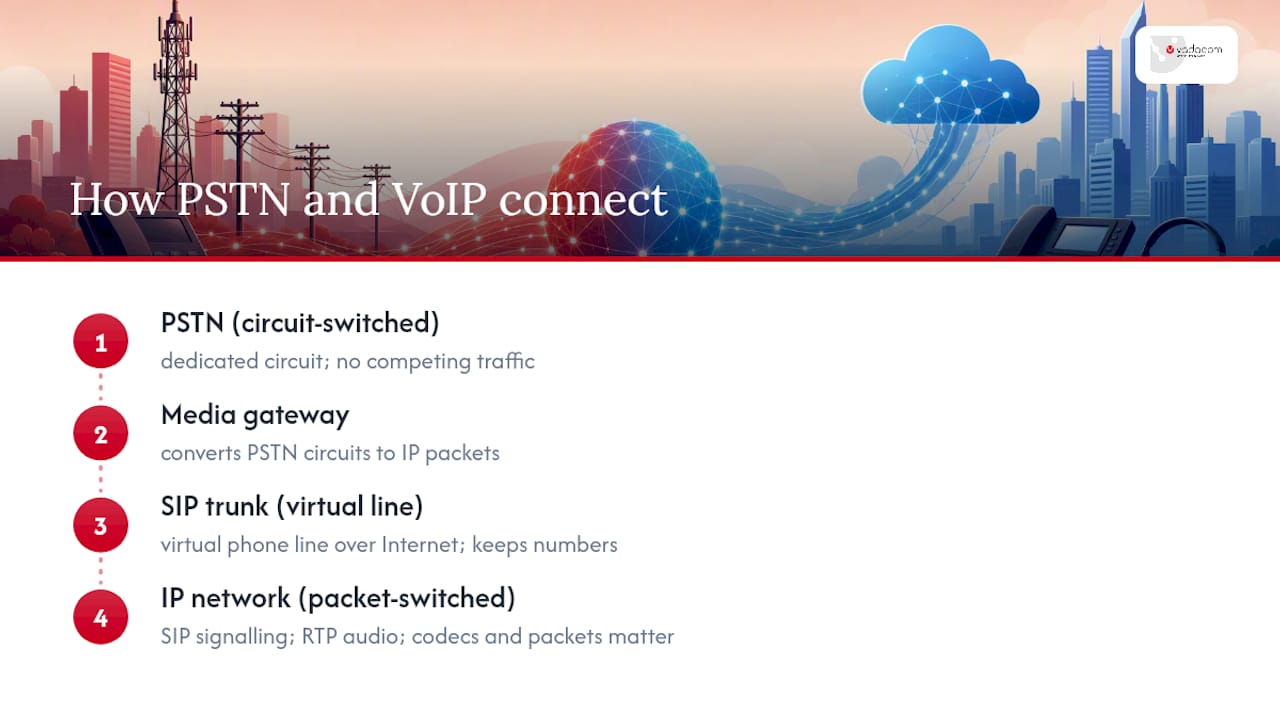
The core difference is switching method, and it explains almost everything else in this comparison. VoIP breaks your voice into digital packets and sends them over the internet using SIP for call signalling and RTP for the actual audio stream. Landline calls, by contrast, run on the PSTN, the traditional circuit-switched network that dedicates a physical circuit to your call for its entire duration.
That circuit is why landline call quality has historically been so predictable. Once the connection is established, nothing else competes for that path. VoIP has no dedicated circuit. It shares your internet connection with everything else your business does online, which is why codec choice, jitter and packet loss become real engineering concerns rather than abstract network trivia.
SIP signalling handles call setup, routing and teardown, while RTP carries the compressed voice data itself. Codecs like G.711 and G.722 determine how that audio gets compressed. Better codecs need more bandwidth but sound closer to a landline call, and this trade off is exactly where a lot of businesses get their VoIP quality assessment wrong. Poor call quality is a bandwidth or configuration problem in almost every case, not a fundamental limitation of the technology.
Where the PSTN and IP worlds meet, you’ll find media gateways and SIP trunks. A SIP trunk is effectively a virtual phone line delivered over your internet connection rather than a copper pair, and it’s the mechanism most businesses use to keep their existing numbers while shifting the underlying technology to VoIP. Number portability across this boundary is now routine, not the ordeal it was a decade ago. Your existing business number moves with you, whether you’re going VoIP, staying on landline, or running both during a transition.
Voip pros and cons vs landline: what actually matters for your business
Weighing VoIP against a landline phone alternative comes down to a short list of trade-offs that repeat across almost every business case.
Where VoIP wins:
- Lower ongoing cost per user, since there’s no separate line rental to a phone carrier
- Built-in features like auto-attendants, voicemail-to-email and call recording, usually included rather than billed as add-ons
- Scales in minutes. Add a user, assign a number, done. No technician visit, no new copper run
- Works from anywhere with a decent connection: home office, second site, a laptop in an airport lounge
- Integrates with CRM and helpdesk tools, turning your phone system into a data source rather than just a handset
Where landline still has an edge:
- Call quality doesn’t fluctuate with network congestion, because the circuit is dedicated
- Some legacy phones draw power from the exchange line itself, so they can keep working through certain power outages
- Emergency location handling is simpler and more predictable, since the number is tied to a fixed physical address
The catch with VoIP is that its strengths come with responsibilities landlines never asked of you. You need enough bandwidth, a plan for what happens when your internet drops, and someone accountable for the security of a system now sitting on your network rather than a phone company’s private infrastructure. None of that is a dealbreaker. It just means VoIP shifts work from the phone company to your IT team, and the businesses that plan for that upfront have a much smoother experience than the ones who don’t.
What does VoIP vs landline actually cost over three years?
VoIP’s cost advantage is the single biggest driver of adoption, and the gap is bigger than most people expect going in.
Pro Tip: Ask any VoIP vendor for an all-in quote that includes call recording, SMS and international minutes before you compare it to a landline quote. Base VoIP pricing often excludes features a landline plan bundles in by default, and that’s where budget comparisons quietly go wrong.
Cost falls into a handful of predictable buckets:
- Subscription or line rental. Business VoIP plans commonly run $10 to $15 per user each month, while legacy landline lines often sit at $50 or more per line once you add maintenance.
- Hardware. Landlines need physical handsets and, often, an on-premise PBX. VoIP can run on softphones and existing computers, though many businesses still buy IP handsets for reception and shared spaces.
- Internet capacity. VoIP adds voice traffic to your existing connection, which sometimes means an upgraded plan or a second link for redundancy.
- Installation and maintenance. Landline installation involves a technician and physical cabling. VoIP setup is largely configuration work, but that configuration still takes skilled time.
- International and long-distance calling. This is where the totals diverge fastest. Landline long-distance rates stack up quickly for businesses with offshore clients or suppliers; VoIP calling is usually far cheaper per minute, sometimes bundled.
Take a 20-person business making moderate international calls, roughly the kind of profile a lot of New Zealand exporters and professional services firms fit. A landline setup with per-line rental, a PBX lease and international call charges regularly totals tens of thousands of dollars over three years once maintenance and toll calls are counted. The equivalent VoIP deployment, with per-user subscriptions, minimal hardware and bundled international minutes, typically costs significantly less over the same period, according to industry cost analysis from TechnologyAdvice. The gap widens further for businesses with multiple sites, since each landline site multiplies fixed line costs, while VoIP users can sit on one unified system regardless of location.
The caveat: these outcomes depend heavily on call profile and network readiness. A business with patchy broadband and high call volumes can find its VoIP savings eaten up by the cost of fixing its network first.
Is VoIP as reliable as a landline during an outage?
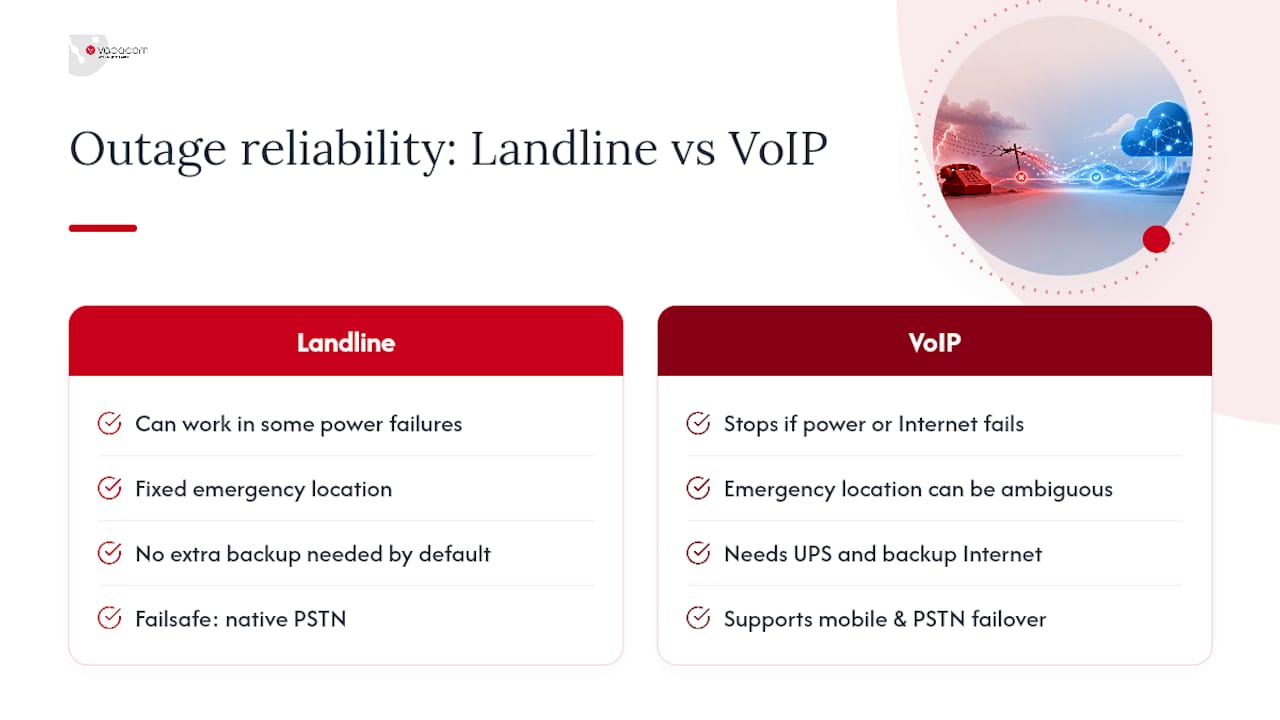
Not automatically, and this is the question every IT manager should ask before signing anything. The PSTN can keep working through some power failures because certain corded phones draw their power directly from the exchange, independent of your building’s mains supply. VoIP has no equivalent by default. If your router, switch or internet connection loses power or drops offline, your phones go with it.
That’s a real gap, but it’s a closeable one. A UPS on your core network gear, router, switch and VoIP handsets, buys you enough runtime to survive a short outage or fail over gracefully. A second internet connection from a different provider, even a modest 4G or 5G backup link, covers the scenario where your primary ISP goes down rather than your power. Mobile app failover means calls to your business number can ring through to a staff member’s phone the moment the office system goes dark, and PSTN fallback via SIP trunking lets calls drop back onto the traditional network if your IP path fails entirely.
Emergency calling deserves its own line of questioning. Ask any VoIP provider exactly how they handle emergency service location data, whether that’s tied to a registered physical address per handset or per site, and how quickly that information updates if you move desks or offices. A landline’s emergency location is fixed and unambiguous by nature. VoIP’s isn’t, unless the provider has built proper location handling into the platform, and that’s a question worth asking before a pilot, not after an incident.
Which features change once you move off a landline?
The feature gap between landline vs digital phone systems is where a lot of the real operational value sits, well beyond just making and receiving calls.
Auto-attendants route callers without a receptionist. Call queues distribute inbound volume across a team instead of dumping it all on one extension. Voicemail-to-email means nobody has to dial in and sit through a menu just to check messages. Call recording, transcription and CRM integrations turn phone activity into searchable, analysable data rather than a conversation that vanishes the second the call ends.
Some legacy features carry over cleanly:
- Extension dialling and call transfer work the same way conceptually, just delivered differently
- Voicemail exists on both, though VoIP versions typically arrive as audio files or transcripts in your inbox
- Call forwarding is standard on both systems
Others simply don’t exist on a landline at all:
- Softphone apps that turn any laptop or mobile into a full extension
- Announced call transfer with live context handed to the next person
- Configurable call flows that route by time of day, caller history or team availability
For a distributed team working across home offices and a central site, the mobile app alone often justifies the switch. For a multi-site organisation, unifying every location under one number plan and one set of call flows removes a layer of administrative friction that landlines never solved well in the first place.
What security and compliance checks does VoIP need?
Moving voice traffic onto your data network means voice inherits data network risks: eavesdropping, toll fraud, denial-of-service attacks and unauthorised access to voicemail or call recordings. None of these threats existed in the same form on a traditional landline, and that’s the trade off IT teams need to plan for, not fear.
The standard defences are well established. Session border controllers manage and filter SIP traffic at the network edge. Encryption via SRTP for media and TLS for signalling stops calls being intercepted in transit. Network segmentation, keeping voice traffic on its own VLAN, limits how far an attacker can move if another part of the network is compromised. Vendors offering compliance-ready features still require the buyer to verify them, rather than assuming compliance comes bundled with the subscription.
Operationally, that means checking access controls on the admin portal, confirming call logging and retention policies match your industry’s requirements, and asking specifically how recordings are encrypted and stored. If your business handles payment details over the phone or operates under privacy legislation around where customer data is stored, get explicit answers on data residency and retention before signing. A broader enterprise security framework helps put these voice-specific controls in context alongside your wider network security posture.
How do you migrate from landline to VoIP without disrupting calls?
Nobody sensible rips out a landline system on a Friday and expects Monday to go smoothly. The safer path is usually a hybrid one, running SIP trunking alongside your existing lines, a parallel run where both systems operate simultaneously, or PSTN fallback as a safety net while you build confidence in the new platform.
A practical migration checklist looks like this:
- Audit network readiness: bandwidth, router QoS settings, and whether your current internet plan can handle voice traffic without degrading other services
- Configure Quality of Service rules to prioritise voice packets over less time-sensitive traffic
- Run a pilot with a single team or department before touching the whole business
- Port a subset of numbers first, confirming call flows and voicemail before committing further
- Document a rollback plan in case the pilot uncovers a blocker
- Schedule full number porting and cutover only once the pilot has run cleanly for a set period
A pragmatic approach favoured by IT teams is exactly this sequence: pilot with one team, tune QoS and failover, port a subset of numbers, then commit to full cutover once confidence is established.
Before signing with any vendor, get straight answers on:
- What’s the SLA on uptime, and what happens financially if it’s missed?
- What are actual support hours, and is that support local or offshore?
- How is handover managed, and what training is included for staff?
- Who owns the rollback decision if the pilot fails?
VoIP vs landline: how do you actually decide?
Choose VoIP if your internet connection is stable, your team needs mobility or advanced call handling, and you’re comfortable managing a system that lives on your network rather than a phone company’s copper. Choose landline, or keep one alongside VoIP, if your location has genuinely unreliable broadband, or if a regulatory or continuity requirement demands a phone that survives a total internet or power outage.
A quick readiness check before you commit to VoIP: confirm your bandwidth per concurrent call, test your network under real load rather than idle conditions, and check whether your router supports proper QoS tagging. If all three check out, VoIP is very likely the right call.
Next steps that actually move things forward: run a small pilot with one team, loop in your IT lead and whoever owns the phone budget, and get internal sign-off on a rollback plan before full cutover. That sequence removes almost all the risk that normally makes this decision feel bigger than it is.
What migrations like this actually teach you
The businesses that get VoIP migrations right test their network honestly before they commit, not after. Latency and jitter under real daytime load tell you far more than a speed test run at midnight. Change management matters just as much as the technology: staff need to know what’s changing and why before the cutover, not during it.
Local support shortens the gap between signing and actually running smoothly, because someone who understands New Zealand network conditions can spot a problem before it becomes an outage.
— Stuart
Where Vadacom NextVoice fits into this decision
Vadacom built NextVoice specifically for the trade offs this comparison raises: telco-grade cloud architecture across multiple availability zones, without the upfront hardware cost or complexity of an on-premise PBX. That resilience matters directly, since it’s built to keep scaling as your team grows rather than needing a re-platform every time you add users.

The platform covers extension dialling, call transfer, voicemail, in-app call recording and configurable call flows, plus optional AI analytics for businesses that want deeper insight from their call data. Support is available for the migration process, helping reduce the risk in a phased cutover. If you’re weighing up cloud communications and want the AWS-backed infrastructure detail behind that resilience, Vadacom’s AWS architecture page breaks down exactly how it’s built. Businesses assessing partner or reseller pathways can also check Vadacom’s reseller program for deployment options.
If this comparison has you leaning toward VoIP, the sensible next step is a conversation, not a contract. Get in touch with Vadacom to talk through a pilot for your team and see how NextVoice fits your specific call profile and network setup.
Sources
For deeper technical grounding on the concepts covered here, these sources are worth a closer read during procurement planning:
- PSTN and IP voice explanation — TelcoBridges
- VoIP vs landline: Business phone systems comparison — TechnologyAdvice
FAQ
Do I need a landline if I have VoIP?
No, most businesses running VoIP drop their landline entirely once the migration is stable. Some keep one landline as a fallback for emergency calling or during the transition period, but it’s not a technical requirement.
What are the downsides to VoIP?
VoIP depends on your internet connection and local power, so outages affect it in ways landlines don’t, and call quality can suffer without proper bandwidth and QoS configuration. It also shifts security responsibility onto your business, requiring controls like encryption and network segmentation that a landline never needed.
Can a VoIP phone be used as a landline?
A VoIP handset can look and function like a landline phone for everyday calling, but it needs power and an internet connection to work, unlike a traditional corded landline that can draw power from the exchange. Number porting means your existing landline number can move to a VoIP service and behave the same way for callers.
Can I just plug a VoIP phone into my router?
Yes, most VoIP handsets connect directly to your router or network switch via ethernet, and some support Wi-Fi. For reliable call quality, your network still needs proper QoS configuration so voice traffic gets priority over other data.