
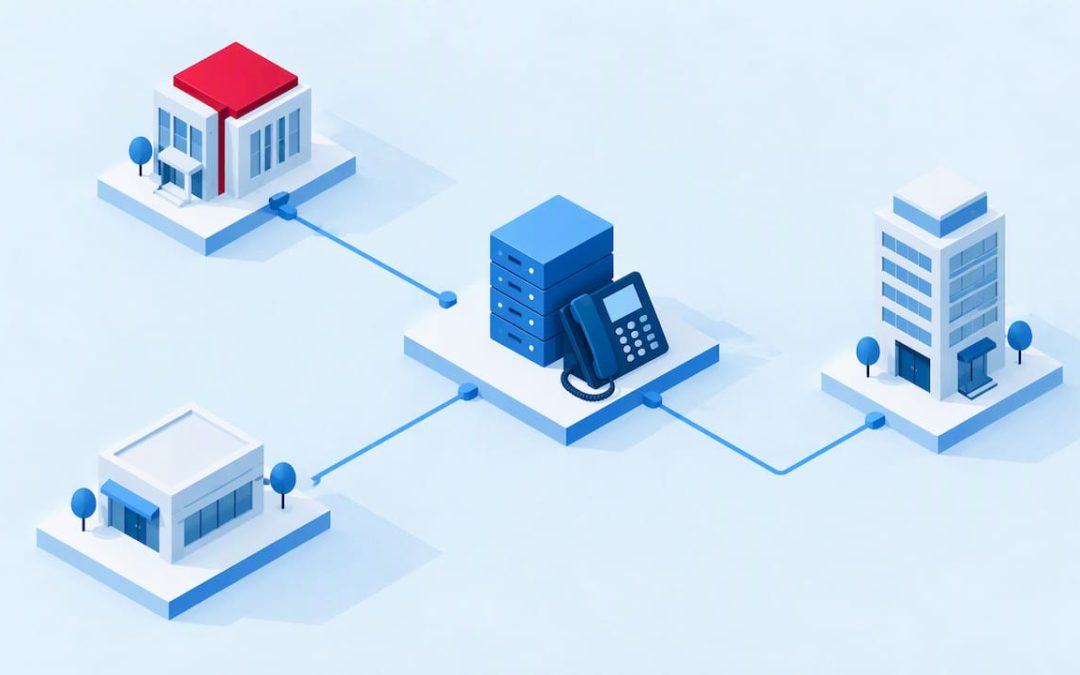
A multi-site phone system connects every branch, depot, clinic or home office to one shared telephony platform, so staff dial each other by extension, callers reach the right location, and you manage it all from one place. A cloud platform such as our NextVoice is the simplest way to do this in New Zealand, because there is no PBX box to buy and maintain at each site. This guide covers how multi-site calling works, how call routing between locations is built, what to check before you move, and how AI answering fits in.
TL;DR
- A multi-site system treats all locations as one phone network: shared extensions, shared call flows, one admin view, whatever the number of sites.
- Hosted (cloud) systems are owned and maintained by the provider for a monthly charge, which removes per-site hardware (IT Brief NZ).
- Call routing is only as reliable as your broadband at each site and the carrier arrangements behind your numbers, so check both before you commit.
- Map your calls before you build: who answers, when, and where a call goes if nobody picks up.
- AI receptionists can handle overflow and after-hours calls, but start with a governed pilot rather than switching everything at once.
Table of Contents
- What a multi-site phone system actually is
- How a multi-site system connects offices and remote staff
- Multi-site call routing: how calls find the right place
- Features that keep every site consistent
- Reporting: knowing what happens to calls at each location
- What to check before you move: internet, power, security and service
- What does a multi-site phone system cost in New Zealand?
- Moving from old on-premise systems
- Where AI answering fits
- A simple rollout plan for several sites
- Our perspective
- Talk to us about your sites
- FAQ
- Sources
What a multi-site phone system actually is
People often mix up three terms. A multi-line system lets one business handle several calls at the same time. A multi-site (or multi-location) system links separate physical locations into one telephone environment. A cloud system is simply the way most businesses now deliver the second one.
The difference matters when you have, say, a head office in Auckland, a warehouse in Hamilton and a sales team working from home in Dunedin. With separate phone systems at each site, calling a colleague in another town means dialling a full number, possibly paying for the call, and having no shared view of who is available. With one multi-site platform, a colleague in Dunedin is simply extension 214, the same as someone down the hall.
There are three broad ways to get there, and the research on New Zealand VoIP draws the same split: on-premises systems rely on PBX equipment the customer owns and maintains, hybrid setups mix the two, and hosted systems are owned and maintained by a provider for a monthly charge (IT Brief NZ). For a business with several sites, the on-premises route means hardware, a maintenance contract and a site visit every time something changes. Our comparison of hosted PBX and on-premises systems for NZ business sets out the trade-offs in more detail.
How a multi-site system connects offices and remote staff
The core idea is that the phone system lives in the cloud, and every device registers to it over the internet. It does not matter whether that device is a desk phone in a branch, a softphone on a laptop, a mobile app or a browser.
In practice that gives you:
- One extension plan across all sites. Staff dial three or four digits to reach anyone, wherever they are. If you are designing this, our six step extension dialling plan covers numbering ranges and site prefixes.
- Remote and office staff on equal footing. A person working from home uses the same extension, voicemail and transfer features as someone at head office. For the procurement side, see our five checks for remote work phone systems.
- Mobile as a proper endpoint. Rather than forwarding office calls to personal mobiles and losing control of them, the mobile becomes another device on the same account. If you currently rely on forwarding, our guide to call forwarding to mobile explains where it works and where it creates cost and gaps.
- Browser-based calling. Staff who cannot install anything can still take calls, and our notes on deploying browser-based phones cover what IT teams need to know.
NextVoice is built for exactly this: extension dialling, call transfer and announced transfer, voicemail, in-app recording and individual call-flow management, used across the office, home and other work locations on the devices that suit each person.
Multi-site call routing: how calls find the right place
Routing is where a multi-site system earns its keep. Think of it as a set of rules that decide what happens to each incoming call.
The building blocks
- Number to site. Each location can keep its own local number, so customers in Christchurch still ring a Christchurch number even if the call is answered elsewhere.
- Auto attendant (IVR). A menu that lets callers pick a department or location. Well-built menus are short, and our copyable auto attendant scripts give you tested wording.
- Time and opening-hours rules. Each site has its own hours, public holidays and lunch cover, so a call to a closed branch goes somewhere useful.
- Hunt groups and ring strategies. Calls ring a team in sequence or together, rather than a single person.
- Fallback and overflow. If nobody answers at one site within a set time, the call moves to another site, a mobile, voicemail or an answering service.
- Transfer between sites. A receptionist can announce a transfer so the person receiving it knows who is calling and why. Call parking lets a call be picked up from any phone, which suits larger sites; our note on call park orbits explains the numbering rules.
A business that sells to different regions might route by the caller’s choice in a menu, by time of day, or by the reason for calling. Other providers in this field describe routing by customer location, service need or IVR selection, with call volume tracked by location (Delacon). The principle is sound whichever platform you choose: decide the rules on paper first.
Design the call flow before you build it
Most routing problems are design problems. A call that bounces between three sites, or lands in a voicemail nobody checks, was usually never mapped. Sketch each call type (new enquiry, existing customer, urgent fault, supplier) and write down the first, second and third place it should go, with a timeout for each. Our guide to call flow design walks through the mapping exercise step by step.
Routing depends on more than your phone platform
One point is easy to overlook. The New Zealand Commerce Commission’s number-portability terms require participating carriers to configure networks and support systems so that calls to and from ported numbers are routed correctly (Commerce Commission). In other words, when you move existing numbers onto a new platform, routing reliability also rests on carrier records and coordination between providers. That is why we treat number porting as a planned project with a clear cutover, not a switch you flip on a Friday afternoon.
Features that keep every site consistent
Consistency is the real benefit. A customer should get the same experience from the Wellington branch as from head office. A New Zealand small-business telecommunications guide lists the PABX features that matter most: answering, remote supervision, speed dialling, caller ID, hunt groups, extension dialling, forwarding, call parking and transfers (Stephen Larsen & Co).
For a multi-site business, we would add the following to your checklist:
| Feature | Why it matters across sites |
|---|---|
| Extension dialling | Internal calls between locations need no full numbers |
| Announced transfer | Staff hand over a caller with context, not a cold transfer |
| Per-site call flows | Each site keeps its own hours, menus and fallbacks |
| In-app call recording | Quality and training reviews use the same tools everywhere |
| Voicemail | Shared or per-site mailboxes with consistent greetings |
| Self-service administration | Add a user or change a flow without a ticket |
| Video and chat | Teams at different sites meet without extra subscriptions |
Self-service administration deserves a mention. When a site opens, a team moves or someone leaves, your own admin can adjust users and communication settings directly, which is far quicker than waiting on an engineer.
Reporting: knowing what happens to calls at each location
Once calls are flowing through one platform, you can see them. Useful questions include which site misses the most calls, which hours are busiest, and how long callers wait before a fallback rule fires. Recording and analysis help here too; our optional AI Call Intelligence is designed for customers who want deeper insight from recorded calls.
Insight is only useful if it ends up where your teams work. Many businesses push call outcomes into their CRM, and call logging automation is worth reading about if you want call records to update customer data without manual typing.
What to check before you move: internet, power, security and service
A cloud phone system is simple to run but it depends on things you must verify at every site.
Broadband. VoIP carries calls over the internet, so it needs reliable, high-speed broadband, and an unreliable connection means an unreliable phone service (Stephen Larsen & Co). The same guide’s practical point is that VoIP’s flexibility and low cost of adding extensions only pay off when that broadband is adequate. For a multi-site business, test each location, not just head office. Rural depots and older commercial buildings are where surprises occur. If you hear lag on video calls, our seven quick tests for video call lag help you find the cause.
Power and resilience. A desk phone and router need power. Decide what happens during a local power cut: calls should fall back to mobiles or another site through your routing rules. On the platform side, NextVoice is built on a telco-grade cloud architecture that supports multiple availability zones. For a deeper look at quality of service and emergency call responsibilities, see our comparison of UCaaS and VoIP.
Emergency calls. Confirm in writing how 111 calls are handled at each site, including how each location’s address is registered, and who is responsible for keeping it current when staff work from home.
Planned and unplanned outages. The Commerce Commission’s portability terms say planned outages affecting portability should generally occur in specified overnight or public-holiday windows, with at least five business days’ notice, and unplanned outages require prompt notice covering the problem, location, impact, estimated resolution and next update (Commerce Commission). Those terms apply to carriers, but they set a useful standard for what to ask any provider: how will we be told, and how fast?
Local support. When a site cannot take calls, you want a person in your time zone who knows your setup. Ask who answers the support line and where they are based.
What does a multi-site phone system cost in New Zealand?
Price depends on user numbers, the devices you choose, call volumes, and whether you add extras such as AI answering or call analysis. We do not publish fixed prices for NextVoice, NextMobile, AI Call Intelligence or the AI answering service, because packages are tailored to each customer. Ask us for a quote based on your sites and users.
It helps to know what published figures exist. One illustrative 2022 New Zealand comparison gave about NZD 25 per user per month for a calling plan, or NZD 1,000 plus GST monthly for 40 users, against NZD 600 plus GST monthly for ten unlimited-calling channels, and it presented these as market examples, not universal prices (IT Brief NZ). Treat figures like these as a prompt for questions, not a budget.
When you compare quotes, add up the full picture:
- Setup, number porting and any site visits
- Per-user fees and any minimum terms
- Calling charges, including mobile and international
- Handsets or softphone licences
- Support, training and add-ons
- What you already spend on separate lines, maintenance contracts and per-site hardware
That last point is where savings usually show up. International case studies exist, such as a software company that consolidated telephony across 17 offices and about 1,400 staff and reported cutting annual phone costs by roughly USD 500,000 (IT Brief NZ). That is a very large organisation and not a New Zealand benchmark, but it shows why consolidating is worth costing out. Our article on VoIP versus landline over three years shows how to model it for your own sites.
Moving from old on-premise systems
Many multi-site businesses are not starting fresh. They have a PBX at head office, a different system at a branch, and some lines nobody can explain. We recommend an audit first: list every number, line, handset, call flow and contract, then decide what to keep, port or retire.
A phased approach lowers risk. Pilot with one site or one team, check call quality and routing, then roll out the rest. Our technical audit and the audit-first upgrade path describe a structured 8 to 12 week process for small and mid-sized businesses, and our guide on migrating to cloud PBX with a two-week pilot shows how to prove the setup before committing every site.
Where AI answering fits
AI voice tools are increasingly used to handle calls that would otherwise go unanswered. In a multi-site setting they are usually connected by forwarding an existing number or by SIP. Providers describe AI receptionists that use location-specific hours and routing, hand callers to a person with context, and log calls and outcomes in a connected system (HiBell). A New Zealand example describes an AI receptionist reached by forwarding an existing number or using a new local number, answering calls, booking appointments, transferring urgent calls where enabled, and sending summaries with transcripts (FirstVoice AI).
The sensible use cases for a multi-site business are overflow (all lines busy at one site), after-hours cover, and simple, repeatable requests such as opening hours or booking. Complex or sensitive calls should still reach a person quickly.
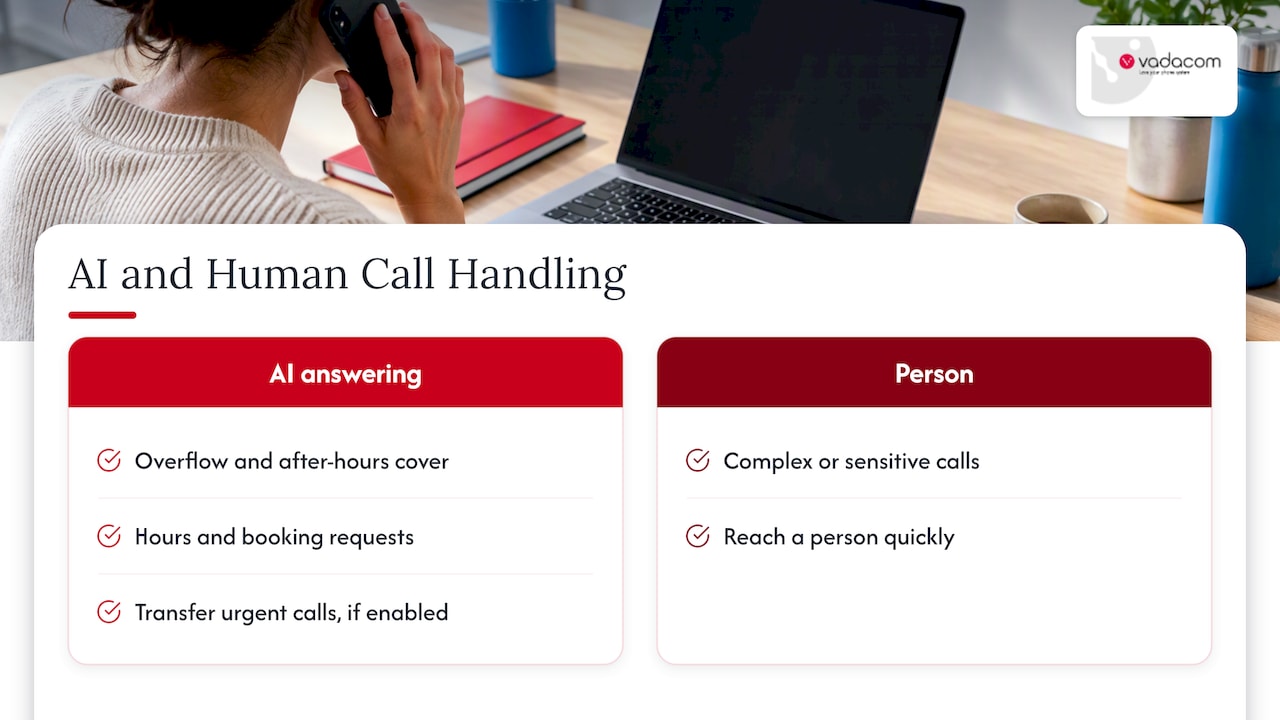
We suggest piloting on one site and one call type, with clear escalation rules, then widening. Our notes on why AI should wait for a governed pilot explain the reasoning, and our after-hours phone answering page describes how AI and human cover can work together. For menu-style answering, see our AI auto attendant. No tool can promise results for your business, so measure missed calls and caller outcomes before and after.
A simple rollout plan for several sites
- Inventory. Numbers, lines, handsets, contracts, and who answers what today.
- Test connectivity. Broadband speed, stability and router quality at every site.
- Map call flows. One diagram per call type, with fallbacks and timeouts.
- Design the extension plan. Ranges per site, room to grow, shared groups.
- Pilot. One site or team for two weeks, with real calls.
- Port numbers. Agree cutover windows with your providers and keep a rollback plan.
- Train and review. Short sessions per site, then check reports after the first month.
Our perspective
Most multi-site phone problems we see are not technology problems. They are problems of ownership: nobody decided what should happen when the Hamilton branch is busy, or who updates the menu when opening hours change.
That is why we built NextVoice around the essentials: extension dialling, transfers, voicemail, recording and call flows you can manage yourself. Fewer features done well are easier to roll out across five sites than a platform nobody fully understands. Running on a telco-grade AWS cloud with multiple availability zones means you are not buying, housing and servicing a PBX at every location.
We have spent more than 20 years designing, delivering and supporting communications in New Zealand and Australia, and we think local support matters most on the day something goes wrong at a site. Start with the audit, map your calls, pilot one location, and add AI where it clearly helps.
Stuart
Talk to us about your sites
If you run more than one location and want them to work as one team, NextVoice and NextMobile give you shared extensions, per-site call flows and self-service administration, supported locally. If you are unsure where to begin, our technical audit is the first step.
You can also add our AI answering service for overflow and after-hours calls, and contact the team to scope your sites.
FAQ
What is the difference between a multi-site and a multi-line phone system?
A multi-line system lets a business handle several calls at once. A multi-site system links separate locations so they share extensions, call flows and administration. Most cloud systems do both, so you can have many lines at each of many sites.
Can each location keep its own phone number?
Yes. In a cloud system each site can keep or have its own local number while the calls are handled on one platform. When you move existing numbers, they are ported between providers, so plan the cutover with your carriers and keep a fallback.
Do remote staff work on the same system as the offices?
Yes. Remote staff register a softphone, mobile app, browser phone or desk phone to the same platform, and use the same extension, voicemail and transfers as office staff. What they need is a reliable internet connection at home.
What happens to calls if one site loses power or internet?
That depends on the fallback rules you set. Typically, calls to the affected site reroute to another site, to mobiles or to voicemail or an answering service. Test these rules before go-live, not after an outage.
Is an AI receptionist a replacement for the front desk?
Not necessarily. It is best used for overflow, after-hours calls and routine requests, with clear rules for passing urgent or complex calls to a person. We recommend piloting on one site first and measuring results.
Sources
- VoIP: On-premises, hybrid or hosted? (IT Brief NZ)
- Terms for Local and Mobile Number Portability in New Zealand (Commerce Commission)
- Call Management for Franchise and Multi-location Businesses (Delacon)
- Guide: Telecommunications in small business (Stephen Larsen & Co)
- How MSPs can add value with Teams Phone (IT Brief NZ)
- Xero cuts phone bill by USD 500,000 (IT Brief NZ)
- Enterprise AI Receptionist for Multi-Location Groups (HiBell)
- How an AI Receptionist Works (FirstVoice AI)
- Call Logging Automation: How to Set It Up and Keep CRM Data (Sonta AI)