

The fastest, safest way for most small and medium businesses to capture calls is a cloud-based business phone system with built-in recording, clear retention rules and visible consent notifications, rather than bolting a recording app onto individual handsets. Use automatic recording for compliance-heavy queues like finance or support, and on-demand recording for sales coaching or one-off disputes. Check your local consent laws first and switch on audible notifications by default.
TL;DR:
- Automatic recording is best for regulated queues, but on-demand recording provides flexibility for sales and dispute cases.
- Cloud-based storage with role-based access, encryption, and configurable retention periods ensures compliance and easier management.
- Legal consent requirements vary by jurisdiction; audible notifications and clear policies are essential regardless of local laws.
- Vendor selection should prioritize flexible recording modes, security features, accurate transcripts, and transparent pricing for storage.
- An integrated cloud telephony platform with support and self-administration ensures reliable recording and easy policy adjustments.
Table of Contents
- Recording options for business: automatic, on-demand and device apps
- How business phone systems store, secure and retain recordings
- What consent rules apply to recording business calls?
- How to choose and implement call recording for your business
- Turning recordings into coaching, dispute evidence and QA
- Why a locally supported cloud telephony partner matters for recording
- Employee privacy: what legal notification doesn’t cover
- Author’s quick pick and one-line checklist
- Get call recording sorted with a cloud phone system built for it
- Sources
Recording options for business: automatic, on-demand and device apps
Automatic recording runs in the background once an admin switches it on for a line, queue or team. Every call gets captured with no one needing to remember to hit a button, which makes it the obvious choice for regulated queues where a missed recording could mean a compliance gap.
On-demand recording, sometimes called ad hoc recording, puts the decision in the caller-facing staff member’s hands. They start it when a conversation turns into something worth keeping, a tricky complaint or a verbal agreement that needs a paper trail.
There’s also a split worth understanding between device-level and system-level recording. Phone apps on mobile handsets can record calls locally, with an on-screen indicator showing when it’s active, but those files sit on the device itself unless someone exports them. For a business, that’s a governance headache: no central backup, no admin oversight, no consistent retention. Cloud-based systems handle this differently.
Recording modes to know:
- Automatic (always-on): admin-enabled, runs for every call on a line or queue.
- On-demand: staff trigger it manually during a live call.
- Selective automatic: always-on for specific queues (e.g. accounts) while other lines stay on-demand.
- Device-level: stored locally on a phone, weak for business governance.
- System-level (cloud): stored centrally with admin access, export and retention controls.
Add AI transcription into the mix and recordings stop being passive audio files. Searchable transcripts, automatic call summaries and keyword flagging turn a call log into something sales and support teams actually search through instead of scrubbing through hours of audio to find one conversation.
How business phone systems store, secure and retain recordings
The flow is straightforward once you see it laid out: a call gets captured; the audio is encrypted and pushed to storage, then access is limited by role so only the right people can play it back, download it or export it into another system.
Retention is where most businesses get caught out. Some vendors default to short windows, shorter retention windows are common, then charge extra for anything longer. A 90-day window might be plenty for coaching purposes but nowhere near enough if you’re in an industry where a dispute can surface a year after the call happened. Work out what your actual exposure looks like before you accept a vendor’s default setting.
Admin controls worth prioritising:
- Role-based permissions so only managers or compliance staff can access sensitive recordings.
- Audit logs that record who listened to what and when.
- Encryption both in transit and at rest, not just one or the other.
- Retention and deletion policy you can actually configure, not a fixed vendor default.
- CRM or ticketing integration so a recording attaches to the customer record automatically.
Google Voice’s business tier is a decent illustration of how this should work: admins manage recordings through a central retention system rather than relying on whatever happens to be saved on someone’s personal device. That’s the model to look for, regardless of which provider you choose.
What consent rules apply to recording business calls?
Consent law varies by jurisdiction, and this is one area where guessing wrong is expensive. Some places operate on one-party consent, where only one person on the call needs to know it’s being recorded. Others require all-party consent, meaning every participant has to be told. Don’t assume either applies to you. Check your own jurisdiction’s rules, and if you operate across borders, check every jurisdiction your callers might be sitting in.
What you can control regardless of the legal minimum:
- Audible notification at the start of every recorded call, not buried in a terms page nobody reads.
- A written call recording policy that staff and customers can actually find.
- Staff training on when recording is automatic, when it’s optional, and how to explain it if a customer asks.
- A defined process for handling a customer’s request to delete their recording.
- Retention limits set deliberately, not left on a vendor’s factory default.
Regulated sectors need an extra layer of caution. Finance and health businesses handling anything that brushes up against PCI DSS or HIPAA-equivalent obligations should get specific legal advice rather than relying on a general call recording policy. Technical controls, redacting card numbers from transcripts, restricting who can access a health related call, help meet those obligations, but they don’t replace a proper compliance review.
How to choose and implement call recording for your business
Picking a system comes down to six questions, and most vendor pitches skip at least two of them.
- Which recording modes does it support? You want both automatic and on-demand, plus the ability to apply automatic recording selectively by queue.
- What’s the permission model? Confirm you can restrict playback access by role, not just by user.
- How configurable is retention and deletion? A fixed 90 day window with no override is a red flag for anything compliance related.
- How accurate are the transcripts? Test it on a real call with background noise, not a scripted demo.
- What’s the security posture? Ask specifically about encryption in transit and at rest, not just “we’re secure.”
- What’s the pricing model for storage? Per-user recording charges and per-GB storage fees add up fast; get the numbers before you commit, not after your first invoice.
Once you’ve picked a system, roll it out in stages rather than flipping it on for the whole business at once. Start with one team, set a conservative retention window, configure the notification message, train that team specifically, and check the audit logs are actually capturing who accessed what. Only expand once that pilot has run long enough to show you what actually gets used.
Questions worth asking any vendor directly: where physically are recordings stored? What’s the default retention period, and can you change it? How is consent surfaced to callers? What’s the process if a customer asks you to delete a specific recording? And how are backups handled, are they encrypted separately from live storage?
Pro Tip: Run your pilot on the team most likely to generate a real dispute or coaching moment, like new hires in sales or a support queue handling complaints. You’ll know within a month whether the retention window and access rules you picked actually hold up.
Turning recordings into coaching, dispute evidence and QA
The businesses that get real value out of call recording aren’t the ones with the most storage. They’re the ones with a system for actually using what they’ve captured.
Clipped excerpts work far better than full recordings for coaching, a two-minute segment showing how someone handled an objection teaches more than an hour of unedited audio. Searchable transcripts speed up onboarding because new staff can search for “refund” or “cancellation” and hear exactly how experienced staff handled that exact situation. When a dispute lands on your desk, having the recording and a timestamped transcript ready cuts resolution time from days to minutes.

None of that works if your archive turns into an unsearchable pile. Tag calls by outcome, queue and date. Set an archive rule so recordings older than your retention window get deleted automatically rather than accumulating as a liability nobody remembers exists.
Privacy discipline matters here too:
- Redact sensitive details like card numbers before a transcript gets shared widely.
- Keep the reviewer list for sensitive calls as small as it can reasonably be.
- Rely on audit trails, not trust, to track who accessed what and why.
Why a locally supported cloud telephony partner matters for recording
A recording feature is only as good as the support behind it when something goes wrong, a retention setting doesn’t stick, an export fails, a staff member can’t find the right permission toggle. A cloud telephony platform with in-app call recording and admin controls and configurable retention integrated into the phone system ensures recording isn’t a bolt-on feature that conflicts with your existing setup.
For SMEs, having local support can mean faster resolution when an issue arises, rather than waiting on an offshore ticket queue. Self-service administration means teams can adjust retention windows or permissions in real time as business needs change, without submitting a request and waiting days for a change. Combined with clear billing and cloud infrastructure built for resilience, it’s a practical fit for businesses that want recording handled properly without hiring dedicated IT staff to manage it.
Employee privacy: what legal notification doesn’t cover
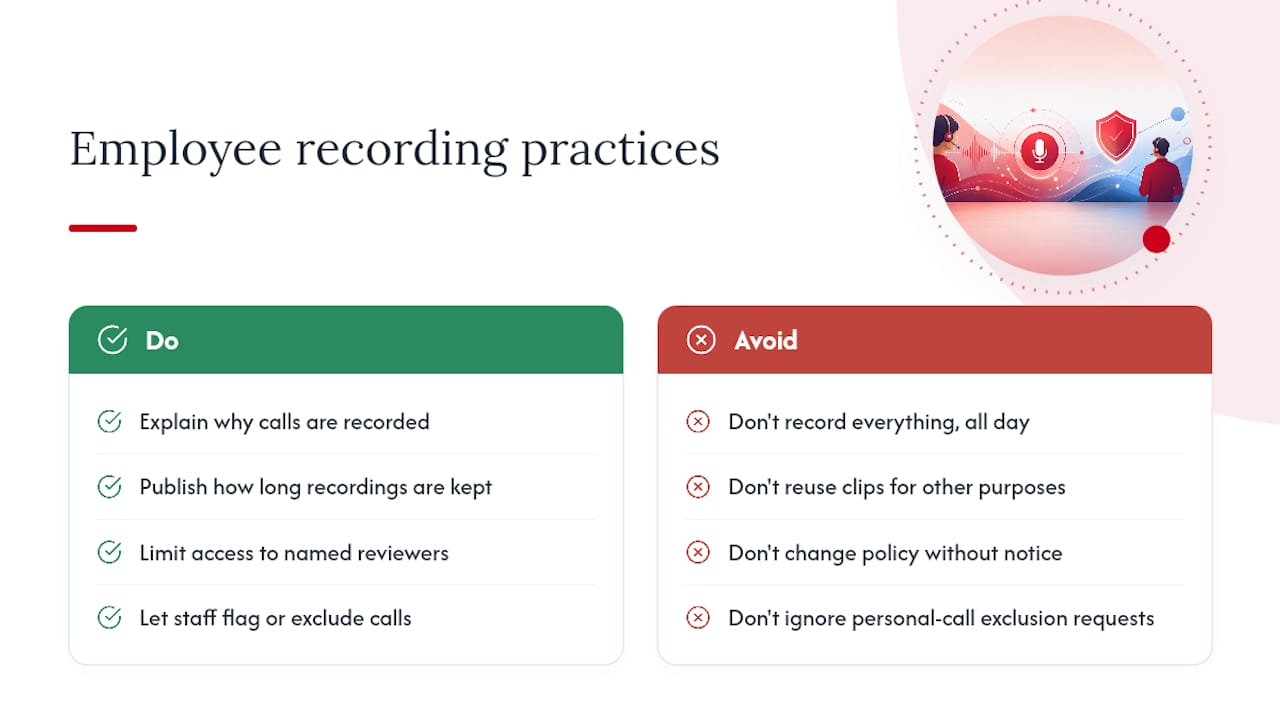
Telling staff that calls are recorded satisfies the legal minimum in most places, but it doesn’t answer the harder question: how much of an employee’s working day should be captured, and who gets to listen back?
Recording every call a staff member takes, all day, every day, creates a surveillance dynamic that goes well beyond what compliance or coaching actually requires. If the business case is dispute resolution and training, you don’t need every call reviewed by a manager. You need a defined, limited set of people with access, and a clear reason for why they’re listening.
There’s a difference between recording for quality assurance and recording as a way to monitor performance minute by minute. Staff generally accept the former. The latter tends to breed resentment and can push good employees to disengage, even where it’s entirely legal. Worth thinking about before you set automatic recording to “everything, always.”
Practical steps that go beyond the legal bar: tell staff not just that calls are recorded but why, and how long recordings are kept. Give them a way to flag a call they’d like reviewed or excluded, particularly for personal calls that might slip onto a business line. Avoid using recordings for anything other than the stated purpose, if the policy says “coaching and disputes,” don’t quietly start using clips in performance reviews without updating that policy and telling people first. Trust, once lost over a surveillance concern, is hard to rebuild, and it shows up in turnover long before it shows up in a complaint.
Author’s quick pick and one-line checklist
Stuart’s starting point for most SMEs: on-demand recording as the default, with automatic capture switched on only for regulated queues. It keeps risk low while still giving you what you need for coaching and disputes. Pilot it with one team before rolling it out further.
— Stuart
Get call recording sorted with a cloud phone system built for it
Call recording is often offered as part of a cloud-based business phone system, rather than a separate app that must be managed alongside it. This means admin controls, configurable retention and audible notifications are integrated in the same platform as calls, video meetings and collaboration tools, possibly backed by support when adjustments are needed.
For a small or medium business trying to get compliance, coaching and dispute resolution right without hiring extra IT resource, that combination matters more than a long feature list. Self-service administration allows a team to change retention settings or permissions as business needs shift, without waiting on a support ticket. Ready to see how it fits your setup? Get in touch with Vadacom to talk through a configuration for your team, or check out the reseller network if you’re advising other businesses on their phone systems.