

Call the main number, then dial the extension when prompted, or save that number as a contact with a pause (,) or wait (;) before the extension so your phone sends it automatically. Inside the office, desk phones and softphones let you dial the short extension directly; mid-call, the same digits go through the keypad as DTMF tones. Use wait when the greeting length is unpredictable, and pause when it’s short and consistent.
TL;DR:
- Internal extensions should be tested with other staff before use to catch misassignments or duplicates early.
- External callers must use a pause or wait character after the main number to access extensions reliably, depending on timing variability.
- Most hosted PBX systems expect four-digit unique extensions, with site codes only necessary for multi-location setups to prevent conflicts.
- Auto-attendant configuration is essential for a smooth dial-by-extension experience in systems like Microsoft Teams, which don’t natively provide keypad prompts.
- Proper planning, documentation, and staff training are critical to prevent common issues like inconsistent numbering, missing directories, or untested auto-attendant paths.
Table of Contents
- How to dial an extension from inside the office
- How do I dial an extension from outside the business?
- How do hosted PBX and Microsoft Teams handle extension dialing?
- Best practices for building an extension numbering plan
- How Vadacom’s NextVoice platform handles extension dialing
- The mistakes that actually break extension dialing
- If you want help implementing this, here’s how Vadacom can help
- Helpful technical documentation and support pages
- Sources
- FAQ
How to dial an extension from inside the office
Internal calling is meant to be the easy part, and on most desk phones and softphones it is: pick up, punch in three or four digits, done. The friction shows up around transfers, remote staff, and shared devices, so it pays to know the mechanics rather than guess at them.
- On a desk phone, lift the handset or press the line key, then dial the extension exactly as listed in your company directory. No area code, no main number, just the short internal digits.
- On a softphone or mobile app, open the directory and use click-to-call rather than typing manually. This matters more for remote staff, who are prone to typo’d extensions when dialing from memory.
- Mid-call, to reach someone else’s extension or navigate a menu, open the in-call keypad and send the digits as DTMF tones. Most desk phones have a dedicated keypad icon during an active call; softphones usually hide it behind a small grid icon.
- For transfers, choose blind transfer (hang up immediately, caller goes straight to the extension) or announced transfer (you speak to the colleague first, then connect the caller). Announced transfer is slower but avoids dumping a confused caller onto someone unprepared.
Edge cases trip people up more than the basics. A desk-to-mobile handoff, where a call needs to follow someone out of the building, depends on whether their extension is configured to ring a mobile simultaneously or in sequence. Shared devices, like a reception phone used by three rostered staff, need voicemail assigned to the extension itself rather than to a person, otherwise messages vanish into whoever last logged in.
Pro Tip: Test every new starter’s extension by calling it from another handset before their first day. A misassigned or duplicate extension is far easier to catch before someone’s client tries to reach them and hits the wrong desk.
How do I dial an extension from outside the business?
External callers can’t skip straight to an extension. They have to hit your main number or a direct inward dial (DID) number first, then send the extension digits once the system answers or prompts them. That’s true whether the call comes from a landline, a mobile, or another business’s PBX.
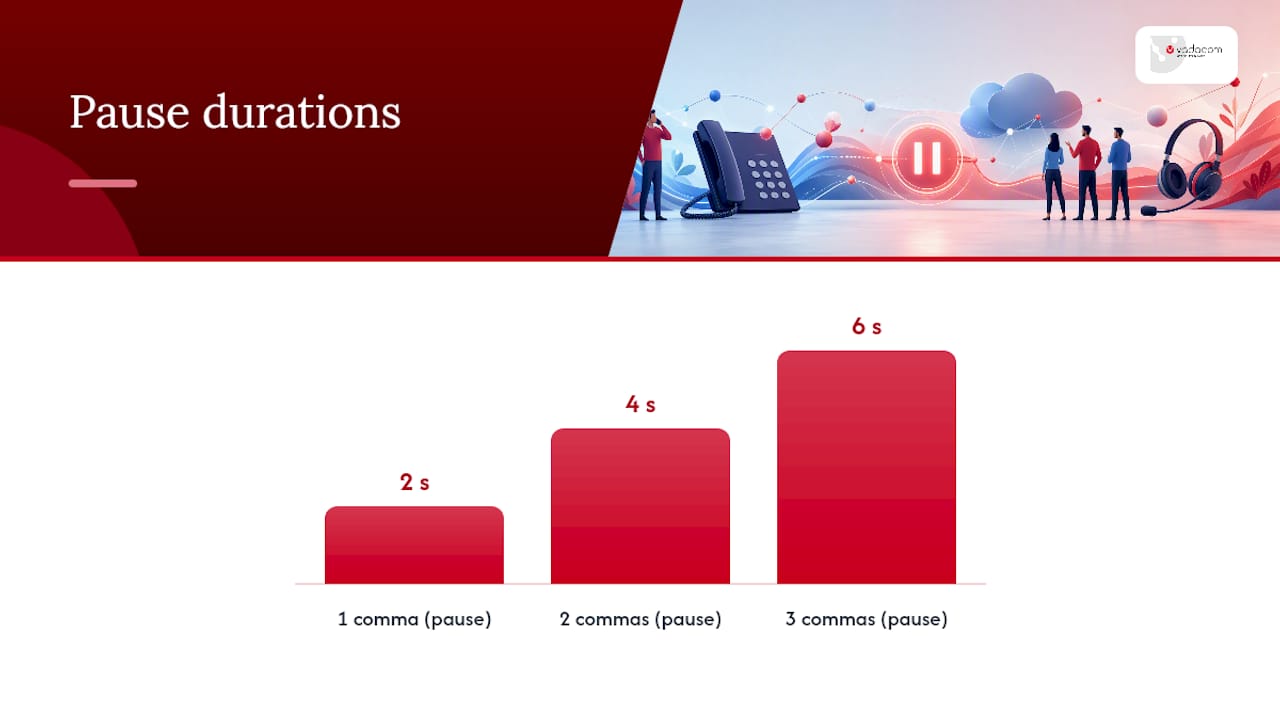
Where this gets useful is automation. Save the main number as a contact and add the extension after it, separated by a pause or wait character, and your phone sends the digits without you touching the keypad mid-call.
On an iPhone, open the contact editor, tap where you want to insert the character, then hold down the asterisk (*) key for a pause (comma) or the hash (#) key for a wait (semicolon). On Android, the phone app’s dialer menu has explicit options labelled “Add 2-sec pause” and “Add wait” when you’re building or editing a number.
- Use a pause when the greeting or hold time before the extension prompt is short and reliable.
- Stack two or three commas if the system takes longer than a couple of seconds to reach the prompt.
- Use a wait when the timing varies, since it holds the digits until you tap “send” or “dial” manually, rather than firing blind.
Two examples make the difference concrete. +64912345678,,,204 fires the extension automatically three seconds after connecting, which works fine for a stable auto-attendant. +64912345678;204 waits for you to confirm before sending, which is safer for a receptionist who might pick up live and start talking before the automated menu even runs. Getting this wrong usually means your digits land mid-greeting and go nowhere, according to SIPNEX’s breakdown of comma and semicolon behaviour.
Pro Tip: If a saved contact keeps misfiring on the extension, switch from comma to semicolon before assuming the extension itself is wrong. Timing errors look identical to wrong numbers on the receiving end.
How do hosted PBX and Microsoft Teams handle extension dialing?
Hosted PBX systems treat an extension as a software account, not a physical line, which is the biggest mental shift for anyone used to old on-premise phone cabinets. That account can ring a desk phone, a softphone, and a mobile app simultaneously, and it’s distinct from a direct inward dial (DID) number, which is the full external phone number the public can call straight through.
- Extension length and format matter for scale. Most hosted platforms default to four-digit extensions and expect every extension to be unique across the whole account, according to 8×8’s dial-plan documentation.
- Site codes come into play once you’re running more than one office. A three-digit site prefix in front of the extension avoids the classic problem of both Auckland and Wellington offices independently assigning “extension 205” to different people.
- Microsoft Teams needs an auto attendant before dial-by-extension works at all. Teams doesn’t natively expose a keypad-style extension prompt the way a traditional PBX does; an admin has to configure an auto attendant with the right dial voice reference settings, including how identity fields in the directory map to callable extensions.
- DTMF reliability varies across carriers and codecs. Test every extension path after setup rather than assuming it works because the config saved without errors.
Where direct extension dialing isn’t practical, particularly for external callers who need to skip the auto attendant entirely, assigning a DID becomes the fallback. It’s a slightly higher-cost option per number, but it removes menu navigation for callers who dial that person often.
Pro Tip: Run a monthly test call to your five busiest extensions. Auto-attendant updates and carrier changes both have a habit of quietly breaking DTMF paths without triggering any alert.
Best practices for building an extension numbering plan
A good dial plan is boring by design. It should be predictable enough that a new employee can guess a colleague’s extension pattern within their first week, and rigid enough that no two people in the business ever share one by accident.
- Pick one extension length and stick to it. Three digits suit a business under 1,000 staff; four digits gives more headroom and matches what most hosted platforms default to.
- Reserve number blocks early. Set aside a range for shared resources like reception, voicemail-only mailboxes, and ring groups, separate from individual staff extensions, so growth doesn’t force a renumber later.
- Use site codes only when you actually operate multiple sites. A single-office business gains nothing from a prefix system and just adds a digit everyone has to remember.
- Avoid confusing lead digits. Don’t start extensions with “1” or “0” if either digit also triggers external dialing or operator access on your system, and keep extensions in roughly sequential blocks by department where it helps staff guess numbers.
- Document the rules and publish a directory. A one-page reference showing the numbering logic, plus a searchable staff directory, cuts down on the “what’s Dave’s extension again?” messages that clog up chat channels.
- Set change control before you renumber anything. Migrations and mergers are when numbering plans usually break, so lock in who approves a renumber and how staff get retrained on new extensions and transfer shortcuts before it happens, not after.
Pro Tip: Before merging two phone systems, run both dial plans side by side on a spreadsheet first. Overlapping extensions between the two organisations are the single most common cause of dropped or misrouted calls during a merger.
How Vadacom’s NextVoice platform handles extension dialing
NextVoice treats each staff member as an extension account with its own voicemail, call flow, and in-app recording, rather than tying anything to a physical handset. Setting it up follows the same logic covered above.
- Set a standard extension length across the organisation before assigning any numbers.
- Add site codes only if the business genuinely spans multiple locations.
- Configure auto-attendant prompts and confirm the dial-by-extension path actually connects.
- Test DTMF handling on a handful of extensions before rolling the system out to every desk.
Local support teams help with the migration and training side, which is usually where numbering plans quietly fall apart. Businesses considering a broader comparison of hosted VoIP options can review general VoIP phone system guidance for small business alongside their own requirements before locking in a plan.
The mistakes that actually break extension dialing
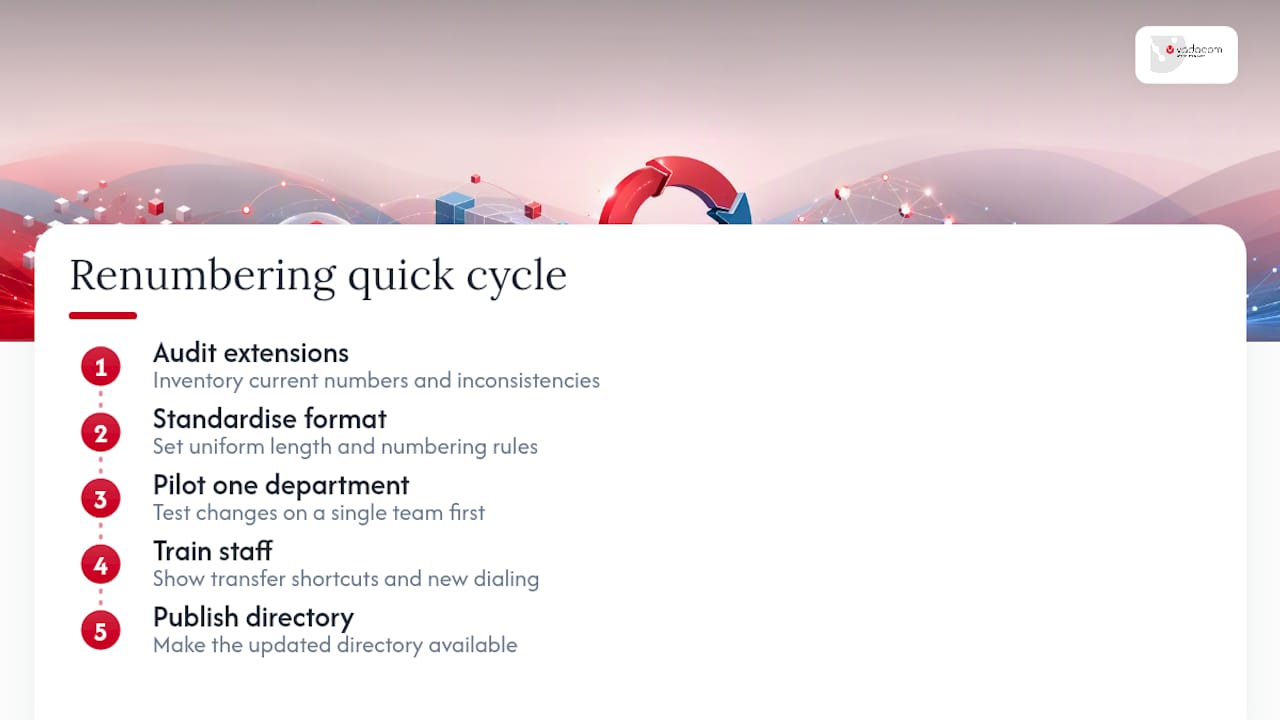
Most extension problems trace back to the same handful of causes: inconsistent numbering across departments, no published directory, staff never trained on transfer shortcuts, and an auto-attendant path nobody tested after the last update. None of these are technically hard to fix. They just get skipped because a phone system that mostly works doesn’t feel urgent, until someone dials the wrong extension in front of a client.
If you manage IT for your business, the fastest fix is a short cycle: audit current extensions, standardise the length and format, pilot the change on one department, train staff on transfers, then publish the directory. Skipping the pilot step is the most common reason a renumbering project turns messy.
— Stuart
If you want help implementing this, here’s how Vadacom can help
Getting a dial plan right on paper is one thing. Getting every extension, auto-attendant path, and voicemail box actually working after a rollout is where most businesses lose time, especially without local support to lean on.

Extension dialing, call flows, voicemail, and in-app call recording are built into the NextVoice platform, and migration and training work typically accompany rollouts. This includes mapping out extension length, site codes, and auto-attendant configuration before launch, plus optional AI call intelligence for businesses wanting deeper insight from call recordings. If your business is weighing up a renumbering project, a multi-site rollout, or a shift away from ageing on-premise hardware, start with a look at the Vadacom business phone platform and get in touch about an audit of your current setup. Resellers exploring the platform on behalf of clients can also check the Vadacom reseller program for partnership details.
Helpful technical documentation and support pages
For deeper configuration detail, Microsoft’s dial voice reference covers Teams auto-attendant setup, 8×8’s dial-plan guide explains extension length and site codes, and Cisco’s Unified CME documentation covers extension-to-E.164 mapping for multi-router setups.
Sources
- Dial voice reference — Microsoft Learn
- Understand your dial plans — 8×8 documentation
- Phone extensions: How to dial, set up & route — SIPNEX
FAQ
What is extension dialing?
Extension dialing is the practice of reaching a specific person or department within an organisation using a short internal number, rather than dialing their full external phone number.
How do I dial an extension when calling from outside?
Call the organisation’s main number first, then enter the extension digits when the system prompts you, either manually on the keypad or automatically via a saved pause or wait character.
How do I dial directly into an extension?
You generally can’t skip straight to an extension from outside the network. Save the main number with a pause (,) or wait (;) followed by the extension digits so your phone sends them for you.
What is the phone extension code for New Zealand?
There’s no single national extension code. Each organisation sets its own internal numbering, usually three or four digits, on its hosted PBX or on-premise phone system, such as the extension format used in Vadacom’s NextVoice platform.