

Use WebRTC for browser-native, low-latency media, and use SIP for telephony signalling and PSTN interconnect. Most production communications systems combine both: a WebRTC front end for easy, encrypted access, and a SIP backend for carrier trunks and PBX integration. The sections below unpack the trade-offs and show how teams typically wire the two together.
TL;DR:
- WebRTC requires ICE, STUN, and TURN servers for NAT traversal, which can impact latency and bandwidth, especially without adequate TURN capacity.
- SIP relies on proxy servers and traditional signalling methods, making it suitable for PSTN interconnection and carrier-grade telephony infrastructure.
- Combining WebRTC and SIP introduces media translation, codec conversion, and small latency costs, which can affect audio quality and call reliability.
- Hybrid deployments typically use WebRTC front ends with SIP gateways or media servers, requiring careful management of TURN, SBCs, and monitoring of call performance metrics.
- Prioritize pilot testing WebRTC with real networks before integrating SIP components to ensure reliable call setup, sound quality, and manageable infrastructure costs.
Table of Contents
- Key differences at a glance: signalling, media, NAT and developer surface
- How they interoperate: WebRTC-to-SIP gateways and signalling glue
- Technical comparison: signalling flow, media negotiation, NAT, codecs and security
- When to choose WebRTC, when to choose SIP, and when to use both
- Integration patterns and architecture examples
- Vadacom perspective and practical approach to WebRTC + SIP projects
- A pragmatic, incremental path to production
- FAQ
- Sources
Key differences at a glance: signalling, media, NAT and developer surface
SIP and WebRTC solve different layers of the same problem. SIP, defined in RFC 3261, is an application-layer signalling protocol built around registrars and proxy servers that locate users and set up sessions. WebRTC, as described in RFC 8825, leaves signalling up to the application and instead standardises the media and connectivity layer that runs inside a browser or native app.
The practical differences show up fast once you start building:
- Addressability: SIP endpoints register with a known identity; WebRTC peers are addressed through whatever signalling channel your application chooses.
- Media security: WebRTC mandates DTLS-SRTP by default, while SIP deployments often leave TLS and SRTP as configuration choices.
- NAT traversal: WebRTC leans on ICE, STUN and TURN; SIP commonly relies on keepalives, ALGs and firewall rules that vary by carrier.
- Developer surface: WebRTC ships as browser APIs with no client install; SIP usually needs a dedicated softphone, SDK or hardware endpoint.
How they interoperate: WebRTC-to-SIP gateways and signalling glue
A WebRTC-to-SIP gateway sits between the two worlds and translates both the signalling and the media. On the signalling side, it converts your application’s offer/answer exchange into SIP INVITE, REGISTER and BYE messages the carrier or PBX expects. On the media side, it typically terminates DTLS-SRTP from the browser and re-encodes or relays RTP toward the SIP network, which is where codec mismatches and added latency usually appear.
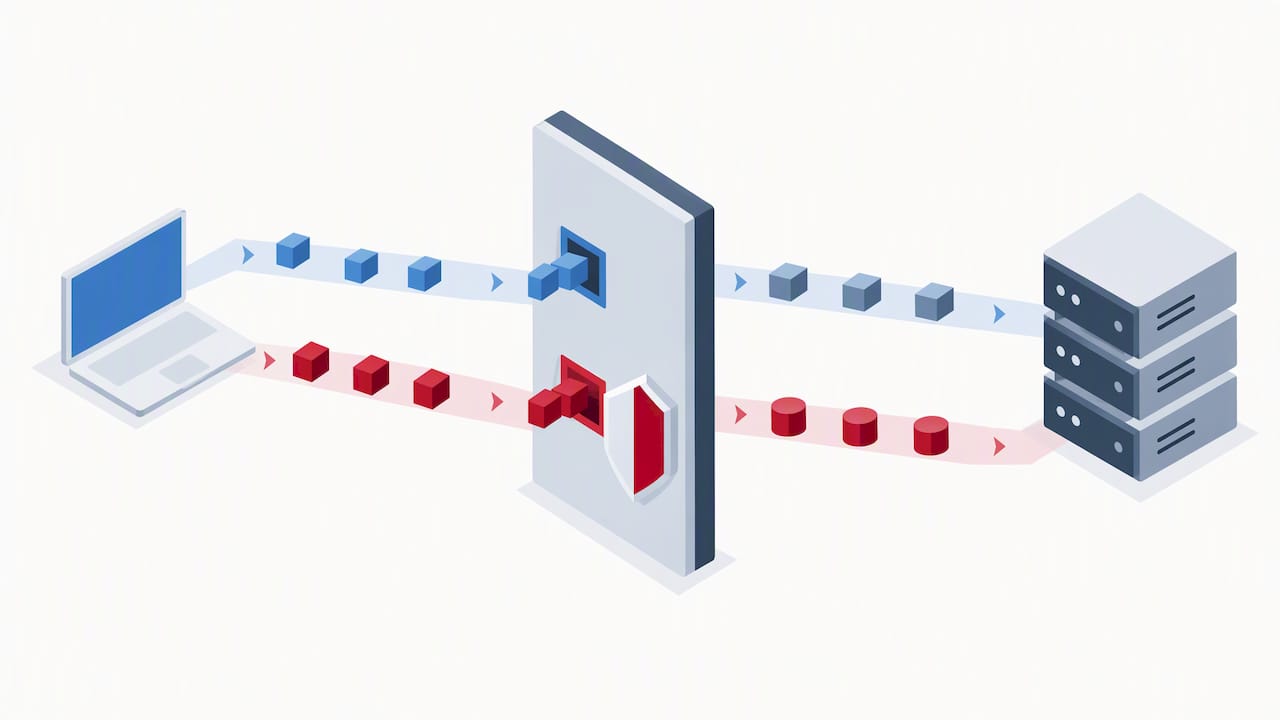
Browser clients cannot speak SIP natively, so signalling has to travel over a transport the browser supports. SIP over WebSockets, specified in RFC 7118, is the most common answer, carrying ordinary SIP messages over a WebSocket connection to a SIP server.
A few operational trade-offs follow from this design:
- Gateways add a media hop, so expect a small latency and jitter cost compared with a pure SIP or pure WebRTC path.
- Codec translation (commonly Opus on the browser side, G.711 or G.729 on the carrier side) consumes CPU and can introduce audio artefacts.
- Lawful intercept and call recording need to happen at a point where both legs are visible, usually the gateway or media server, not the browser.
Technical comparison: signalling flow, media negotiation, NAT, codecs and security
SIP’s core primitives, INVITE, REGISTER, ACK and BYE, set up and tear down a dialogue between two registered endpoints, with proxies forwarding requests based on address resolution. WebRTC has no mandated signalling protocol at all: RFC 8825 describes an offer/answer model carried over SDP, but the actual transport of that SDP (WebSocket, HTTPS, or a SIP server) is left to the application.
SDP format matters more than it first appears. Browsers moved from the older “Plan B” SDP semantics to Unified Plan, changing how multiple media streams are represented in a single session description. Teams interworking WebRTC with SIP need to validate Unified Plan SDP against whatever SDP dialect their SIP infrastructure expects, since mismatches are a frequent source of call setup failures.
Connectivity relies on ICE candidate gathering, with STUN resolving public addresses and TURN relaying media when a direct path is not possible. TURN capacity and geographic placement directly affect both latency and bandwidth cost, so sizing TURN infrastructure correctly is a first-order design decision, not an afterthought.
On encryption, WebRTC mandates DTLS-SRTP for every media stream, while SIP has historically treated TLS signalling and SRTP media as optional, configured per carrier or per trunk. That difference matters when you are auditing a hybrid deployment for security gaps.
Scaling a hybrid system usually means session border controllers (SBCs) for SIP trunk management, media servers or SFUs for WebRTC fan-out, and cloud autoscaling to absorb call volume spikes without over-provisioning fixed capacity.
When to choose WebRTC, when to choose SIP, and when to use both
Matching the protocol to the job avoids a lot of rework later. Run through this checklist before committing to an architecture:
- Choose WebRTC when you need browser or app access with no client install, encryption on by default, and tight control over the user experience.
- Choose SIP when you need PSTN interconnect, an existing SIP trunk or PBX estate, or established carrier relationships you cannot easily replace.
- Use both for contact centres and unified communications platforms, where agents work in a browser but calls still need to reach landlines and mobiles.
- Use both when modernising incrementally, replacing desk phones with WebRTC clients while keeping the SIP core for a transition period.
- Treat forcing SIP directly into a browser as a red flag: it adds client complexity WebRTC already solves, with little upside.
- Treat ignoring NAT diversity as a red flag: without TURN fallback, a meaningful share of calls will fail to connect on real-world networks.
Integration patterns and architecture examples
Three patterns cover most real deployments.
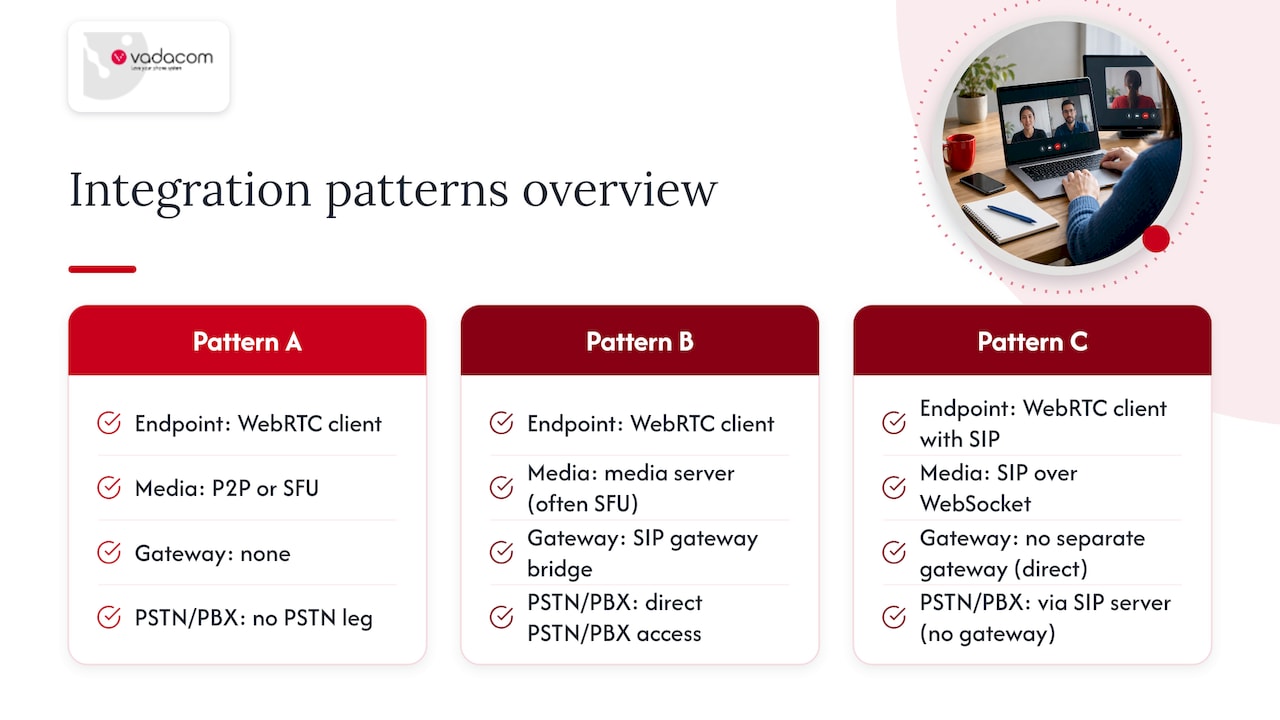
Pattern A: pure WebRTC. Peer-to-peer or SFU-based calling suits small group video, browser-based meetings and low-friction consumer experiences where no PSTN leg is needed. It is the simplest pattern to build and the cheapest to run, provided TURN coverage is adequate.
Pattern B: WebRTC front end plus SIP gateway. Browser clients connect to a media server (often an SFU) that also bridges to a SIP gateway for PSTN and PBX access. This is the standard shape for contact centres and business phone systems that need both a modern web client and traditional calling.
Pattern C: direct SIP over WebSockets. Where you control every endpoint, a browser client can speak SIP directly over a WebSocket connection to a SIP server, skipping a separate gateway layer. It suits controlled internal deployments more than open consumer-facing products.
Whichever pattern you pick, the same operational questions apply: how many TURN servers you need and where they sit, which SBC handles trunk security and registration throttling, how call recording and compliance requirements are satisfied at the point where both legs are visible, and what you monitor day to day, including ICE failure rate, TURN relay ratio and average call setup time, which predict production support load well before customers start complaining.
Vadacom perspective and practical approach to WebRTC + SIP projects
With more than 20 years delivering business communications across New Zealand and Australia, we build our NextVoice platform on a cloud architecture spanning multiple availability zones, supporting extension dialling, call transfer and configurable call flows without on-premise hardware.
In practice, we structure hybrid deployments with cloud-hosted media handling, SIP gateways for PSTN reach, properly sized TURN capacity, and SBCs for trunk security, an approach that works for our platform and is worth weighing against your own constraints rather than treating as a universal blueprint. For customers wanting more from their call data, AI Call Intelligence adds recording and analysis on top of that same hybrid base.
A pragmatic, incremental path to production
The teams that get this right do not start with a protocol debate. They pilot a WebRTC front end, measure ICE failure rates and call setup times against real networks, confirm TURN coverage holds up for their user base, then bolt on SIP adapters for PSTN reach once the browser experience is solid. Protocol preference matters far less than whether calls connect and sound clear.
— Stuart
FAQ
What are the main uses of WebRTC?
WebRTC is mainly used for browser-based video and voice calling, web conferencing, screen sharing and live customer support widgets that need no client install. It also underpins many webinar platforms built for low-friction group meetings. Its mandatory encryption and peer connection model make it well suited to any product where users join straight from a link.
What are the downsides of using WebRTC?
WebRTC has no built-in signalling protocol, so every application must design its own, which adds engineering work. NAT traversal needs properly sized TURN infrastructure or a meaningful share of calls will fail to connect, and SDP differences such as Unified Plan can cause interoperability bugs with SIP systems if not tested early.
Is Google Meet using WebRTC?
Major browser-based video conferencing products, including Google Meet, rely on WebRTC for real-time audio and video transport, consistent with WebRTC’s role as the standard for browser-native media. The signalling and room management layer around that media transport is built separately by each provider.
What are the key differences between the SIP protocol and WebRTC?
SIP is an application-layer signalling protocol, defined in RFC 3261, that registers endpoints and sets up calls using INVITE and REGISTER messages. WebRTC standardises media transport and security inside the browser, mandates DTLS-SRTP by default, and leaves signalling entirely up to the application.
Should my business choose a platform that already combines SIP and WebRTC?
Building and maintaining your own gateway, TURN infrastructure and SBC stack takes dedicated engineering time most businesses would rather spend elsewhere. Our NextVoice platform handles that hybrid architecture as a managed service, so you get browser and mobile access alongside PSTN calling without running the infrastructure yourself.