
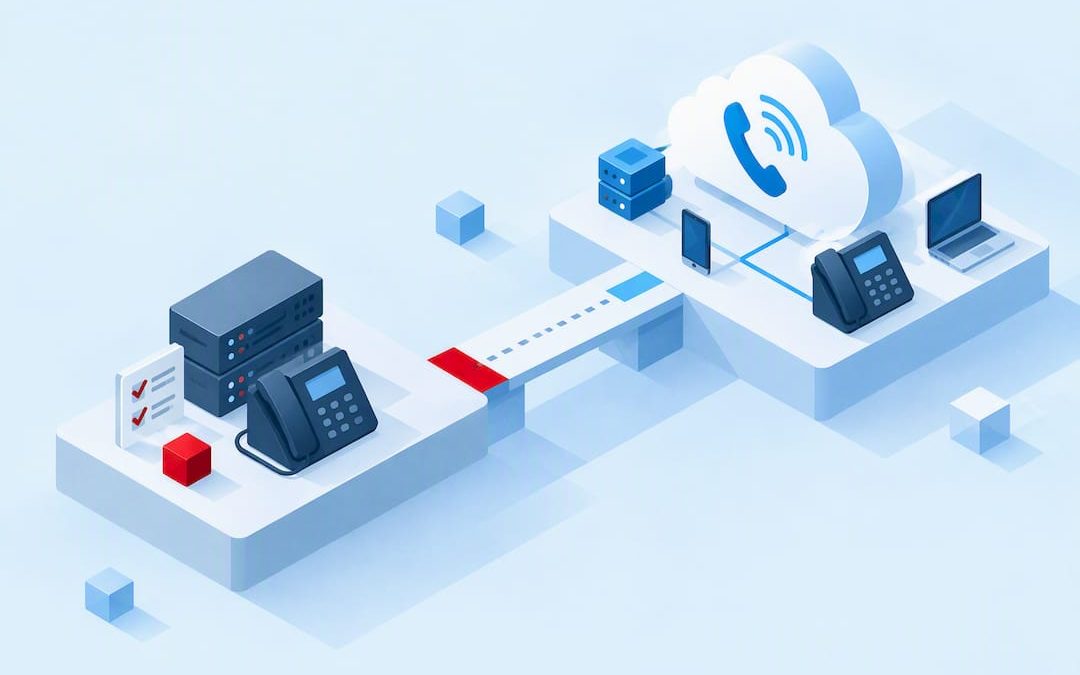
A cloud PBX is a business phone system hosted by a provider and delivered over the internet, replacing on-premise PBX hardware while adding mobility and lower capital costs. Instead of a server room full of cabling and telephony cards, your team makes and receives calls through IP phones, softphones or mobile apps, all managed centrally from a web portal. Providers like NextVoice run the infrastructure, so you pay a predictable subscription instead of a large upfront hardware bill.
TL;DR:
- Cloud PBX offers a flexible, scalable alternative to traditional hardware-based systems with data center hosting across multiple availability zones for better resilience.
- Call quality heavily depends on sufficient broadband bandwidth, low latency, and minimal jitter, requiring businesses to plan and upgrade their internet as needed.
- Features like CRM integration, call analytics, AI call intelligence, and real-time call management are delivered faster and more cost-effectively through software updates than on legacy hardware.
- Moving to cloud PBX suits small to medium businesses, multi-site, remote teams, and those with rapidly changing headcount, but is less appropriate for organizations with strict data residency or custom hardware needs.
- Planning a migration involves network auditing, a pilot run, setting realistic timelines, and preparing backup connectivity options to minimize disruption during transition.
Table of Contents
- How does a cloud PBX actually work?
- What are the main benefits of cloud PBX?
- What features should you look for in a cloud PBX provider?
- Cloud PBX vs on-premise, hosted VoIP and UCaaS: what’s the difference?
- Who should actually consider moving to cloud PBX?
- How do you plan and roll out a cloud PBX migration?
- What does a locally supported cloud PBX look like in practice?
- Is now the right time to move, or should you stage it?
- Ready to move your phone system to the cloud?
- Sources
- FAQ
How does a cloud PBX actually work?
A traditional PBX is a physical box in your office switching calls between extensions and the outside phone network. A cloud PBX does the same job, but the switching happens on servers in a provider’s data centre, not in your building. Voice gets converted into digital packets using Voice over Internet Protocol (VoIP), then those packets travel across your broadband connection to the provider’s platform and out to whoever you’re calling.
The signalling that sets up, manages and ends each call relies on Session Initiation Protocol, or SIP. Think of SIP as the traffic controller: it establishes the connection between two endpoints, keeps it alive for the duration of the call, then tears it down cleanly when someone hangs up. SIP trunking is what links your cloud PBX to the public telephone network, replacing the physical phone lines a legacy PBX would have used.
Providers typically run their platforms across multiple availability zones, meaning your call routing doesn’t depend on a single server in a single location. If one zone has an issue, traffic shifts to another without you noticing. This is the same resilience principle cloud infrastructure providers like AWS build into other business software, and it’s a meaningful upgrade on a single on-site PBX box that fails when the power does.
On the endpoint side, staff connect through:
- IP desk phones that plug into your network like a regular handset but run on VoIP
- Softphone apps on a laptop or desktop, useful for people who work from a screen most of the day
- Mobile apps that turn a personal or company phone into a full business extension, wherever there’s a data connection
Hosted PBX systems put the routing and switching equipment off-site, cutting the need for a technician to visit every time you add a user or change a call flow. Security runs on encryption standards such as TLS for signalling and SRTP for the actual voice stream, so calls aren’t sitting in plain text as they cross the internet.
None of this works well on a shaky connection. Cloud PBX call quality depends on adequate bandwidth, low latency and minimal jitter, and businesses migrating voice to the cloud need to plan for quality of service rather than assume their existing internet plan will cope without adjustment.
What are the main benefits of cloud PBX?
The appeal of cloud PBX for a growing or distributed business comes down to five things: money, flexibility, maintenance burden, features and resilience.
- Cost shifts from CAPEX to OPEX. Instead of buying a PBX box and telephony cards outright, you pay a per-user subscription that scales with headcount. This changes the cost profile from a large upfront outlay to a predictable monthly line item.
- Mobility becomes standard, not an add-on. A staff member can take the same extension, call flows and voicemail with them whether they’re at the office desk, working from home, or travelling, because the phone system lives in the cloud rather than in a physical handset tied to a desk.
- Maintenance drops off your plate. The provider handles server upkeep, security patches and platform updates. Administrators can change routing rules and permissions in real time through a browser, without waiting on a technician visit.
- Feature access accelerates. Because the system runs on software rather than fixed hardware, providers can roll out new capabilities such as voicemail-to-text, call analytics or AI-assisted call handling far faster than a legacy PBX vendor ever could.
- Resilience improves through multi-zone hosting. Spreading infrastructure across availability zones means a single hardware failure doesn’t take your phones down for the whole business.
Pro Tip: Ask any provider you’re evaluating exactly how many availability zones their platform runs across and what happens to active calls during a zone failover. A vague answer here is a red flag.
Small business adoption of cloud PBX has been climbing, driven largely by remote work demand and the appeal of lower operating costs compared with maintaining ageing on-premise hardware. That trend matters for budgeting decisions: it’s no longer a niche choice reserved for large enterprises with dedicated IT teams.
What features should you look for in a cloud PBX provider?
Not every cloud PBX platform is built the same, and a feature checklist saves you from discovering gaps after you’ve already migrated. At minimum, evaluate:
- Core call handling: auto-attendant/IVR menus, call queues, transfer (including announced transfer), voicemail and in-app call recording
- Self-service administration: a web portal where your team can add users, adjust call flows and manage settings without vendor tickets
- Integration options: CRM connections, directory sync and APIs so your phone system talks to the other software you already run
- Device and app parity: consistent functionality across IP desk phones, softphone apps and mobile apps, so no one loses features by working from a laptop instead of a desk phone
- Security and compliance: encrypted voice streams, clear data residency, and a documented SLA that spells out uptime commitments
- Advanced options: analytics, contact centre features and AI call intelligence for teams that want more than basic call logs
Providers bundle features that would be expensive or impossible on analog lines, things like voicemail-to-email and transcription, precisely because they’re running software rather than fixed hardware. That’s the practical payoff of the cloud model: new capability arrives as a feature release, not a hardware refresh.
Cloud PBX vs on-premise, hosted VoIP and UCaaS: what’s the difference?
These four terms get used loosely, and the overlap causes genuine confusion during procurement conversations.
- On-premise PBX is physical switching hardware you own and maintain in your own building. You control every setting and piece of equipment, but you also own every maintenance call, every hardware refresh cycle, and every capital expense.
- Hosted VoIP is a broader term for any phone service delivered over the internet rather than copper lines. It’s the transport layer, not a specific product.
- Cloud PBX is hosted VoIP with the PBX functions, routing, extensions, call flows, moved into the provider’s infrastructure and delivered as a service.
- UCaaS (Unified Communications as a Service) goes further again, bundling voice with video conferencing, chat and collaboration tools into one platform.
The trade-offs are straightforward once you separate them. On-premise gives you maximum control and customisation, which still matters for organisations with bespoke telephony hardware or strict compliance rules that demand on-site data handling. Cloud PBX trades some of that control for lower maintenance, faster feature access and no hardware refresh cycles. UCaaS is worth the extra cost when your business genuinely needs voice, video and messaging under one login rather than three separate logins and three separate vendor relationships. If you’re weighing the total cost of physical infrastructure against a cloud subscription, a cost comparison model for multi-site operations can help frame the maths, even outside the telephony context specifically.
Who should actually consider moving to cloud PBX?
Cloud PBX fits a specific set of business profiles better than others, and knowing which one you are saves a lot of wasted evaluation time.
- Small to medium businesses without a dedicated IT team, where offloading server maintenance to a provider is a genuine relief, not just a preference.
- Multi-site operations that want one phone system and one set of call flows across several locations instead of separate PBX boxes at each site.
- Remote and hybrid teams who need the same extension and call features whether they’re at a desk, at home, or on the road.
- Businesses with seasonal or fast-changing headcount, since adding or removing users is a portal change, not a hardware order.
- Teams that want CRM integration and call analytics feeding into sales or support workflows, rather than a phone system that’s isolated from everything else.
The exceptions are organisations bound by strict data-residency rules or reliant on specialised telephony hardware that a standard cloud platform can’t replicate. For those, on-premise or a heavily customised deployment still makes sense.
How do you plan and roll out a cloud PBX migration?
A cloud PBX migration goes smoothly when it’s treated as a short project with clear checkpoints, not a same-day switch.
- Audit your network first. Check available bandwidth, existing quality of service settings, firewall and NAT configuration, and confirm your provider can port your existing numbers.
- Run a pilot with a small group. Test call quality, confirm softphone and mobile app parity, and check that the provider is actually meeting the SLA it promised before rolling out company-wide.
- Set a realistic timeline. Most migrations move through discovery, pilot, full rollout and post-launch review over several weeks, with IT, procurement, the vendor and end users all involved at different stages.
- Budget for the full cost picture. Per-user subscription fees are only part of it. Factor in any new handsets, SIP trunking charges, number porting fees and time spent training staff on the new system.
- Plan for internet outages before they happen. Backup PSTN lines, a secondary SIP trunk, or cellular fallback on mobile apps all reduce the risk of a single connectivity issue taking your phones down entirely.
Pro Tip: Don’t skip the pilot phase, even under time pressure. A ten-person pilot running for two weeks will surface call quality or integration issues far more cheaply than discovering them after your whole business has switched over.
What does a locally supported cloud PBX look like in practice?
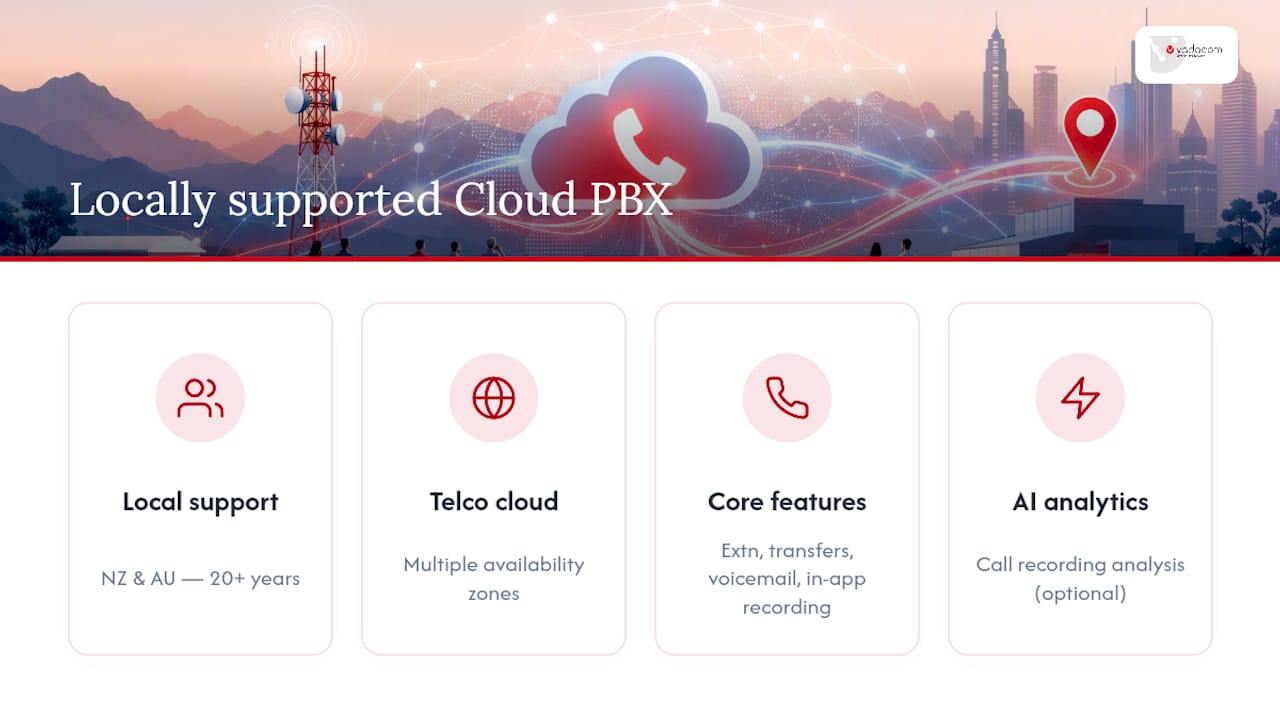
Vadacom has spent more than 20 years delivering and supporting business communications locally across New Zealand and Australia, which matters when something goes wrong at 8am on a Monday. The NextVoice platform runs on telco-grade cloud architecture with multiple availability zones, and covers the checklist above directly: extension dialling, call transfer and announced transfer, voicemail, in-app recording and individual call-flow management. Optional AI Call Intelligence adds call recording analysis for teams that want more than basic logs. A technical audit before migration is one of the more reliable ways to catch network or configuration issues before they become live problems.
Is now the right time to move, or should you stage it?
The businesses that get burned by cloud PBX migrations aren’t the ones who moved too early. They’re the ones who moved without a pilot, without checking their bandwidth, and without a fallback plan for the day their internet drops out. If your network is solid and your use case is straightforward, moving now beats waiting for a “perfect” moment that never quite arrives. If you’re running anything unusual, custom call flows, compliance constraints, legacy integrations, stage it: pilot first, lock in your SLA terms, confirm backup connectivity, then roll out in full. Either way, start with an honest technical audit rather than a sales pitch.
— Stuart
Ready to move your phone system to the cloud?
If you’ve read this far, you already understand the trade-off: on-premise gives you full control at the cost of hardware, maintenance and technician callouts, while cloud PBX hands that burden to a provider so your team can focus on the actual work. One solution to that trade-off is a telco-grade platform built on AWS cloud infrastructure and backed by years of local support across New Zealand and Australia, not an offshore call centre reading from a script when something breaks.
NextVoice covers the core checklist this article walked through: extension dialling, call transfer, voicemail, in-app recording and flexible call-flow management, all manageable through self-service tools as your team grows or changes. If you want deeper insight into call patterns and customer conversations, AI Call Intelligence is available as an add-on rather than a forced bundle. The most sensible first step for most businesses is a technical audit to check your network readiness before committing to a full rollout, followed by a look at the NextVoice platform itself to see how the pieces fit your organisation.
Sources
- What is cloud PBX (private branch exchange)?
- What Is a Cloud PBX System? A Business Guide for 2026
- What Is Hosted PBX? How it Works, Key Features & Benefits
FAQ
What is a PBX and how does it work?
A PBX, or private branch exchange, is a phone system that routes calls between internal extensions and out to the public phone network, so a business doesn’t need a separate physical line for every handset. A cloud PBX does the same job but runs the switching in a provider’s data centre instead of a box in your office, delivering calls over the internet using VoIP.
What are the disadvantages of a cloud phone system?
The main drawback is dependence on your internet connection: poor bandwidth, latency or jitter directly affects call quality, so businesses need to plan for adequate network capacity before migrating. Data security and provider reliability during outages are also worth scrutinising closely, which is why backup connectivity options and clear SLAs matter during evaluation.
Do businesses still use traditional on-premise PBX?
Yes, though adoption has been shifting toward cloud models as small business demand for remote work flexibility and lower costs has grown. On-premise systems remain common among organisations with strict compliance requirements or specialised telephony hardware that a standard cloud platform can’t easily replicate.
Is a PBX system better than VoIP?
They’re not competing options. VoIP is the transport method, voice carried as data packets, while a PBX (cloud or on-premise) is the system managing extensions, call routing and features on top of that transport. A cloud PBX like NextVoice uses VoIP as its underlying technology, so the real comparison is cloud PBX versus on-premise PBX, not PBX versus VoIP.
How much does a cloud PBX system like NextVoice cost?
Pricing for NextVoice isn’t published as a flat rate because it depends on user numbers and feature requirements, so current pricing is available directly from Vadacom on request. A technical audit is a practical starting point to get an accurate cost picture for your specific setup.