
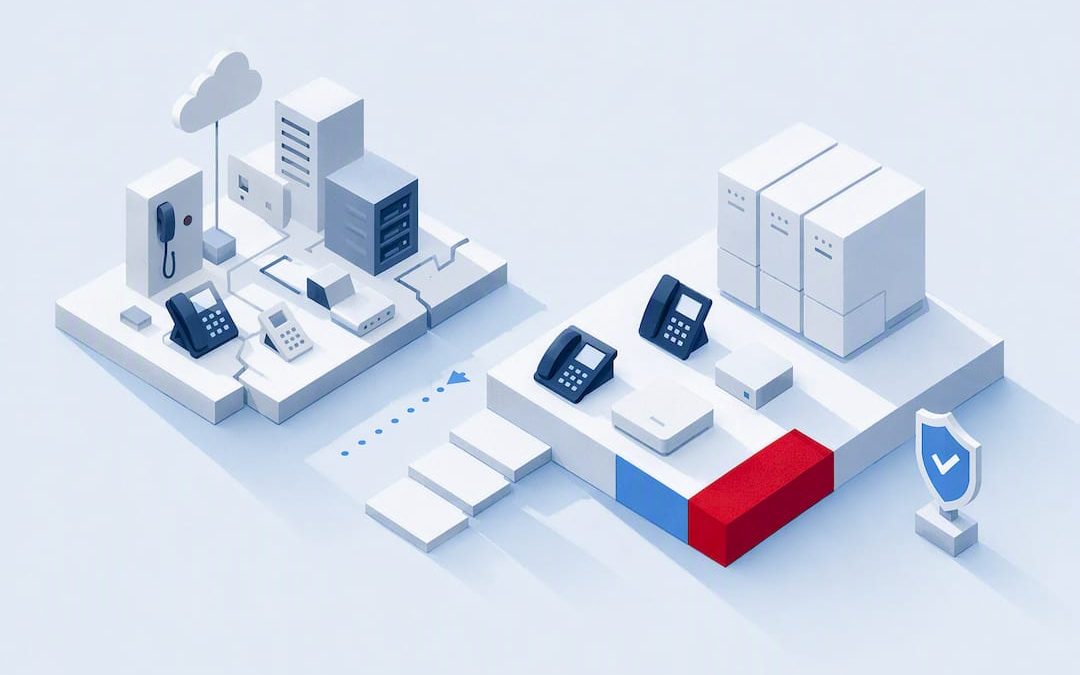
Run a focused audit of your existing PBX, lines and licences before you choose a path forward. That audit, paired with a short resilience test, tells you whether cloud, hybrid or on-premise modernisation fits your business. Schedule the inventory this month, not after the next outage, because the finding almost always uncovers costs and risks nobody’s tracking. Done properly, the payoff is a more reliable, feature-rich setup with less operational risk than what you’re running now.
TL;DR:
- Conduct a thorough audit of your PBX, lines, licenses, and dependencies to identify hidden costs and risks before choosing a modernization path.
- Escalating outages, unsupported firmware, rising repair bills, and unused licenses signal urgent needs for upgrading legacy PBX systems.
- Cloud solutions suit businesses with distributed teams and minimal local hardware management, while hybrid setups fit those with critical analog dependencies; on-premise modernization appeals to firms with complex integrations or regulatory requirements.
- Migration planning should include staged implementation, testing, and contingency measures to ensure continuity and compatibility, especially for emergency services and existing hardware.
- The full total cost of ownership over three to five years often exceeds initial hardware price, influenced by licenses, support, migration labor, and savings from decommissioned or outdated equipment.
Table of Contents
- Signs it’s time to upgrade an old on-premise phone system
- Audit your existing system: what to inventory and why it matters
- Choose the right approach: cloud, hybrid or modernise on-premise
- Plan the migration: timeline, porting, compliance and cutover
- Network and device readiness: bandwidth, QoS and endpoints
- Minimise disruption: cutover execution and testing protocols
- Estimate costs and total cost of ownership
- What to keep and what to retire
- How Vadacom approaches an upgrade like this
- Common pitfalls and practical trade-offs
- How Vadacom can help with your upgrade
- Sources
- FAQ
Signs it’s time to upgrade an old on-premise phone system
Some signals are obvious. Others hide in a bill you’ve stopped reading closely.
Repeated outages are the clearest red flag: if your team is losing calls weekly, or repair callouts are becoming routine, the system is telling you something. Vendor support lifecycle matters just as much. Once a PBX manufacturer declares end-of-sale or end-of-life, replacement parts get scarce and firmware stops receiving security patches, leaving you exposed with no fix coming.
Feature gaps show up fast once staff start working from multiple locations. A system with no softphone option, clumsy call transfer, or conferencing that drops the third caller is actively holding your team back.
Watch for these signals together, not just one in isolation:
- Escalating repair bills or a technician who says the part “isn’t made anymore”
- Firmware or software updates that stopped arriving years ago
- Remote staff relying on personal mobiles because there’s no proper softphone
- Carrier invoices that creep up with no clear explanation
- Licences or extensions you’re still paying for that nobody uses
That last point deserves its own conversation, because it’s where the real money usually is.
Audit your existing system: what to inventory and why it matters
A proper audit isn’t a walkthrough with a notepad. It’s a documented inventory that becomes the brief you hand to a technician, reseller or your own IT team.
Start by listing everything physical and contractual:
- PBX make, model and firmware version, plus support status with the manufacturer
- Handsets and gateways, noting age, protocol (analog, digital, SIP) and condition
- Analog lines still in service, and what they’re actually used for (fax, alarms, lift phones)
- SIP trunks, carrier contracts and their renewal or cancellation terms
- Licences per user or per feature, cross-checked against active staff
- Integrations: CRM click-to-dial, call recording, contact centre or helpdesk tools
- Maintenance contracts and who technically owns each piece of infrastructure
This is where you find what the industry calls “zombie licences”: paid seats nobody’s using, premium features switched on by default years ago, or a line still billed monthly for a fax machine that was unplugged in 2019. A thorough modernisation audit routinely turns up exactly this kind of hidden recurring cost, and it’s often enough on its own to fund part of the upgrade.
Pro Tip: Ask your current carrier for an itemised bill going back three months, not just the summary invoice. Line-by-line detail is where zombie charges actually surface.
Map ownership too. Who controls the SIP trunk, who owns the on-site hardware, who holds the support contract? Ambiguity here is exactly what causes stalled projects later. Finish the audit with a short migration requirements brief: what must be kept, what can go, and any compliance constraints (emergency calling, industry regulation) that shape your options.
Choose the right approach: cloud, hybrid or modernise on-premise
Your audit results point you toward one of three paths, and none of them is automatically the “right” answer for every business.
Cloud (UCaaS) suits businesses with distributed or hybrid-working teams and minimal appetite for managing local hardware. Most UCaaS platforms bundle voice, messaging and video into one subscription, which removes the need for an on-site server altogether. The trade-off is a firmer reliance on internet connectivity, and number porting work needs to be scheduled carefully.
Hybrid setups make sense when you have life-safety analog dependencies, like lift phones or alarm lines, that can’t simply move to cloud, or when you need a phased migration rather than a single cutover. Hybrid modernisation lets you keep a survivable local core while progressively adding cloud features, which lowers the risk of any single migration event.
On-premise modernisation (upgrading firmware, adding SIP gateways, virtualising the PBX) preserves existing investment and suits businesses with heavy custom integrations or regulatory reasons to keep infrastructure local.
Work through this checklist before deciding:
- How much local survivability do you genuinely need if the internet drops?
- Do you have analog life-safety devices that complicate a full cloud move?
- How deep are your CRM, recording or contact centre integrations?
- Does your IT team have the capacity to manage local hardware, or would you rather not?
- What’s your realistic budget horizon, this year versus the next three to five?
Plan the migration: timeline, porting, compliance and cutover
A realistic migration runs in phases, and rushing any one of them is where projects go wrong.
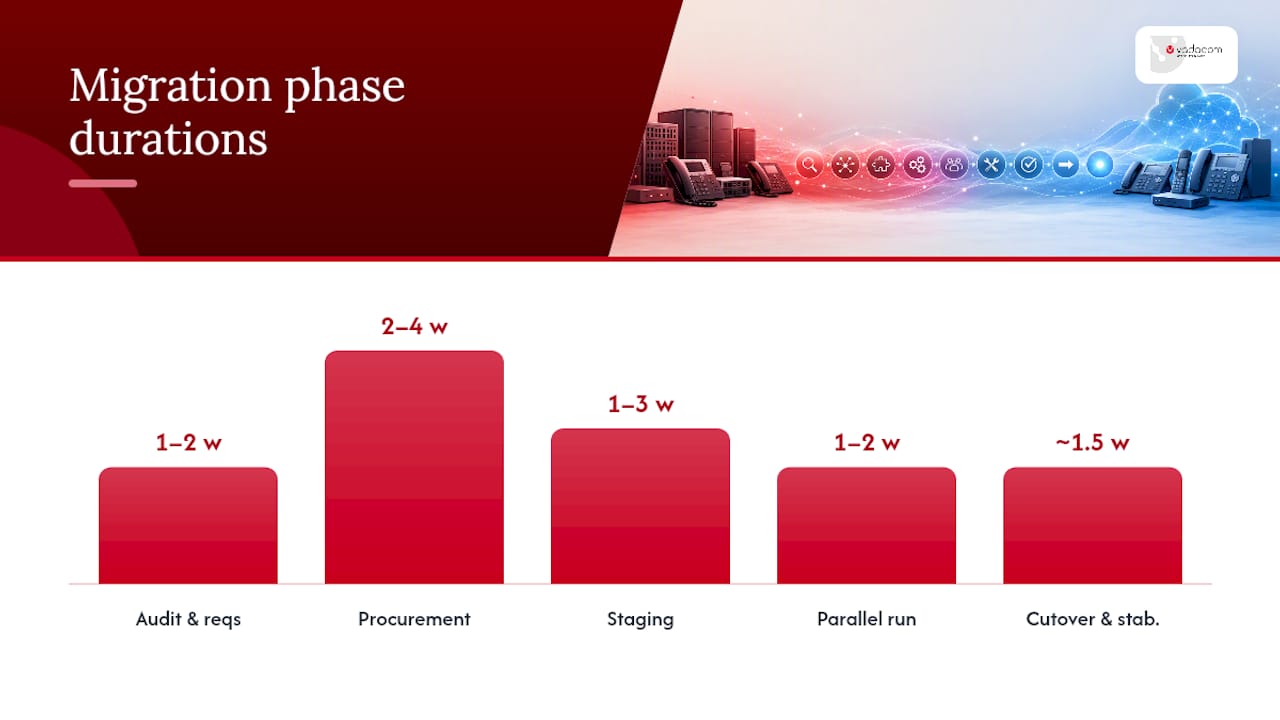
- Audit and requirements (1 to 2 weeks): the inventory and brief covered above
- Procurement and vendor selection (2 to 4 weeks): quotes, contract review, hardware ordering
- Staging (1 to 3 weeks): configuring the new system, call flows and user accounts without touching live traffic
- Parallel run (1 to 2 weeks): both systems live simultaneously while you test
- Cutover and stabilisation (a few days, plus a monitored week after)
Business.com’s guidance on upgrade timing notes that a full project from audit to port typically takes 8 to 12 weeks for a typical SMB, though procurement can stretch longer for larger organisations running formal tender processes.
Number porting deserves its own attention. Your existing lines need to stay active until the port is fully complete. Cancel too early and you risk losing numbers your customers already know. Keep a temporary call-forwarding fallback ready in case the port date slips.
Emergency calling can’t be an afterthought either. Confirm your new system passes dispatchable location information to emergency services correctly, and check that alarms, lift phones and any other analog life-safety device still function once the main system changes.
Before cutover day, work through this checklist:
- Pre-staged handsets and user accounts ready to activate
- A test matrix covering every extension, hunt group and IVR path
- Staff communication sent at least a week ahead, with a simple “what changes for you” summary
- Defined rollback triggers and who has authority to pull them
- A named support contact available for the first 48 hours post-cutover
Network and device readiness: bandwidth, QoS and endpoints
Voice quality problems after a migration are almost always a network issue, not a phone system issue.
Calculate concurrent call capacity based on realistic peak usage, then add headroom for video meetings running at the same time. Quality of Service (QoS) settings should prioritise voice and video traffic ahead of general data, with jitter and packet loss kept as low as your router configuration allows. Test this before go-live, not after staff start complaining.

SIP trunks and any session border controller in the path need checking for both security (encrypted signalling, not open ports facing the internet) and interoperability with your chosen platform.
On endpoints, decide early:
- Which existing desk phones are SIP-capable and worth keeping
- Which handsets should move to softphone apps on laptops or mobiles instead
- How devices get provisioned and staged before staff ever touch them
- Whether a phased handset refresh makes more financial sense than replacing everything at once
Pro Tip: Run a one-week bandwidth test using a spare SIP trunk or trial account before committing to a full migration. It’s the cheapest insurance you’ll buy in this whole project.
Minimise disruption: cutover execution and testing protocols
The safest cutovers run both systems in parallel until every test passes, not until the calendar says it’s time.
- Confirm main numbers route correctly on the new system before disconnecting anything on the old one
- Test every IVR menu path, hunt group and voicemail box end to end
- Verify call recording captures correctly, particularly if compliance depends on it
- Test emergency calling and confirm location data reaches dispatch correctly
- Schedule the actual cutover for a low-traffic window with key staff on hand, not a Friday afternoon when everyone’s gone home
A staged approach that runs old and new systems in parallel during testing is consistently the difference between a clean cutover and a chaotic one. Set clear rollback conditions in advance: if call quality drops below an agreed threshold, or a critical integration fails, you revert without debate.
Prepare short communication templates for staff and customers ahead of time, so nobody’s improvising an explanation mid-cutover. Once you’re live, monitor closely for the first day and keep a lighter watch through the first week, because issues that don’t surface on day one sometimes show up once real call volume returns to normal.
Estimate costs and total cost of ownership
Sticker price on a new system is the smallest part of the real cost.
Build a 3 to 5 year total cost of ownership (TCO) model that includes subscription or licence fees, SIP trunk charges, any handset refresh, integration work, migration labour, and ongoing support. Per-user costs are the easiest way to compare options apples-to-apples, since headcount is the variable most likely to change over that window.
Where the savings actually show up: recovering zombie licences uncovered in your audit, reduced hardware maintenance once local infrastructure shrinks, and fewer emergency callout fees from ageing equipment. None of these show up on a vendor’s price sheet, but they materially change your real cost over five years.
For finance stakeholders, a simple one-page summary works better than a detailed spreadsheet: current annual spend, projected new spend, one-off migration cost, and the break-even point. That’s the version that actually gets approved.
What to keep and what to retire
Not everything needs replacing, and forcing a full rip-and-replace usually costs more than it needs to.
- Keep SIP-capable handsets with current firmware; they’ll usually work on a new platform without modification
- Replace handsets running unsupported firmware, since they’re a security gap even if they still make calls
- For analog devices like fax lines or intercoms, a SIP gateway or “POTS in a box” adapter usually costs far less than maintaining a full legacy exchange just for those few lines
- Keep a local survivable core if your business genuinely can’t tolerate downtime during an internet outage
- Document every integration (CRM, recording, contact centre) before you touch anything, so nothing breaks silently mid-migration
Before disposing of retired hardware, confirm data has been wiped and any compliance retention requirements for call recordings have been met.
How Vadacom approaches an upgrade like this
Vadacom starts every engagement with the same audit-first process outlined above, because guessing at requirements is how migrations go wrong. A cloud communications platform runs on a telco-grade architecture across multiple availability zones, with extension dialling, announced transfer, voicemail and in-app call recording built in from day one.
Migrations are staged, not switched overnight: legacy systems and NextVoice run side by side while porting and testing complete, with New Zealand-based support through the process. Where analog life-safety devices or local dependencies are part of the picture, that gets mapped in the audit and accounted for in the migration plan, not discovered after cutover. Optional AI Call Intelligence is available for businesses wanting deeper insight from call recordings once the core migration is settled.
Common pitfalls and practical trade-offs
The biggest mistake I keep seeing is skipping the discovery audit because a business wants to move fast. Skip it, and porting delays or an overlooked analog alarm line will cost you more time than the audit ever would have.
Hybrid beats an immediate full cloud switch whenever life-safety analog dependencies exist or your team simply isn’t ready to abandon local hardware in one move. If you’re already seeing repeated outages or unsupported firmware, that’s your signal to act now, not after the next failure.
— Stuart
How Vadacom can help with your upgrade
There’s no shortage of ways to approach this: a DIY hardware refresh, a generic cloud subscription, or a full managed migration. If you’d rather not run the audit, porting and cutover logistics yourself, that’s exactly where Vadacom fits.
A technical audit of your current PBX, lines and licences can be run to build a staged migration plan onto a cloud platform with local support throughout, so nothing goes live until it’s tested and your team’s ready. For businesses weighing procurement options, it’s worth understanding how SMB budgeting for communications tools typically works before you commit to a path. There’s no single cutover weekend where everything’s staked on one switch flip: legacy lines stay live until porting is confirmed, and the AWS-backed multi-availability-zone architecture behind NextVoice is built for resilience rather than a single point of failure. If you want to see what that migration plan looks like for your specific setup, request a NextVoice assessment or demo and get a clear picture of the audit findings, timeline and cost before you decide anything.
Sources
- Enterprise Telephony Modernization Guide for Growth – Advanced Communication Systems
- How to Replace Your Legacy Phone System: A Practical Migration Guide
- Business
- Hybrid communications modernization: How to upgrade without starting over – Converged Systems
FAQ
Can I use my old landline phone for VoIP?
Only if it’s SIP-capable, and most analog landline handsets aren’t. You can usually keep the physical handset working through an analog telephone adapter or SIP gateway, though a dedicated SIP phone will give better call quality.
Do businesses still use PBX systems?
Yes, many small and medium businesses still run on-premise PBX systems, particularly where vendor support hasn’t lapsed or local integrations make replacement complex. Modernising that PBX with SIP trunking or virtualisation is often a valid middle step rather than a full replacement.
Can I upgrade my phone system and still keep my old handsets?
Often, yes, provided the handsets support SIP and are running current firmware. Devices on outdated or unsupported firmware are usually better retired, since they carry security risks even if they still function.
How can I convert my analog telephone to VoIP?
An analog telephone adapter or SIP gateway converts the analog signal so the handset can run on a VoIP or cloud platform like NextVoice. This is the standard approach for keeping devices like fax lines, alarms or lift phones operational after migration, without maintaining a full legacy exchange just for those few endpoints.