
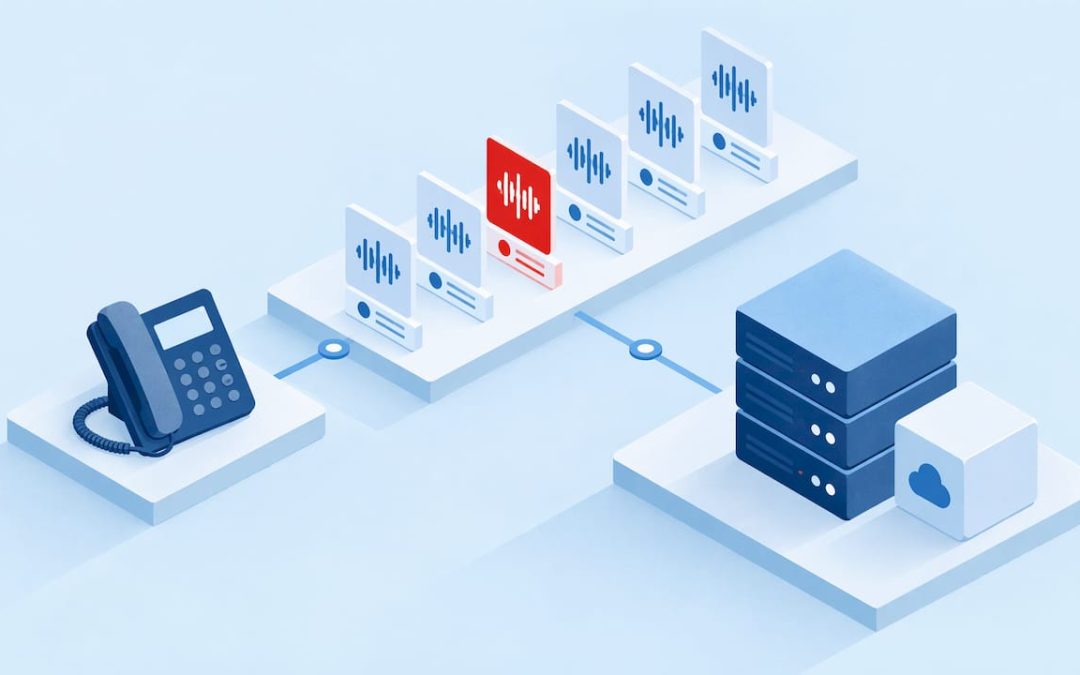
Business call recordings are stored in one of three places: on a device (a handset, a phone app or a server in your office), in your phone provider’s cloud, or in storage you control yourself. For most small and mid-sized Australian businesses, cloud storage tied to the phone system is the easiest to organise, search, secure and delete on schedule. What matters most is not the location. It is that you decide how long recordings are kept, who can open them, and how they are removed.
This guide is for owners, operations managers and IT managers. It covers storage options, retention, access controls, organising and exporting recordings, and what call recording analytics and AI analysis add once recordings are in good order.
TL;DR
- Recordings live on a device, on an on-premise server, or in a cloud platform. A cloud phone system keeps them with the call record, so they are easier to find and manage.
- Set a retention period by call type and write it down. No single period fits every business, so base it on your purpose and any industry rules.
- Limit access by role: agents see their own calls, supervisors see their team’s, and only a few people can export or delete.
- Tell callers they are being recorded, and keep recordings only as long as you have a reason to.
- Analytics and AI analysis are only as good as the library behind them: well-labelled, searchable, retained on purpose.
Table of Contents
- Where business call recordings are stored
- How long to keep call recordings
- Consent and notice
- Security and access controls
- Organising, finding and exporting recordings
- What call recording analytics measures
- How AI call recording analysis works
- A short checklist for your recording storage
- Put your recordings on a platform you can manage
- FAQ
- Sources
Where business call recordings are stored
If you searched this topic and landed on pages about Android folders and recorder apps, you will have noticed they answer a different question. Those cover one person recording one handset. A business needs a storage design, because recordings pile up quickly, contain personal information, and may be needed months later for a dispute or a training review.
There are four common setups.
| Storage option | Where the audio sits | What suits it | What to plan for |
|---|---|---|---|
| Handset or app storage | On the phone itself | One-off personal recording | No central search, easy to lose, hard to control who holds copies |
| On-premise server | Hardware in your office or comms room | Sites with legacy phone systems | Disk capacity, backups, hardware refresh and who maintains it |
| Cloud phone system | The provider’s cloud platform, linked to each call | Teams across offices, home and mobile | Retention settings, access roles and export options |
| Your own cloud bucket or archive | Storage you operate, with recordings copied across | Businesses with strict records policies | You own encryption keys, access logs and lifecycle rules |
The handset option is the weakest for a business. Recordings scatter across staff devices, nobody can search them together, and deleting a recording on request becomes a hunt. If your team currently records on mobiles, moving recording into the phone system is the single most useful change you can make.
On-premise servers work, but you carry the cost of capacity, backups and replacement. If you are weighing a move away from older equipment, our technical audit is a practical first step to see what you have and what a cloud setup would involve.
Why cloud storage tied to the phone system works well
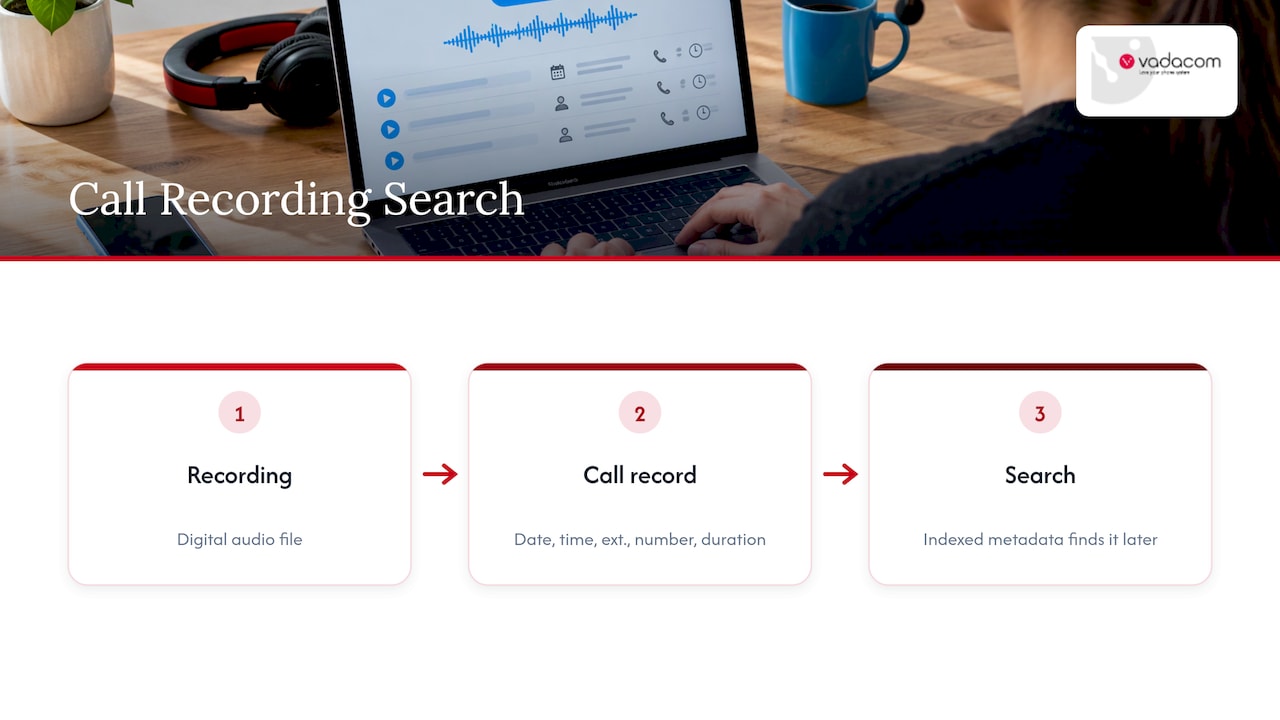
When recording is part of the phone platform, the audio is attached to the call record: the date, time, extension, number and duration. Recordings are typically stored as digital audio files indexed with metadata of this kind, which is what makes them searchable later. You are not matching a file name to a call log by hand.
NextVoice, our cloud business phone platform, includes in-app recording alongside extension dialling, transfer, voicemail and individual call-flow management. It is built on a telco-grade AWS cloud architecture that supports multiple availability zones, so the platform is designed to stay available when a single facility has a problem. That architecture is our design; how long you keep recordings and who can open them is still your policy to set.
How long to keep call recordings
There is no universal answer. Retention depends on why you record and what rules apply to your industry.
The principle is consistent across privacy regimes: keep personal information only as long as you need it for the purpose you collected it for. The European GDPR, for example, does not set a fixed period for call recordings. It asks that data be kept no longer than necessary, that people be told the period or the criteria used, and that erasure periods be recorded, as this guide to retention and deletion rules summarises. Australia and New Zealand have their own privacy laws built on a similar idea, and the exact obligations depend on your size, sector and the type of information in the call. Ask your legal adviser or privacy officer to confirm the rules that apply to you.
Build a retention schedule by call type
A single “keep everything for X months” rule is easy to write and hard to defend. A better approach is a short matrix. One technical specification guide recommends setting retention by call type, business unit, channel and status, rather than one blanket figure. For a typical small business, that might look like this:
- Routine sales and service calls: keep for a short, defined period that covers quality review and the window in which complaints usually arrive.
- Calls tied to a complaint or dispute: hold until the matter is resolved, then return them to the normal schedule.
- Calls covered by an industry record-keeping rule: keep for the period that rule sets, and no longer without a reason.
- Training examples: keep only with a clear purpose, and review the list regularly.
Write the schedule in one page, name an owner, and put the review date in the calendar. Regulated sectors can have long mandatory periods. In the EU, for example, financial firms recording under MiFID II keep certain records for five years, extendable to seven at a regulator’s request, according to ESMA’s published Q&A. That is a European rule, shown here only to illustrate how far sector requirements can sit from a general business default. Check what your own regulator expects.
Deletion is part of storage
Retention is only half the job. Recordings that outlive their purpose are a liability, because a breach exposes more, and a request to see or delete personal information covers them too. If you want a plain-English view of purpose-based retention and deletion for Australian businesses, this data retention policy guide for calls walks through the thinking. Automatic deletion at the end of the schedule is better than relying on someone to remember.
Consent and notice
Tell people before you record. In Australia, rules on recording and listening to calls sit in federal telecommunications law and in state and territory laws, and they differ. The standard business practice is a clear announcement at the start of the call, such as a message that the call may be recorded, followed by a stated purpose. Staff who record manually should say so aloud.
A few habits make this easier to run:
- Put the notice in your call flow so every inbound call hears it, rather than relying on each person.
- Record the purpose in your privacy policy: quality, training, dispute resolution, compliance.
- Decide what happens when a caller objects, for example offering an unrecorded alternative where that is practical.
- Pause recording for payment card details and other highly sensitive information.
We cover the consent and retention side for small business in more depth in our guide to call recording for SMEs. Because you may take calls from customers in other countries, check the rules of each place you operate in. A rule that is fine in one state or country can be a problem in another.
Security and access controls
A recording library is a store of personal information and sometimes financial or health details. Treat it that way.
Encrypt in storage and in transit
Encryption protects the audio when it sits in storage and when it moves between systems. Industry guidance for regulated sectors commonly points to AES-256 for stored recordings and current TLS versions for transfers, with role-based access and multi-factor authentication on the systems that hold them, as set out in this guide to compliant call recording storage. If you manage your own archive, your key handling matters as much as the algorithm. This explainer on encryption at rest helps you choose the layer at which to encrypt and then protect the keys.
Give people the least access they need
Role-based access is the control most small businesses skip, and it is the one that prevents most internal problems. A workable set of roles, drawn from a call recording specification guide, looks like this:
| Role | Suggested access |
|---|---|
| Agent | Their own calls only, no exports |
| Supervisor | Their group’s calls, scoring and coaching |
| Quality assurance | Sample-based access |
| Security or compliance | All recordings, with the ability to place a legal hold |
| Administrator | System management, ideally without access to call content |
That same guide suggests time-limited access for sensitive calls: access granted on request, with a stated reason, that expires automatically. For example, a QA reviewer gets 48 hours on a specific call tied to an incident, and access then ends by itself. Even a ten-person business can apply the idea. Name who can listen, who can export, and who can delete, and keep the lists short.
It also helps to log who played or downloaded what. If a customer asks who has heard their call, you will have an answer.
Organising, finding and exporting recordings
The difference between a useful library and a pile of audio is how it is labelled and searched.
- Search by the details the phone system already holds: date, time, extension, caller number and duration.
- Add tags that reflect your work: complaint, quote, escalation, training candidate. Keep the list short enough that people use it.
- Standardise names for exports. If you download a file, the name should carry the date, extension and a reference, not a default string of digits.
- Export only when you must, for example for a dispute, a regulator or a customer request, and record who exported it and why.
- Delete on schedule, and when you delete a customer’s information on request, include their recordings.
Call flow design helps here too. When your call flows are mapped before you build them, you know which queues and numbers record, which announce it, and which should never record. Our guide to call flow design shows how to map calls before configuring anything.
Voicemail is a related store people forget. Messages are recordings too, often with names and phone numbers. If you forward voicemail to email, treat those inboxes with the same care; our piece on voicemail to email setup covers security and local support considerations.
What call recording analytics measures
Once recordings are stored sensibly, you can learn from them. Call recording analytics turns a library of audio and call data into patterns you can act on. Depending on the platform, it typically looks at:
- Volume and timing: when calls arrive, how long they last, and where queues build up.
- Handling: how often calls are transferred, how many reach voicemail, and how many go unanswered.
- Conversation themes: the topics customers raise most often.
- Quality indicators: whether required statements were made and how calls were closed.
Operations managers use these to staff for busy periods and fix call routes. Owners use them to see which enquiries are turning into work. The caution is to measure what you will act on. Ten tidy dashboards that nobody reviews are less useful than one weekly look at missed calls and transfers.
How AI call recording analysis works
AI analysis sits on top of the recording. In outline, the audio is converted to text, and software then reads the text, and sometimes the audio, to pick out topics, questions, objections, outcomes and the tone of the conversation. Instead of a supervisor sampling a handful of calls, the system can review every recorded call and surface the ones worth a person’s attention.
What that can show you, depending on the setup:
- Recurring reasons customers call, which may point to unclear web content or billing questions.
- Calls where a customer asked for something that was not delivered.
- Coaching moments, such as long silences or unresolved questions.
- Trends over weeks rather than single calls.
Results depend on audio quality, the way calls are configured and how your team uses the insight. We make no promise of a particular outcome, and an AI summary should prompt a human review, not replace it.
For customers who want this, we offer optional AI Call Intelligence, which provides deeper insight from call recording and analysis. If you are considering AI more broadly for routing or answering, our article on why AI should wait for a governed pilot sets out a careful way to start.
Privacy applies to analysis as much as to storage. Analysing recordings is a use of personal information, so your notice should mention it, your retention rules should cover transcripts and summaries as well as audio, and access to the analysis tools should follow the same role limits.
A short checklist for your recording storage
Use this as a one-page review:
- List every place recordings are created today, including staff mobiles.
- Move recording into the phone system where you can.
- Write the retention schedule by call type and name an owner.
- Switch on the call notice and record the purpose in your privacy policy.
- Set roles for listening, exporting and deleting.
- Confirm encryption in storage and in transit with your provider.
- Schedule automatic deletion and a quarterly review of the rules.
- Decide what analytics you will actually use.
Our perspective
Most recording problems we see are not technology problems. They are decisions nobody made: how long to keep calls, who may listen, and what callers are told. A phone system should make those decisions easy to apply, not bury them in settings.
That is why we build NextVoice around the essential features businesses use every day, with recording inside the app rather than bolted on through a separate tool. Keeping recordings with the call record on a resilient cloud platform means fewer files scattered across handsets and fewer places for something to go wrong.
We have spent more than 20 years designing, delivering and supporting communications locally in New Zealand and Australia, and we think local people who understand your business are worth having when you set retention and access rules. Start with the basics, write the policy down, and add analytics when you know what you will do with the answers.
Stuart
Put your recordings on a platform you can manage
If your recordings sit on handsets or an ageing on-premise system, moving to a cloud phone system gives you one place to manage them. NextVoice gives teams extension dialling, transfer, voicemail, in-app recording and individual call-flow management across the office, home and other locations, and you manage users and settings as your needs change. Our local team can talk through how recording would work for your business.
See NextVoice and NextMobile or start from the Vadacom home page to talk to our team.
FAQ
Where are call recordings stored on a business phone system?
On a cloud phone system they sit in the provider’s cloud, linked to the call record so you can search by date, extension or number. On older systems they may be on an on-premise server, and on mobiles they are in the device’s own storage. Ask your provider where the audio is held and what retention and export options you have.
How long should a business keep call recordings?
Keep them only as long as you need them for the reason you recorded, and no shorter than any rule for your industry requires. Set periods by call type, hold recordings tied to a dispute until it is resolved, and delete on schedule. Your legal adviser can confirm what applies to you.
Who should be able to listen to or download recordings?
Fewer people than you think. Agents typically hear only their own calls, supervisors their team’s, and only a small group should export or delete. Time-limited access for specific calls is a practical way to handle reviews without opening the whole library.
Do I have to tell callers I am recording?
Yes, as standard practice. Australian federal, state and territory laws differ, so the safe habit is a clear notice at the start of every call and a stated purpose in your privacy policy. Check the rules for each place you take calls from.
Can AI analyse my call recordings?
Yes. Software can transcribe calls and then pick out topics, outcomes and trends across many calls. Treat the output as a guide for human review, and cover transcripts and summaries in your notice, retention rules and access controls.
Sources
- Set call recording retention and deletion rules | CallsIQ
- ESMA Q&A 1770: Recording of telephone conversations
- Call Recording Retention Periods and Low-Cost Storage Tiers | CallSphere
- Call recording spec: requirements for Verint, NICE and more | GSE
- Data Retention Policy for Calls: What Australian Businesses Need | Wattle AI
- Data Encryption at Rest: Choose the Layer, Then Secure the Keys