

Good hybrid work communication comes down to three things: agreed expectations about how and when people talk, a small set of tools that work the same from the office, home or a client site, and habits that keep remote staff from being second-class participants. Get those right and the location of your people matters much less. This guide covers each one, with New Zealand rules and guidance where they apply, and shows where a cloud phone system fits.
TL;DR
- Write down your communication rules: which channel for what, expected response times, and when people are available.
- Use fewer tools, and make sure every one works equally well from the office, home or a mobile.
- Run meetings so remote people are included by design, not as an afterthought. WorkSafe NZ treats exclusion as a real risk.
- Mix scheduled conversations (1:1s, team check-ins) with informal channels so people stay connected socially as well as on tasks.
- Your business phone system is part of the hybrid toolkit: extensions, transfers, voicemail and call flows should follow the person, not the desk.
Table of Contents
- What hybrid work means, and why communication gets harder
- Set expectations before you choose tools
- Synchronous or asynchronous: decide what needs a live conversation
- Keep remote and office-based staff connected
- Where the phone system fits in a hybrid setup
- Our perspective
- How NextVoice supports a hybrid team
- Common hybrid communication mistakes, and fixes
- Techniques that make individuals better hybrid communicators
- A 30-day plan to improve hybrid communication
- FAQ
- Sources
What hybrid work means, and why communication gets harder
Hybrid work is a mix of time in the workplace, at home and sometimes elsewhere. In practice it ranges from a fixed “Tuesday and Thursday in the office” pattern to a fully flexible arrangement where each person chooses day by day.
It is well established in New Zealand. Employees have been able to formally request flexible working arrangements since 2008 under the Employment Relations Act, according to the Public Service Commission’s hybrid working report. That same report notes that in the 2021 Te Taunaki Public Service Census, 58 percent of public servants said they worked from home at least some of the time. Private businesses have followed a similar path, even if the numbers differ.
The communication problem is simple to state. When everyone sits in one room, a lot of coordination happens by accident: a question across the desk, overhearing a call, a quick word at the kettle. Hybrid work removes that background channel. Whatever you do not replace deliberately, you lose.
Three things tend to go wrong:
- Information reaches people unevenly. Those in the office hear things first. Those at home hear them second-hand, or not at all.
- Nobody knows the rules. Is a chat message urgent? Should a call be answered on a mobile at 6pm? Without agreement, people guess, and guesses differ.
- Tools multiply. Chat, email, a phone system, a meeting app and a document tool, each with its own notifications, and none of them quite connected.
Set expectations before you choose tools
Most teams reach for software first. It works better the other way round. Boston University’s guidance for hybrid teams, published by its HR department, recommends that teams agree on communication frequency, channels, response times, availability and how progress is shared, then use regular pulse checks to see how the team is feeling. It is a US university, but the practice transfers to any workplace.
A one-page communication agreement is enough. Here is a template you can adapt.
| Question to settle | Example answer for a 20-person NZ business |
|---|---|
| Urgent and needs an answer now | Phone call to the person’s extension, which rings on their app or mobile |
| Needs an answer today | Team chat message, with a named person and a time |
| Needs an answer this week | Email or a shared task, with the context written out |
| Core availability | 9:30am to 3:30pm, so meetings sit in a window everyone can hit |
| Out of hours | No expectation to respond unless on a published on-call roster |
| Where decisions are recorded | One shared document or channel, not the meeting itself |
The specific answers will differ. What matters is that they exist and that managers follow them first. If the boss sends chat messages at 9pm and expects replies, the written policy is irrelevant.
Timing and flexible hours
Hybrid often goes with flexible hours. Employment New Zealand’s Flexible work toolkit says that when a meeting or event falls outside a flexible worker’s usual hours, the employer and worker should work out together how to handle it. In other words, do not just drop a 5pm meeting on someone who starts at 7am. Ask.
If you receive a flexible working request, the process is formal. Under Employment New Zealand’s guidance, an employer must consider the request in good faith and reply in writing within one month, and can decline only for certain reasons. Having your communication rules in place makes it easier to say yes, because you can show how the arrangement will work day to day.
Synchronous or asynchronous: decide what needs a live conversation
Synchronous communication happens in real time: calls, video meetings, a quick conversation. Asynchronous communication lets people reply when it suits them: email, documents, recorded updates, most chat.
Some distributed companies make asynchronous the default. New Zealand software company Vital describes in its own blog how internal messages do not need an immediate response, while manager 1:1s, a monthly all-hands and online socials are the live moments. That is one company’s approach, not a rule, but the principle is useful for any team.
A workable split for most small and medium businesses:
- Go live for: anything urgent, sensitive or emotional (feedback, bad news), complex problem solving, onboarding conversations, and anything where tone matters.
- Go async for: status updates, routine approvals, information that several people need, and anything that benefits from being written down.
- Customer-facing contact stays live. Customers phoning your business expect a person or a well-built call flow, not a delayed reply. That is where your phone system carries the load.
The rule of thumb is to default to writing, then escalate to a call when a thread goes past two or three exchanges without resolution.
Keep remote and office-based staff connected
This is where most hybrid teams feel the strain, and where tools make the most visible difference. Four habits help.
Run hybrid meetings so no one is a spectator
WorkSafe New Zealand’s guidance on mental health when working from home says meetings and social events should offer options for all workers, wherever they are working. It also notes that hybrid workers can face behaviours that are harder to spot, such as being left out of online meetings or not being given enough information to do a task.
Practical ways to meet that standard:
- Everyone joins on their own device when some people are remote, even those sitting in the office. A meeting room with six people and one face on a screen leaves the remote person on the outside.
- Nominate someone to watch the chat and raise remote people’s questions.
- Go around remote participants first when asking for input.
- Share the agenda ahead of time and circulate notes and decisions in writing afterwards.
- Make sure meeting rooms have decent audio. Poor sound is the quickest way to turn a remote participant into a bystander. Our guide to getting hybrid rooms live covers what IT and facilities need to plan, and our video meeting etiquette rules are worth sharing with the whole team.
Schedule regular check-ins
Boston University’s guidance recommends scheduling both one-to-one and group meetings. For hybrid teams, a predictable rhythm beats ad hoc catch-ups, which tend to favour whoever is physically nearby.
A simple pattern:
- Weekly 1:1 between each person and their manager, 20 to 30 minutes, on video or a call. Cover work, blockers and how the person is doing.
- Short team check-in once or twice a week, 15 minutes, same time each time.
- Monthly or quarterly all-hands for direction, wins and questions.
- Pulse check every few weeks: two or three questions on workload, connection and clarity.
Make space for informal contact
WorkSafe NZ recommends that employers encourage workers to stay in touch socially and informally, with casual group chats given as an example, to reduce the psychosocial risks of working from home. It also advises that communication be open, clear and in place from the start, to manage risks such as isolation and feeling disconnected from colleagues.
That tells you something: informal contact is not a nice extra. It is part of how an employer manages health and safety. A “kitchen” channel for non-work chat, a fortnightly virtual coffee, or office days that coincide for a whole team all count.
Pick tools that behave the same everywhere
The test for any tool is whether a person at home on a laptop has the same capability as someone at a desk. For voice, that means:
- the same extension number, whichever device is in use
- the ability to transfer a call to a colleague, with an announced transfer when the caller needs context
- voicemail that reaches the right person
- call recording from within the app, where your policies allow it
- the ability to see who is available before you transfer or call
If your phone system ties people to a physical handset on a desk, hybrid work will keep running into it. Our guide to procurement checks for remote work phone systems lists what to ask a provider before you sign.
Where the phone system fits in a hybrid setup
Team chat and video get most of the attention in hybrid work articles. Yet for many NZ small and medium businesses, the phone is still how customers reach them, and how staff reach customers. If calls ring at an empty desk, nobody is connected.
A cloud phone system moves the number and the extension into software. Calls can ring on a desktop or mobile app, a browser or a desk phone, whichever the person is using that day. A few details matter more than they look:
- Call flows. Decide what happens when someone calls the main number: who rings first, what happens if they do not answer, and where calls go after hours. Our guide to call flow design shows how to map this before you build.
- Forwarding. Sending calls to personal mobiles is a common stopgap but can bring surprise costs and scam risks. See our notes on NZ call forwarding rules and forwarding to mobile.
- Security. Phones and meetings used from home networks need sensible controls. We cover VoIP security practices and video conferencing security controls.
- Numbers. If customers know you by an 0800 number, check it moves cleanly to the new system. Here is how to buy or port an 0800 number.
Our perspective
We have spent more than 20 years designing, delivering and supporting communications for businesses in New Zealand and Australia, and the pattern we see in hybrid teams is consistent: the technology is rarely the first problem. The first problem is that nobody has decided what “reachable” means.
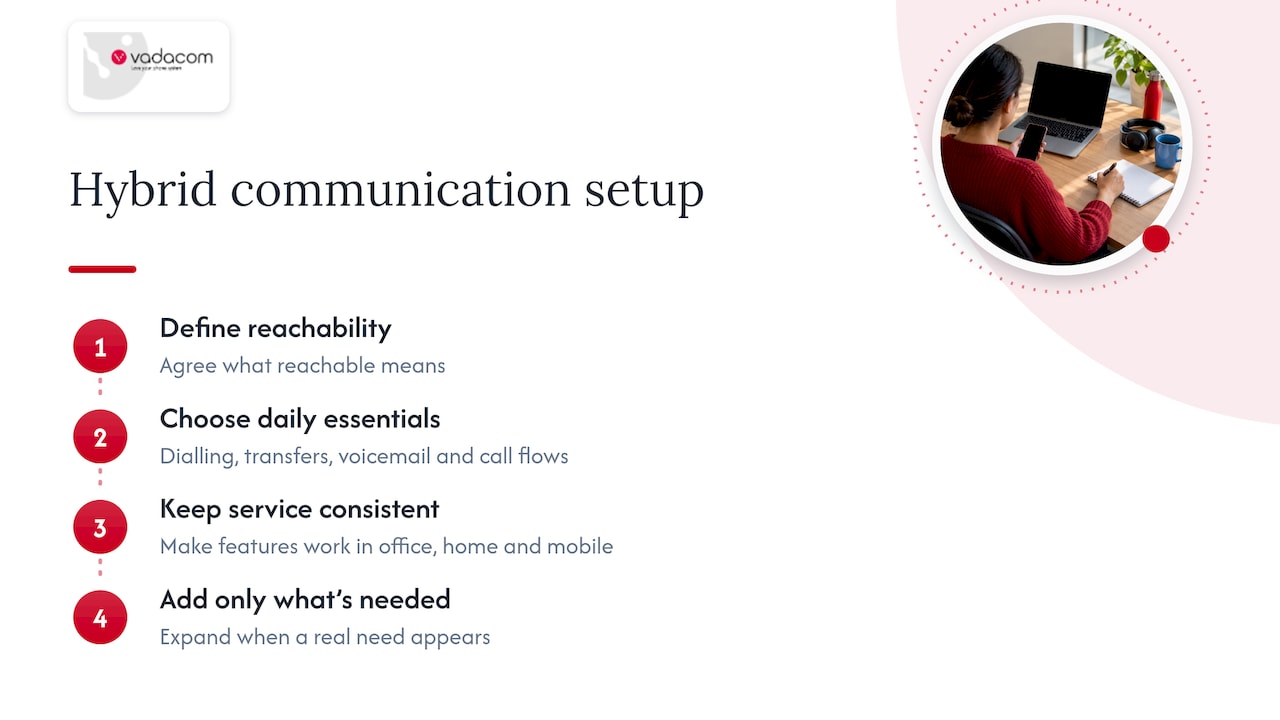
So we suggest starting small. Pick the essentials your team uses every day: extension dialling, call transfer, announced transfer, voicemail and individual call flows. Make sure they work identically in the office, at home and on a mobile. Then add things only when a real need shows up.
That is the thinking behind NextVoice. It is a cloud platform built on AWS across multiple availability zones, focused on the features businesses use most, so it stays affordable and easy to run. Administrators can add and change users and settings themselves as the team changes, and it does not depend on on-premise hardware or a large upfront investment.
And we would sooner you set the rules first. A well-written communication agreement with a modest toolset will beat an expensive platform that nobody has agreed how to use.
— Stuart
How NextVoice supports a hybrid team
NextVoice gives each person one extension that works across office, home and other locations, on the devices that suit how they work. Transfers, announced transfers, voicemail and in-app recording are built in, and each person can manage their own call flow. If you want more insight from recorded calls, optional AI Call Intelligence is available, and we also offer a locally supported AI answering service for calls you cannot take.
If you are not sure whether your current system can keep up, our technical audit looks at what you have today, and you can read more about moving off an old on-premise phone system. To see how the platform works, visit the NextVoice page or talk to our local team. We do not promise specific results, because they depend on how you set up and use the system, but we will help you build it around how your people work.
Common hybrid communication mistakes, and fixes
| Mistake | Why it hurts | Fix |
|---|---|---|
| Decisions made in the corridor | Remote staff find out late or never | Record decisions in a shared channel or document the same day |
| Hybrid meetings with one big room and a few faces on screen | Remote people cannot join in naturally | Individual devices, a chat monitor, remote voices first |
| Too many channels | People miss things and switch off notifications | One home for each type of message, written down |
| Unspoken response times | Anxiety, or constant checking | Agreed windows and a clear route for urgent matters |
| Calls tied to desk phones | Customers reach empty desks | Extensions that follow the person on app or mobile |
| Only task talk | People feel isolated | Informal channels and scheduled social contact |
Techniques that make individuals better hybrid communicators
Individual habits matter as much as policy. The Boston University guidance lists a handful: communicate often and transparently, share information and progress, listen actively, ask questions to clarify, and make sure everyone has a voice. An academic study of globally distributed Scrum teams, based on interviews with 10 professionals, found that transparency, quality and discipline in communication together lead to a shared understanding in the team. It is a small study, but it matches what most managers see.
Turn that into daily practice:
- Write messages that stand alone. Include the context, the ask and the deadline, so no one has to reply just to find out what you mean.
- Say what you are working on. A short daily or weekly update removes the need for “where are you at?” messages.
- Check understanding. Close a call by repeating the decisions and who owns each one.
- Use video when it adds something. Hard conversations and relationship building suit video. A status update does not need it.
- Include everyone in inclusion. The Public Service Commission suggests normalising pronouns in email signatures as one way to build belonging. Whether or not you adopt that, the aim is that everyone feels safe to ask questions and challenge ideas.
WorkSafe NZ also advises employers to make sure all staff know the code of conduct and the bullying and harassment policies. In a hybrid team this matters more, because poor behaviour can happen in private messages or on calls where nobody else sees it.
A 30-day plan to improve hybrid communication
- Week 1: listen. Ask the team three questions: what information do you struggle to get, which tools frustrate you, and when do you feel left out?
- Week 2: write the agreement. One page, using the table earlier in this guide. Share it, edit it with feedback, and publish it.
- Week 3: fix meetings and calls. Introduce the hybrid meeting rules. Review how calls are handled: who answers, what happens when they cannot, and how calls reach people working remotely.
- Week 4: check and adjust. Run a short pulse survey. Keep what works, drop what does not, and set a date to review again in three months.
You do not need a transformation programme. You need a clear set of rules, a small set of tools that work everywhere, and a regular check that the arrangement is still working.
FAQ
What is hybrid work communication?
It is the set of tools, rules and habits that keep people informed and connected when some or all of their time is spent away from the workplace. It covers calls, video, chat and email, along with agreements on when and how to use each one.
What are the key communication techniques for hybrid teams?
Communicate often and openly, share progress, listen actively, ask questions for clarity and make sure everyone gets a say. Agreed response times and regular one-to-one and team check-ins turn those techniques into routine.
How do you stop remote staff feeling left out?
Design meetings so that remote people take part equally, with each person on their own device and remote voices heard first. WorkSafe NZ also recommends informal channels such as casual group chats, and options for everyone at social events.
Can a business phone system help with hybrid work?
Yes, if the extension follows the person rather than the desk. With a cloud system, calls, transfers and voicemail work from an app, browser or desk phone, so customers and colleagues reach the right person wherever they are. Results depend on how the system is set up and used.
Sources
- Hybrid Working in the New Zealand Public Service, Public Service Commission
- Mental health when working from home: for PCBUs, WorkSafe New Zealand
- Effective Communication and Collaboration, Boston University HR
- Flexible work toolkit
- Flexible working, Employment New Zealand
- How we think about distributed working at Vital
- Effective Communication in Globally Distributed Scrum, AJIS
- Pronoun use in email signatures, Public Service Commission