

Good call flow design means drawing the path every inbound call can take, from the first ring to a person, a voicemail or a callback, before you touch the phone system settings. Start with one main number, a short greeting, an opening-hours check, no more than five menu choices, a ring group for each choice, and a fallback for when nobody answers. This guide walks through that process for a New Zealand business, with a worked example, the mistakes that cause the most complaints, and the privacy points to settle if you record calls or use AI.
TL;DR
- Draw the flow as a diagram first. It becomes your requirements list: every number, menu, queue, destination and owner has to exist before go-live.
- Keep the structure shallow: one greeting, a time-of-day check, five or fewer options, and a human route that is always visible.
- Every branch needs a fallback. Busy, no answer, after hours and public holidays each need a defined outcome.
- If the flow records calls or sends audio to AI, the disclosure, purpose, access and retention settings are part of the design under New Zealand privacy rules.
- Test the flow by calling it, on a normal day, after hours and on a holiday, before customers do.
Table of Contents
- What a call flow is, and why drawing it first pays off
- A worked example: a 25-person professional services firm
- Design principles that keep callers on your side
- Matching the flow to the size of the business
- Where AI fits into a call flow
- Privacy: part of the diagram, not a footnote
- Our perspective: design for the caller, then pick the features
- Building your flow on NextVoice
- A pre-launch checklist
- FAQ
- Sources
What a call flow is, and why drawing it first pays off
A call flow is the connected series of actions that makes up the caller’s experience: what they hear, what they choose, who rings, and what happens when no one picks up. Genesys describes a flow in similar terms, but you do not need contact centre software to benefit from the idea. A five-person plumbing firm and a 200-seat operations team both have call flows. The only question is whether they were designed or just accumulated.
Microsoft’s guidance for Teams recommends working out call routing in a diagram as part of planning. The reason is practical. The diagram shows which auto attendants, queues, service numbers and licences you need. For an IT manager, the picture is a bill of materials. For an owner, it is a way to see the experience a caller will actually have.
What the diagram should capture:
- Every inbound number, including the main line, any 0800 number and direct lines.
- Business-hours and after-hours branches, including public holidays.
- Each menu, with the exact wording of the options.
- Each queue or ring group and who sits in it.
- Transfer destinations, including external ones such as a mobile or an after-hours service.
- A fallback for every branch.
- An owner for each element, so someone is responsible when staff change.
A whiteboard or a free diagramming tool is enough. Boxes for actions, diamonds for decisions, arrows for outcomes.
A worked example: a 25-person professional services firm
Here is a flow a small or mid-sized New Zealand business could build, based on a standard inbound pattern. It follows the same sequence that AWS documents in its sample flows, which cover inbound handling, queued callbacks, queue priority, recording behaviour and disconnect flows.
- Call arrives on the main number. One number is published everywhere: website, email signature, Google Business Profile.
- Greeting and recording notice. “Thanks for calling Example Ltd. Calls may be recorded for training and quality purposes.” Add an AI notice here too if AI is involved.
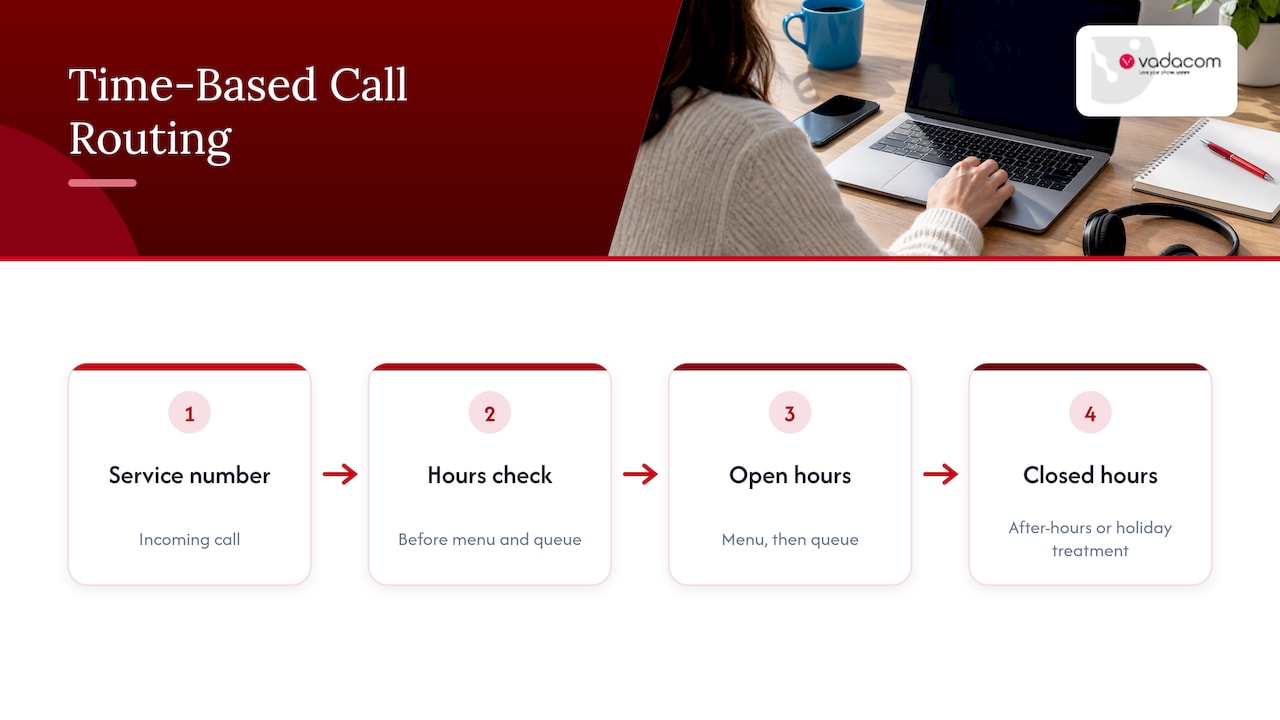
- Business-hours check. Monday to Friday, 8:30 am to 5 pm, with a public holiday calendar attached.
- If open: a menu. “For sales, press 1. For support, press 2. For accounts, press 3. To speak to reception, press 0.”
- Route to the right ring group. Sales rings the sales team together; support rings in order; accounts rings two people.
- Answer or transfer. Staff either take the call directly or use an announced transfer, so the next person knows who is calling and why.
- If busy or no answer after, say, 20 seconds: offer voicemail or a callback request.
- Notification. The voicemail lands in email or the app, with the call record attached.
- If closed: a short message with opening hours, plus voicemail, a callback option or an after-hours answering service.
The same skeleton handles holiday routing, remote workers, external forwarding and temporary announcements such as an office closure. You change the destinations, not the structure.
Why the time check comes first
Microsoft’s guidance warns against connecting a service number straight to a queue unless that queue is truly available around the clock. Otherwise callers miss your after-hours and holiday treatment. Put an auto attendant, or the equivalent time-based layer, in front of the queue. In the worked example above, the hours check sits ahead of the menu for exactly this reason.
Design principles that keep callers on your side
The best-run menus treat the caller’s time as the scarce resource. TTEC frames IVR as a customer-experience product rather than a telephony feature: capture intent before transfer, resolve simple requests with self-service, and hand the captured context to the employee so the caller does not start again.
Keep menus shallow and in plain words
Microsoft suggests keeping menu items to five or fewer and using nested menus only if you need more. Name options after what the caller wants (“a quote”, “a delivery”) rather than your internal departments (“logistics”). If you must nest, stop at two levels.
Always show a way to a human
A visible human option is the single best protection against caller frustration. A pressed 0 that reaches reception, or a clear “stay on the line” path, costs little. A technically elegant menu still fails if callers cannot escape it or must repeat themselves.
Avoid loops
Every transfer must lead somewhere with an end state. Microsoft Teams limits a call to a maximum of 25 transitions through auto attendants and queues before it disconnects, to prevent infinite loops. Even if your platform has no such cap, treat an unbounded loop as a design bug. On your diagram, trace each arrow to a person, a voicemail box or a hang-up.
Plan the failure paths as carefully as the happy path
Most complaints come from branches nobody drew: the sales team is all on calls, the receptionist is at lunch, the afterhours mobile is switched off. For each, decide the outcome:
| Situation | Poor design | Better design |
|---|---|---|
| All sales staff busy | Rings out forever | Overflow to a second group, then voicemail or callback after a set time |
| Closed on a public holiday | Normal menu, nobody answers | Holiday calendar triggers a closed message and voicemail |
| Caller picks no option | Silence, then disconnect | Repeat once, then route to reception |
| Voicemail left | Sits unheard in a shared box | Emailed to a named owner with an expected response time |
| Forwarding to a mobile | Surprise costs, spoofing risk | Forward from the cloud system with rules set in advance |
On that last row, see our guides on call forwarding rules in New Zealand and how to handle forwarding to mobile without surprise fees.
Matching the flow to the size of the business
Different businesses need different depth.
Under 10 people. One number, one short greeting, an hours check and a ring group. Perhaps two menu options at most. Often a good flow here is “ring everyone, then voicemail”.
10 to 50 people. The three-to-five option menu in the worked example, with ring groups per team and an after-hours treatment. This is where extension dialling matters, so staff can reach each other quickly; our extension dialling plan guide covers the numbering.
Multiple sites or remote teams. Add location-aware routing and make sure staff at home or on the road receive calls on the same flow, using whichever device suits them. Here the diagram earns its keep, because a missing destination is easy to overlook.
For scripts you can paste into an auto attendant, our copyable auto attendant scripts give wording for greetings, menus and closed messages.
Where AI fits into a call flow
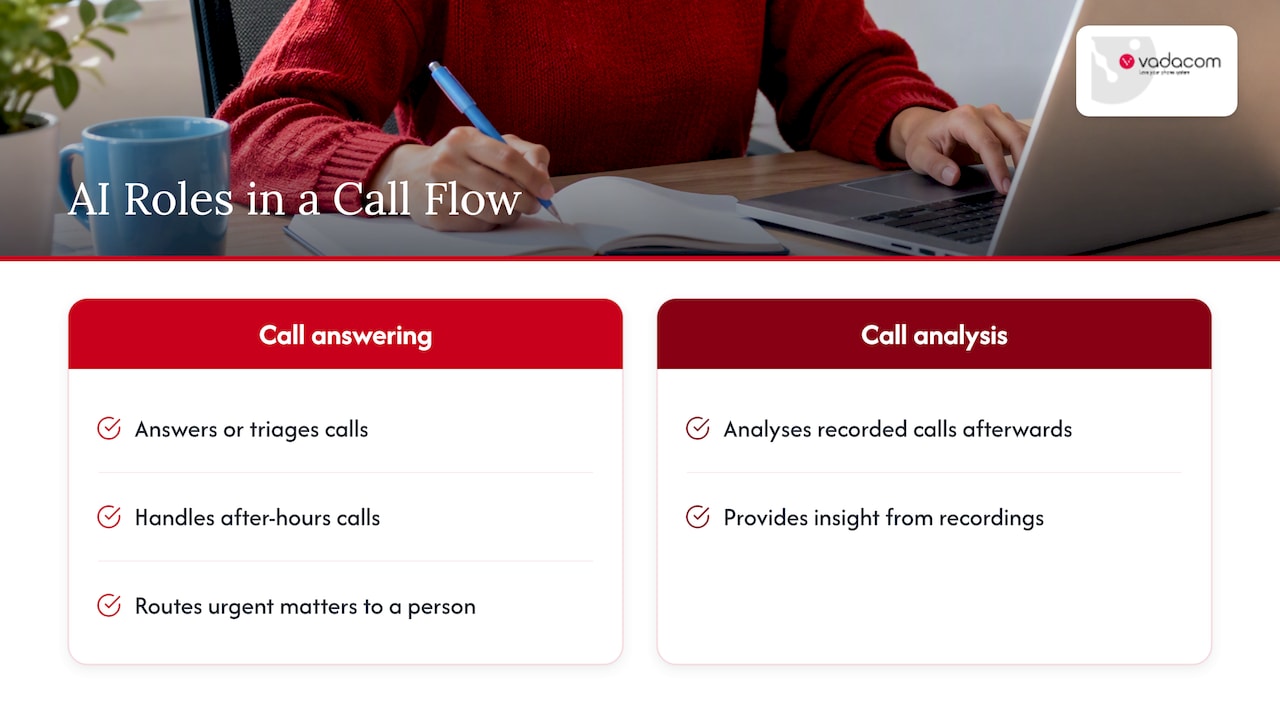
AI can sit in a flow in two quite different ways. It can answer or triage calls, as in an AI receptionist. Or it can analyse recorded calls afterwards, for insight. Both change the design.
For answering, the useful questions are what the AI may resolve alone, what it must hand to a person, and what context it passes on. Some vendors build AI agents that run whole inbound conversations for high-volume sales enquiries, but most small businesses are better served by starting narrower: handle after-hours calls, capture the reason for calling, and route urgent matters to a person. Our piece on call routing strategies and why AI should wait for a governed pilot sets out that approach, and the AI auto attendant overview shows how it can look in practice.
If calls are missed anyway, a compliant missed call recovery process closes the loop, and for evenings and weekends our page on after-hours phone answering covers combining AI and human answering.
Privacy: part of the diagram, not a footnote
If your flow records calls, or sends recordings or transcripts to an AI tool, put the privacy decisions on the diagram.
The Privacy Commissioner notes that recording someone without telling them may breach the Privacy Act, depending on the circumstances, including who records and why. So the disclosure belongs in the greeting, before the menu.
The Telecommunications Information Privacy Code 2020 sits under the Privacy Act 2020 and limits how telecommunications information may be disclosed. Recorded calls are personal information, and the Human Rights Review Tribunal’s decision in Waxman v Pal involved an employer recording staff calls without their knowledge. The case mentions a five-year retention policy, but that was the practice’s own policy, not a New Zealand rule. Set your own documented, purpose-based retention period instead of copying it.
Before switching on recording or AI analysis, write down:
- The purpose: training, dispute resolution, quality, compliance.
- Who can listen to or read recordings and transcripts.
- How long you keep them and who deletes them.
- Which vendors receive the data and where it is processed.
One point of confusion: the Unsolicited Electronic Messages Act 2007 excludes voice calls over a standard telephone service or VoIP, including calls with recorded or synthetic voice. That concerns the Act’s scope for electronic messages only. It is not a blanket exemption from privacy, consumer protection or sector-specific obligations. If you are unsure how this applies to your outbound or recorded calls, ask a privacy lawyer or the Office of the Privacy Commissioner. Our guide on call recording for SMEs covers consent and retention from a practical angle.
Our perspective: design for the caller, then pick the features
We have spent more than 20 years designing, delivering and supporting communications for businesses in New Zealand and Australia. The pattern we see is consistent: businesses buy features first and design the flow second, then wonder why callers get lost.
We would reverse that. Draw the flow on a single page. If it does not fit, it is too complicated for the caller as well. Then check that your platform covers the essentials the drawing needs: extension dialling, transfer and announced transfer, voicemail, in-app recording and individual call-flow management per user or team. Those are the features NextVoice focuses on, because most businesses need them done well more than they need a long list of extras.
We also think the flow should be changeable by the people who own it. Staff move, teams reorganise, seasons change. If a simple edit needs a support ticket and a week’s wait, the flow drifts away from reality. That is why NextVoice lets customers manage users and communication settings as their needs change, with local support behind it when they want a second opinion.
On AI, our view is cautious but positive. Add it where it removes a clear problem, such as after-hours calls going unanswered, and decide the privacy rules first.
— Stuart
Building your flow on NextVoice
If you are replacing an ageing on-premise system or starting fresh, NextVoice is our cloud business phone system, built on AWS and supported locally. You can bring your drawn flow to us and we will help you map it onto the platform. If you are not sure what your current system can do, our technical audit is a starting point. For businesses interested in AI answering or call analysis, see AI Call Intelligence.
A pre-launch checklist
- Does every number on the diagram exist and point to the right place?
- Is the hours check ahead of every queue?
- Are public holidays loaded?
- Does every branch end in a person, a voicemail box or a callback?
- Does each voicemail box have a named owner and an email notification?
- Is there a visible way to reach a human?
- Does the greeting include the recording or AI notice, if relevant?
- Have you called the flow yourself during hours, after hours and on a mock holiday?
- Have you listened to the wording on a mobile phone, not just a desk phone?
- Is someone responsible for reviewing the flow every quarter?
FAQ
What are the main steps of a call flow?
In most businesses the steps are: the call arrives, a greeting plays, the system checks the time, the caller chooses an option, the call routes to a person or group, and a fallback applies if no one answers. After that, a record and notification are created. Not every business needs every step, but each one you skip should be a deliberate choice.
How many menu options should an auto attendant have?
Five or fewer, in line with Microsoft’s guidance. If you need more, use a nested menu rather than a long list. Callers forget long lists, and a short menu with a way to reach a person usually performs better.
Do I need to tell callers I am recording?
Yes, as a sensible rule in New Zealand. The Privacy Commissioner says recording someone without telling them may breach the Privacy Act, depending on the circumstances. Put a notice in the greeting and document your purpose, access and retention. For a specific situation, seek legal advice.
Should I use AI to answer calls?
Only where it solves a clear problem, such as unanswered after-hours calls, and where a human route remains. Decide what the AI may resolve, what it hands over and how recordings are handled before you turn it on. A small, governed pilot is safer than a full rollout.
Sources
- Design – Call flows for voice applications, Microsoft Teams
- Ten Contact Center IVR Best Practices to Improve CX, TTEC
- Sample flows, Amazon Connect
- Can I record someone without telling them? Office of the Privacy Commissioner
- Waxman v Pal [2016] NZHRRT 28
- Unsolicited Electronic Messages Act 2007, Schedule
- Inbound AI agents for telecom