

Call forwarding to mobile sends incoming calls from one number to a mobile number you choose, and you can usually turn it on through your phone settings, a carrier service code or a cloud phone portal. It works reliably for personal and business use alike, but forwarding across networks, while roaming or to an overseas mobile can trigger extra charges. The sections below cover setup on iPhone and Android, landline and VoIP options, dial codes, costs and when a business needs more than a basic diversion.
TL;DR:
- On iPhone, unconditional forwarding sits in Settings, while conditional forwarding depends on carrier support; Android menus also vary by manufacturer and handset model.
- GSM codes cover all calls (21), busy (67), unanswered (61), and unreachable (62) calls, but syntax and availability differ by carrier and country.
- The owner of the original number usually pays forwarded minutes; roaming and overseas destinations can trigger international rates, so confirm plan terms before enabling either.
- For team coverage, cloud phone portals can schedule rules and log forwarded calls, while handset settings lack shared visibility into changes and call handling.
- Verify setup with a test call, and ignore unsolicited links requesting forwarding changes; contact your carrier if the registered destination looks wrong.
Table of Contents
- How to enable call forwarding on iPhone
- How to enable call forwarding on Android
- How to forward home phone or VoIP calls to a mobile
- Conditional versus unconditional forwarding, and the common dial codes
- How forwarding affects your bill, and how to avoid surprises
- Business-grade forwarding: when a cloud phone system beats device settings
- Troubleshooting, verification checks and scam warnings
- When forwarding to mobile is the right call
- How NextVoice handles business forwarding without the guesswork
- FAQ
- Sources
How to enable call forwarding on iPhone
Apple builds call forwarding directly into iOS, and the setup is quick to complete.
- Open Settings, then tap Phone.
- Tap Call Forwarding and toggle it on.
- Enter the mobile number you want calls sent to.
- On a dual SIM iPhone, choose which line the forwarding applies to before entering the number.
Unconditional forwarding (every call) is controlled from this menu. Conditional forwarding, which only redirects calls you miss or decline, depends on your carrier supporting it on the network side rather than through the device, according to Apple’s support guide.
Apple also warns that iOS blocks unsolicited links that try to switch on call forwarding automatically, a common trick used in phishing messages, so treat any text asking you to tap a link to “fix” your call settings as suspicious.
Pro Tip: Test forwarding by calling your own number from another phone straight after setup, so you catch any mistake before a real caller does.
How to enable call forwarding on Android
Android does not have one universal menu, because manufacturers customise the Phone app differently. On most devices you will find the setting under Phone app → Menu (three dots) → Settings → Calls → Call forwarding, or inside your handset’s own Call Settings app.
Where the menu isn’t available or doesn’t stick, carriers still support the underlying GSM codes that predate smartphone settings:
- Dial
*21*followed by the mobile number and#to forward all calls unconditionally. - Dial
*67*followed by the number and#to forward calls only when your line is busy. - Dial
*61*followed by the number and#to forward calls you don’t answer. - Dial
*62*followed by the number and#to forward calls when your phone is unreachable.
These codes are documented in general telephony references, though exact syntax and availability shift by carrier and country, so confirm the correct format with your provider before relying on them.
A carrier app or dedicated forwarding app can be safer than memorising codes, since it validates the number and confirms the setting took effect rather than leaving you guessing whether a code worked.
How to forward home phone or VoIP calls to a mobile
Landline and VoIP forwarding both work, but the setup paths differ from mobile handsets.
- For a traditional home phone, check your provider’s self-service portal first, or call support and ask them to enable call forwarding to your mobile; many landline providers charge a monthly fee for this feature.
- For a VoIP or cloud phone line, log in to the admin portal provided with your service and look for call routing, forwarding rules or call flow settings.
- Cloud portals typically let you schedule forwarding by time of day, set rules for different callers and keep a log of forwarded calls, which matters if a business needs to audit who answered what.
- Check whether international forwarding is supported before relying on it. Some plans block diverts to overseas mobile numbers outright, and carrier plan terms are worth checking before you set anything up for an overseas destination.
Conditional versus unconditional forwarding, and the common dial codes
Unconditional forwarding sends every incoming call straight to your mobile with no ringing on the original line at all. Conditional forwarding only kicks in under specific conditions, and there are three common variants.
- Busy: forwards a call when you’re already on another call.
- No answer: forwards a call after a set number of rings go unanswered.
- Unreachable: forwards a call when your phone is off or out of coverage.
The canonical GSM codes for these are widely documented (*21* for unconditional, *61* for no answer, *67* for busy, *62* for unreachable), but carrier and regional differences mean the exact digits and whether a code works at all can vary, so a quick check with your provider saves a failed setup.
How forwarding affects your bill, and how to avoid surprises
Forwarded minutes are usually billed to the owner of the original number, not the person receiving the forwarded call, which catches people out when they assume the cost sits with the destination mobile.
A few situations commonly trigger charges above what you’d expect:
- Forwarding calls while roaming overseas, since the call is often charged as an international leg even though the caller dialled a local number.
- Forwarding to an international mobile number, which can be billed at international rates rather than a standard local rate.
- Special numbers (like some 0800 or premium lines) that carriers exclude from standard forwarding or charge differently.
Consumer Protection guidance specifically flags forwarding while roaming as a frequent source of unexpectedly high bills, and recommends checking your plan’s terms for roaming and special-number clauses before you travel or set up a long-term divert.
Before you commit to ongoing forwarding, check your plan terms, call your provider to confirm the likely cost, test the setup with a short call, and watch your next invoice closely. A business juggling several forwarded lines benefits from a portal that logs calls automatically rather than relying on memory.
Pro Tip: If you’re planning to forward calls while travelling, call your provider before you leave rather than after you see the bill.
Business-grade forwarding: when a cloud phone system beats device settings
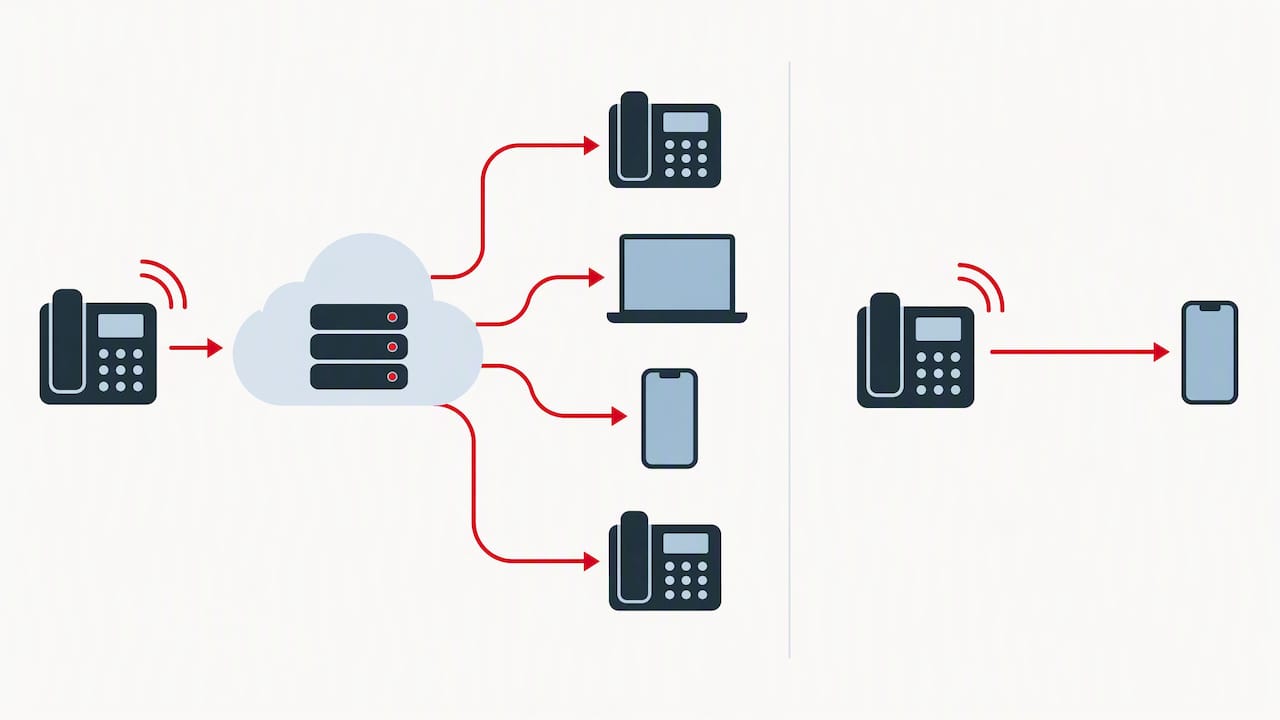
Device-level forwarding works fine for a single person redirecting calls occasionally. It gets harder to manage once a team, a roster or multiple numbers are involved, because there’s no shared visibility into who set what rule, when it changes or whether it’s even working.
A cloud phone platform turns forwarding into something a business can manage centrally rather than something buried in someone’s personal phone settings.
- A central admin console where authorised staff set and change forwarding rules, rather than each person configuring their own handset.
- Scheduled rules that shift calls to mobile outside business hours or during planned absences.
- Logging and reporting so a business can see which calls were forwarded, when and to whom.
- Extension dialling and announced transfer alongside forwarding, so calls can move between people without ever leaving the office system.
- Optional advanced call analysis features for teams that want deeper insight from call recording and analysis, on top of the core forwarding and routing features.
Device forwarding is a setting. Business forwarding needs to be a managed, auditable process.
NextVoice, our cloud communications platform, is built on this principle, and our team has explained the detail of transfer types versus simple forwarding for IT teams who want to understand the call flow behaviour underneath.
Troubleshooting, verification checks and scam warnings
Confirm forwarding is active by calling your own number from another phone and watching whether it rings through to the mobile you set.
- Check your phone’s status bar for a forwarding icon, which most handsets display while the feature is on.
- If forwarding fails, re-enter the destination number with the correct international prefix, and on a dual SIM phone double-check which line you applied the setting to.
- If the network-registered number doesn’t match what you expect, contact your carrier directly rather than repeating the same code.
Be wary of unsolicited texts or calls asking you to enable forwarding or tap a link, a known diversion scam tactic; ignore unexpected prompts and only change settings through your carrier’s official channels. If you spot unexpected charges, keep your bills and correspondence as proof, contact your provider first, and escalate to Telecommunications Dispute Resolution if it’s not resolved.
When forwarding to mobile is the right call
My rule of thumb is simple: use your phone’s built-in settings or a carrier code for ad hoc personal forwarding, like redirecting calls while you’re on leave for a week. Once forwarding needs to run continuously for a team, or someone needs to prove which calls went where, a managed cloud phone system earns its keep.
Before you rely on any forwarding setup, run through three checks: read your plan’s terms on roaming and international calls, test the forward with a real call, and watch your first bill closely for anything unexpected.
— Stuart
How NextVoice handles business forwarding without the guesswork
If your business forwards calls to mobiles regularly, whether for after-hours cover, remote staff or an overflow plan, a device setting on someone’s personal phone is a fragile way to run it — consider professional call overflow management solutions instead. We built NextVoice so forwarding is a feature your whole team can rely on, not a setting one person remembers to toggle.

- A shared admin console for setting and changing forwarding rules without touching individual handsets.
- Scheduled rules that route calls to mobile outside office hours automatically.
- Call logging and reporting so you can see exactly which calls were forwarded and when.
- Optional advanced call analysis features for teams that want more insight from recorded calls.
- Local support from a team with extensive experience in business phone systems.
If after-hours coverage is part of what you’re solving for, our after-hours answering options pair well with forwarding rules. For a closer look at how NextVoice handles routing and scheduling, visit the NextVoice platform page or get in touch to talk through your setup.
FAQ
How do I set my call forwarding?
On an iPhone, go to Settings, then Phone, then Call Forwarding, and enter the mobile number you want calls sent to. On Android, the path is usually Phone app settings, then Calls, then Call forwarding, though the exact menu varies by manufacturer.
What is *#62 call forwarding?
Dialling *#62# checks whether your calls are being forwarded when your phone is unreachable, rather than turning anything on. It’s a status check code, and the matching code to activate that type of forwarding is *62* followed by a number.
What does *73 do on a phone?
Some carrier networks use specific codes to cancel call forwarding rather than set it up. Availability and exact behaviour depend on your carrier, so it’s worth confirming with your provider before relying on it.
What does it mean when a phone call is forwarded?
A forwarded call means the person you dialled has set their line to redirect incoming calls to another number, usually a mobile, instead of ringing on the original device. The caller generally won’t know a call was forwarded unless told, since it connects as normal from their side.
Sources
- Unexpected charges | Consumer Protection
- Set up call forwarding on iPhone – Apple Support
- Call forwarding — Wikipedia