

Attended (warm) transfers consult the target before completing the handoff; blind (cold) transfers forward the call immediately without consultation. That one distinction drives everything else: attended transfers trade a few extra seconds for reliability and context, while blind transfers trade reliability for speed. The rest of this guide covers the signalling behind each, how to configure them on common platforms, and how to pick the right one.
TL;DR:
- Attended transfers provide better reliability by confirming target availability and sharing context before completing the handoff, suitable for complex issues.
- Blind transfers are faster and simpler, ideal for high-volume environments or routine departmental redirects where context is unnecessary and speed is prioritized.
- Signalling differences include attended transfers using SIP Replaces headers to merge dialogs, while blind transfers send a REFER request and end the original call immediately.
- Use attended transfers when caller issues are sensitive or require context, and blind transfers when the destination is a group or near-certain to answer without concern for context.
- A cloud PBX like NextVoice supports configurable transfer options, fallback routines, and transfer logging to optimize reliability and efficiency.
Table of Contents
- What is an attended (warm) transfer?
- What is a blind (cold) transfer?
- How attended and blind transfers work at the signalling level
- When should you use attended vs blind transfers?
- How to transfer a call on common phones and platforms
- Why transfers fail and how to recover
- How a locally supported cloud PBX handles transfers
- Rules of thumb for getting transfers right
- Get configurable transfer behaviour with local support
- FAQ
- Sources
What is an attended (warm) transfer?
An attended transfer, also called a warm or consultative transfer, puts the original caller on hold while the transferring agent calls the target, confirms they’re available, and passes on context with conversation intelligence before connecting the two parties. The agent only completes the handoff once the target has agreed to take the call.
This matters most when the caller’s issue needs background that shouldn’t be repeated from scratch. Benefits include:
- Confirmation that the target is actually available before the caller is sent over
- A verbal handover of context, so the caller doesn’t repeat themselves
- Far fewer dead-end transfers, since the agent hears the target answer
Teams handling escalations, complex support tickets, or any high-touch customer interaction tend to default to attended transfers. A semi-attended variant also exists, where the agent hears the target’s phone ringing (ringback) but doesn’t wait for a full conversation before completing the transfer, a useful middle ground when speed matters but a cold handoff feels risky.
What is a blind (cold) transfer?
A blind transfer, sometimes called a cold or unattended transfer, forwards the call immediately without checking whether the target is available or passing on any context. The transferring party typically exits the call entirely as soon as the transfer is initiated.
The trade-off is straightforward. Advantages include:
- Much faster for the transferring agent, who doesn’t wait on hold
- Fewer steps, which suits high-volume environments
- Simple to automate for predictable, low-context routing
The downside is that a caller can end up ringing out, hitting voicemail, or landing on someone with no idea why they’re calling. Blind transfers work well for busy reception desks, automated attendant routing, and straightforward departmental redirects where the destination is almost always available and context isn’t essential.
How attended and blind transfers work at the signalling level
The operational difference between attended and blind transfers comes down to how the call’s dialog is handled in SIP signalling. According to RFC 5589, attended transfers consult the target first: the transferor places the transferee on hold, calls the target, and only completes the transfer once the target has answered, typically using a Replaces header to merge the dialogs and hand the call off cleanly. Because the transferor stays in the signalling path until that point, there’s a built-in opportunity to recover if the target doesn’t answer.
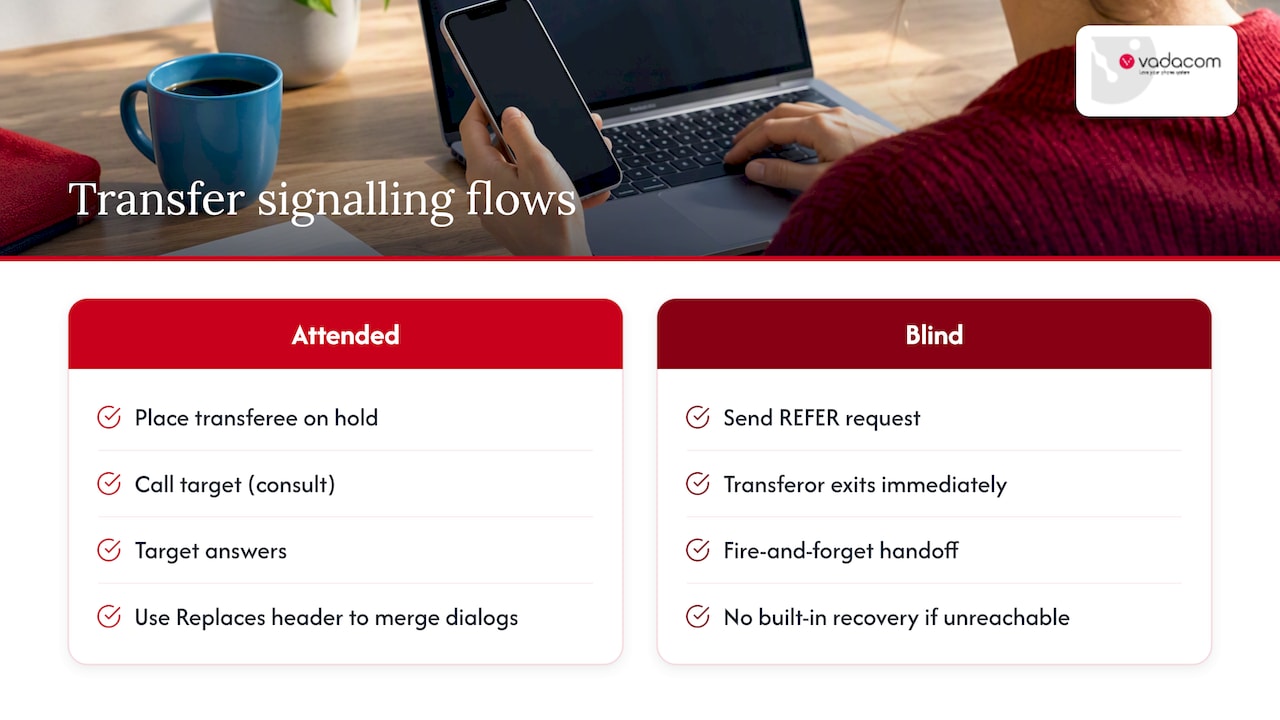
Blind transfers usually skip that step. Asterisk’s feature code documentation describes how a blind transfer sends a REFER request and the transferor can then exit the call immediately, a “fire and forget” handoff with no built-in recovery if the target is unreachable. Semi-attended behaviour sits between the two: the transferor waits for ringback but doesn’t fully consult, which some SIP gateways handle inconsistently if the target’s contact URI isn’t properly routable.
When should you use attended vs blind transfers?
Choosing between the two comes down to four questions: how sensitive is the caller’s issue, does the target need context before picking up, are you optimising for first-contact resolution, or is speed the priority? Support escalations, sales handoffs, and anything involving an upset or confused caller generally call for attended transfers. Simple departmental redirects, where almost any available person can help, suit blind transfers.
A quick checklist for agents deciding in the moment:
- Check whether the target is likely available before initiating any transfer.
- Include a brief call topic or context note if the platform supports it.
- Use ring-back or a full consult when the caller’s issue is complex or sensitive.
- Route to a queue or hunt group rather than a single extension when you’re unsure who’s free.
- Default to blind only when the destination is a group, queue, or near-certain to answer.
Pro Tip: When in doubt, transfer into a queue rather than a named extension, it gives the call somewhere to go if the first available agent doesn’t pick up.
How to transfer a call on common phones and platforms
The mechanics vary slightly by platform, but the attended/blind distinction holds everywhere.
- Generic PBX or softphone: blind transfer is usually a single button plus the destination number; attended transfer adds a hold step, a consult call, and a confirm action before the line drops.
- Microsoft Teams: Microsoft’s own documentation describes a consult then transfer option alongside a “transfer now” (blind) option, and recommends adding a call topic and using ring-back to improve the odds the transfer succeeds.
- Yealink desk phones: Yealink’s support documentation lists blind, semi-attended, and attended transfer as distinct configurable modes, with semi-attended described as hearing ringback only.
- Asterisk-based PBX: administrators configure blindxfer and atxfer feature codes separately, which lets different extensions or teams default to different transfer behaviours.
Why transfers fail and how to recover
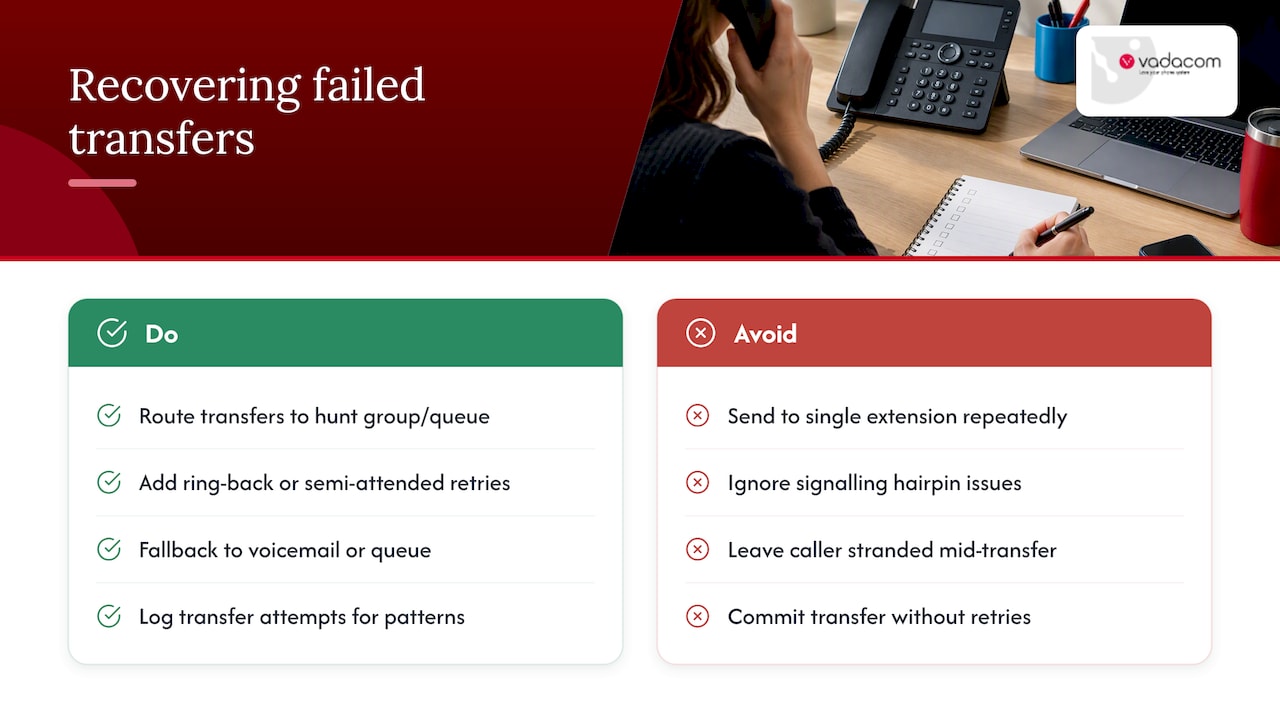
Most transfer failures trace back to a small set of causes: a non-routable contact URI, a target that’s busy or doesn’t answer, or a gateway that mishandles the signalling hairpin between the two legs of the call. Any of these can leave a caller stranded mid-transfer.
The fix is usually architectural rather than a one-off workaround. RFC 5589 notes that routing transfers into a hunt group or queue with overflow rules handles uncertain availability far better than repeatedly trying single extensions. Beyond that, build in ring-back or semi-attended retries before committing to a full transfer, fall back to voicemail or a queue when no one picks up, and log transfer attempts so patterns of failure show up before they become a recurring complaint.
How a locally supported cloud PBX handles transfers
A cloud phone system built for this problem handles consultative transfers, configurable fallbacks, and transfer logging as standard, alongside extension dialling and call-flow management. With NextVoice, we built transfer and announced-transfer behaviour into a resilient cloud architecture, so routing decisions can be tuned without touching on-premise hardware.
Rules of thumb for getting transfers right
Our rule of thumb: use attended transfers whenever context needs to travel with the caller, and blind transfers only when speed matters more than certainty. Beyond that, track a few numbers: transfer success rate, how often a transferred caller phones back within minutes, and average transfer time. Those three tell you more about real-world performance than any policy document.
— Stuart
Get configurable transfer behaviour with local support
Getting transfer behaviour right is partly a training question and partly a platform question, and the platform question is where we come in. NextVoice supports consultative transfer, announced transfer, and fallback routing out of the box, so teams aren’t stuck choosing between a fast handoff and a reliable one.

For businesses still running an on-premise system that handles transfers inconsistently, our technical audit looks at current call-flow setup and where a cloud migration would reduce failed or dropped transfers. We also offer AI Call Intelligence for teams that want call routing recommendations layered on top of standard transfer controls. If you’re assessing options, start with a look at NextVoice and get in touch about configuring transfer rules for your team.
FAQ
How does transferring a call work?
Transferring a call moves an active caller from one agent or extension to another, either after a consult (attended) or immediately with no check (blind). The underlying signalling, described in RFC 5589, uses REFER and Replaces headers to hand the dialog off to the new destination.
What does “cold transfer” mean?
A cold transfer is another name for a blind transfer: the call is forwarded immediately with no consultation, and the original agent typically exits the call straight away. Asterisk’s documentation describes this as a “fire and forget” handoff.
What is blind transfer?
Blind transfer sends a caller directly to a new destination without the transferring agent checking if that destination is available or passing on any context. It’s faster than an attended transfer but carries a higher risk of the caller reaching voicemail, an unavailable line, or someone unprepared for the call.
Which is a rule for transferring calls?
A widely used rule is to route to a queue or hunt group rather than a single extension whenever availability is uncertain, since RFC 5589 notes this reduces lost or stranded calls compared with repeated single-extension attempts. Another practical rule: use attended transfers whenever the caller’s issue needs context to carry over.
What is the difference between semi-attended and attended transfer?
A semi-attended transfer lets the transferring agent hear the target’s phone ringing before completing the handoff, without waiting for a full conversation, as Yealink’s support documentation describes. A fully attended transfer goes further, with the agent speaking to the target and confirming availability before connecting the caller.