

Enable QoS on any contended or bandwidth-limited link carrying voice. It keeps latency and jitter low enough that calls stay clear rather than clipped or garbled. The mechanics rest on well-documented standards: ITU-T G.114 sets the delay target, and RFC 3246 defines the Expedited Forwarding behaviour most networks use to hit it. Experience supporting cloud telephony deployments confirms the same pattern: the networks with the fewest quality tickets are the ones where QoS was configured before go-live, not after the complaints started.
TL;DR:
- QoS must be enabled on bandwidth-limited links to prioritize voice traffic and prevent call quality issues caused by latency, jitter, or packet loss.
- Mark RTP streams with DSCP EF (46) at the source and police EF traffic at network ingress to prevent priority abuse and ensure consistent call quality.
- Use low latency queuing or priority queueing on devices to guarantee that voice packets are processed faster than other data, especially on the WAN uplink.
- Regularly verify QoS effectiveness with real-time tests, such as synthetic calls, packet captures, and measuring one-way delay, jitter, and packet loss.
- Proper configuration requires careful boundary trust, bandwidth policing, and device-specific queue management to avoid common pitfalls like priority inversion or marking loss.
Table of Contents
- How VoIP QoS works: DSCP, PHBs, EF and queueing fundamentals
- Performance targets and standards for latency, jitter and packet loss
- Recommended QoS settings and packet marking conventions
- Step-by-step QoS configuration checklist across routers, switches, firewalls and wireless
- Measuring and validating QoS changes with real tests
- Best practices and common pitfalls in VoIP QoS deployments
- How a managed platform and local QoS work fit together
- Deciding whether to keep QoS in-house or bring in specialists
- Where Vadacom fits if you would rather not manage this alone
- Sources
- FAQ
How VoIP QoS works: DSCP, PHBs, EF and queueing fundamentals
DiffServ is the framework that lets routers treat packets differently based on a marking in the IP header rather than inspecting every flow individually. That marking is the Differentiated Services Code Point (DSCP), a 6-bit value that tells each hop along the path which per-hop behaviour (PHB) to apply, things like how quickly to service the packet and how likely it is to be dropped under load.
Expedited Forwarding (EF) is the PHB built specifically for traffic that cannot tolerate delay or jitter. RFC 3246 defines EF as a low-delay, low-jitter, low-loss service, which is exactly what a voice call needs: RTP packets arriving late or out of order sound worse than packets that simply do not arrive at all.
Getting EF traffic through a busy device depends on how the queue is scheduled:
- Low Latency Queuing (LLQ) gives voice a strict-priority queue ahead of everything else, while still capping how much bandwidth it can consume.
- Priority Queuing (PQ) services the highest queue first every time, which is simple but can starve lower classes if not capped.
- Weighted Fair Queuing or Weighted Round Robin (WFQ/WRR) shares bandwidth proportionally across classes, useful for non-voice traffic but too slow to react for real-time media on its own.
None of this works safely without policing at the edge. If every packet can claim EF marking, the priority queue stops meaning anything, so ingress policing enforces a ceiling on how much EF traffic a link will honour, protecting the rest of the network from a marking free-for-all.
Performance targets and standards for latency, jitter and packet loss
ITU-T G.114 recommends a one-way delay under 150 milliseconds for high-quality conversational voice, with up to 300 milliseconds tolerable on long-distance calls and anything past 400 milliseconds generally unacceptable. That figure is the backbone of most VoIP QoS design: it sets the ceiling every other decision works around.
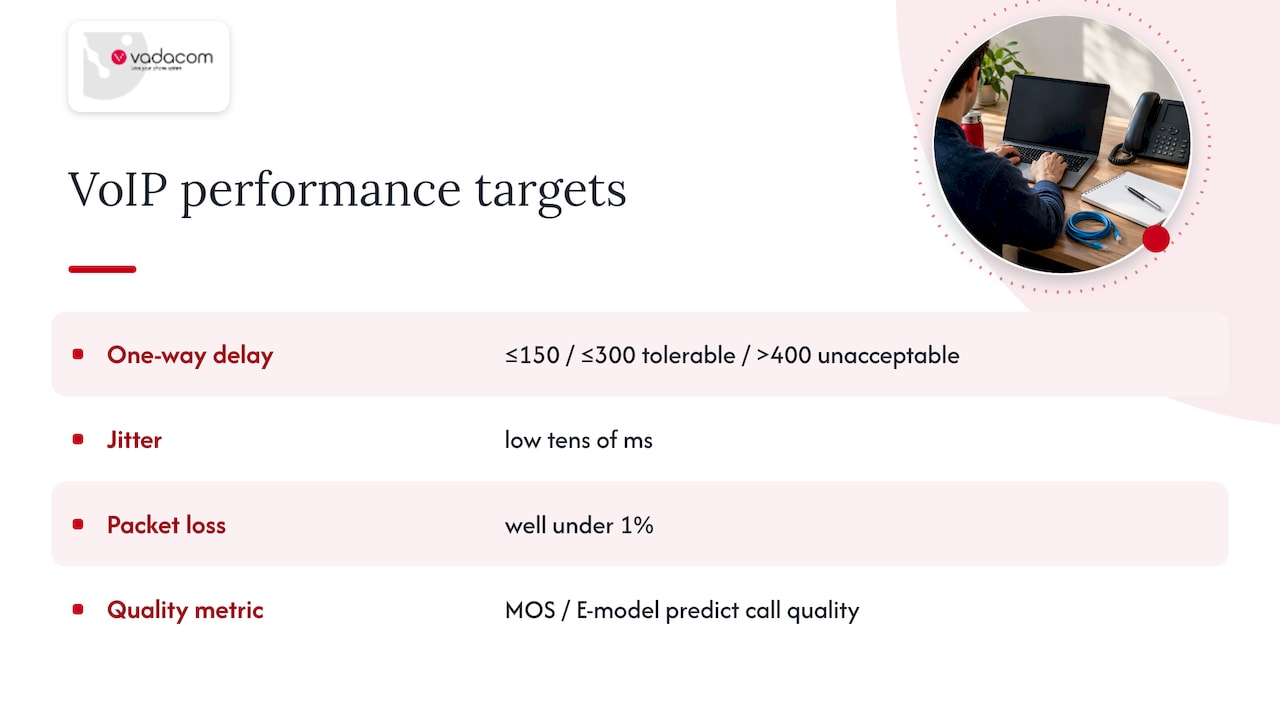
Jitter and packet loss matter alongside delay. Administrators commonly monitor jitter in the low tens of milliseconds and packet loss well under 1%, because a jitter buffer can only absorb so much variation before it either introduces its own delay or drops packets to keep up. Choppy-sounding calls are frequently a jitter problem rather than a loss problem, since QoS mainly works by stabilising arrival timing so the jitter buffer has less to compensate for.
The Mean Opinion Score (MOS) and the related E-model give you a way to translate these network metrics into a predicted call quality score before you commit to a design, and to validate against after deployment.
Recommended QoS settings and packet marking conventions
Voice RTP traffic should carry DSCP EF, commonly expressed as DSCP 46. Signalling traffic (SIP, H.323) typically carries a lower-priority class selector, often CS5 or CS6 depending on your existing DiffServ scheme, since signalling needs timely handling but not the same strict priority as the media stream itself.
- Mark RTP as DSCP EF (46) at the source or as close to it as possible, ideally on the endpoint or the PBX.
- Mark SIP/H.323 signalling as CS5 or CS6, kept distinct from the media class.
- Cap EF bandwidth on each interface so voice cannot consume the entire link during a burst.
- Define trust boundaries explicitly: trust marks from managed endpoints and PBXs, but remark or clear DSCP from untrusted or public-facing interfaces.
Bandwidth policing matters as much as the marking itself. An EF queue with no ceiling will happily take every spare cycle on the link, and RFC 3246 is explicit that the queue’s service rate needs to match the expected aggregated EF load, otherwise the very calls you are trying to protect start dropping packets.
Pro Tip: Remark or strip DSCP on anything entering your network from an untrusted source, then re-mark it correctly once it is inside your own boundary. Trusting someone else’s tags is how priority inversion creeps in.
Step-by-step QoS configuration checklist across routers, switches, firewalls and wireless
Work outward from the WAN edge inward, since the access bottleneck is usually the constraint that matters most.
- Edge router: mark or police incoming voice at the WAN uplink, build an LLQ or priority queue for EF traffic, and reserve bandwidth as a percentage of the link’s actual capacity, not an assumed figure.
- Switches: map DSCP to 802.1p Class of Service on trunk links, decide which access ports are trusted to carry their own markings, and configure uplink queue scheduling so voice is not waiting behind bulk transfers.
- Firewalls: preserve or correctly remark DSCP as traffic passes through, open the SIP and RTP port ranges your PBX or provider requires, and create QoS rules that reserve a minimum per-session bandwidth for RTP streams.
- Wireless: enable WMM (Wi-Fi Multimedia, the 802.11e-derived mechanism) so access points respect voice priority over the air, map the voice SSID to its own QoS class, and plan channels to reduce contention from other SSIDs and neighbouring networks.
- Verify: check queue statistics on each device to confirm EF traffic is actually using the priority queue, inspect packet captures to confirm DSCP values survive the path end to end, and place test calls while watching call flow logs for retransmissions or gaps.
Firewalls and NAT devices are the most common place markings quietly disappear, so step three deserves particular attention during a rollout. Confirm the rule set explicitly preserves DSCP rather than assuming the default policy leaves it untouched.
Pro Tip: Name your queues and classes consistently across every device (EF-Voice, CS5-Signal) so a technician troubleshooting at 2am can match a queue on a switch to the same queue on the router without guessing.
Measuring and validating QoS changes with real tests
Configuration without validation is a guess. Before and after any QoS change, run the same tests so you have a genuine comparison rather than an impression.
- Characterise the link first with a tool like iperf3 to understand available throughput under load, separate from any voice traffic.
- Place synthetic test calls or inject RTP streams to measure real behaviour under contention, not just theoretical capacity.
- Measure one-way latency using timestamped ping tests where possible, since round-trip figures can mask an asymmetric problem.
- Track jitter and packet loss on the same test calls, alongside a MOS or E-model estimate to translate the numbers into a quality prediction.
One-way delay under 150 milliseconds remains the target worth testing against, since it is the threshold the ITU ties directly to high-quality conversational voice.
Specialised VoIP test tools and RTP analysers give more detail than a basic ping sweep, and passive monitoring on the PBX or session border controller can flag degradation over time rather than only at the moment of a test call. When a problem persists despite correct on-premises configuration, that is the point to loop in your carrier, since the bottleneck may sit upstream of anything you control.
Best practices and common pitfalls in VoIP QoS deployments
QoS fails most often from overreach, not underreach. Marking too much traffic as high priority defeats the purpose of prioritisation entirely, since a priority queue only helps when most traffic is not in it.
- Budget EF bandwidth deliberately and police it at the edge rather than trusting every marked packet by default.
- Fix the access bottleneck first. Prioritising voice inside a well-provisioned LAN does nothing if the WAN uplink itself is saturated.
- Document every policy and queue name, and keep a rollback step ready before any maintenance window touches QoS configuration.
- Watch wireless and NAT behaviour closely, since both are common places DSCP markings get stripped or rewritten without anyone noticing until calls start breaking up.
Pro Tip: If a change window goes wrong, the fastest fix is reverting to the last known-good queue configuration rather than debugging live while calls are dropping.
How a managed platform and local QoS work fit together
A cloud telephony provider typically manages carrier interconnects and multi-availability-zone resilience on its own infrastructure, but the last mile is still the customer’s responsibility: endpoint marking, local switch configuration and edge QoS on the office network. Neither side substitutes for the other. A technical audit is the sensible next step when call quality complaints persist despite a stable-looking network, since it usually uncovers a specific misconfiguration (an unmarked wireless segment, an unpoliced EF queue) rather than a wholesale redesign. Where deeper diagnosis is needed after the fact, optional AI Call Intelligence adds post-call analysis on top of recordings, which can surface patterns a one-off test call would miss.
Deciding whether to keep QoS in-house or bring in specialists
Most competent network teams can handle QoS on infrastructure they fully control. The signal to bring in outside help is different: recurring call quality tickets despite correct configuration, or no visibility into the WAN uplink because it sits behind a carrier you cannot touch directly. An audit’s scope is usually narrow and practical, checking marking, queueing and trust boundaries against what is actually happening on the wire, then handing back a short list of fixes rather than a lengthy report. When talking to carriers or managed providers, ask specifically how DSCP is treated across their network and who owns troubleshooting when a call sounds wrong, since vague answers on either point tend to predict slow resolution later.
— Stuart
Where Vadacom fits if you would rather not manage this alone
If your team has the QoS groundwork covered but wants the platform layer handled, a cloud telephony platform runs on a resilient AWS cloud architecture across multiple availability zones, so carrier interconnects and platform resilience are managed by the provider while your own edge QoS still governs the last mile.
- A technical audit can check existing marking, queueing and trust boundaries against what is actually happening on the network.
- A scalable cloud phone system can provide platform functionality without the cost of on-premise hardware, covering the platform side while you manage the local network.
- AI-based call analysis services add recording-based insights on top, useful once basic QoS is in place and you want to track quality trends over time.
If persistent call quality issues have you second-guessing your own configuration, a technical audit is a practical way to find out whether the problem is local, upstream, or something a managed platform like NextVoice would solve outright.
Sources
FAQ
Should I enable VoIP QoS?
Yes, on any link that is shared with other traffic or has limited bandwidth, since QoS is what keeps latency and jitter low enough for calls to sound clear under load. On a dedicated, heavily overprovisioned link with no contention, the benefit shrinks, but most office and home networks are not that link.
What is a QoS requirement for VoIP calls?
The widely used benchmark is ITU-T G.114’s one-way delay objective for high-quality conversational voice, alongside low jitter and minimal packet loss. Meeting that target generally requires marking voice traffic as EF and giving it priority queueing ahead of other classes.
What is QoS for VoIP?
QoS for VoIP is the set of network mechanisms, chiefly DSCP marking and priority queueing, that gives voice packets preferential treatment over other traffic so calls do not suffer from delay, jitter or packet loss. It works by marking RTP traffic with a code point like EF (RFC 3246) and having each network device honour that marking with faster, more predictable handling.
How to configure QoS for VoIP?
Mark RTP as DSCP EF (commonly value 46) as close to the source as possible, then configure an LLQ or priority queue on every router and switch the traffic crosses, capped by policing so it cannot consume the whole link. Extend the same marking and priority handling to firewalls and wireless access points, then verify with packet captures and test calls rather than assuming the configuration took effect end to end.