

When callers get a busy signal at your business, the cause is almost always one of three things: every line or channel is in use, the call is failing somewhere in routing or the carrier network, or a number or diversion setting is wrong. The fix is to work out which of the three you have, then give calls somewhere to go when staff are busy. A cloud phone system such as our NextVoice lets you set that up through call flows, so a second caller is queued, redirected or answered instead of hitting a dead tone.
This guide shows you how to tell the tones apart, how to run a quick diagnosis, and how to design your phone setup so busy signals stop costing you customers.
TL;DR
- A normal busy tone means the line or channel you dialled is in use. A faster, harsher tone usually means the call could not be routed at all.
- Check three things first: how many calls were active at the time, whether the number is routed correctly (including after a port or diversion change), and whether the fault is on one line or all of them.
- Old lines and fixed-capacity trunks produce busy signals when two people call at once. Call flows with queues, overflow and voicemail remove the problem.
- Every unanswered call is a lost chance to win or keep a customer, so build a fallback for the moment staff are busy.
- Make changes to routing in small steps and test each one with a real call from a mobile and a landline.
Table of Contents
- What a busy signal actually tells you
- Why callers get a busy signal when they call a business
- How to diagnose a busy signal in 30 minutes
- Why a busy signal costs more than a missed call
- How to stop callers hearing a busy signal
- Why cloud calling removes most busy-signal causes
- Promo: stop losing callers to a dead tone
- Our view
- Preventing busy signals: a short checklist
- FAQ
- Sources
What a busy signal actually tells you
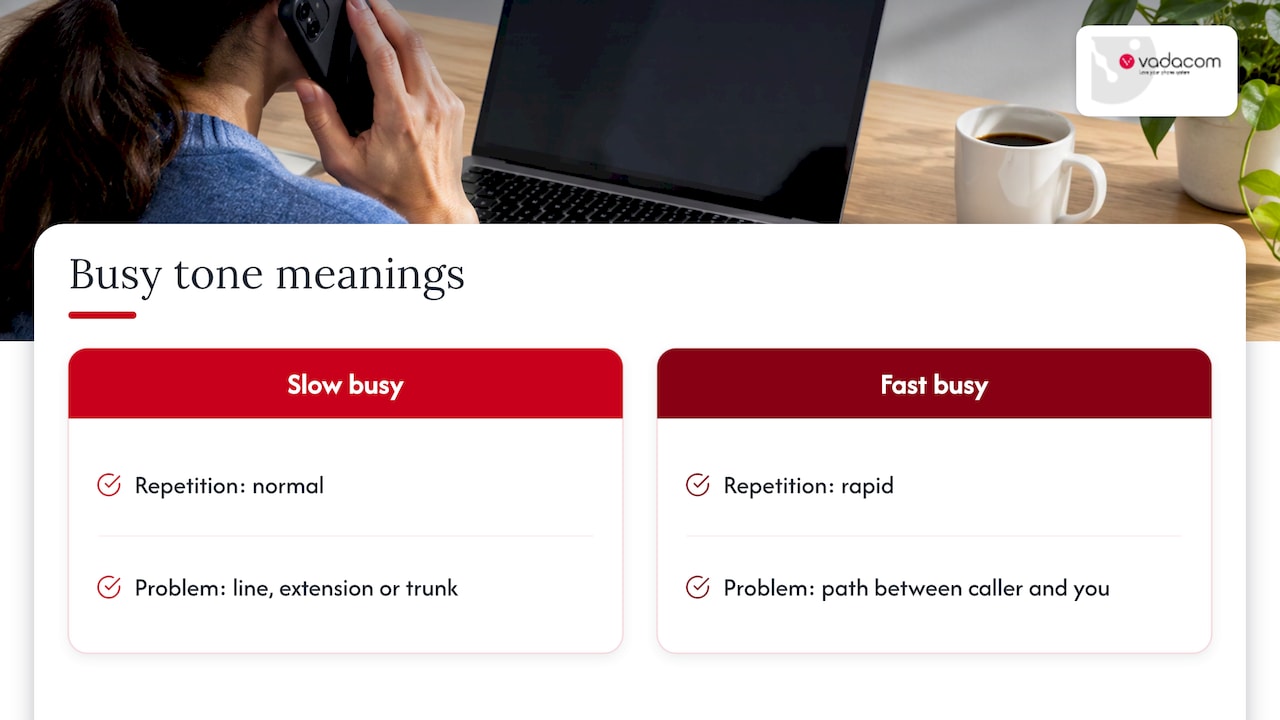
A busy signal, also called an engaged tone, is the sound a caller hears when the number they dialled is already in use. Collins Dictionary describes it as a regular run of buzzing tones that tells the caller the circuit serving the number is blocked or in use. It also notes that normal repetition suggests the called phone is in use, while rapid repetition suggests the network is blocked.
That difference matters for a business. A slow busy tone says the problem sits at your end: your line, your extension or your trunk. A fast one says something went wrong earlier, in the path between the caller and you. Tone patterns also differ by country. A published tone database lists the Australian busy tone as a 425 Hz tone with a 0.375-second on and off pattern, which is why a call from overseas can sound different to what an Australian caller hears.
Normal busy versus fast busy
In the North American tone plan, the busy tone and the reorder (fast busy) tone use the same frequencies but the reorder tone cycles twice as quickly: 0.25 seconds on and off, against 0.5 seconds. A fast busy indicates that no transmission path to the called number is available, for example when a trunk is full or the number is temporarily out of service.
In plain terms:
| What the caller hears | What it usually means | Where to look |
|---|---|---|
| Slow, regular busy tone | The number is in use or all channels are taken | Your lines, extensions, concurrent call capacity |
| Fast busy (reorder) | The call could not be routed | Carrier routing, number status, trunk setup |
| A recorded message saying the number cannot be connected | The number is not recognised or not in service | Number porting, number allocation, dial plan |
| Busy, then silence or a disconnect | The call was rejected during setup | Diversion settings, call barring, firewall or SIP settings |
One caution: callers often assume a busy tone means they have been blocked. A busy tone is a call-completion result, not a universal blocked code. It says the call was not connected, and it usually does not say why. For your business, the practical point is that a customer who hears a busy tone will not know whether you are shut, engaged or broken. They will simply ring someone else.
Why callers get a busy signal when they call a business
Most business busy signals trace back to a handful of causes.
1. You have fewer lines or channels than simultaneous calls
Traditional phone lines and fixed-size trunks carry a set number of calls at once. If you have two lines and three people ring in a busy moment, the third gets a busy tone. This is the classic problem for a small shop, clinic or trade business after a marketing push or an advertised promotion. The phones are working fine. They are simply full.
2. One person, one line, no fallback
If your main number rings a single handset and that person is on a call, the next caller hears a busy tone because the system has no instruction for what to do next. This is a design gap, not a fault. A call flow that sends the second caller to a colleague, a queue or voicemail closes it.
3. Diversion and forwarding loops
Forwarding a business number to a mobile is common, but if the mobile is on a call, switched off or out of coverage, the caller can get a busy tone. A diversion that points back to a number that points back to the first creates a loop and the same result. Our guide to call forwarding to a mobile covers the fees and the points at which a cloud phone is the better tool, and our call forwarding rules page explains the diversion rules to know before you set them.
4. A number port that did not finish
If callers started getting a busy tone right after you moved to a new provider, check whether the port completed and whether the number is routed to the new service. Forum discussions of this problem commonly point to an unfinished port as the culprit, particularly when the problem began within a day or so of the move. Your new provider can confirm the status of the number.
5. Routing and configuration faults in the phone system
PBX and VoIP systems can present several different faults as a busy signal. A vendor’s PBX troubleshooting guide lists common culprits: a missing trunk, missing inbound or outbound routes, a missing extension, incorrect network address translation, blocked firewall rules and wrong authentication or provider addresses. If calls fail only on certain routes or only in one direction, a configuration fault is far more likely than a capacity one.
6. Network and carrier problems
Congestion, an outage or a coverage problem can all produce a fast busy for the caller, particularly on mobile. If many different callers on different networks report the same thing at the same time, check whether your carrier has a fault logged before changing anything on your own system.
How to diagnose a busy signal in 30 minutes
Work from the simplest check to the most technical. Write down what you find at each step, because it will save time if you need to escalate to your provider.
- Ring the number yourself from two places. Use a mobile on one carrier and a landline or a different mobile network. If both fail, the fault is at your end or in the number routing. If only one fails, suspect the caller’s carrier.
- Listen to the tone. Slow busy points to capacity or an in-use line. Fast busy points to routing. A recorded message points to number status.
- Check how many calls were active. Look at your system’s call log or concurrent call count for the time of the complaint. If you were at your limit, you have a capacity issue.
- Test each extension and each number. If one DDI or extension fails and others work, the fault is in that number’s routing, not in the whole system.
- Review diversions. Switch off all forwarding, test again, then re-enable one rule at a time. Look for loops and for forwards to numbers that are often engaged.
- Check recent changes. A port, a new router, a firewall update or a new provider is the usual trigger. If calls to your office worked last week, ask what changed since then.
- Check the network path for VoIP. One-way audio and failed call setup often come from the router. Our guide to disabling SIP ALG covers one of the most common causes, and the VoIP bandwidth requirements page helps you check that your internet connection can carry the number of calls you expect at once.
If you are also rethinking handsets and devices as part of a tidy-up, this small business phone setup guide walks through the equipment side of getting a phone arrangement in order.
When to escalate
If the fault affects every caller, started suddenly and survives the steps above, contact your phone provider with your notes: the time of failed calls, the tone heard, which numbers are affected and what changed recently. With a locally supported provider, you speak to a team that knows your setup rather than working through a global ticket queue.
Why a busy signal costs more than a missed call
A missed call at least sends the caller to voicemail, where they can leave a message. A busy tone gives them nothing. Industry surveys suggest the scale of the problem is large: one 2026 analysis says 62% of calls to small businesses go unanswered during business hours, and 85% of callers who do not reach a person will not call back. Treat those numbers as a guide to the size of the issue rather than a prediction for your business, since your trade and customers will differ.
In call centres, a call that gets a busy tone is called a blocked call. One UK benchmark says blocked calls should ideally stay within 2% of inbound calls. You are probably not running a call centre, but the idea is useful: count how many callers cannot get through, and set a target for reducing it.
How to stop callers hearing a busy signal
The goal is simple: a caller should never meet a dead end. Every call should land somewhere useful, whether that is a person, a queue, a voicemail box or an automated answer. That is what overflow handling means. It is defined as the set of rules that decide where a call goes when the first destination cannot take it, whether it is busy, unanswered, at capacity or unreachable. The fallback might be another phone, a colleague, an answering service or an AI assistant.
A sensible order of fallbacks for a small or mid-sized business looks like this:
- Ring a group, not a person. Send the main number to a group of extensions so any free person can answer.
- Queue with a message. If everyone is busy, hold the caller with a short message rather than dropping them.
- Overflow to a second destination. After a set time, ring a mobile, another team or a backup site.
- Voicemail with a promise. End with a clear voicemail greeting stating when you will call back.
- After-hours answering. When the office is closed, route calls to an answering option rather than leaving the line to ring out. Our page on after-hours phone answering covers this.
Before you build, map what should happen to each type of call. Our guide to call flow design shows how to draw the paths first, so you do not discover gaps once customers are already calling. If you are considering automation, why AI should wait for a governed pilot sets out a careful way to introduce it.
Give staff visibility
A lot of busy signals come from staff not knowing who is free. A busy lamp field shows on each handset whether a colleague is on a call, so people can pick up or transfer to someone who is available. See our busy lamp field checklist for setup steps. Once someone does answer, clean transfers also matter, and our overview of call transfer methods explains the options, including announced transfer, so a caller is not dropped on the way.
Worked example
Imagine a six-person plumbing business with two phone lines. At 7.30 am, three customers ring about a burst pipe. The first two get through. The third hears a busy tone and rings the next plumber on Google.
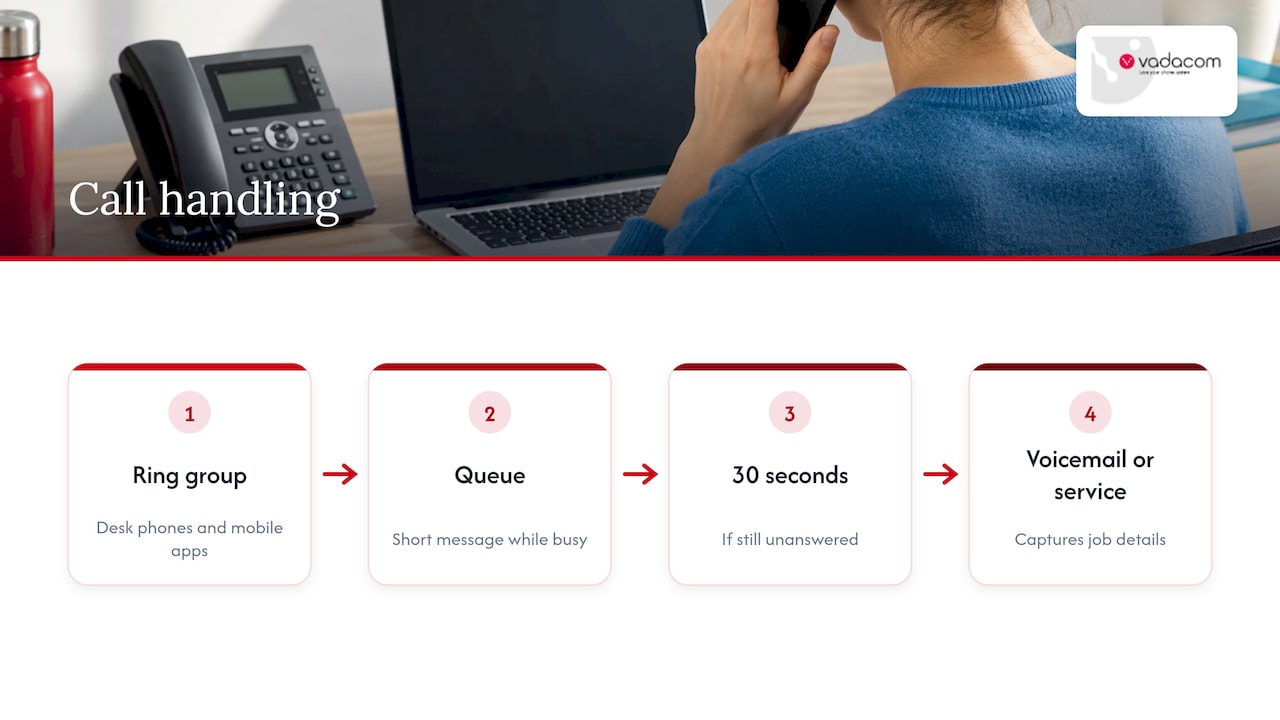
With a cloud phone setup, the same number rings a group of extensions on desk phones and mobile apps. When the two available people are on calls, the third caller hears a short message and is held in a queue. After 30 seconds without an answer, the call goes to voicemail or to an answering service that takes the job details. No caller meets a dead tone, and every job request is captured. The settings behind this are call-flow choices, not extra hardware.
Why cloud calling removes most busy-signal causes
The two root causes of business busy signals, fixed line capacity and no routing fallback, are exactly what a cloud phone system is designed to handle. NextVoice is built on an AWS cloud architecture that supports multiple availability zones and scales as your business grows, without on-premise hardware or a large upfront investment. You manage users and communication settings as your needs change, so adding a seasonal team member or a new location is a setting, not a site visit.
Core features include extension dialling, call transfer and announced transfer, voicemail, in-app recording and individual call-flow management. Together they let you decide what happens to each call rather than leaving it to a fixed line’s default behaviour. If your current system is an older on-premise PBX that struggles with peak call volumes, our technical audit is where we look at your existing setup before you decide what to change.
Promo: stop losing callers to a dead tone
If your callers are meeting busy signals, the quickest route is to review how your calls are routed and where they run out of places to go. NextVoice gives you extension dialling, call transfer, voicemail and individual call-flow management on a cloud platform that scales with your team, supported locally across New Zealand and Australia. Learn more about NextVoice and how it handles busy periods.

For businesses that want an automated front line, we also offer an AI answering service and optional AI Call Intelligence, which draws insight from call recording and analysis. See how an AI auto attendant can fit your calls for more.
Our view
Most busy signals are a design problem, not a fault. A business grows, calls bunch up at the same hour, and the phone setup still assumes one call per line and one person per number.
We build NextVoice around the essential features a business needs to keep every call moving: extension dialling, transfers, voicemail, recording and call flows you control yourself. We think the best phone system is one where a customer never has to guess whether you are open, because there is always somewhere for their call to go.
Local design, delivery and support matters here. Over more than 20 years in New Zealand and Australia, we have focused on practical technology and a support team that understands the business behind the phones. If calls are being lost, start with the call flow, then decide the technology.
Stuart
Preventing busy signals: a short checklist
- Count the maximum calls you might receive at the same time, and make sure your system can carry that number.
- Replace single-person ringing with groups and overflow rules.
- Add a clear voicemail greeting and review messages at set times each day.
- Test your number weekly from a mobile and a landline, and after every change to routing, firewall or provider.
- Keep a record of diversions, and remove any you no longer need.
- Review your call log monthly for failed or unanswered calls, and set a target to reduce them.
FAQ
Why do I get a busy signal when I call a number?
A slow busy tone usually means the number you dialled is in use or its lines are full. A fast busy tone usually means the call could not be routed, for example because of a network or number problem. If it keeps happening, try again later from a different phone.
Does a busy signal mean I have been blocked?
Not necessarily. Some landline systems and call-blocking devices play a busy tone to blocked callers, but other phones and carriers send blocked calls to voicemail or end them silently. A busy tone on its own does not identify the reason, so it is a poor test for blocking.
What does a fast busy signal mean on a mobile?
It generally means the call could not be completed or routed. Typical causes include temporary congestion, weak coverage, an outage, account restrictions, Wi-Fi calling trouble or a problem with the number being called. Fast busy explanations for mobile phones list the same range of causes, and your carrier can check for a fault on your service.
Why do callers get a busy signal when they ring my business?
The most common reasons are that all your lines or channels are in use, there is no fallback when a person is on a call, a diversion points to an engaged number, or a number port did not complete. Test the number from two phones, review your call log and check recent changes to find which applies.
How can I stop callers getting a busy signal?
Give every call a destination. Ring a group of extensions, queue callers with a message, overflow to another team or voicemail, and answer after hours. A cloud phone system with configurable call flows lets you set these rules yourself.
Sources
- Busy signal definition, Collins Dictionary
- World Tone Database: Australia
- Precise Tone Plan
- Busy signal
- FreePBX and VX call troubleshooting
- Small business phone setup guide
- Percentage of business calls unanswered
- Call centre benchmarks, UK version
- What is overflow call handling?
- What does a fast busy signal mean on a cell phone?