

CCaaS stands for Contact Centre as a Service. It is contact centre software that runs in the cloud and is paid for by subscription, so your team handles customer calls, chats and emails through a web-based platform instead of racks of hardware in a back room. For many small and mid-sized businesses the practical question is how much of that you actually need. Often the answer is a reliable cloud phone system with well-built call flows, recording and an AI answering layer, which is the ground we work on at Vadacom with NextVoice.
This guide explains the term in plain language, what a CCaaS platform includes, how it differs from UCaaS and an on-premises setup, where AI fits, and how to decide what your business should buy.
TL;DR
- CCaaS means Contact Centre as a Service: contact centre software hosted by a provider and paid for as a monthly or annual subscription.
- It bundles voice, messaging, call routing, IVR (the automated menu callers hear), analytics and often AI, so agents need little more than a headset, a computer and broadband.
- UCaaS connects your own staff to each other; CCaaS is built to manage conversations with customers at volume. Many businesses use one, some use both.
- Service reliability is the criterion buyers rank highest when choosing a provider, ahead of feature lists.
- If you are a small team that needs dependable calling, call flows, recording and an AI receptionist, a cloud business phone system may cover the job at a lower cost and with less complexity.
Table of Contents
- What does CCaaS stand for?
- How CCaaS works in plain terms
- What a CCaaS platform can include
- CCaaS vs UCaaS vs on-premises
- How big is the CCaaS market?
- What buyers rank first when choosing a provider
- Do you need CCaaS, or a cloud phone system?
- Where AI fits
- Our perspective
- Working out what you need
- How Vadacom can help
- FAQ
- Sources
What does CCaaS stand for?
CCaaS is short for Contact Centre as a Service (the US spelling is Contact Center as a Service). It follows the same naming pattern as SaaS, Software as a Service: the provider runs the software and infrastructure, and you pay to use it rather than buying and maintaining it yourself.
A “contact centre” is the team and the tools that handle inbound and outbound conversations with customers, such as sales enquiries, support requests, bookings and follow-ups. It is wider than the old idea of a call centre because it includes channels beyond the phone.
TechTarget describes a cloud contact centre as an internet-hosted service, typically managed by a third party, that handles inbound and outbound customer communications. It adds that CCaaS is a specific version of that idea built on a subscription model, where customers use the provider’s assets instead of owning them.
You may also see “CCASS” searched. That is usually a typo or an unrelated acronym. In business communications, the term you want is CCaaS.
How CCaaS works in plain terms
In a traditional contact centre, the company buys servers, telephony hardware and software licences, houses them on site, and employs people to keep them running. Adding ten seats means ordering equipment and waiting.
With CCaaS, the provider hosts all of that in its cloud. According to No Jitter, the software for making and receiving calls, handling email and chat, IVR, routing, virtual agents, AI, analytics and workforce management is hosted in the cloud and can be added or removed. Agents need only local computing equipment, broadband and a headset, and they can work from a central site, several sites or home. The business pays a monthly or annual fee.
Three practical consequences follow for a business owner or IT manager:
- Setup is mostly configuration. You decide how calls are answered and routed, rather than installing equipment.
- Capacity moves with demand. You add or remove users as the business changes, such as a seasonal peak or a new team.
- Location matters less. A team spread across an office and several homes can answer from the same queue.
What a CCaaS platform can include
Platforms differ, but the building blocks are consistent.
Voice and call handling
Inbound and outbound calling is the foundation. Around it sit call queues, transfers, voicemail and call recording, so conversations can be reviewed for training or dispute resolution.
IVR and routing
IVR stands for interactive voice response. It is the “press 1 for sales” menu, and in newer systems a caller can simply say what they need. Routing then sends the call to the right person or group. Good routing is often the single biggest influence on whether a caller feels looked after.
Digital channels
Larger platforms add email, web chat, SMS and social messaging into one agent screen, so a customer’s history is visible regardless of how they got in touch. This is called omnichannel.
Analytics and workforce tools
Dashboards show wait times, abandoned calls and agent activity. Workforce management tools forecast call volumes and build rosters. These are valuable for teams with dozens of agents and less so for a team of five.
AI and virtual agents
No Jitter lists virtual agents and AI among the standard components. In practice this means automated answering, call summaries, and analysis of recorded calls. We cover how it fits below.
CCaaS vs UCaaS vs on-premises
The acronyms blur together, so here is the short version.
| On-premises contact centre | UCaaS | CCaaS | |
|---|---|---|---|
| Where it runs | Hardware at your site | Provider’s cloud | Provider’s cloud |
| Main purpose | Handle customer contacts | Connect your own staff | Handle customer contacts at volume |
| Typical features | Queues, IVR, recording | Calling, video, chat, presence | Queues, IVR, omnichannel, analytics, workforce tools |
| Cost pattern | Upfront hardware, ongoing maintenance | Subscription per user | Subscription, usually per agent |
| Who runs the system | Your IT team | Provider | Provider |
UCaaS stands for Unified Communications as a Service. Vonage describes UCaaS as focused on internal collaboration, with tools like video conferencing, messaging and presence, while CCaaS is geared to customer-facing interactions across voice, chat and SMS. The same article notes that businesses often get the most from combining the two.
If you are weighing the calling side of this, our guide to UCaaS vs VoIP and what to check on quality, resilience and emergency call ownership goes deeper. For the collaboration side, see how to choose cloud collaboration tools.
CPaaS, Communications Platform as a Service, is a third term you may meet. It gives developers building blocks (APIs) to embed calling or messaging in their own applications. It suits teams with software engineers and a custom project, not a business that wants a phone system working next week.
How big is the CCaaS market?
The category is growing quickly. Metrigy’s MetriCast analysis puts global CCaaS revenue at US$8.4 billion in 2025, up 16.4% year over year, with a forecast of US$13.3 billion by 2030. Other analysts size the market differently: The Business Research Company’s report, published in September 2026, states the 2025 market at US$7.91 billion and projects US$18.83 billion by 2030. Estimates vary with how each firm defines the category, but they agree on the direction: more customer contact is moving to cloud platforms.
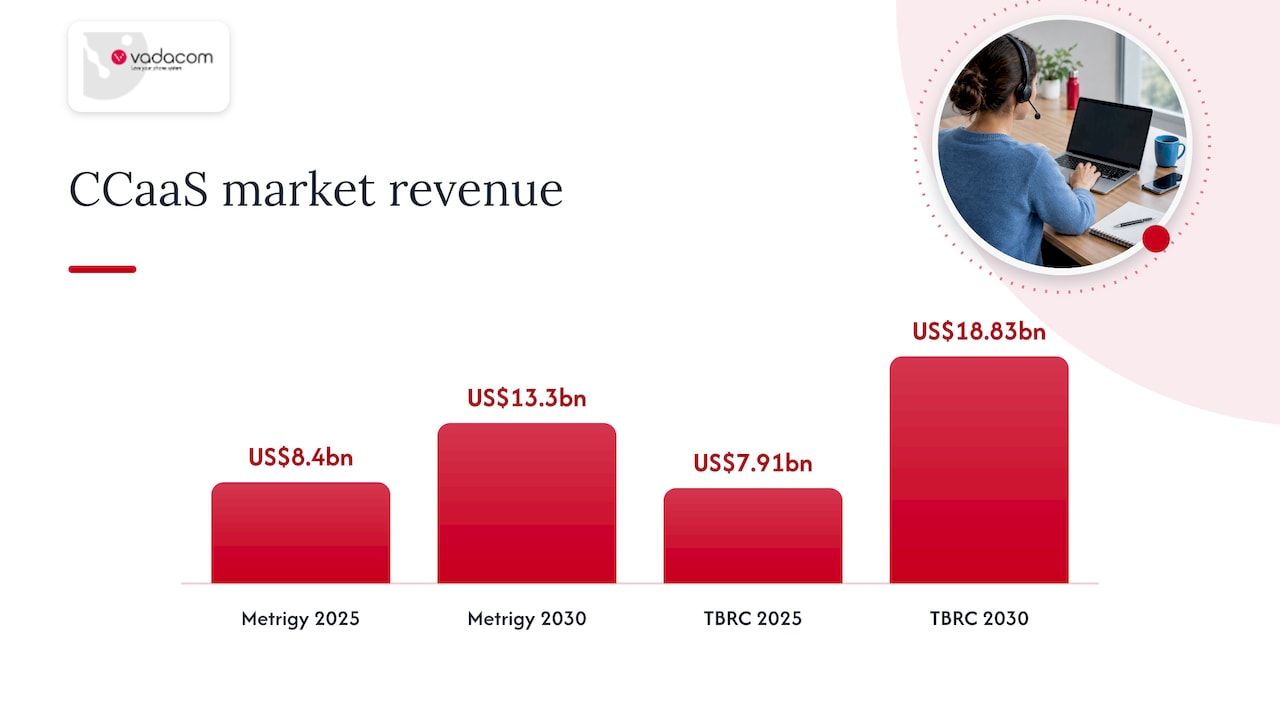
That growth is a reason to understand the term. It is not a reason to buy the biggest platform. What matters is the fit with how your business talks to customers.
What buyers rank first when choosing a provider
Metrigy’s research finds that service reliability is the most important criterion when businesses evaluate CCaaS providers, and that cost and gaps in integrations are among the reasons users look to change providers.
That is a useful checklist for any cloud communications purchase:
- Reliability and architecture. Ask where the platform runs and how it keeps running if part of the infrastructure fails.
- Total cost over time. Per-seat pricing, add-ons and minimum seat counts can change the real cost once your team grows.
- Integrations. Check that the platform connects to the systems your team already uses, such as your CRM or helpdesk.
- Support. Who answers when something breaks, and in which time zone.
- Ease of administration. Can your own admin add a user or change a call flow without raising a ticket?
Switching later is possible but disruptive, in the same way that switching software platforms is for any organisation with members or customers depending on it. Getting the shortlist right the first time saves rework.
Do you need CCaaS, or a cloud phone system?
This is the question most small and mid-sized Australian and New Zealand businesses should answer before comparing vendors.
A full CCaaS platform makes sense when you run a dedicated team of agents, need skills-based routing across channels, measure agent performance against targets, or forecast staffing for large volumes of contacts.
A cloud business phone system makes sense when your customers mostly call, your team is made up of people who also do other jobs, and what you need is consistent answering, sensible routing, voicemail, transfers and recordings, wherever your staff are working.
A useful self-test:
- Do you have more than a handful of people whose full-time job is answering customer contacts?
- Do you need email, chat and social messages in the same queue as calls?
- Do you report on agent-level metrics daily?
If the answers are mostly no, you are likely looking for a strong cloud phone system with call flows and an AI answering layer, not a full contact centre suite. If they are mostly yes, a CCaaS platform is the better category, and a well-run cloud phone system can still sit alongside it for your internal calling.
Where AI fits
AI is the fastest-moving part of this space, and it is where smaller businesses can gain the most without a contact centre.
- AI answering and voice agents. Software that picks up a call, understands what the caller wants, answers common questions, books or routes. Our explainer on how AI voice agents work, from spoken words to completed tasks walks through the steps.
- Auto attendants. A simpler, rules-based greeting and menu. If you want to build one now, these copyable auto attendant scripts give you wording to start with.
- Call analysis. Recording plus analysis can surface common questions, missed opportunities and training needs. AI Call Intelligence is our optional capability for customers who want that insight from call recording and analysis.
- Summaries. Automatic call notes save staff time after each conversation; see how AI call summaries work and what to check first.
Our view on rollout is to start small. A governed pilot on one call type shows you what the AI handles well before you widen it. We set out that approach in call routing strategies and why AI should wait for a governed pilot.
Our perspective
Most of the businesses we speak to do not need a contact centre. They need every call answered properly, sent to the right person, and recorded when it matters, whether the team is in the office, at home or on the road.
That is why NextVoice focuses on the essential communication features: extension dialling, call transfer and announced transfer, voicemail, in-app recording and individual call-flow management. It is built on a telco-grade cloud architecture on AWS that supports multiple availability zones, so reliability is designed in rather than added later, and you scale users up or down as your business changes, without on-premise hardware or a large upfront investment.
We have spent more than 20 years developing, delivering and supporting communications in New Zealand and Australia. When you call us, you reach a local team that understands your business, not a global queue.
If you want deeper insight into your conversations or an AI receptionist, you add it when you are ready, on top of a phone system that already works.
Stuart
Working out what you need
Before you speak to any provider, write down five things:
- Call volume and peaks. Roughly how many calls a day, and when do they bunch up?
- Who answers. Dedicated staff or people with other roles?
- Where they work. Office, home, mobile, or all three? Our checklist of procurement checks for remote work phone systems is a good companion here.
- What happens out of hours. Voicemail, forwarding, or an AI plus human answering approach. See how cloud phone answering stops after-hours lead loss.
- What you have today. An ageing on-premises system may be costing you more than you think. A technical audit of your current phone system shows what you can move to the cloud and what a sensible upgrade looks like.
With those answers, the choice between a contact centre platform and a cloud phone system usually becomes clear, and so does the budget conversation.
How Vadacom can help
NextVoice is our cloud business phone system for organisations that want flexibility, reliability and efficiency. Teams can stay connected across the office, home and other locations using the devices that suit them, with call flows managed individually and users and settings adjusted as requirements change. NextMobile extends that to mobile, and our AI answering service is locally supported.
If you are comparing options, start with NextVoice and NextMobile and talk to our team about your call flows.
For a closer look at how the cloud phone approach suits smaller teams, read about cloud business phone for SMBs.
FAQ
What does CCaaS stand for?
CCaaS stands for Contact Centre as a Service. It describes contact centre software delivered from the provider’s cloud and paid for by subscription, in the same way SaaS describes any software delivered that way. The US spelling is Contact Center as a Service.
Is CCaaS the same as UCaaS?
No. UCaaS connects your own people through calling, video and messaging, while CCaaS manages conversations between your business and its customers, including queues, routing and analytics. Some providers bundle the two so staff and agents work in one environment.
Can a small business use CCaaS?
Yes, because subscriptions let you start with a few seats and add more. Whether you should depends on how much of your day is spent answering customers. If calls are the main channel and your team has mixed roles, a cloud phone system with call flows and an AI receptionist is often the closer fit.
How does AI work with a cloud phone or contact centre system?
AI can answer or route calls using what the caller says, produce call summaries, and analyse recordings for patterns. It sits on top of the telephony platform, so the phone system underneath needs to be dependable first.
Sources
- What is a cloud contact center? | TechTarget
- What is Contact Center as a Service (CCaaS)? How it Works | No Jitter
- MetriCast Market Analysis | Metrigy
- CCaaS Market Size, Share, Industry Report 2026-2030 | The Business Research Company
- Unified Communications and Contact Center: Better When Bundled | Vonage
- SorrelSites and Join It comparison