

When calls go straight to voicemail, the phone is either unable to ring or has been told not to. On a single mobile that is usually a setting: Do Not Disturb, a silenced caller list, a call divert or poor signal. For a business it is also a routing problem, because the call has to find a person, and every mobile, desk phone and app along the way is another place it can drop out. This guide walks through the quick checks first, then shows how to stop missed calls at the source. For teams that depend on the phone, that means one cloud phone system, like our NextVoice, where call flows and users are managed in one place.
TL;DR
- Most calls that skip ringing come from Do Not Disturb or Focus, silenced unknown callers, an active call divert, Bluetooth, blocked numbers or weak signal.
- Work through the checks below in order. Each takes under a minute and most fix the problem.
- If only some callers or some staff are affected, look at the settings on that phone and the carrier divert rules, not at the network as a whole.
- If it keeps happening across a team, the fix is a system change: one set of call flows, extension dialling and voicemail that you control centrally.
- Nothing guarantees every call will be answered, but a managed system makes it far easier to see where calls go and correct it.
Table of Contents
- Why a call goes to voicemail instead of ringing
- Quick checks on the phone that isn’t ringing
- Why a phone with signal still doesn’t ring
- Check for an active call divert
- A five-minute test routine
- When it is a pattern, not a one-off
- Fix it at the source with call flows
- What to ask your IT team or provider
- Promo: stop missed calls being left to chance
- Our view
- FAQ
- Sources
Why a call goes to voicemail instead of ringing
Voicemail is the fallback. A call lands there when the phone is off, out of reach of the network, busy, set to silence the caller, or diverted. Four things decide it:
- The handset’s own settings. Do Not Disturb, Focus modes, call screening and blocked lists.
- Call diverts. Rules that send calls elsewhere when you are busy, unreachable or do not answer.
- The network connection. Signal, 4G/5G calling registration and Wi-Fi or data quality.
- The business rules behind the number. Who the call is meant to ring, for how long and at what hours.
A personal user only deals with the first three. A business deals with all four, and the fourth is where most repeat problems sit.
Quick checks on the phone that isn’t ringing
Start on the handset that should have rung. These are the causes that come up most often, and they apply to iPhone and Android alike.
Do Not Disturb, Focus and silenced callers
Do Not Disturb and Focus modes can send calls straight to voicemail without a ring. On iPhone, check Control Center and Settings > Focus. On Android, check Quick Settings. A related iPhone setting, Silence Unknown Callers (under Settings > Phone), sends anyone who is not in your contacts to voicemail. That catches new customers and suppliers calling for the first time, which is exactly who a business wants to hear from.
If staff use Focus modes for meetings or driving, set the allowed list deliberately so that the office number and key customers still ring through.
Blocked numbers and the side switch
Check the blocked contacts list for a number that has been added by mistake. A silenced ringer or a stuck side switch can also make a call look as if it went to voicemail when it simply did not make a sound, so check the switch and the volume.
Bluetooth and paired devices
A phone paired with a car kit, headset or watch can send the ring to that device instead. Business Insider’s Android guide lists turning off Do Not Disturb, checking blocked numbers and call forwarding, turning off Bluetooth and checking the SIM card among its main fixes. Turning Bluetooth off for a minute and calling the phone is a fast test.
Airplane mode and signal
Airplane mode behaves like a phone that is switched off, so the caller goes to voicemail. Toggle it on and off, then restart the phone. Weak signal does the same, and a phone can show bars and still not ring.
Why a phone with signal still doesn’t ring
This is the case that frustrates people most: the phone shows coverage, yet some calls never ring. Communications expert Jairo Gutierrez explains in The Conversation that 4G and 5G calls need both phones to be registered with the IP Multimedia Subsystem (IMS), the part of the network that handles voice over data. If that registration fails because of a software glitch, a SIM issue or a network problem, the phone will not ring. He also points to failed hand-overs from 5G to 4G, battery-saving features on Android that restrict the phone app, and dead zones with poor reception.
His suggested fixes are practical:
- Make sure VoLTE or VoNR (voice calling over 4G and 5G) is enabled.
- Restart the phone and toggle airplane mode.
- Exclude the phone app from battery optimisation on Android.
- Ask your carrier to confirm that VoLTE or VoNR is provisioned on the service.
If one staff member has the problem and colleagues on the same carrier do not, start with those handset settings and the SIM.
Check for an active call divert
A call divert (also called call forwarding) tells the network to send calls somewhere else. A conditional divert applies when you are busy, unreachable or do not answer within a set time. An unconditional divert sends every call. If a divert is set to voicemail, or to a number that is off, callers hear the voicemail greeting with no ring at all.
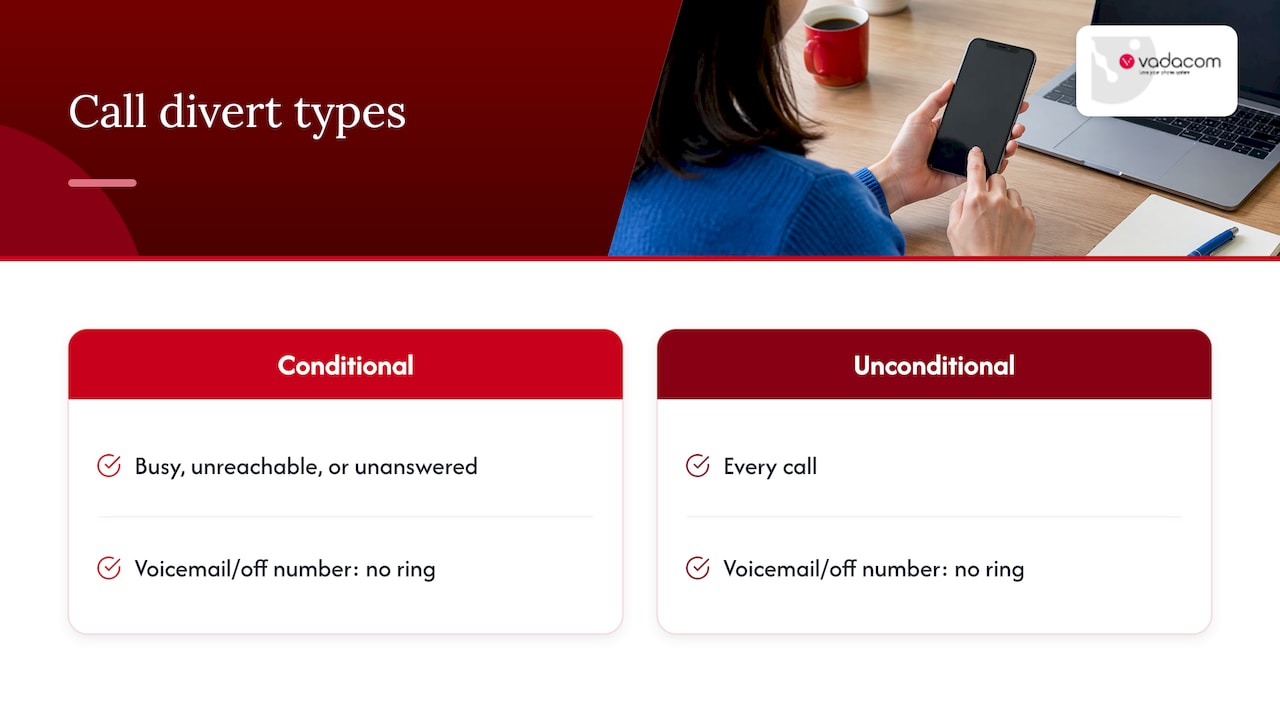
Divert codes are typed into the dialler, and they differ between carriers. They often share condition numbers but use different activation sequences, so confirm the exact code with your carrier or in your carrier’s account app rather than copying one from a forum. The same goes for the ring time before a call falls to voicemail: it is set by the carrier and can be changed, so a short ring time means callers reach voicemail before you can pick up.
Before you change anything on a business number, read our guide to NZ call forwarding rules, which covers diversion scams and surprise costs. Forwarding office calls to mobiles can also add per-minute charges, which we cover in call forwarding to mobile.
A five-minute test routine
Use this order when someone says “my calls are going to voicemail”.
- Call the number from a second phone and note what you hear: straight to voicemail, a few rings and then voicemail, or a busy tone.
- Check Do Not Disturb, Focus and Silence Unknown Callers on the affected handset.
- Turn off Bluetooth and check the ringer and side switch.
- Toggle airplane mode and restart.
- Look for diverts in the phone’s call settings or the carrier account.
- Check the blocked list.
- Try the SIM in another handset. If it rings there, the original phone is the cause.
If the call produces a busy signal rather than voicemail, that is a different fault; see why callers get a busy signal.
When it is a pattern, not a one-off
A single missed call is a handset problem. A pattern is a process problem. Signs that you are in pattern territory:
- Calls go to voicemail at the same time every day, for example at lunch or after 5 pm.
- Customers say they got voicemail while staff were at their desks.
- The problem follows one team or one number, not one phone.
- Staff work from home, on the road and in the office, and nobody is sure which device a call should ring.
In these cases the phone is doing what it was told. The instruction is wrong, missing or scattered across a dozen personal handsets and carrier accounts. A worked example: a three-person plumbing business publishes one mobile number. The owner is on a roof, the office manager is at the supplier and the third person has Focus mode on. All three go to voicemail, and the customer rings a competitor. Nothing on any one phone is broken. What is missing is a rule that says: ring everyone, then the next person, then a person or an answering service.
Fix it at the source with call flows
A cloud phone system moves that rule out of individual handsets and into one place. With NextVoice, calls reach people through extension dialling, call transfer and announced transfer, with voicemail and individual call-flow management as core capabilities. Staff can take calls in the office, at home or elsewhere on the device that suits them, so a call is no longer tied to one handset’s settings.
Practically, this changes the five-minute test above:
| Problem | On personal mobiles | With a managed cloud phone |
|---|---|---|
| Who a call rings | Whoever’s number was dialled | Set by the call flow you manage |
| Staff away or in a meeting | Call drops to personal voicemail | Transfer to a colleague or another path |
| Changing a rule | Each person edits their phone | Settings changed centrally as needs change |
| Reviewing what happened | Ask each person | Call recording in the app to review calls |
| Adding or removing staff | New SIMs and diverts | Users managed on the platform |
NextVoice is built on a telco-grade cloud architecture across multiple availability zones, so the platform itself is designed to keep running when something fails. Our NextMobile offer is listed alongside it for teams that want mobile working covered. If you are still on an old on-premise system with lots of workarounds, our technical audit is the place to start.
Voicemail that works for you
When a call should go to voicemail, it helps if the message reaches someone quickly. Our guide on voicemail to email setup explains how IT teams handle this and the security points to watch. For recovering the calls that were missed, see missed call recovery on cloud phones.
After hours and busy periods
Voicemail is the right answer at 9 pm and a poor one at 10 am on a busy Monday. Our locally supported AI answering service is designed to pick up when staff cannot, and our page on after-hours phone answering covers how AI and human answering fit together. If you want insight from your calls, AI Call Intelligence adds recording and analysis for customers who choose it; AI Call Intelligence explains it.
What to ask your IT team or provider
When calls keep reaching voicemail, bring these questions to whoever manages your phones:
- Which devices ring for each number, and in what order?
- How long does a call ring before it falls to voicemail?
- What happens when someone is on a call, in Do Not Disturb or logged out?
- Who can change the rules, and how quickly?
- Can we see call records for a missed call?
If the answers are “it depends on each person’s phone”, that is the cause.
Promo: stop missed calls being left to chance
If your team keeps losing calls to voicemail, NextVoice gives you one place to manage users, call flows and voicemail across the office, home and other work locations. Vadacom has more than 20 years of local development, delivery and support across New Zealand and Australia, and our team is there to help you set it up the way your business works.

To see how your current setup handles calls, start with a technical audit.
Our view
Most voicemail problems are blamed on the phone, and the phone is rarely the real cause. The real cause is that the business has never decided, in one place, what should happen to a call.
When routing lives in personal handsets, every Focus mode, divert and flat battery becomes a business decision nobody made. We build NextVoice so that the rules sit on the platform: who rings, in what order, what happens when nobody answers. You can change them as your team changes.
Voicemail still has a place. It should be a deliberate step in a call flow, not the place calls fall when something goes wrong. And no system promises that every call is answered; what a good one gives you is control and visibility.
Stuart
FAQ
Why are my calls going straight to voicemail without ringing?
The usual causes are Do Not Disturb or a Focus mode, Silence Unknown Callers on iPhone, an active call divert, Bluetooth sending the ring to another device, a blocked number or no signal. Work through them in that order, then restart the phone.
Why do some calls ring and others go to voicemail?
That points to a rule that depends on the caller. Silence Unknown Callers, a blocked list or a Focus allowed list will let contacts ring and send everyone else to voicemail. If every caller is affected only sometimes, look at signal and 4G/5G calling registration instead.
Can a phone show signal and still not ring?
Yes. The Conversation explains that calls over 4G and 5G need the phone to be registered with the network’s voice system, and failures there can stop the ring even with bars showing. Enabling VoLTE or VoNR, restarting and checking with your carrier are the starting points.
How do I stop my team’s business calls going to voicemail?
Check each handset using the routine above, then move call routing onto one managed system so that rules do not depend on personal phones. With NextVoice you manage users and call flows centrally and can change them as your requirements change.
Sources
- Why does my phone sometimes not ring when people call? A communications expert explains, The Conversation
- Why Does My Android Go Straight to Voicemail? 7 Fixes, Business Insider