

Internal business communication is how information, ideas and decisions move between the people who work in your organisation: leaders to staff, staff to managers, and team to team. It works when people get what they need, in the right channel, at the right time, and can answer back. This guide covers the types and channels, a plan you can set up in a week, ways to improve team communication in hybrid and remote workplaces, and how to tell whether any of it is working.
TL;DR
- Internal communication flows in three directions (down, up and sideways), and a healthy business deliberately covers all three.
- Pick a small set of channels, give each a job, and write down the rules: what goes where, how fast people reply, what must be documented.
- Start the plan with the “why”, then assign owners, a rhythm and a feedback loop.
- Voice is still the fastest channel for urgent, sensitive or complex conversations, so your phone system is part of your communication stack.
- Measure with a few simple signals: survey answers, response times, missed calls and whether people act on what you send.
Table of Contents
- What internal business communication actually covers
- The types of internal communication
- Why it is worth getting right
- Build a simple internal communication plan
- Choosing channels that fit your team and budget
- Improving team communication in hybrid and remote workplaces
- How to tell whether it is working
- Where the phone system fits
- Our perspective
- Talk to a local team about your setup
- FAQ
- Sources
What internal business communication actually covers
One common definition describes it as sharing information about a company with its employees: executives to staff, employees to managers, and teams among themselves. The formats are familiar: email, meetings, newsletters, all-hands sessions, team chat and one-on-ones.
In a small or mid-sized business, most of it is not a formal “programme”. It is the Monday catch-up, the message asking who is covering reception, the call to a supplier’s contact while the customer waits, the voicemail left for a colleague on leave. BDC’s list of examples runs from newsletters and intranets to town halls, regular team meetings, group messaging apps and two-way feedback channels. That is a useful reminder that the channel matters less than whether it fits the message.
Examples you will recognise
- A manager announces a new after-hours roster at a team meeting and confirms it in writing.
- A sales rep transfers a customer to the accounts team with an announced transfer, so the customer does not have to repeat the story.
- An owner posts a weekly two-minute video update on how the month is tracking.
- A frontline employee flags a recurring customer complaint to their supervisor, and the fix is shared back with the whole team.
- A team agrees that urgent issues go by phone, routine updates go in chat and decisions are written in a shared document.
The types of internal communication
Different sources slice this differently. Indeed uses three: upward, downward and lateral. Smartsheet lists six: top-down, horizontal, bottom-up, culture, crisis and campaign communication. For a business of 5 to 200 people, the three directions plus crisis communication cover almost everything.
| Type | Direction | Typical example | Best channel |
|---|---|---|---|
| Downward | Leaders to staff | Strategy updates, policy changes, rosters | Team meeting plus written follow-up |
| Upward | Staff to leaders | Feedback, concerns, ideas, status reports | One-on-ones, short surveys, open-door calls |
| Lateral | Peer to peer | Handovers, project coordination, covering calls | Chat, calls, video, extension dialling |
| Crisis | Everyone, fast | Outage, safety incident, major customer issue | Phone and mobile first, written confirmation after |
Why direction matters
Most businesses are good at downward messages and weak at upward ones. The University of Oxford’s communications guidance makes two points worth borrowing: communication through the line manager tends to be more effective, and communication is a two-way process. If your managers are not equipped and prompted to listen and relay, your messages stop at the top.
Why it is worth getting right
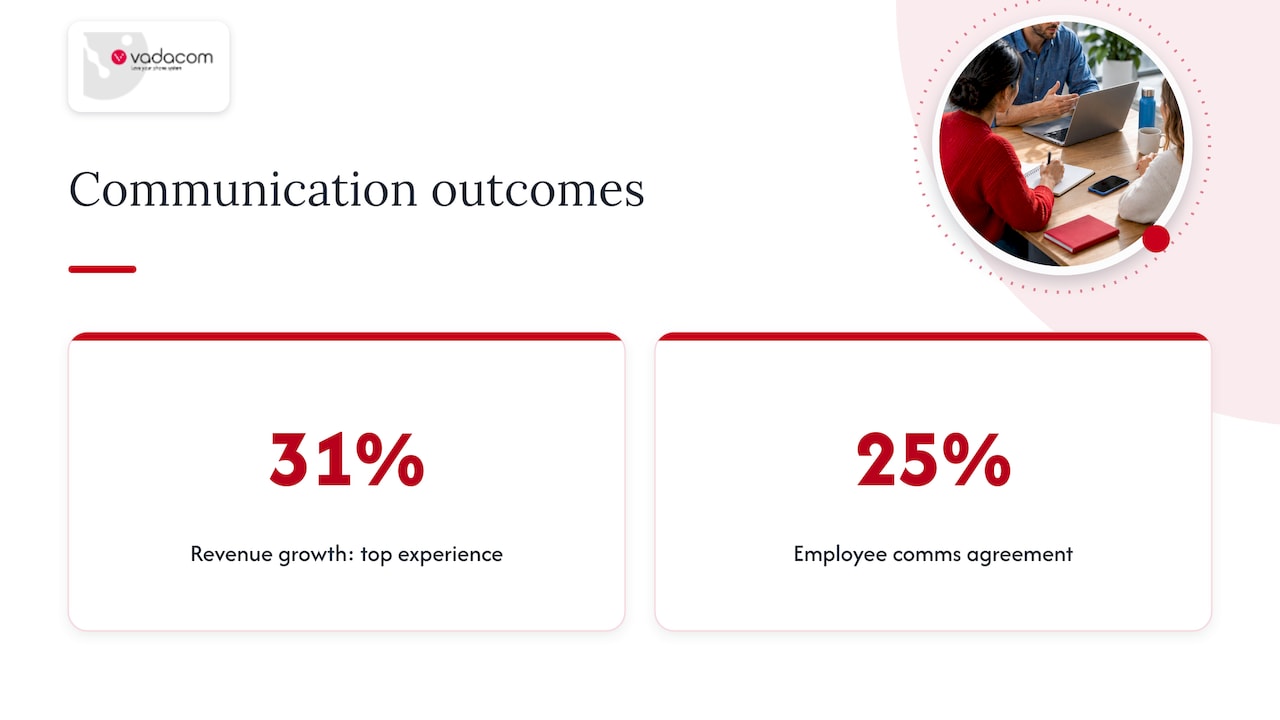
The evidence comes mostly from large organisations and overseas surveys, but the direction is consistent. The US Chamber of Commerce notes that when information is not shared clearly or transparently, employees feel frustrated and excluded and may start looking for their next job. IBM reports, citing its Institute for Business Value, that organisations delivering top employee experiences outperform others on revenue growth by 31%. BDO cites research in which only 25% of surveyed employees strongly agreed their company communicates effectively.
For a small business, the practical translation is simpler. Fewer dropped handovers, fewer customers asked to repeat themselves, fewer “I didn’t know that” moments, and a team that knows where to look. None of this is a guaranteed outcome, but it is a sensible set of problems to aim at.
Build a simple internal communication plan
You do not need a 40-page strategy. The Institute of Internal Communication notes in its 2023 strategy guide that surveys of internal communication professionals keep showing too many organisations lack a clear strategy. A one-page plan already puts you ahead of that.
A one-page plan in six steps
- Start with the why. Oxford’s guidance says to begin not with what you need to do but why you need to do it. Write one sentence: for example, “Everyone, wherever they work, hears about customer-impacting changes on the day they happen.”
- List your audiences. Office staff, field staff, remote workers, managers, part-timers, contractors. Each may need a different channel.
- Assign a job to each channel. Decide what goes in chat, email, meetings, a shared document space and on the phone.
- Set a rhythm. A weekly team huddle, a monthly all-hands, a fortnightly one-on-one. Put them in calendars once.
- Name owners. One person is accountable for each recurring message and for the plan itself.
- Add a crisis path. Oxford’s guidance suggests including crisis and contingency plans to help avoid unnecessary crises. Write down who calls whom if the internet drops, a site closes or a key system fails.
Keep the message consistent
Consistency beats volume. If leadership says one thing at the all-hands and managers say another at the team level, people believe the version closest to their daily work. Give managers a short briefing before big announcements, so the line-manager conversation matches the headline.
Choosing channels that fit your team and budget
More tools do not create better communication. They create more places for information to hide. Choose by the job each channel does.
| Job | Typical channel | Use it when |
|---|---|---|
| Quick, low-stakes questions | Team chat | The answer can wait a few minutes |
| Announcements and policy | Email or a shared page | People need a record to refer back to |
| Discussion and decisions | Video or in-person meeting | Several people need to react in real time |
| Urgent, sensitive or complex issues | Phone call | Tone matters or a delay costs money |
| Customer handovers | Phone with announced transfer | The customer is on the line now |
| Updates that do not need a reply | Short video or written post | You want to avoid another meeting |
Budget thinking
Price each tool against the problem it solves, and look for overlap. Many businesses pay for a chat tool, a video tool and a phone system separately, when one cloud platform could cover calling, video, chat and desktop sharing. Consolidating also means people have one place to find colleagues, one directory and one set of admin controls. If your phone system still depends on on-premise hardware, our technical audit is a starting point for working out what a move to the cloud would involve for your business.
Do not forget voice
Chat is great for speed, but voice carries tone and resolves misunderstandings in a minute that would take twenty messages. Voice also connects you to the people outside your chat tool: customers, suppliers and contractors. For distributed teams, check that the basics work the same on a desk phone, a laptop and a mobile: extension dialling, call transfer, voicemail and the ability to record calls where appropriate. Our guide to procurement checks for remote work phone systems walks through what to ask before you buy.
Improving team communication in hybrid and remote workplaces
When people are spread across the office, home and other locations, informal communication disappears first. Nobody overhears anything. The fix is to make the implicit explicit.
HubSpot’s team communication guidance suggests three moves that suit small teams well:
- Set communication guidelines: how each channel is used, expected response times and what must always be documented.
- Create a central hub for conversations and files so information does not get trapped in inboxes or side conversations.
- Use asynchronous updates to keep inboxes lighter and reduce catch-up meetings.
Practical habits that help
- Agree response expectations. For example: chat within a few hours, email within a working day, calls answered or voicemail returned the same day. Write them down.
- Keep one source of truth. Decisions go in a shared document, not only in a chat thread.
- Make video meetings worth it. A clear agenda, a named note-taker and good etiquette help; see our video meeting etiquette rules.
- Make sure every person can be reached the same way. Whether someone is at their desk or at home, colleagues should be able to dial an extension and reach them. Our hybrid work communication guide covers how to set that up.
- Fix call quality problems early. Choppy audio quietly damages trust in remote tools. Our VoIP quality of service steps and video call lag tests are written for IT teams chasing it down.
Ask, then show what changed
BDO’s Ingela Hartman argues that effective strategies build engagement through channels for feedback, debate and discussion, and that people feel more connected when they are asked for feedback and told how it shaped decisions. The second half is what most businesses skip. Close the loop in your next team meeting: “You told us X, so we did Y.”
Respect time outside work
Good internal communication also means knowing when not to send. In Australia, the right to disconnect lets employees refuse to monitor, read or respond to out-of-hours contact unless the refusal is unreasonable. It applies to small business employees from 26 August 2025, following larger employers a year earlier. The Fair Work Ombudsman encourages employers and employees to talk about out-of-hours contact, so agree your own norms: which situations count as genuinely urgent, and which channel is used for them. Check the Fair Work Ombudsman’s current guidance for how the rules apply to your workplace.
How to tell whether it is working
Measurement does not need a dashboard. Choose a few signals that match the “why” you wrote in your plan, and review them quarterly.
- Pulse survey, three to five questions. “I get the information I need to do my job.” “I know where to find answers.” “My manager listens to my feedback.” Use the same wording each time so you can compare.
- Reach and action. Did people read the announcement, and did they do what it asked? A change that needs a form completed by Friday gives you a natural check.
- Speed. How long do internal questions wait for an answer? Sample a few threads or voicemail returns.
- Missed and abandoned calls. Your phone system reports these. A rising number of missed internal or customer calls can signal a coverage or call-flow problem, not just a busy week.
- Repeat questions. If the same question comes up every week, the information is missing or in the wrong place.
- Handover quality. Ask customer-facing staff how often a customer has to repeat themselves after a transfer.
Combine numbers with conversations. A score tells you something has moved; a five-minute chat tells you why.
Where the phone system fits
Voice is the channel that connects your team to each other and to customers, and it is the one most often left on legacy hardware. A few practical things to review:
- Call flows. Who answers, in what order, and what happens when nobody is free. Mapping calls before you build avoids rework.
- Pickup and coverage. Make sure a colleague can pick up a ringing call when someone is away. Our call pickup groups checklist is aimed at administrators.
- Mobile handling. Forwarding to personal mobiles can create cost and visibility problems; see our guide on forwarding calls to mobile.
- Security for video and meetings. IT should set sensible controls from day one; see our video conferencing security controls.
Our perspective
We have spent more than 20 years designing, delivering and supporting business communications in New Zealand and Australia, and the pattern is consistent. Businesses rarely fail at communication because they lack tools. They struggle because the tools do not line up with how people actually work.
A team member at home, a colleague in the office and someone on a site visit should all be reachable the same way. They should be able to transfer a call, leave and receive voicemail, and be dialled by extension without anyone needing to know where they are sitting. That consistency is what we built NextVoice to provide.
We also believe in keeping the essentials simple. NextVoice runs on a telco-grade cloud architecture with multiple availability zones, so you are not buying and maintaining on-premise hardware, and administrators can adjust users and settings as the business changes. For teams that want more insight, optional AI Call Intelligence adds analysis of recorded calls.
Our advice is to treat the phone system as part of your internal communication plan, not a separate utility. Decide who needs to reach whom, how quickly, and what happens when they cannot. Then make the technology match.
Stuart
Talk to a local team about your setup
If your team is spread across locations and calls, chat and meetings live in different places, we can help you look at the whole picture. NextVoice gives teams calling, voice and video, extension dialling, transfer, voicemail, in-app recording and configurable call flows on one cloud platform, supported locally. Pricing is not published, so the quickest route is to talk to us about your size and setup.
See NextVoice and NextMobile for the platform details, or look at how AI call intelligence can add insight from recorded calls.
FAQ
What is an example of internal business communication?
A manager briefing the team at a weekly meeting, a colleague transferring a customer call with an announced transfer, and a staff member sending feedback to their supervisor are all examples. Others include newsletters, all-hands meetings, team chat messages and one-on-ones. What they share is information moving within the organisation, in any direction.
What are the main methods of communication in the workplace?
Common methods include email, phone calls, meetings, presentations, video, text or chat messages, and internal websites. BBC Bitesize lists these among the most common business methods. Most workplaces use a mix, choosing by urgency, sensitivity and whether a written record is needed.
How do I improve internal team communication on a small budget?
Start with free changes: write down which channel is used for what, agree response times, and hold a regular short team meeting. Then check for overlapping tools you pay for separately. Consolidating calling, video and chat can simplify things for staff and administrators.
How often should we review our internal communication?
A quarterly review suits most small and mid-sized businesses. Run the same short survey, look at missed calls and repeat questions, and ask managers what staff are confused about. Adjust one or two things at a time so you can see what made a difference.
Sources
- Grammarly: How to improve your business’s internal communication
- BDC: Internal communications, how to do it effectively
- Indeed: Guide to business communications
- Smartsheet: Why is internal communication important?
- University of Oxford Communications Hub: Writing an internal communications plan
- US Chamber of Commerce: Benefits of an internal communications plan
- IBM: What is employee communication?
- BDO: Internal communications, definition and best practices
- Institute of Internal Communication: Internal Communication Strategy guide
- HubSpot: 12 ideas to improve team communication
- Fair Work Ombudsman: Right to disconnect for small business employees
- BBC Bitesize: Ways of communicating in a business context