
A good voicemail greeting names you (or your business), sets a clear callback window, and tells the caller exactly what to leave. That’s the whole formula. Below you’ll find ready-to-use scripts for personal, professional, after-hours, and customer support lines, plus short recording tips so your greeting sounds like a person, not a robot reading a script.
TL;DR:
- Most callers respond better to brief, structured greetings that clearly state their callback window and provide an alternative contact for urgency.
- Customization is essential for high-volume, client-facing, or professional lines to reflect current staff, hours, and specific caller needs.
- Cloud-based systems simplify updating greetings across multiple lines, especially as team size grows, ensuring consistent and accurate messaging.
- Adding humor can make greetings memorable but should be used cautiously and only in appropriate, casual contexts to avoid undermining trust.
- Regularly reviewing and updating voicemail scripts prevents outdated information from frustrating callers and maintains a professional impression.
Table of Contents
- Voicemail greeting examples for personal, professional and after-hours use
- Short voicemail greeting templates you can copy in under a minute
- Funny and creative voicemail greeting ideas (and when to skip them)
- How to record a voicemail greeting that actually sounds good
- How to record and upload your greeting across phones and platforms
- What actually improves how many callers leave a message
- Legal and privacy considerations when leaving voicemail greetings
- Voicemail greeting examples for healthcare, real estate and sales
- Tips for updating and maintaining voicemail greetings regularly
- Common mistakes to avoid in voicemail greetings
- When it’s worth customising a voicemail greeting properly
- Managing voicemail greetings across a growing team
- Sources
- FAQ
Voicemail greeting examples for personal, professional and after-hours use
Every greeting does the same three jobs: confirm the caller reached the right person or team, explain what happens next, and give them a reason to stay on the line instead of hanging up. The wording changes depending on who’s calling and why. HubSpot’s scenario-based approach groups templates by situation for exactly this reason. It’s faster to adapt a script built for your scenario than to write one from scratch.
Personal greetings work best short and warm. You don’t need your surname, your job title, or a callback promise measured in business hours.
- “Hey, it’s [Name]. Can’t get to the phone right now. Leave a message or shoot me a text.”
- “You’ve reached [Name]. I’m away from my phone. Leave your name and number and I’ll call you back.”
- “Hi, this is [Name]! Sorry I missed you. Leave a message after the beep.”
Standard professional greetings need a name, sometimes a company name, and a callback expectation. This is the version most callers hear most often, so it carries the most weight.
- “You’ve reached [Name] at [Company]. I’m unable to take your call right now. Please leave your name, number, and a brief message, and I’ll return your call within one business day.”
- “Thank you for calling [Company]. This is [Name] from the [department] team. Please leave a detailed message and I’ll get back to you as soon as possible.”
After-hours and out-of-office scripts need to state hours plainly and give an alternative if the matter is urgent.
- “You’ve reached [Name] at [Company]. Our office hours are Monday to Friday, 9 AM to 5 PM. Please leave a message and we’ll return your call the next business day. For urgent matters, email [address].”
- “Thanks for calling [Company]. We’re currently closed. Our hours are [days/times]. Leave your name, number, and reason for calling, and someone will follow up when we reopen.”
Vacation and extended leave templates should always name a deputy. A caller left with no alternative contact is a caller who won’t call back.
- “Hi, you’ve reached [Name]. I’m out of the office until [date] with limited access to messages. For anything urgent, please contact [colleague’s name] at [number or email]. Otherwise, leave a message and I’ll respond when I’m back.”
Customer support greetings benefit from a quick triage prompt, so the caller starts explaining their issue instead of waiting to be asked.
- “You’ve reached customer support at [Company]. If you have your account number handy, please state it along with a brief description of your issue, and a representative will call you back within [timeframe].”
Short voicemail greeting templates you can copy in under a minute
A tight, 10 to 30 second script beats a rambling one every time, because most callers stop listening after the first two sentences if nothing relevant has been said yet. FitSmallBusiness recommends keeping business greetings brief, naming the person or team, and stating a callback window. Here are six fill-in-the-blank options split by use case.
Personal (10 to 15 seconds):
- “Hi, it’s [Name]. Can’t talk right now, leave a message and I’ll call back.”
- “You’ve reached [Name]’s phone. Leave your name and number after the tone.”
- “Hey, this is [Name]. I’m probably driving or busy. Text me if it’s quick, otherwise leave a message.”
Business (20 to 30 seconds):
- “Hello, you’ve reached [Name] at [Company]. I’m away from my desk. Please leave your name, number, and the reason for your call, and I’ll get back to you within [X hours/one business day].”
- “Thanks for calling [Department] at [Company]. All our team members are currently assisting other callers. Leave a message with your name and callback number and we’ll return your call as soon as possible.”
- “You’ve reached [Name], [Role] at [Company]. I’m unavailable right now, but if you leave your details I’ll call you back by [day/time].”
Swapping details is simple once you’ve picked a base template: change the name, the company, the callback window, and the alternate contact, and the rest of the script stays put. If your phone system caps voicemail greetings at a fixed length (many mobile carriers cut off around 30 seconds), trim the middle sentence first. Callers rarely notice a missing courtesy line, but they do notice when your greeting cuts off mid-sentence.
Funny and creative voicemail greeting ideas (and when to skip them)
A well-placed joke makes a greeting memorable. The trick is knowing your audience before you record one.
Work-safe funny examples:
- “Hi, you’ve reached [Name]. I’m avoiding phone calls, not you specifically. Leave a message and I’ll prove it.”
- “You’ve reached the desk of [Name], currently powered by coffee and mild denial. Leave a message.”
- “This is [Name]. I screen calls the way I screen job applicants: badly. Leave a message anyway.”
Use with caution: “You’ve reached [Name]. If this is an emergency, hang up and call someone who’s actually available.” This one works for friends and casual clients, but it can read as dismissive to a first-time caller who genuinely needs help.
Avoid humour entirely on lines used for legal, medical, financial, or any high-stakes client work, where callers expect competence, not comedy. A funny greeting on a specialist’s after-hours line can undermine trust before the conversation even starts. If you’re on the fence, play the recording to two or three colleagues first and ask whether it reads as friendly or unprofessional. That five-minute test catches more bad greetings than any amount of second-guessing.
How to record a voicemail greeting that actually sounds good
Length matters more than most people think. FitSmallBusiness and other voicemail guides consistently point to 10 to 30 seconds as the sweet spot, because shorter greetings have higher completion rates. Callers who hang up before the beep never leave a message at all.
Tone and pace matter almost as much as wording. Speak at a moderate, conversational speed, slightly slower than normal chat, and cut filler words like “um” and “just” that creep in when you’re reading off a script. A friendly, clear voice with a slight smile in it (yes, that’s audible) beats a flat monotone every time.
On phrasing, swap “leave a message” for something more active, like “take a message for the team” or “leave your name, number, and a short reason for calling.” The NextPhone script library found this framing performs better because it signals a person is actually going to act on the message, not just store it. Always state an explicit callback window, whether that’s “within one business day” or “by end of day Friday.” A vague promise reads as no promise at all.
Pro Tip: Before your final take, do a mic-distance check. Hold your phone or headset roughly 15 centimetres from your mouth. Too close and it distorts, too far and background noise creeps in.

Run through this checklist before you hit record for real: pick a quiet room, set your mic distance, do two full test recordings, then play both back through your phone’s speaker (not headphones) to hear what a caller actually hears.
How to record and upload your greeting across phones and platforms
Most phone systems give you three practical routes. Your carrier’s voicemail menu lets you record and save directly by dialling into voicemail setup, usually option 1 or 2 in the menu, no extra app needed. A smartphone voice memo app gives you more control over retakes, and you can export the finished file and upload it through your carrier’s settings or business phone portal. A cloud-phone admin panel (the option most small businesses end up using) lets you or your team update greetings without touching individual handsets at all.
For file formats, WAV or MP3 covers almost every platform, and a standard 44.1kHz sample rate is more than enough quality for voice. There’s no need for anything higher.
Common headaches worth troubleshooting before you upload:
- Background hum from air conditioners or laptop fans, fixed by recording in a smaller, softer-furnished room.
- Upload errors from a file that’s too large, usually solved by trimming the recording to under a minute.
- Clipped audio at the start or end, fixed by leaving a half-second of silence before you speak and after you finish.
If you’d rather skip manual recording altogether, generator tools like Narakeet can produce a clean voice file from typed text, useful for quick testing or multilingual greetings.
What actually improves how many callers leave a message
The single biggest lever isn’t wording, it’s structure: giving callers an explicit alternative. NextPhone’s review of real greeting patterns found that offering an out, whether that’s email, text, or “take a message for the team,” measurably improves the number of callers who stay on the line and leave a message instead of hanging up.
A stated callback window does similar work from a different angle. It removes the caller’s uncertainty about whether anyone will actually call them back, which is the main reason people avoid leaving voicemails in the first place. Businesses running multiple lines or shift patterns tend to find that swapping greetings by hand across handsets doesn’t scale. That’s usually the point where a cloud phone system with centralised greeting management starts to make more sense than juggling settings on individual devices, an option covered further down.
Legal and privacy considerations when leaving voicemail greetings
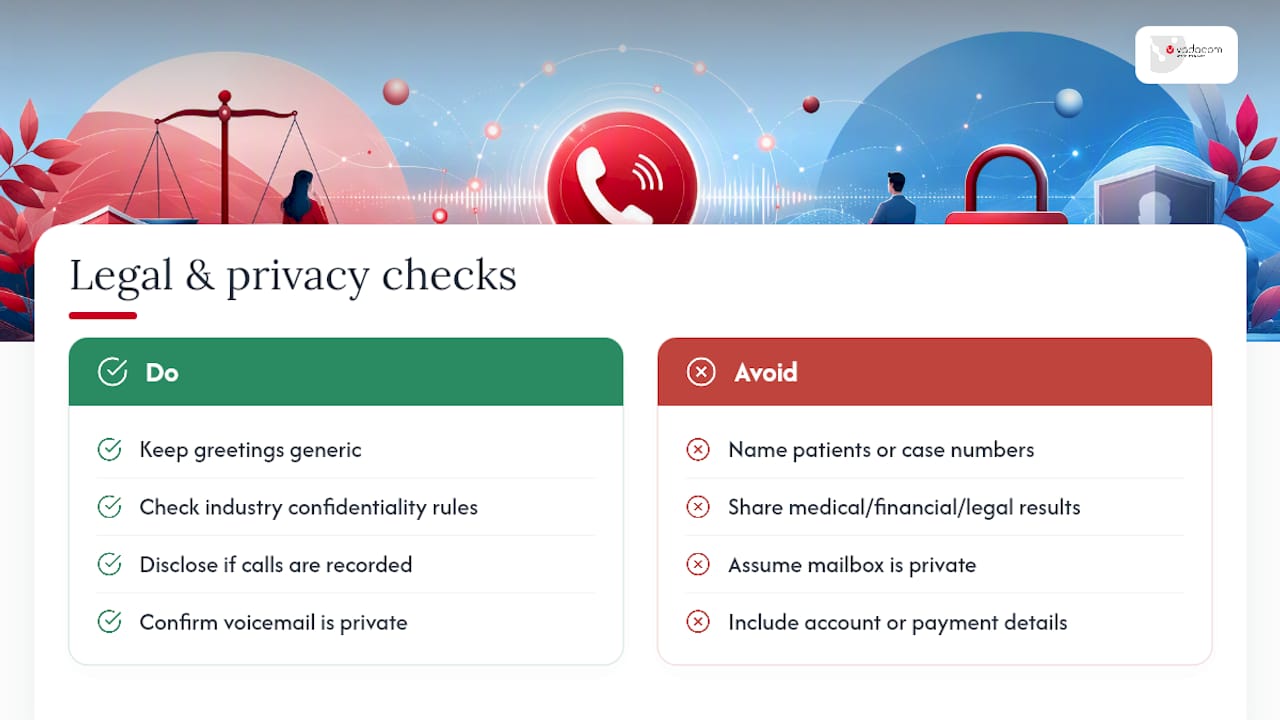
Recording a greeting is your choice to make, but leaving a voicemail for someone else touches privacy rules you don’t fully control. If you’re a business, avoid stating sensitive personal details in an outgoing greeting, things like specific patient names, case numbers, or financial account details, since anyone who calls that line and reaches voicemail can potentially hear it.
The same caution applies in reverse. If you’re leaving a message on someone else’s voicemail, don’t disclose private information (medical results, financial figures, legal matters) unless you’re certain only the intended person accesses that box. Shared or family voicemail lines are common enough that this isn’t a hypothetical risk.
For healthcare, legal, and financial services specifically, check your industry’s confidentiality obligations before scripting any greeting that references case status, appointment details, or account information. Many professions operate under confidentiality rules that restrict what can be said in an unsecured message, and a greeting that names a specific matter or patient can breach that obligation even if no one intended harm.
If your business records calls (not just voicemail, but live conversations) for training or quality purposes, most jurisdictions require you to disclose that in your greeting or at the start of the call. This varies by location, so check your local telecommunications rules rather than assuming a script you’ve seen used elsewhere is compliant where you operate.
Voicemail greeting examples for healthcare, real estate and sales
Different professions carry different caller expectations, and a generic script often misses the mark.
Healthcare practices need to balance warmth with discretion, and should never confirm appointment specifics or medical details in the greeting itself.
- “You’ve reached [Practice Name]. Our office hours are [days/times]. If this is a medical emergency, please hang up and dial 111. Otherwise, leave your name, date of birth, and callback number, and our team will return your call.”
Real estate agents juggle high call volume from prospective buyers and sellers, so a greeting that filters intent saves everyone time.
- “Hi, you’ve reached [Name] with [Agency]. I’m currently with a client. If you’re calling about a specific property, please leave the address along with your name and number. If you’re looking to list or need a valuation, mention that too, and I’ll call you back within a few hours.”
Sales professionals benefit from a greeting that keeps the door open without sounding desperate for a callback.
- “You’ve reached [Name] at [Company]. I’m currently on another call. Leave your name, company, and what you’re looking to solve, and I’ll get back to you today.”
Each of these leans on the same underlying structure covered earlier: name, purpose, and a specific next step. The details just shift to match what that caller actually needs to hear.
Tips for updating and maintaining voicemail greetings regularly
A voicemail greeting isn’t a set-and-forget task. Public holidays, office relocations, staff changes, and seasonal hours all make an old greeting misleading, sometimes in ways that annoy callers enough to hang up entirely. Set a recurring calendar reminder, monthly is reasonable for busy front-desk lines, to listen back to your current greeting and check it still matches reality.
The most common trigger for an outdated greeting is a stale date reference. Anything mentioning “until the end of the month” or “back next week” needs a hard expiry check, not a vague memory of when you recorded it. If your greeting names a specific colleague as backup contact, that needs updating the moment that person changes roles or leaves.
Businesses with seasonal shifts, retail during holidays, real estate during peak listing season, benefit from keeping two or three pre-written greeting scripts on hand so swapping takes minutes, not a scramble. Keep a simple text document with your current default, your after-hours version, and your holiday version, ready to record whenever the calendar turns over.
Common mistakes to avoid in voicemail greetings
The most frequent mistake is silence about what happens next. A greeting that says “leave a message” with no callback window gives the caller zero reason to trust their message will be actioned, and that uncertainty is a major reason people hang up instead of speaking after the tone.
Other recurring problems:
- Rambling introductions. A 45 second greeting buries the useful information under courtesy filler nobody needed.
- Marketing taglines crammed into the script. Callers want a person on the other end, not a slogan; skip the brand tagline unless company policy specifically requires it.
- Mumbled or rushed recordings. If you can’t understand your own name played back, neither can your caller.
- No alternate contact for urgent matters. A caller with a genuine emergency and no other option will simply try someone else.
- Forgetting to update after a schedule or staff change. An old greeting naming a former employee as backup contact actively misdirects callers.
Most of these are fixable in the time it takes to rerecord a 20 second script, which is exactly why there’s no excuse to leave a broken greeting running for months.
When it’s worth customising a voicemail greeting properly
A generic default is fine for most personal lines and low-volume internal extensions, nobody’s judging your voicemail on a private mobile. Where it stops being fine is anywhere a caller forms a first impression of your business: front desk, sales, client-facing roles, and any line where callback delay costs you money or trust.
Before recording, run through a quick checklist: what’s the role behind this line, how much call volume does it get, who’s typically calling (existing client, cold lead, internal colleague), and is there a faster channel, email or text, worth mentioning. If two or more of those answers point toward “this matters,” it’s worth the ten minutes to script and record properly rather than leaving the factory default running.
Pick three greetings to fix this week: your main business line, your after-hours line, and whichever personal or team line gets the most unpredictable callers. That’s a realistic starting point, not a full audit of every extension in the building.
— Stuart
Managing voicemail greetings across a growing team
Recording a good script solves half the problem. The other half is keeping every extension, department, and after-hours line updated without chasing down individual handsets every time something changes. That’s the gap a cloud-based phone platform can close for growing businesses. Voicemail, in-app recording, and configurable call flows all sit in one admin panel, so updating a greeting across your whole team takes minutes, not a round of phone calls to whoever’s in the office that day.
Cloud phone systems run on cloud infrastructure that scales as your team grows, without the upfront cost of on-premise phone hardware. If you’re weighing up whether to keep juggling individual voicemail boxes or move to a system where greetings, call transfers, and call flows all sit in one place, visit the Vadacom home page to see how it fits your setup, or get in touch with the support team for help uploading your first batch of greetings.
Sources
The examples and recording guidance above draw on scenario-based templates from HubSpot and Indeed, production and length advice from FitSmallBusiness, the “verbal handshake” framing from Shopify, and real-world script patterns from NextPhone. For businesses exploring automated call routing alongside voicemail, Sun State Digital’s AI systems overview covers related automation options.
- Professional voicemail greetings — HubSpot
- Best professional voicemail greetings — FitSmallBusiness
- 35+ voicemail greeting scripts with audio — NextPhone
FAQ
What is a good greeting for a voicemail?
A good greeting states who you are (name and, for business lines, company or role), what the caller should leave (name, number, reason for calling), and when to expect a callback. Keep it under 30 seconds.
What is the best greeting on the phone?
For business lines, the best-performing greetings name the person or department, give an explicit callback window, and offer an alternative like email or text for urgent matters. That combination reliably keeps more callers on the line long enough to leave a message.
What is a good funny voicemail greeting?
Work-safe options include lines like “I screen calls the way I screen job applications: badly. Leave a message anyway.” Save humour for personal or casual business lines, never for legal, medical, or high-stakes client calls.
What is a standard voicemail message?
A standard business voicemail message follows a simple structure: name and company, a brief apology for missing the call, a request for the caller’s name, number, and reason for calling, and a stated callback timeframe such as “within one business day.”
How often should I update my voicemail greeting?
Check it at least monthly for accuracy, and update it immediately after any schedule change, staff change, or holiday period that makes the current wording out of date.