

Three things drive video conferencing cost: per-user licence fees, meeting-room hardware, and ongoing support. Expect hardware to dominate your first-year bill, then licences and support take over as the recurring cost from year two onward, often split roughly 50/50 depending on room count. A single huddle space might cost a few thousand dollars to fit out; a boardroom estate across multiple rooms with around 100 users can run into the tens of thousands of dollars in year one. The room-level ranges and a repeatable formula follow below.
TL;DR:
- Hardware costs vary widely by room size, with first-year expenses ranging from under $2,000 for small spaces to over $15,000 for large boardrooms, then dropping significantly afterwards.
- Licences typically cost between $4 and $63 per user per month, with platform choice affecting ongoing expenses, especially if already bundled with productivity suites.
- Hidden costs like installation, cabling, and network capacity can significantly increase initial budgets, so request itemized quotes and assess network upgrades upfront.
- Annual total costs decrease notably after the first year due to hardware amortization, often reducing recurring expenses by 60 to 80 percent.
- Conducting a technical audit before purchasing helps clarify actual costs and ensures network infrastructure can support high-quality video conferencing.
Table of Contents
- What makes up your video conferencing cost?
- What does video conferencing cost by room size?
- How do licence structures affect your ongoing spend?
- What hidden costs catch IT budgets off guard?
- How do you calculate your annual video conferencing cost?
- What should IT and procurement teams check before signing?
- Does your network need an upgrade before you spend on hardware?
- A publisher’s note on video conferencing cost
- How Vadacom cuts the guesswork out of your cost planning
- Tools to check current pricing
- Sources
- FAQ
What makes up your video conferencing cost?
Every quote you get breaks down into three buckets: licences, hardware, and support. Knowing what sits inside each one stops you from comparing quotes that aren’t actually comparable.
Licence models come in three flavours: per-seat (every named user pays), per-room (a fixed device or space pays regardless of who uses it), and host-based (only meeting organisers need a paid seat, attendees join free). Billing usually runs monthly or annual, and annual commitments typically buy a meaningful discount over pay-as-you-go month-to-month pricing.
Hardware is where budgets swing hardest. A basic webcam and speakerphone setup costs a fraction of a room fitted with a pan-tilt-zoom camera, ceiling microphone array, digital signal processor for echo cancellation, and a commercial-grade display. The Video Conferencing Cost Calculator indicates per-room hardware ranges broadly depending on setup and features, and that gap comes down almost entirely to camera quality, audio pickup range, and display size.
Support and maintenance covers installation, cabling, firmware updates, and the help desk time when a room stops working mid-meeting. Some vendors fold this into an annual fee; others bill it separately, which is worth asking about upfront.
To estimate each line item:
- Count actual users who need a licence, not total headcount
- Get itemised, not bundled, hardware quotes per room type
- Ask whether support is a fixed annual fee or billed per incident
What does video conferencing cost by room size?
Room size is the single biggest lever on your budget, more so than which platform you pick. Here’s how the bands typically shake out, combining hardware and a modest licence allowance for that room’s users.
- Huddle spaces (2-4 people). A basic camera, speaker, and mic bar plus a couple of user licences can land under $2,000 in first-year hardware, with monthly licence costs adding a small recurring line. These rooms rarely need a dedicated room licence at all if a laptop and USB device does the job.
- Small to medium rooms (5-10 people). This is where most businesses spend their budget, typically in the $3,000 to $8,000 hardware range per room, plus a room-based licence if the platform charges one. A mid-range PTZ camera and a proper speakerphone usually covers it.
- Large rooms and boardrooms (10+ people). Expect $8,000 to $15,000 or more per room once you add ceiling mic arrays, dual displays, and professional installation. These rooms also carry the highest support burden because more moving parts means more that can fail.
First-year totals for any band include the hardware outlay; from year two, you’re paying licences and support only, which is why the same room can look “expensive” in year one and “cheap” by year three.
How do licence structures affect your ongoing spend?
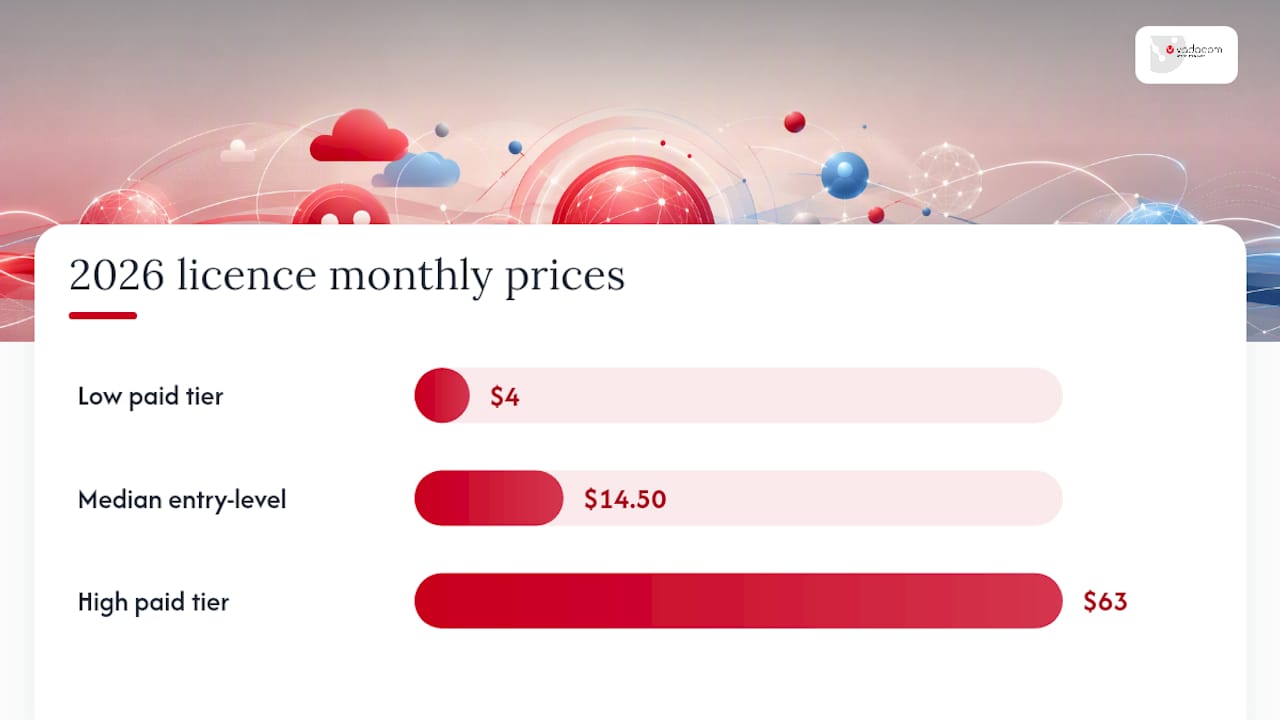
Recurring licence costs are where the real multi-year cost lives, not the hardware you buy once. The median entry-level paid plan across 19 conferencing products sat near $14.50 per user per month in 2026, with paid tiers ranging from roughly $4 to $63 a month depending on features.
Per-seat licensing suits organisations where most staff host their own meetings. Per-room licensing suits businesses with a handful of shared meeting spaces and low individual hosting needs. Host-only licensing works when a small group runs most meetings and everyone else just joins.
A separate wrinkle: many businesses already pay for Meet or Teams inside a productivity suite, which means the incremental conferencing cost can be close to zero unless you need features the base tier doesn’t include.
- Recording and transcription often sit behind a paid tier upgrade
- Webinar hosting for large external audiences is usually a separate add-on
- AI features (meeting summaries, live captioning) increasingly carry their own fee
- Annual prepayment and mixed-tier licensing (not everyone needs the top plan) both cut recurring spend
What hidden costs catch IT budgets off guard?
Installation is the cost most quotes leave out. Cabling, power runs, network drops, and rack space can add a real chunk to a hardware quote once a vendor actually walks the room, so always ask for an itemised installation line rather than a bundled “supply and install” figure.
Pro Tip: Ask every vendor to separate hardware, installation, and first-year support into three distinct numbers. Bundled quotes make it impossible to compare vendors fairly.
Hardware lifecycle matters too. Most businesses amortise room hardware over three to five years, which changes how a $10,000 room actually looks on an annual budget:
- Year one: full hardware cost plus licences plus support, the highest spend year
- Year two onward: licences plus support only, often 60 to 80% lower than year one
- Licence sprawl (unused seats nobody cancelled) quietly inflates recurring cost over time
- Bundled productivity suites can hide the true incremental conferencing spend inside a bigger software bill
How do you calculate your annual video conferencing cost?
The formula is straightforward: annual cost = (users × per-user licence fee × 12) + hardware (amortised or one-off) + annual support. Run your own numbers with your actual user count and quoted hardware, not industry averages.
Here’s a worked example using sourced default figures for a business with 100 users and five meeting rooms:
| Cost component | Example figure | Notes |
|---|---|---|
| Licences (100 users × $14.50/month × 12) | $17,400 | Recurring every year |
| Hardware (5 rooms) | $25,000 | One-off, or amortise over 3-5 years |
| Support | $3,000 | Often a fixed annual fee |
| First-year total | $43,600 | Hardware spike included |
| Year-two total | $18,900 | Licences plus support only |
That drop from year one to year two is the amortisation effect finance teams need to see. Present both figures, not just the first-year number, or your project looks far more expensive than its steady-state reality.
What should IT and procurement teams check before signing?
A short checklist saves you from discovering gaps after the contract is signed:
- Confirm the exact licence unit (per-seat, per-room, or host) and how it’s counted
- Ask which tier unlocks recording, webinar hosting, and AI features, and at what cost
- Check integration requirements with your existing calendar and directory systems
- Get the SLA in writing, including local support response times
- Confirm whether installation, cabling, and training are included or billed separately
On negotiation, term length is your strongest lever. Annual prepayment at scale often unlocks a substantial discount over month-to-month billing, and a quick internal licence audit before renewal can reveal duplicate seats worth 10 to 30% in savings once contractors and low-use accounts move to cheaper tiers.
Pro Tip: Build acceptance criteria into the statement of work: minimum call quality benchmarks, room booking integration, and a defined support response time. Vendors treat written KPIs very differently to verbal promises.
For broader guidance on structuring SaaS procurement negotiations and mixed-tier licensing, this SaaS buying comparison covers similar ground from a different software category.
Does your network need an upgrade before you spend on hardware?
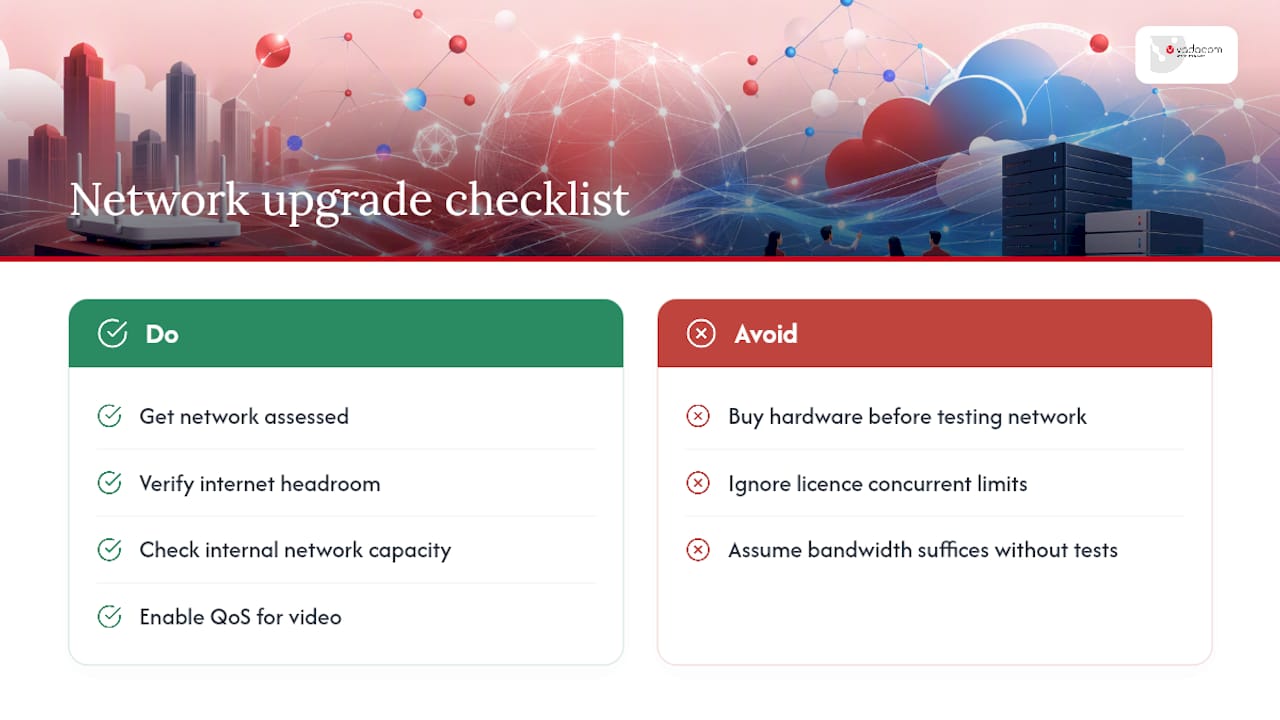
Bandwidth is the cost most businesses forget to budget until a meeting starts dropping frames. A single HD video call can need anywhere from 1.5 to 3 Mbps per participant stream, and that multiplies fast once you’ve got several rooms running concurrent meetings on the same office connection.
Before buying any room hardware, get your network assessed. Two questions matter most: does your current internet connection have enough headroom for the number of concurrent meetings you expect, and is your internal network (switches, Wi-Fi access points, cabling) actually capable of pushing that traffic without congestion? A business with five active meeting rooms and general staff internet use on the same connection often needs a bandwidth upgrade before the new cameras even arrive.
Concurrent meeting limits also affect licence tier choice, not just network capacity. Some plans cap simultaneous meetings or participant counts per meeting, and hitting that ceiling mid-growth forces an unplanned upgrade. Budget for network assessment as its own line item, separate from room hardware, because it’s easy to blow a hardware budget on cameras and displays while the connection underneath still can’t support them reliably.
Quality of service configuration on your router or firewall, prioritising video traffic over general browsing, is a cheap fix that often solves problems businesses assume need an expensive bandwidth upgrade.
A publisher’s note on video conferencing cost
Most cost guides treat video conferencing and phone systems as separate budget lines. They shouldn’t be. The businesses that get this right unify voice, video, and messaging under one cloud platform, avoiding duplicate licence sprawl across two separate vendors.
Cloud-first procurement shifts the heavy hardware capital outlay into a predictable operating expense, which is exactly what finance teams want to see when approving a communications refresh. A cloud-first communications platform runs on this model, scaling with a business without the upfront cost of on-premise hardware.
— Stuart
How Vadacom cuts the guesswork out of your cost planning
Working out your real video conferencing cost is hard when hardware quotes, licence tiers, and hidden installation fees all arrive separately from different vendors. Some providers offer a technical audit that gives you a clear picture of what you’re actually spending now and what a cloud-first move would cost instead, before you commit to anything.
NextVoice brings voice and video into one platform, which means you’re not running separate licence structures and separate support contracts for phone and conferencing. Built on cloud infrastructure rather than on-premise hardware, it scales as your team grows without the big upfront capital outlay that room-by-room hardware buying demands. For teams wanting deeper insight from call and meeting data, AI Call Intelligence is available as an add-on rather than a forced cost.
If you’re budgeting a refresh or renewal, start with a technical audit to get a realistic total cost of ownership figure before you sign anything else.
Tools to check current pricing
Run your own numbers with the cost calculator and check current licence pricing before budgeting.
Sources
- Video Conferencing Cost Calculator | FinToolSuite
- In‑person, video conference or audio conference — York University study
- Zoom vs Google Meet vs Microsoft Teams: The video conferencing spend data (2026) | Cledara
FAQ
How much does video conferencing cost?
Most businesses pay between $2,000 and $15,000 per room in first-year hardware, plus $4 to $63 per user per month in licence fees depending on the tier. A five-room, 100-user setup often totals around $43,600 in year one, dropping sharply once hardware is paid off.
How much does a video conferencing system cost?
A complete room system, camera, microphone, display, and installation, typically ranges from $2,000 for a basic huddle space to $15,000 or more for a boardroom with premium audio and dual displays.
What is the cheapest online meeting platform?
The cheapest option is often one you already pay for: if your business already has Google Workspace or Microsoft 365, conferencing features may already be included at no extra licence cost. Some platforms are priced on request, so contact the provider directly to compare against your current licence spend.
What’s the difference between video and phone meeting costs?
Phone meetings need no camera, room display, or video-specific bandwidth, keeping hardware and network costs near zero. Video meetings require room hardware investment and higher bandwidth per participant, but they reduce miscommunication compared with audio-only calls for anything beyond a quick check-in.