

Write a short, action-first script: name the business, give three or fewer menu options phrased as actions, add “0” for reception, and keep business-hours and after-hours messages separate. Test the finished script today by calling it yourself, then put a review on the calendar for six months out.
TL;DR:
- Clear, action-first menu options ordered by caller frequency significantly improve routing accuracy and reduce call abandonment and transfer rates.
- Testing call flows with real data every six months helps identify evolving caller needs and ensures menus remain optimized for efficiency.
- Visual and auditory accessibility can be improved by speaking slowly, repeating key options, and avoiding background noise, ensuring inclusivity for all callers.
- Automated workflows should connect to CRM and helpdesk systems to provide context for agents and track call outcomes effectively.
- Contrary to common advice, broader menus with simple options outperform deep, nested options in terms of caller satisfaction and routing success.
Table of Contents
- Benefits of an auto attendant and how success looks
- Core script structure and precise wording rules
- Copyable script templates for day, after-hours and urgent calls
- Recording and voice guidance for auto attendant prompts
- Setting up business hours and routing in your phone admin
- Testing and reviewing your menu on a regular cycle
- How a cloud platform simplifies auto attendant rollout
- Customising scripts for different industries and business sizes
- Making your auto attendant accessible to all callers
- Connecting your auto attendant to CRM and other business systems
- What actually matters when you write one of these
- Get help writing and deploying your auto attendant
- Sources
- FAQ
Benefits of an auto attendant and how success looks
A well-written auto attendant cuts the time staff spend manually directing calls and reduces the number of callers sent to the wrong extension. Callers who hear a short, clear menu tend to stay on the line rather than hang up, because they know within seconds whether they will reach the right person.
Once the script is live, the value shows up in numbers you can track from your phone system’s reporting dashboard.
- Call abandonment rate: the share of callers who hang up before reaching a person or voicemail.
- Transfer rate: how many calls the auto attendant routes correctly on the first attempt versus how many need a second transfer.
- Average handling time: how long it takes from answer to resolution, which usually drops once callers stop looping through irrelevant options.
Watching these three figures before and after a script change tells you whether the new wording actually helped, rather than just sounding better on paper.
Core script structure and precise wording rules
Good menu wording removes friction. A caller should never have to replay the message to work out what to press.
- Lead with the action, not the department name: “To book a service, press 1” beats “For bookings, press 1.”
- Order options by how often callers actually choose them, not by your org chart, so the most common request comes first.
- Keep the opening greeting brief and each menu option short, so the whole message clears quickly.
- Always give a way to reach a person, typically “0” or “press 9 for reception”, and say it plainly rather than burying it last.
- Cut filler phrases like “Thank you for calling, your call is important to us” and get straight to the business name and the options.
Pro tip: Read your draft script aloud with a stopwatch running. If the greeting passes eight seconds or any single option passes five, cut words until it doesn’t.
Copyable script templates for day, after-hours and urgent calls
These templates are written to be edited in minutes rather than rewritten from scratch. Swap in your business name, team names and numbers.
- Day-hours greeting: “Thanks for calling [Business Name]. For sales, press 1. For support, press 2. For accounts, press 3. For all other enquiries, press 0.”
- After-hours greeting: “Thanks for calling [Business Name]. Our office is closed. Our hours are [days and times]. To leave a message, press 1. For an urgent [industry] matter, press 2.”
- Urgent or priority path: “You’ve reached the urgent line for [Business Name]. If this is a genuine emergency, press 1 to be connected now. For all other matters, please call back during business hours or press 2 to leave a message.”
- Hold message: “All our team are currently assisting other callers. Your call will be answered in the order it was received. Please stay on the line or press 1 to leave a voicemail instead.”
- Voicemail prompt: “You’ve reached the voicemail for [Name/Team] at [Business Name]. Please leave your name, number and a brief message after the tone, and we’ll return your call as soon as we can.”
- Transfer wording: “Connecting you to [Team/Department] now. If no one is available, you’ll be given the option to leave a message.”
Keep the after-hours message honest about when the caller will actually get a response. A vague “we’ll call you back soon” frustrates people more than a specific “we return calls within one business day” ever will.
Recording and voice guidance for auto attendant prompts
A professional voice artist suits businesses that want consistent tone across multiple locations, while text-to-speech is faster to update when menu options change often. Staff-recorded prompts work well for small teams where a familiar, local voice matters more than polish.
Whichever method you choose, speak slightly slower than normal conversation, pause briefly between options, and avoid long preambles before the first real instruction. Most phone systems accept standard WAV or MP3 files, so listen back on a mobile handset as well as a desk phone before publishing, since compression can make sibilant sounds harsh on cheaper speakers.
Setting up business hours and routing in your phone admin
Most of the wording work is wasted if the underlying routing is wrong, so configuration deserves the same care as the script itself.
- Set your business hours schedule first, then upload a separate after-hours greeting file so the system switches automatically rather than relying on someone remembering to change it.
- Map every menu option to a specific ring group, call queue, external number or voicemail box, and check there’s no dead end where a caller presses a key and nothing happens.
- Add holiday schedules for public holidays and planned closures so the after-hours message plays even during a normal weekday shutdown.
- If you run Microsoft Teams Phone, the admin centre handles business-hours call flows and audio uploads, and PowerShell cmdlets are available for larger deployments that need bulk changes.
- For day-to-day changes like swapping a greeting or updating a menu option, the Teams calling settings let an admin do it without touching PowerShell at all.
Testing and reviewing your menu on a regular cycle
A script that tests well on day one can drift out of date within months as teams change and call patterns shift.
- Pull your last 50 to 100 calls and note what each caller actually needed, then reorder your menu so the most requested option comes first, a method IVR menu design guidance for small businesses recommends over guessing from an org chart.
- Call the main number from a mobile, a landline and an internal extension, and press every option to confirm each one lands where it should.
- Log call abandonment and transfer accuracy for a few weeks after any change, then put a recurring reminder in the calendar to repeat this whole check every six months.
How a cloud platform simplifies auto attendant rollout
Cloud phone platforms that run across multiple availability zones keep call routing working even if one data centre has an issue, and features like in-app recording and scalable ring groups mean a script change doesn’t require a hardware visit. Support is available for this kind of rollout including technical audits, help uploading recordings, and scheduling support, with a recommendation for a staged pilot on a small ring group before publishing changes business-wide.
Customising scripts for different industries and business sizes
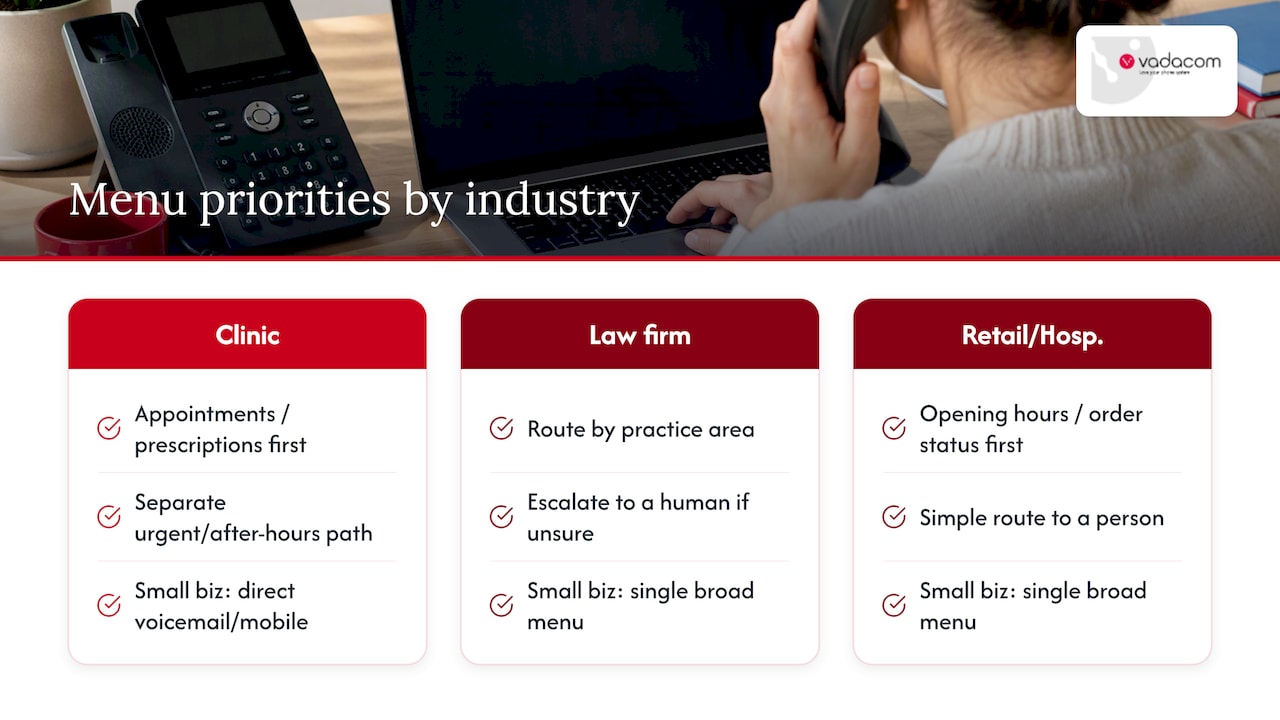
A medical clinic, a law firm and a retail chain all need different menu priorities, even though the underlying rules (short greeting, action-first options, clear escape to a human) stay the same. A clinic’s busiest option is usually appointment booking or a prescription line, so that goes first, with a clearly separated urgent or after-hours path for anything that can’t wait. A law firm often benefits from routing by practice area (conveyancing, family, commercial) rather than by individual staff names, since callers rarely know which solicitor they need.
Retail and hospitality businesses tend to get the highest call volumes around opening hours and order status, so those options belong at the top of the menu, with a simple route to a person for anything unusual. A sole trader or very small business might skip the multi-option menu altogether and use a single greeting that routes straight to voicemail or a mobile number, since a long menu for a two-person operation adds delay without adding value.
The size of the business also changes how many menu layers make sense. A single, slightly longer list of options can outperform a deep, nested menu that forces callers through multiple rounds of choices: a peer-reviewed comparison of broad versus deep menu structures found that broader, shallower menus led to better user performance and satisfaction than the conventional advice to keep menus to five options or fewer. For most small and mid-sized businesses, that means one well-ordered menu beats a maze of sub-menus every time.
Making your auto attendant accessible to all callers
An auto attendant script should work for callers using a TTY or relay service, callers who are hard of hearing, and callers who find rapid-fire menus difficult to follow regardless of the reason. Speaking at a measured pace and repeating the “press 0 for a person” option at both the start and the end of the menu gives callers more than one chance to catch it.
Where your phone system supports it, offer an option that connects directly to a person without requiring the caller to navigate a menu at all, since this removes the single biggest barrier for anyone who finds automated systems hard to use. If your business takes calls via a national relay service, note that clearly in your greeting or on your website so callers using that service know what to expect when they connect.
Avoid background music or sound effects during hold or menu playback louder than the spoken message itself, since this can drown out the instructions for callers using hearing aids or lower-quality phone lines. A simple, consistent rule across every prompt, a clear pace, a repeated path to a human, and no competing audio, covers most accessibility needs without requiring a separate script for different callers.
Connecting your auto attendant to CRM and other business systems
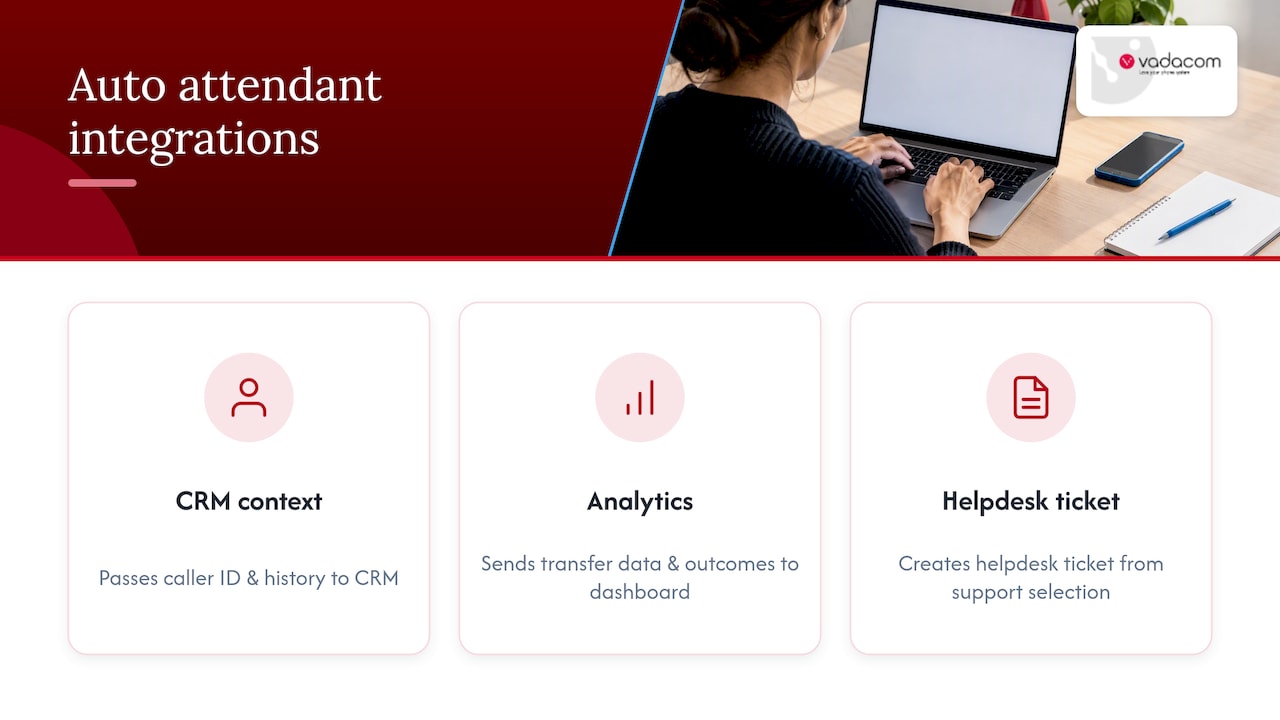
Routing a call correctly is only half the job if the person answering has no context on who’s calling. Many cloud phone platforms can pass caller ID and call history into a CRM automatically, so the team member picking up sees the caller’s past interactions before they say hello.
Integration also extends to call recording and analytics tools: when transfer data and call outcomes feed back into a CRM or reporting dashboard, the abandonment and transfer figures from your testing process become far easier to track over time instead of being pulled manually from the phone system each month. Some businesses also connect their auto attendant to helpdesk or ticketing software, so a caller who presses the support option automatically generates a ticket before they even reach an agent. The more your call data talks to the systems your team already uses, the less manual work sits between “the call was routed correctly” and “the caller got what they needed.”
What actually matters when you write one of these
The advice to keep every menu to three or fewer options gets repeated so often it’s treated as gospel, but the evidence doesn’t fully support it. Broader menus with clear, action-first wording tend to outperform deep, narrow ones, and the same logic applies to automated routing systems, where flattened menu paths improve routing accuracy for automated systems too. The rule that matters more than option count is clarity: does the caller know within five seconds what each choice does.
Most businesses spend their effort writing the script and none reviewing it. That’s backwards. A script written from a guess about what callers want will always underperform one built from actual call data, and the six-month review is where most of the real improvement happens, not the first draft. If you only have time for one thing, skip the polishing and pull your last 100 calls instead. Everything else in a good script follows from knowing what people actually ask for.
— Stuart
Get help writing and deploying your auto attendant
Vadacom’s NextVoice platform gives teams a straightforward way to build, record and adjust auto attendant call flows without on-premise hardware, and its optional AI Call Intelligence adds deeper insight into how calls are actually routed once your script is live.
If you’re moving off an ageing on-premise system or just want a second opinion on your current call flow, a technical audit is a practical place to start, and the NextVoice and NextMobile page has the detail on what the platform supports.
Sources
- Create a phone system auto attendant – Microsoft Learn
- Manage your call queue and auto attendant settings in Microsoft Teams – Microsoft Support
- IVR menu design for small business – NeedToKnowComms
- A comparison of broad versus deep auditory menu structures – SAGE Journals
FAQ
What does auto attendant mean?
An auto attendant is the automated system that answers an incoming business call and offers a menu of options, such as “press 1 for sales”, before connecting the caller to a person, a team or voicemail. It replaces a live receptionist for routing purposes, though most setups still include an option to reach a person directly.
What is a good script for answering phone calls?
A good script states the business name immediately, offers no more than a handful of action-first options ordered by how often callers choose them, and always includes a way to reach a person. Keeping the whole greeting under about eight seconds and each option under five seconds, as outlined above, keeps callers from losing patience or hanging up.
What is a good script for an after-hours phone message?
An effective after-hours message states clearly that the office is closed, gives the actual business hours, and offers a path to leave a voicemail or reach an urgent line if one exists. Avoiding vague promises like “we’ll call you back soon” in favour of a specific timeframe sets clearer expectations for the caller.
What is a good greeting to use in a call center?
A strong call centre greeting names the business, thanks the caller briefly, and moves straight into the menu options or a queue message without a long preamble. Where wait times are likely, adding a short hold message that gives callers a way to leave a voicemail instead of waiting reduces abandoned calls.