
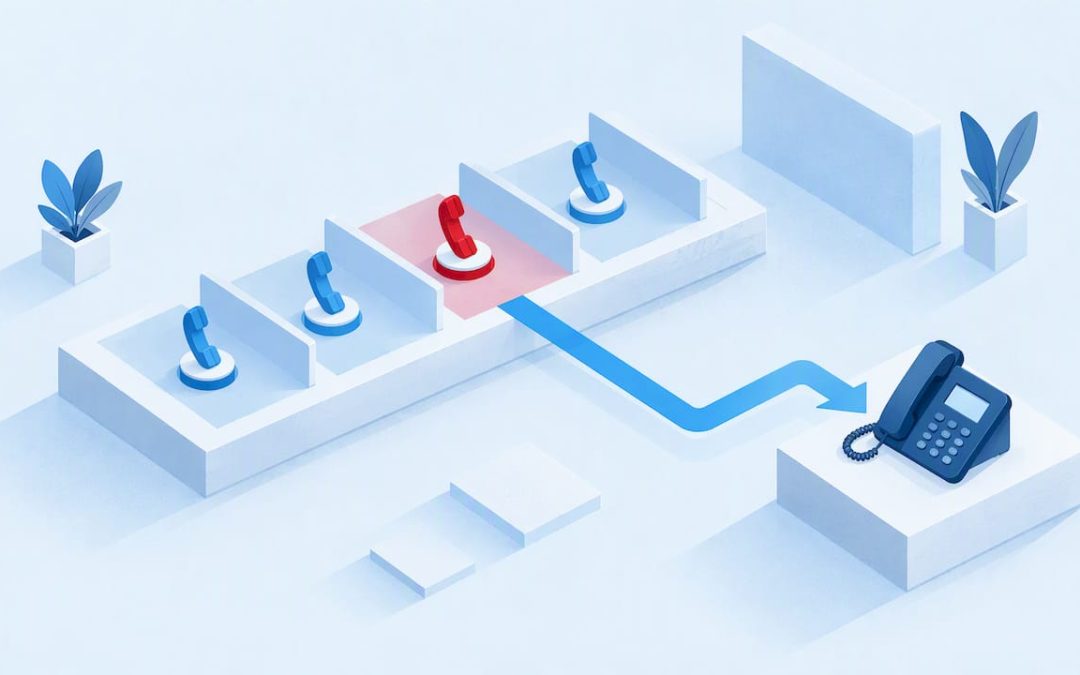
Call park puts a live call on hold in a shared slot so anyone on the phone system can pick it up from any handset, softphone or app. Unlike hold, which ties the call to one device, or a transfer, which needs a named recipient, park works when you don’t know where the right person is. That flexibility is why teams use it daily.
TL;DR:
- Small teams should use system assigned orbits to avoid slot collisions; department based sites can use fixed extensions, while busy sites benefit from visual panels.
- Orbit numbers are typically three or four digits, and a parked call can return to its parker or route to reception or voicemail after timeout.
- Asterisk gives 300 seconds as a sample parking timeout, not a universal setting; admins should choose a window that matches staff retrieval times.
- Remote access should require a PIN and remain limited to internal extensions where possible; admins should also test fallback routing when callbacks go unanswered.
Table of Contents
- How does call parking work, step by step?
- How does call park differ from hold and transfer?
- Where does call parking help most?
- Which call park types and configurations can you choose?
- How do you park and retrieve a call in practice?
- What should admins configure for timeouts, fallback and security?
- Why a visual call park view usually wins
- What does call park look like with NextVoice?
- FAQ
- Sources
How does call parking work, step by step?
The flow is short, and most systems follow the same pattern.
- You answer the call and press a park key, or transfer the call to the park extension.
- The system assigns a slot, called an orbit, and announces or displays it to you.
- You tell the colleague the orbit, usually by page, chat or a quick call.
- They dial that orbit from any phone, or tap the parked call in a visual interface, and the call connects.
The SIP call-park draft describes the call as made inactive but not terminated, so any user agent can resume it. It also notes that parked calls are commonly identified by a short orbit, typically three or four digits, which may be allocated by the user or by a Park Server.
Several calls can sit in parked state at once, because each takes its own orbit. If nobody retrieves a call in time, the system rings it back to the person who parked it or sends it to a fallback destination, covered under admin settings below.
How does call park differ from hold and transfer?
All three actions manage a live call, but they answer different questions: who can pick it up, and from where?
- Hold: the call stays on your handset. Only you can resume it, so it suits a quick check while you remain at your desk.
- Blind transfer: you send the call to a named extension and drop out. It suits cases where you know the recipient is free and nearby.
- Attended transfer: you speak to the recipient first, then hand over. Our guide to call transfer methods covers when each style fits.
- Park: the call waits in a slot that any permitted extension can retrieve. It suits cases where the right person is somewhere on site, on another floor or on a mobile app.
Take a receptionist with a supplier on the line asking for the workshop manager. Transferring to a desk phone fails if the manager is on the floor, and holding keeps the caller stuck at reception. Parking the call and paging the orbit number lets the manager pick it up from the nearest handset.
Where does call parking help most?
Parking earns its place wherever people move around or calls arrive faster than they can be routed.
- Reception and front desk: staff park the call, page the orbit number and get back to the next caller promptly.
- Retail and hospitality: staff on the shop floor, in the kitchen or at the loading dock can retrieve a call from the nearest handset.
- Hybrid work: a call parked from a desk phone can be picked up on a softphone or mobile app at home.
- Busy periods: several calls can wait in separate slots instead of piling up on one receptionist’s hold queue.
The wins are flexibility, speed and a better caller experience. Callers are connected to the right person faster, with fewer “please hold while I find them” moments and fewer dropped transfers.
Which call park types and configurations can you choose?
Admins usually meet three approaches, and the choice shapes daily workflow.
- System-assigned orbit: the system picks the next free slot automatically. It is simple and avoids two staff parking into the same slot. According to Inpark, auto-assignment reduces human error.
- Directed parking: staff park to a fixed extension, such as a designated slot for sales and another for service. It gives departments predictable slots, but needs discipline to avoid collisions.
- Visual call park: a desktop or app panel shows which slots are occupied. TechTarget notes that colour-coded indicators reduce errors compared with tracking numeric slots by hand.
Pro Tip: If your team already pages by department, start with hosted call forwarding provider settings that mirror those names, then move to visual call park once volumes grow.
Pick system-assigned for small teams, directed for department-based sites, and visual for busy sites where mistakes cost callers.
How do you park and retrieve a call in practice?
Exact keys differ by vendor, but the shape is the same. Check your phone’s documentation for the codes it uses.
- Park the call. Press the park key if your handset has one. Otherwise, transfer the call to the park extension and listen for the announced orbit.
- Note the orbit. Directed systems let you choose a slot; system-assigned ones read out or display the number.
- Tell the recipient. Page it, send a chat message or call their extension.
- Retrieve the call. The recipient dials the orbit from any permitted phone, or taps the parked call in the visual panel or softphone app.
- Confirm the connection. If the call is still waiting, they are connected straight away.
A compact sample: a range of orbits is reserved, and calls parked through the park extension are announced with their assigned orbit. Your dial plan will differ, so see our guide to extension dialling plans when allocating ranges.
If a slot is busy, park again and the system should offer the next free one, or choose a different directed slot. If two staff collide on the same slot, the second park fails, which is a good reason to prefer system-assigned orbits or a visual panel.
What should admins configure for timeouts, fallback and security?
Treat these as commissioning checks, because each one decides what happens when a parked call is forgotten.
- Parking time: the Asterisk documentation gives 300 seconds as a worked example of a parking-time setting. Choose a value that suits how long your staff typically take to retrieve calls.
- Comeback behaviour: a timed-out call can return to the person who parked it or go to a timeout context, such as reception or voicemail.
- Fallback if the callback fails: if the parker doesn’t answer, route to reception or voicemail so the caller is never left ringing out. Our notes on call pickup groups help with that fallback design.
- PINs and scope: require a PIN for remote retrieval, limit retrieval to internal extensions where possible, and keep audit logs.
- Park server or decentralised: a central server allocates orbits consistently, while decentralised parking relies on each endpoint, so test both normal and failure behaviour.
Why a visual call park view usually wins
I’ve watched busy sites struggle with spoken orbit numbers shouted across a room, and the failure is always the same: someone mishears “703” as “708” and a caller waits. My view is that visual call park is the single best upgrade for any site with a busy reception team, because it removes the memory work from the process. For quieter offices, system-assigned orbits and a sensible timeout do the job.
Whatever you choose, test it before go-live. Run a paging test with real staff, let a call time out on purpose, and confirm the fallback lands where you expect.
— Stuart
What does call park look like with NextVoice?
Our NextVoice platform gives your team a cloud phone system without on-premise hardware, backed by local support from people who know your setup. We build it around the essentials: extension dialling, announced transfer, voicemail and individual call flows. If you’re replacing an ageing PBX, our technical audit shows what needs migrating first. Talk to our team and we’ll walk through your site’s park and paging workflow.
FAQ
How does call park work?
You park a live call, the system assigns it a numbered slot called an orbit, and anyone permitted can dial that orbit to resume the call. The call stays active but isn’t tied to your handset.
What is call park on a phone?
It is a feature that moves a call out of your hands without ending it, so a colleague can pick it up elsewhere. It suits staff who move around or when you don’t know who is free.
What does “unpark” mean on a phone?
Unpark means retrieving a parked call, usually by dialling its orbit or tapping it in a visual panel. Once retrieved, the call connects to the person who unparked it.
What happens if nobody picks up a parked call?
After the parking time passes, the system typically rings the call back to the person who parked it or routes it to a fallback such as reception or voicemail. The exact behaviour depends on how your admin set the timeout.
Sources
- [Implementing Call Park and Retrieve using the
Session Initiation Protocol (SIP)](https://datatracker.ietf.org/doc/id/draft-procter-bliss-call-park-extension-02.html) - Call Parking – Asterisk Documentation
- Inpark
- Techtarget