

Securing a VoIP phone system comes down to six things: keep it off the open internet, protect every login with phishing-resistant multi-factor authentication, lock down what the system is allowed to dial, encrypt calls where you can, patch everything that has an IP address, and treat call recordings as personal information under the Privacy Act 2020. This guide walks through each one in the order we would do them, with the New Zealand sources behind the advice.
TL;DR
- VoIP is an IP problem, not a separate “voice” problem. Treat phones, gateways and apps like any other device on your network.
- Turn on phishing-resistant MFA for admin and user logins, and stop forcing frequent password changes.
- Block international, premium-rate and out-of-hours forwarding for anyone who doesn’t need them. This is your main defence against toll fraud.
- Record calls only when you have a clear business reason, and decide who sees recordings and how long you keep them.
- Ask your provider where the system runs, how it is patched and who answers the phone when something looks wrong.
Table of Contents
- Why small NZ businesses are in scope
- Know what you are protecting
- The checklist, in order
- A quick self-audit table
- Our perspective: security you can actually run
- If you are modernising your phone system
- What to ask any VoIP provider about security
- FAQ
- Sources
Why small NZ businesses are in scope
Most owners assume a phone system is secure because it came from a reputable supplier. The weak point is usually exposure. CERT NZ’s guidance warns that port forwarding or DMZ set-ups leave devices easy for attackers to reach, and that simply connecting a device to the internet shouldn’t make it globally addressable.
The “we’re too small to be a target” idea doesn’t hold up either. Automated tools scan the internet for open VoIP ports and weak logins without caring who owns them. A five-person accounting firm with an old SIP handset forwarded through the router is as findable as a large retailer.
A note on who to call: CERT NZ was folded into the National Cyber Security Centre in July 2024, according to the NCSC’s own site. Older articles and checklists still point to CERT NZ, but incident reporting now goes through the NCSC.
Know what you are protecting
A VoIP system has more moving parts than a landline ever did. Before you apply any control, list them:
- Handsets and softphones: desk phones, mobile apps and browser-based phones.
- Call control: the platform or PBX that registers users and routes calls.
- Gateways: anything connecting to the public phone network or to older equipment.
- Admin portals: where users, call flows, forwarding and recording are configured.
- Voicemail and recordings: audio files, and often transcripts or emails with attachments.
- The network underneath: routers, switches, Wi-Fi and the internet connection.
CERT NZ’s point is that any device with an IP address is part of your network. The practices you’d use on a critical server, such as logging, central monitoring and restricted access, apply equally to VoIP gateways and endpoints. If you can’t list your VoIP devices, start there.
The checklist, in order
1. Reduce what is exposed to the internet
The NZISM guidance and CERT NZ both point to the same principle: expose only what must be exposed. For a VoIP setup that means:
- No port forwarding from the router to a handset or on-site PBX unless there is a documented reason.
- No devices in a DMZ “to make the phones work”. If a phone only works that way, the phone or the design is wrong.
- Admin interfaces reachable only from trusted networks or through a VPN.
- Unused services, such as spare SIP trunks, test extensions and old remote-access accounts, switched off.
A hosted platform changes this picture considerably. When the call control lives in the provider’s cloud, you no longer have an on-site server with ports open to the world. Your remaining exposure is the user logins and the handsets. That is one reason many NZ businesses are retiring ageing on-premise systems. If you aren’t sure what yours exposes, our technical audit is a sensible first step.
A broader small-business view of shrinking your attack surface is in this cybersecurity action list for small businesses, which pairs well with the VoIP-specific steps here.
2. Separate voice from everything else
Put phones on their own VLAN where your equipment supports it. The NZISM-aligned advice is network segmentation, so that a compromised laptop can’t see your handsets and a compromised handset can’t see your file server. Segmentation also helps call quality, because you can prioritise voice traffic. Our guide to VoIP QoS for engineers covers the tagging and queueing side.
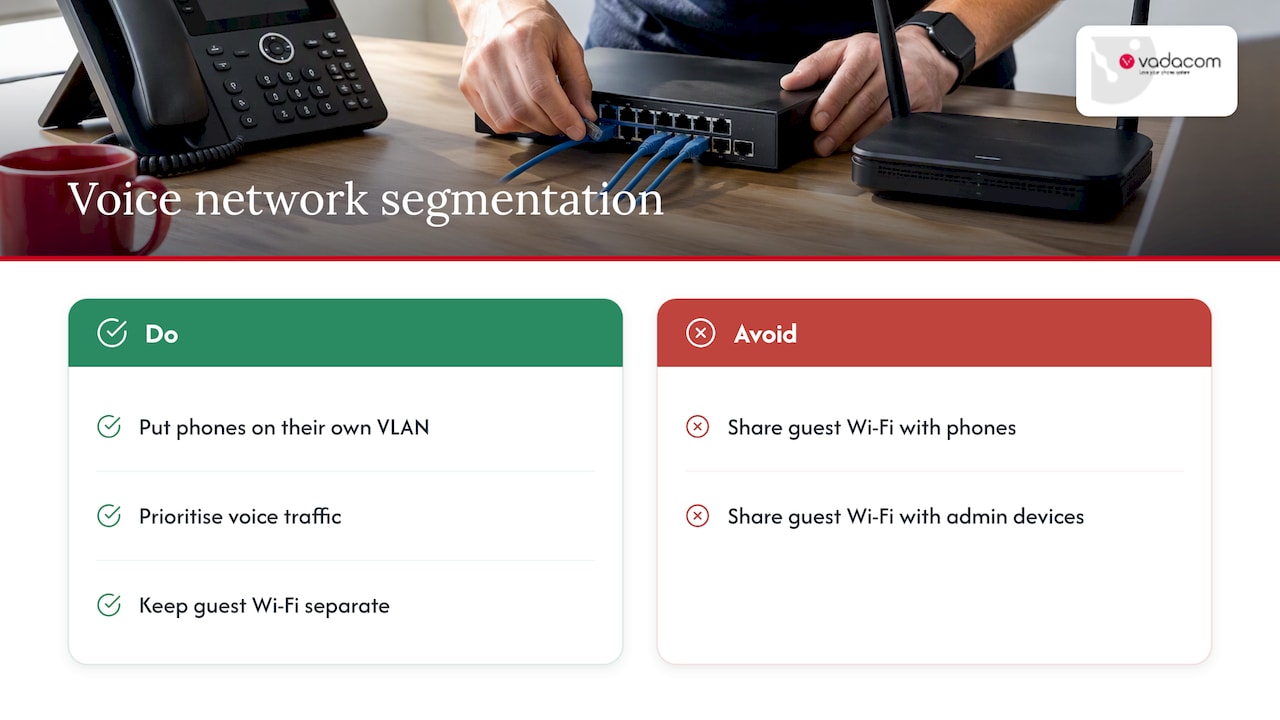
Guest Wi-Fi should never share a segment with phones or admin devices. This one is cheap to fix and often missed.
3. Use phishing-resistant MFA, and rethink passwords
The NZISM v3.9 change overview says access control is a critical part of security strategy and moves towards passwordless authentication and phishing-resistant MFA. It’s written for government agencies, but it is the best local benchmark a business can borrow.
In practice:
- Admin accounts first. Whoever can change call forwarding, add users or download recordings needs MFA, no exceptions.
- Then every user login, including the softphone and mobile app.
- Prefer hardware keys or passkeys over SMS codes where your platform supports them. Codes sent by text can be phished or intercepted.
- Favour length over complexity. Modern guidance puts weight on long passphrases and resistance to automated guessing, not on forced monthly changes.
- Change every default. Handset admin passwords and default voicemail PINs are the first thing automated tools try. The UK’s NCSC PBX guidance lists strong access controls and user authentication among its baseline controls for every PBX.
Don’t forget voicemail. A four-digit PIN left at its default hands an attacker call history, personal details and sometimes a route to reset other accounts.
4. Lock down what the system can dial and forward
Toll fraud is the VoIP risk that costs real money quickly. An attacker who gets into an extension or a forwarding rule routes calls to high-cost destinations, often overnight or on a long weekend, and the bill arrives later.
The UK NCSC’s PBX guidance is clear on the controls: restrict dialling patterns, disable international and premium-rate calling for staff who don’t need it, and restrict out-of-hours call forwarding. Apply that in NZ terms:
- Default every new user to national calling only. Grant international access by request.
- Block premium-rate number ranges outright unless a specific role needs them.
- Set spend or call-volume alerts, and have someone who reads them.
- Review forwarding rules monthly. Forwarding to external numbers is a favourite route for abuse.
- Limit simultaneous outbound calls per user.
Forwarding deserves its own attention, because it is also where costs and diversion scams creep in. See our guides on NZ call forwarding rules and forwarding to a mobile.
5. Encrypt signalling and audio
VoIP has two layers to protect. TLS secures the signalling that sets up and ends calls, and SRTP secures the audio itself. A NZ provider explainer makes the same split. Ask your provider which connections support each, and switch them on where supported. Don’t assume every handset and trunk does.
The SANS white paper Secure Voice Over IP is a useful technical overview of the signalling protocols and the mechanisms that protect them, if your IT lead wants to go deeper. A free-for-all approach to encryption leaves gaps: one old handset negotiating plain RTP is enough to expose a conversation.
6. Patch handsets, gateways and apps
CERT NZ and the NZISM both stress applying the latest security patches to all firmware. Phones are the forgotten devices. Build a simple register: model, firmware version, last update, owner. Then set a rhythm, monthly for critical fixes, and retire any handset the manufacturer no longer updates.
With a cloud platform, the provider patches the call-control layer. You still own the handsets, the router and the laptops running the softphone.
7. Log, monitor and know your baseline
You can’t spot abuse without knowing what normal looks like. Record typical call volumes, destinations and hours. Then alert on:
- Repeated failed logins to the admin portal or a single extension.
- Calls to countries you never contact.
- Spikes in short-duration calls, a typical sign of scanning or premium-rate abuse.
- New forwarding rules or new users created outside business hours.
CERT NZ’s point about central monitoring for servers applies here. Phones deserve the same attention.
8. Defend against caller ID spoofing and impersonation
Attackers don’t only break in. They also impersonate: a call that appears to come from your bank, your supplier or your own number. Put controls on outbound caller ID, make sure you can only present numbers you own, and train staff to verify requests for payments or password resets through a second channel. We set out five questions to put to any provider in our caller ID spoofing guide.
If your phone system also runs meetings, the same hardening applies there. Our video conferencing security controls cover waiting rooms, recording permissions and guest access.
9. Treat recordings as personal information
This is where NZ differs from most generic checklists. The Office of the Privacy Commissioner says personal information is covered by the Privacy Act regardless of how it is stored, and a voice recording of an identifiable person qualifies. The same page says organisations need a privacy officer, and that includes small businesses.
The Commissioner’s approach to collection is data minimisation. If audio isn’t needed for a lawful business purpose, don’t collect it. For recording, that translates to:
- Record by purpose, not by default. Always-on recording of every call creates liability you may not need.
- Run a Privacy Impact Assessment. The Commissioner’s CCTV guidance recommends one before adopting surveillance technology. The same discipline applies to recording calls.
- Tell people. Callers should know they are being recorded, and why.
- Decide access and retention. Who can listen, how long files are kept, and how they are securely deleted.
- Be ready for access requests. The Commissioner’s small business insights report covers protecting information from loss and unauthorised access, and having a clear privacy statement and processes behind it.
Our guide on call recording for SMEs goes into consent and retention in more detail. This is general information, not legal advice. For a specific recording policy, talk to your privacy officer or a lawyer.
A quick self-audit table
| Control | Question to ask | Red flag |
|---|---|---|
| Exposure | Does any phone or PBX sit behind port forwarding or a DMZ? | Yes, and nobody remembers why |
| Authentication | Do admins and users use MFA? | Passwords only, defaults unchanged |
| Dialling | Can every user call premium-rate and international numbers? | Yes, by default |
| Encryption | Are TLS and SRTP enabled where supported? | Nobody knows |
| Patching | Is there a firmware register? | No register, handsets 5+ years old |
| Recording | Is there a documented purpose and retention period? | “We record everything, just in case” |
| Monitoring | Does someone get alerts on unusual calls? | The first alert is the invoice |
Our perspective: security you can actually run
We’ve spent more than 20 years designing, delivering and supporting communications for New Zealand and Australian businesses, and the same pattern repeats. The breaches we hear about rarely involve clever attacks. They involve a forgotten admin account, an open port someone added during a rushed install, or a forwarding rule nobody reviewed.
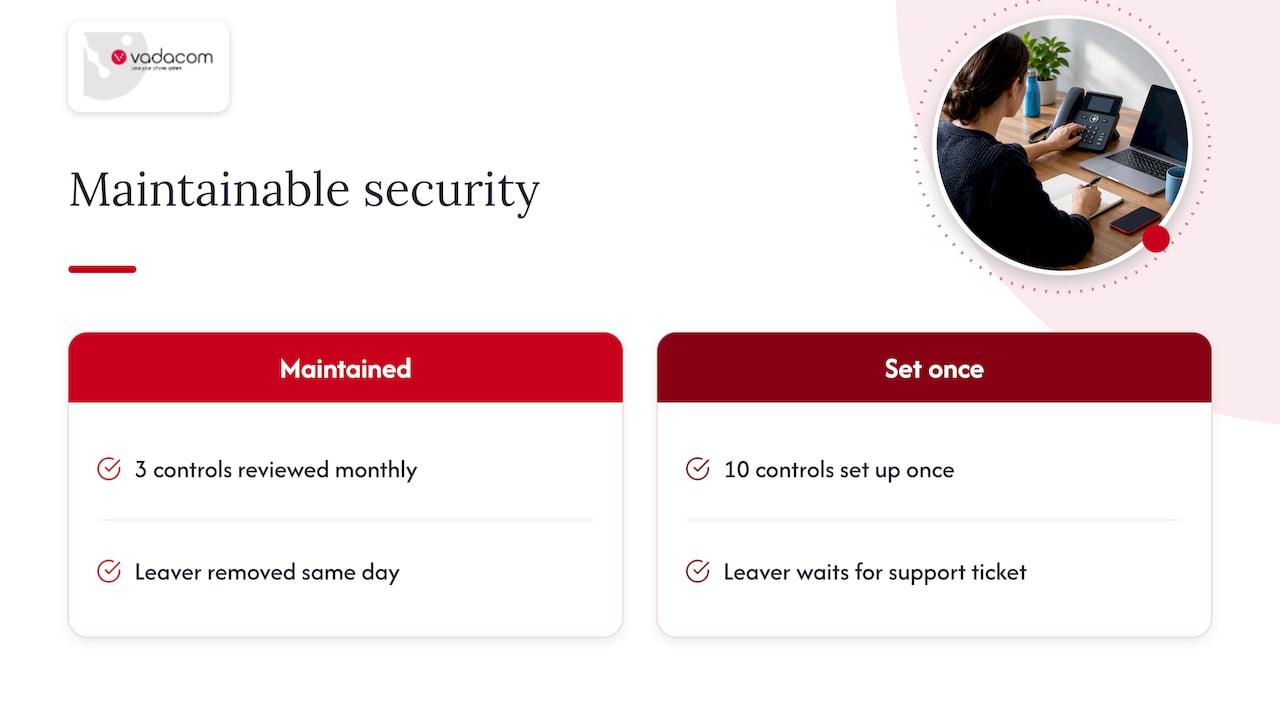
That shapes how we build NextVoice. We keep the feature set to the essentials businesses need, because every extra feature is something else to configure and secure. The platform runs on AWS cloud across multiple availability zones, so you don’t carry the burden of an on-site server. Administrators manage users and settings themselves, which means a leaver can be removed the same day rather than after a support ticket.
Our advice for any business, whoever supplies the phones: pick the controls you will really maintain. Three controls that are reviewed monthly beat ten that were set up once. And choose a provider whose support team is in your timezone and picks up the phone, because the worst time to discover your supplier is offshore is during an incident.
— Stuart
If you are modernising your phone system
If your current system is an older on-premise PBX, moving to the cloud is the single biggest reduction in exposure most businesses can make. NextVoice gives teams extension dialling, call transfer, voicemail, in-app recording and individual call-flow management across office, home and other locations. If you want to know where you stand first, our technical audit reviews your existing set-up. For comparing suppliers, our procurement checks for remote work phone systems list what to ask.
What to ask any VoIP provider about security
- Where is the platform hosted, and does it span more than one availability zone?
- Which MFA methods are supported for admins and users?
- Are TLS and SRTP supported, and on which endpoints?
- How can I restrict international, premium-rate and out-of-hours forwarding per user?
- How are call recordings stored, who can access them and how are they deleted?
- What alerts will I get for unusual call activity?
- Who handles an incident, in which timezone, and how fast do they respond?
Answers like “it’s all handled” aren’t answers. You want specifics, in writing.
FAQ
Is VoIP secure enough for a business?
Yes, when it is configured and managed properly. The risks are real, including toll fraud, interception of unencrypted traffic and account takeover, but each has a practical control. Most incidents trace back to default passwords, exposed devices or unreviewed settings, not to the technology itself.
What is the biggest VoIP security risk for a small business?
Exposure and weak logins, which together lead to toll fraud. CERT NZ warns that devices reachable directly from the internet are easy targets. Pair that with default or reused passwords and an attacker can route expensive calls through your account.
Should VoIP use TCP or UDP?
Both are used. SIP signalling can run over UDP or TCP, and TLS runs over TCP, while the audio is normally carried over UDP for speed. The security question matters more than the transport: protect signalling with TLS and audio with SRTP where supported. Your provider should tell you which they support.
Do I need to tell callers I am recording them?
In New Zealand, the Privacy Act 2020 expects you to collect personal information openly and only when you have a lawful purpose. That means telling callers they are recorded and why. For your own policy, check with your privacy officer or a lawyer.
Where do I report a VoIP security incident in NZ?
Report it to the National Cyber Security Centre, which took over CERT NZ’s functions in 2024. If money has been lost, contact your bank and your phone provider immediately as well.
Sources
- CERT NZ guidance
- NCSC NZ: Who we are
- NZISM change overview
- NCSC UK: Private Branch Exchange (PBX) best practice
- SANS: Secure Voice Over IP
- Office of the Privacy Commissioner: Complying with the Privacy Act
- Office of the Privacy Commissioner: Privacy and CCTV
- Office of the Privacy Commissioner: Small business insights report