

Holiday hours routing means your phone system changes how it handles incoming calls on days you are closed, using a schedule you set once instead of a diversion someone has to remember to switch on. In New Zealand that schedule has to cover national public holidays and your region’s anniversary day. It also needs a clear closed-for-holidays message, a sensible destination for urgent calls, and a way to return to normal afterwards. This guide walks through each step.
TL;DR
- Holiday routing is a layer on top of your business hours schedule: open, closed, and holiday each get their own call path.
- Build the holiday list from the official New Zealand dates, and add your own region’s anniversary day, because it differs from place to place.
- A good closed-for-holidays message gives the reopening day, what to do if it is urgent, and one way to leave a message.
- Test every path with a real call before the break, and diarise a check for the first working day back.
- Choose a system where schedules sit in a self-service admin screen, so you are not waiting on a technician at 4pm on Christmas Eve.
Table of Contents
- What holiday hours routing is, and how it differs from business hours routing
- Build the date list from official New Zealand sources
- Decide where each kind of call goes
- Write a closed-for-holidays message that actually helps
- Set it up: a step-by-step process
- Test before you leave
- Switching back to normal
- When a voicemail box is not enough
- What to check when choosing a phone system for holiday routing
- Our perspective: keep the rules simple
- How Vadacom can help
- FAQ
- Sources
What holiday hours routing is, and how it differs from business hours routing
Three terms get used for overlapping things, so it helps to separate them.
Business hours routing (sometimes called time-of-day routing) sends calls one way during your open hours and another way outside them. For example, 8:30am to 5pm Monday to Friday rings the front desk, and everything else goes to voicemail or an after-hours service.
Night mode scheduling is the same idea applied to the evening: a scheduled switch to your after-hours call path, rather than someone flipping a setting by hand when they lock up.
Holiday hours routing is an exception layer. It says: on these specific dates, ignore the normal weekly pattern and use the closed (or reduced-hours) path instead. Without it, a phone system that only knows “Monday to Friday, 8:30 to 5” will happily ring an empty office on Boxing Day, or worse, tell callers you are open.
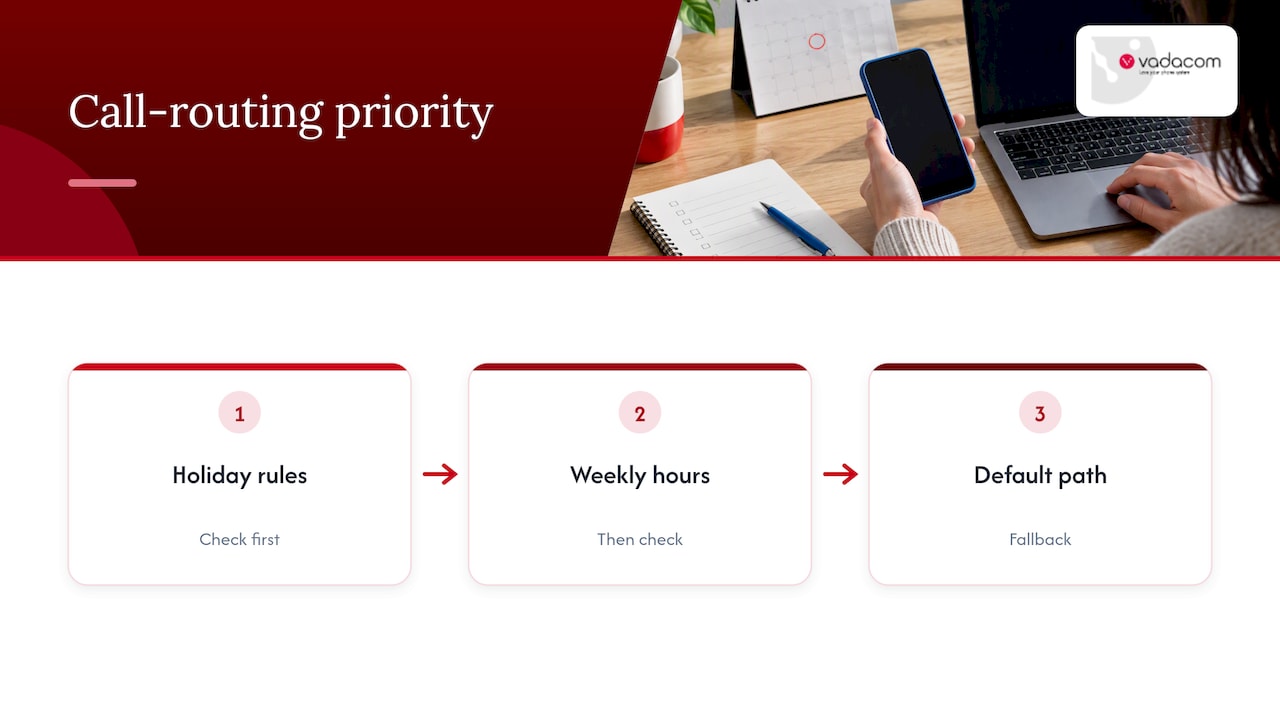
The order of priority matters. A well-built schedule checks holidays first, then the weekly hours, then falls back to a default path. If your system evaluates them the other way round, the holiday rule never gets a chance to apply.
Build the date list from official New Zealand sources
The common mistake is typing holidays in from memory or copying last year’s list. Use the official dates, and refresh the list once a year.
National public holidays are set by law and observed on specific dates, such as New Year’s Day on 1 January and Waitangi Day on 6 February, as listed on the New Zealand Government public holidays page. That page also publishes the movable ones for the coming years, so it is the right place to copy from each year.
Anniversary days are regional
Anniversary days are the ones that trip up multi-site businesses. The same government page shows that Auckland and Wellington, for instance, observe theirs on different dates in January. Employment New Zealand explains that local customs and historical precedent influence regional anniversary observances, often the Monday nearest the actual anniversary, while some regions such as Otago rely on agreements between employers and employees.
What this means for your phone system:
- One site, one region: add your region’s anniversary day as a holiday.
- Several sites in different regions: give each site or each queue its own holiday calendar, rather than one national list.
- A national team answering from home: decide which region’s anniversary day you honour for customer-facing calls, and say so in your message.
The Christmas and New Year block
The four Christmas and New Year public holidays are Christmas Day, Boxing Day, New Year’s Day and 2 January. When they fall on a weekend, the holiday moves to the next working day for people who do not normally work weekends. For a phone schedule, that means the day your office is actually closed may not be the calendar date. Check the weekday for the year, then enter the dates your team really takes off.
Many businesses also close for a stretch between those holidays, or on the working days around them. Those are your own decisions, not public holidays, so add them as custom closure dates.
Decide where each kind of call goes
Before you touch any settings, write down what should happen to each type of caller on a holiday. A short table is enough.
| Caller | Normal hours | Holiday closure |
|---|---|---|
| New customer enquiry | Reception or sales queue | Closed message, then voicemail or callback request |
| Existing customer, routine | Support queue | Closed message with reopening date and web or email option |
| Existing customer, urgent | Support queue | Option to reach an on-call mobile or after-hours service |
| Supplier or courier | Reception | Voicemail to a shared mailbox |
| Staff dialling in | Extension dialling | Same, if staff work from home |
The urgent row is the one worth thinking about most. If your business has any genuinely time-critical callers, such as an electrician, a property manager or an IT provider, the closure path needs a route to a person. A voicemail box nobody opens until 12 January is not a route.
If you have decided the answer is an on-call mobile, read our guide on call forwarding to mobile first. It covers the cost traps and when a cloud phone is the better choice. Our note on NZ call forwarding rules covers diversion scams and surprise charges, both of which are worth knowing before you forward a business line to a personal phone for a week.
Write a closed-for-holidays message that actually helps
“Closed for holidays message” is the thing most people search for on this topic, and the reason is simple: it is the one part callers hear. Most bad messages fail in the same ways. They are too long, they bury the reopening date, or they leave callers with no next step.
A good message does four things in about 20 to 30 seconds:
- Names your business, so the caller knows they reached the right place.
- Says you are closed and gives the day you reopen, including the weekday.
- Gives the urgent option, if you have one.
- Offers one way to leave a message or use another channel.
A template you can adapt
Kia ora, you’ve reached [Business name]. Our office is closed for the holiday break and we reopen on Monday [date] at [time]. If your call is urgent, press 1 to reach our on-call team. Otherwise, please leave your name, number and a short message after the tone, and we’ll call you back on our first working day. You can also email [address]. Thanks for calling, and happy holidays.
Some habits that make it better:
- Say the date, not just “in the new year”. Callers decide whether to wait or look elsewhere based on it.
- Keep the menu to one or two options. On a closure message, nobody wants five choices.
- Don’t over-promise. “We’ll call you back on our first working day” is only good if someone will. Avoid promising a time you cannot keep.
- Record it in a human voice. A calm, clear recording from a team member usually beats a robotic one.
- Match the tone to your brand. A trades business and a law firm sound different, and that is fine.
If you want ready-made wording for menus, greetings and closures, our copyable auto attendant scripts give you text you can drop into your system. If your calls pass through several menus before reaching a person, map them first with our call flow design guide so your holiday path does not leave a dead end.
Set it up: a step-by-step process
The screens differ between systems, but the logic is the same everywhere.
- Confirm your normal hours schedule. Set your weekly open hours first, in the correct time zone. Holiday exceptions only work if the base is right.
- Create a holiday calendar. Enter each closure date with a clear name, such as “Christmas Day” or “Auckland Anniversary”. Names help when you review the list in a year.
- Attach the calendar to the right call paths. Each number, queue or auto attendant that should behave differently on holidays needs the calendar linked. It is easy to update the main number and forget the support line or a direct dial.
- Choose the closure destination. Pick your closed message, then voicemail, an after-hours answering option, or an on-call number.
- Set the end point. Check whether the closure ends at midnight or at a set time. If you reopen at 8:30am on 5 January, the schedule should flip back before the first call, not after.
- Record or upload the message. Record it in advance, and keep a spare copy of last year’s version for editing.
- Save, then test. See the next section.
Reduced hours and half-days
Not every holiday is a full closure. Christmas Eve at lunchtime, or a short opening on a day between holidays, are common. If your system supports date-specific hours, use them: open 9am to 12 noon on the day, closed after. If it only supports full-day closures, add a second schedule rather than leaving the phones to ring unattended after noon.
Test before you leave
Testing is where most holiday routing failures get caught, and it takes about ten minutes.
- Call from an outside line, such as your mobile, not from an internal extension. Internal calls can bypass the schedule.
- Try every public number you advertise: main line, 0800 number, direct dials and any number on your website or Google profile. If you use one, see our guide to buying or porting an 0800 number.
- Press every menu option, including the urgent one, and confirm it reaches a live phone that is switched on and charged.
- Check voicemail delivery. Leave a message and confirm it arrives where you expect, whether that is an email, an app or a shared mailbox.
- Ask someone else to listen. You know what you meant to say, a colleague hears what you actually recorded.
- Test the switch back by temporarily setting a closure for today and confirming normal routing resumes afterwards.
If the system offers a way to preview or simulate a given date, use it for the first and last day of each closure.
Switching back to normal
The return is where silent problems appear. Schedule-based routing removes most of the risk, because the system reverts on its own, but a short checklist still pays off.
- Check the calendar for the next holiday while you are in there, so you do not rebuild everything in a rush at Easter.
- On the first working day, ring in before opening to confirm the normal greeting plays.
- Clear and answer the voicemail backlog in order, oldest first, and return urgent ones before routine ones.
- Remove temporary diversions. If someone manually forwarded the main line to a mobile, take it off. A forgotten diversion is one of the most common causes of missed calls in the week after a break.
- Update the message and calendar for the year ahead, using the government dates once they are published.
Put a recurring reminder in a shared calendar for two dates each year: late November to set up the Christmas schedule, and early January to confirm the new year’s anniversary days.
When a voicemail box is not enough
For some businesses, a closed message and voicemail are a fine answer. For others, a week of unanswered calls means lost enquiries, especially if customers ring when they have time off to book a job or make a purchase.
There are three common options beyond voicemail:
- A live after-hours answering service, which takes messages and passes on urgent ones.
- An AI receptionist, which answers, captures details and can book or route according to rules you set. Used well, AI agents answering calls take the place of the voicemail dead end, particularly for scheduling-type enquiries.
- A hybrid, where AI handles routine questions and hands urgent ones to a person.
We lay out the trade-offs in stop losing leads after hours, and our piece on call routing strategies explains why we suggest trialling AI in a governed pilot before you rely on it. A holiday period is a reasonable moment for a small pilot, because call volumes are low and mistakes are easy to review. Whatever you choose, no setup can promise every call will convert, so measure what happens and adjust.
What to check when choosing a phone system for holiday routing
If you are replacing a system, or finding the current one awkward at every holiday, these are the questions that matter:
- Can your own team edit schedules? If changes need a support ticket, holiday cut-offs become stressful.
- Are holidays separate from weekly hours? You want date-specific exceptions, not only a repeating weekly pattern.
- Can different numbers or queues have different calendars? Essential for multi-region businesses and anniversary days.
- Does it support reduced hours and half-days?
- Can you preview or test a date?
- What happens when the internet at your office goes down? A cloud system can still apply the schedule and send calls to mobiles, whereas an on-premise box in a dark office cannot.
- Who do you call when it goes wrong? Local support on a public holiday is worth more than a long feature list.
- Is there a path to AI answering later, without replacing everything?
For wider procurement criteria, our five procurement checks for remote work phone systems is a useful companion.
Our perspective: keep the rules simple
We have spent more than 20 years designing, delivering and supporting business communications in New Zealand and Australia. Holiday routing is rarely a technology problem. It is almost always a process problem: nobody owned the calendar, nobody tested the message, or the setting lived in one person’s head.
Our advice is to treat the call schedule like a rostering document. Give it an owner and a backup, review it twice a year, and keep the logic plain. One closure path, one urgent option, one clear message. Every extra branch is another thing to test and another place for a caller to get stuck.
We also think the tools should be easy enough for the person who knows the business to run them. That is why NextVoice has self-service administration and individual call-flow management: the office manager can change a schedule without waiting for us. And when you want us involved, our local team is here, not offshore.
— Stuart
How Vadacom can help
NextVoice is our cloud business phone system, built on AWS with multiple availability zones. It includes extension dialling, call transfer, voicemail, in-app call recording and configurable call flows, so your holiday paths sit alongside everything else you manage. If you want calls answered instead of sent to voicemail, we also offer a locally supported AI answering service and optional AI Call Intelligence.
Still on an older on-premise system? Our technical audit looks at what you have today and what a move would involve. To see the platform, start at NextVoice, or talk to us through vadacom.com.
FAQ
How far ahead should I set up holiday call routing?
Aim for at least a week before your closure, so you have time to test every number and fix mistakes. Enter the whole year’s dates once the official list is available, so later holidays are already in place.
Do I need to include regional anniversary days?
Yes, if your business or staff are in that region. Anniversary days are set by region, so Auckland and Wellington differ, and some regions such as Otago rely on agreements between employers and employees. Check the official dates and your own team’s arrangements.
Should I route calls to voicemail or forward them to a mobile?
Voicemail suits non-urgent calls and is the simpler option. Forwarding to a mobile makes sense only for a clearly urgent path with a named person on call. Check any carrier charges first, and see our guide on call forwarding to mobile.
What should a closed-for-holidays message say?
It should name your business, say you are closed, give the date and day you reopen, and offer one next step. Add an urgent option only if someone will answer it. Keep it under 30 seconds.
Sources
- Dates for public holidays and anniversary days, New Zealand Government
- Public holidays and anniversary dates, Employment New Zealand
- Public holidays over Christmas and New Year, New Zealand Government