

For most small and mid-sized New Zealand businesses, a hosted (cloud) PBX is the easier fit. You pay a recurring fee, the provider runs the platform, and staff can take calls from the office, home or a mobile. An on-premise PBX still makes sense when you need tight local control, have in-house technical staff and a stable site. The right answer depends on your headcount, your sites, your internet and what happens to your calls when something fails. This guide walks through each of those, so you can decide on facts rather than on a sales pitch.
TL;DR
- A hosted PBX is a managed service in the cloud. An on-premise PBX is equipment you own, house and maintain yourself.
- Hosted usually wins on remote work, scaling and low upfront cost. On-premise can win on local control and customisation, at the price of capital spend and in-house upkeep.
- Neither is automatically more reliable or more secure. Check failover, backups, access control and tested recovery, whichever you pick.
- Compare total cost over three to five years, not the monthly fee against the hardware invoice.
- If you are unsure, start with an audit of your current system before you commit to a replacement.
Table of Contents
- What the terms actually mean
- Hosted PBX vs on-prem: the practical differences
- Cost: compare the whole bill, not one line
- Reliability and continuity
- Security and privacy
- Remote and hybrid teams
- Features, collaboration and AI
- When each option makes sense
- Our perspective
- How Vadacom can help
- A simple way to decide
- FAQ
- Sources
What the terms actually mean
A PBX (private branch exchange) is the system that routes calls inside your business and out to the public network. It gives you extensions, transfers, voicemail and call flows such as “press 1 for sales”.
An on-premise PBX uses dedicated hardware or software installed at your site. TechTarget describes the traditional model as dedicated equipment on the premises, and a cloud PBX as the same function delivered as a managed service running in the cloud.
A hosted PBX and a cloud PBX are often used as synonyms in New Zealand. Some vendors draw a line: “hosted” can mean an older design where a provider runs a dedicated PBX for you in a data centre, while “cloud” suggests a multi-tenant platform built for the cloud from the start. When you compare quotes, ask which design you are actually buying, because it affects scaling and resilience. You will also see “PABX” in older documents. It is the same idea with an older name.
If you want a deeper walk-through of the cloud model, our guide on what cloud PBX is and how to pilot it covers the basics.
Hosted PBX vs on-prem: the practical differences
| Area | Hosted / cloud PBX | On-premise PBX |
|---|---|---|
| Where it runs | Provider’s cloud platform | Hardware or server at your site |
| Upfront cost | Low, mostly handsets or apps | Substantial: equipment, licences, installation |
| Ongoing cost | Recurring subscription | Maintenance, upgrades, specialist call-outs, power and space |
| Updates | Provider applies them | You schedule and apply them |
| Adding users | Through a web portal | Often needs licences, ports or hardware |
| Remote and hybrid staff | Built in, via apps and browsers | Possible, but needs extra configuration |
| Control and customisation | Within the platform’s features | Highest, if you have the skills |
| Single point of failure | Internet connection and provider | Site power, hardware and your own recovery plan |
These differences are well established. TechTarget notes that cloud systems use phones or apps connected over the internet with a cloud interface for user changes, while on-premise equipment needs manual updates and specialist repairs. New Zealand trade publication IT Brief makes the same point from a local angle: with on-premise VoIP the business must own, administer and maintain its IP-PBX equipment and software.
That article is from 2015, so treat its technology comments with care. The trade-off it describes still holds. It says on-premise systems can offer greater control, quality-of-service management and customisation, but bring substantial start-up costs, limited flexibility and scalability, and a need for in-house maintenance resources.
Cost: compare the whole bill, not one line
The most common mistake is comparing a monthly subscription with a one-off hardware quote. They are different shapes of spending, so put both on the same timeline, usually three to five years.
For an on-premise PBX, include:
- The PBX hardware or server, licences and handsets
- Installation and configuration
- Annual support or maintenance contracts, and call-out fees for faults
- Upgrades when software or hardware reaches end of life
- Backup power, rack space and cooling if applicable
- Your own staff time, or a contractor’s, to administer it
- Lines or SIP trunks for calling, plus the connectivity itself
For a hosted PBX, include:
- The per-user or per-plan subscription
- Handsets, headsets or app rollout, if you want desk phones
- Calling charges or bundles
- Optional extras such as call recording, AI features or extra numbers
- Internet upgrades if your current connection is thin
- Setup and migration help, including number porting
Published New Zealand prices vary widely because they depend on user count, simultaneous calls, hardware, connectivity and support. We have not found a reliable single “typical” figure worth quoting, and any article that gives you one is simplifying. Get two or three written quotes on identical requirements and compare the totals.
On-premise looks cheaper in year four or five only if the hardware is still serving you well and nobody needs to touch it. Costs tend to show up when you add a site, replace ageing equipment or pay a specialist to fix a fault. If you are also weighing up legacy copper lines, our piece on VoIP vs landline over three years shows how to build that comparison.
Reliability and continuity
People assume cloud is riskier because “the internet can go down”, or that on-premise is safer because “it’s in our building”. Neither is reliably true.
The New Zealand Department of Internal Affairs frames cloud decisions as a case-by-case assessment: classify your information, assess security and privacy risks, and review the provider’s controls and assurance. The same guidance says cloud users should check the provider’s business-continuity and disaster-recovery plans, including whether data recovery is covered and whether the plans are regularly tested. That guidance dates from 2014, so use it as a framework for questions rather than as a current standard.
Here is how the two models fail differently:
- Hosted PBX can offer provider-side redundancy and failover, but your calls depend on your local internet and on the provider staying up. If your fibre drops, your desk phones drop with it unless you have a backup path.
- On-premise PBX can keep internal calling and local dial tone through an external outage, but it depends on site power, the hardware itself, your network redundancy and your own recovery plan. If the one server fails and nobody has tested the restore, you are down.
Questions worth asking either way:
- What happens to inbound calls if our internet or power fails? Can calls divert to mobiles automatically?
- Does the platform run across more than one availability zone or site?
- What does the SLA actually measure, and what is the remedy if it is missed?
- When was recovery last tested, and by whom?
- Who is responsible for emergency (111) calling and location details?
The last point matters more than most buyers expect. Our comparison of UCaaS and VoIP covers quality of service, resilience and emergency call ownership in more detail.
Security and privacy
Location does not determine security. A well-run cloud platform can be stronger than a PBX in a cupboard that has not been patched for three years, and a carefully maintained on-premise system can beat a poorly governed service.
What matters is the control set. DIA’s guidance for offshore-hosted office productivity services lists the areas to check: encryption, access control, backup, archiving, recovery, incident management, decommissioning and third-party assurance. Those apply neatly to a phone platform, particularly if you record calls or store voicemail.
Practical checks:
- Is traffic encrypted, and are admin accounts protected with multi-factor authentication?
- Where are recordings and voicemail stored, and who can access them?
- How are call recordings retained and deleted, and does that fit your obligations under the Privacy Act 2020?
- Is there monitoring for toll fraud, which hits both models?
Our VoIP security best practices for NZ businesses article turns these into a working checklist.
Remote and hybrid teams
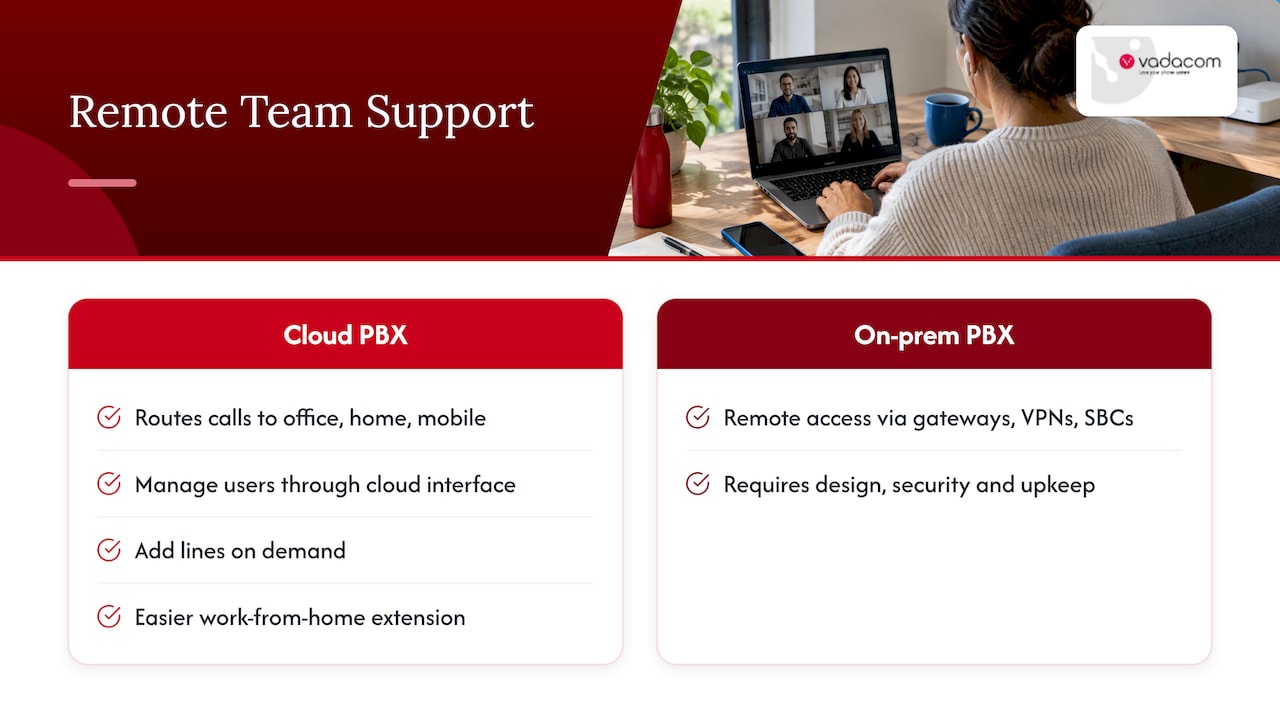
This is where the two models separate most clearly. A cloud PBX can route calls to staff in the office, at home or on a mobile, and managers can add, change or remove users through a cloud interface, as TechTarget explains. TechTarget also says cloud lines can be added on demand and extended to work-from-home users more easily.
On-premise systems can support remote staff too, usually through extra gateways, VPNs or session border controllers, which someone has to design, secure and keep working. For a business with a mix of office, home and field staff, that overhead adds up.
If remote work is a big part of your picture, read our five procurement checks for remote work phone systems. If staff want to take calls without installing anything, see how browser-based phones work.
Features, collaboration and AI
A traditional PBX mainly supplies telephony. Modern cloud PBX platforms may add video, text messaging, screen sharing and collaboration, integrate with CRM or help-desk tools, and some providers offer AI transcription, summaries, coaching and analytics, per TechTarget.
That matters if you want an AI receptionist or smarter call routing. Cloud platforms receive these features as service updates. On an on-premise box, you would normally need an add-on, an upgrade or a separate system. Even so, we would not rush into AI features. Map your calls first, then add automation where it helps. Our guides on call flow design and why AI call routing should wait for a governed pilot set out a sensible order. If you are still listing requirements, the seven phone system features NZ businesses should check is a good starting list.
When each option makes sense
Hosted PBX tends to suit you when:
- You have fewer than a few dozen users, or you are growing or shrinking
- You have more than one site, or staff who work from home or on the road
- You do not have a dedicated telephony or network person
- You want to avoid a large upfront outlay
- You want features such as call recording, video meetings or AI tools without extra boxes
On-premise PBX tends to suit you when:
- You have specialist integrations or call handling that a cloud platform cannot match
- You have a single stable site, strong in-house IT skills and good power backup
- You have strict requirements on where equipment and data physically sit
- Your existing hardware is recent, supported and doing its job
A hybrid can work if you have one site that must keep local dial tone and a scattered team that needs the cloud. It is more complicated to run, so treat it as a deliberate choice rather than a default.
Our perspective
We have spent more than 20 years designing, delivering and supporting business communications in New Zealand and Australia, and the pattern we see is consistent. Businesses rarely regret moving to the cloud because of the technology. They regret it when the migration was rushed, the internet was not ready, or nobody owned the call flows.
So we start with an audit. Before anyone recommends a replacement, we look at what you have: how old the hardware is, how calls actually move, which numbers and lines you rely on, and what your internet can carry. Sometimes the answer is to move everything to the cloud. Sometimes it is to stage the move, or to keep a system a while longer. We would rather tell you that than sell you a migration you do not need yet.
We also think most businesses want the essentials done well: extension dialling, transfers, voicemail, recording and sensible call flows, with admin that a non-specialist can manage. A platform built on AWS across multiple availability zones gives you resilience you would struggle to afford on your own. But resilience is a shared job. Your connectivity, your power and your handset choices still matter, and we would be wary of anyone who promises you an outage-free service.
Local support is the other half. When something goes wrong at 8:55 on a Monday, you want someone in your time zone who knows your setup.
— Stuart
How Vadacom can help
NextVoice is our cloud business phone platform, built on AWS and designed for New Zealand and Australian businesses. It includes extension dialling, call transfer and announced transfer, voicemail, in-app recording and individual call-flow management, and your team can use it across the office, home and other locations on the devices they prefer. Administrators can manage users and settings as needs change. NextMobile extends this to mobile use, and optional AI Call Intelligence adds insight from recorded calls for teams that want it.
You can see how it fits on the NextVoice and NextMobile page.
If you already run an on-premise system and are not sure whether to replace it, our technical audit is the place to start. It reviews what you have before any decision is made, and it leads into a staged upgrade plan if you choose to move. If you want an AI receptionist for after-hours calls, see our after-hours phone answering approach, which combines AI and human support. No platform can guarantee particular results, so we scope each project against your own call patterns and requirements.
A simple way to decide
Work through these steps in order:
- List your users and sites. Include home workers, mobiles and anyone who travels.
- Audit what you have. Note hardware age, support status, lines and numbers, and any integrations.
- Test your connectivity. A cloud phone is only as good as the network under it. Check bandwidth, redundancy and whether voice traffic is prioritised. If calls or video stutter, our video call lag tests help you diagnose it.
- Define your failure plan. Decide what must keep working in an outage, then ask each provider to show how they handle it.
- Price three to five years. Use the cost lists above, and get written quotes on the same specification.
- Check security and privacy. Use the DIA-style questions on encryption, access, backup and tested recovery.
- Pilot before you commit. A small group on the new system exposes problems cheaply.
FAQ
Is hosted PBX the same as cloud PBX?
Often, in everyday use, yes. Some vendors reserve “hosted” for an older model where a provider runs a dedicated PBX for you in a data centre, and “cloud” for a multi-tenant platform built for the cloud. Ask the provider how their service is built and how it scales.
Is an on-premise PBX more secure than a cloud PBX?
Not automatically. Security depends on encryption, access control, monitoring, backups and tested recovery, not on where the equipment sits. DIA guidance recommends assessing risks case by case and reviewing the provider’s controls, which applies to both models.
What happens to a hosted PBX if the internet goes down?
Calls to desk phones and apps that rely on that connection will be affected. Good setups include a backup connection, such as a second line or mobile data, and automatic diversion of inbound calls to mobiles. Ask any provider to show you the failover plan before you sign.
How much does a cloud phone system cost in New Zealand?
It depends on user numbers, concurrent calls, handsets, calling needs, connectivity and support, so published figures vary a lot. The reliable way to compare is to request written quotes against the same specification and add up three to five years of costs for each option, including your own admin time.
Can I move from on-premise to hosted in stages?
Yes. Many businesses audit their system first, pilot with a small group, then move sites or teams in phases while keeping numbers ported across. That limits disruption and gives you time to fix issues early.
Sources
- What is cloud PBX (private branch exchange)? (TechTarget)
- VoIP: On-premises, hybrid or hosted? (IT Brief New Zealand)
- Cloud Computing: Information Security and Privacy Considerations (NZ Department of Internal Affairs)
- Security Requirements for Offshore-Hosted Office Productivity Services (NZ Department of Internal Affairs)