

Good business phone support means a real person who knows your system answers when something breaks, in your time zone, and stays with the problem until it is fixed. It also means the phone system itself is simple enough that you need to ring for help less often. At Vadacom, that is how we build NextVoice: a cloud phone platform designed, delivered and supported locally across New Zealand and Australia, with essential features that teams can manage themselves.
The phrase “business phone support” gets used for two different things, and the first job is to separate them. Then we cover what local support should include, how to judge a provider, what to budget for, and where AI receptionists and AI voice tools fit.
TL;DR
- “Business phone support” can mean help with your phone system, or customer service your business delivers by phone. This guide covers the first, with a short section on the second.
- Local support means people in your region, who understand your carriers, numbers and working hours, and who own a fault from first call to fix.
- Judge a provider on reliability architecture, ease of administration, scalability, security and how faults are escalated, not on the feature list alone.
- Budget for subscriptions, number porting, handsets or apps, calling and support. Ask for each in writing.
- AI answering and call analysis work best when a person can take over and when you start with a defined pilot.
Table of Contents
- Two meanings of business phone support
- What local phone support should mean
- What a good provider supports on the system itself
- How to judge a provider’s support and reliability
- What phone support costs
- When customers call you: support teams and phone systems
- AI receptionists and voice tools: where they help
- Our view
- Moving to NextVoice
- FAQ
- Sources
Two meanings of business phone support
Search results for this phrase mix two very different topics.
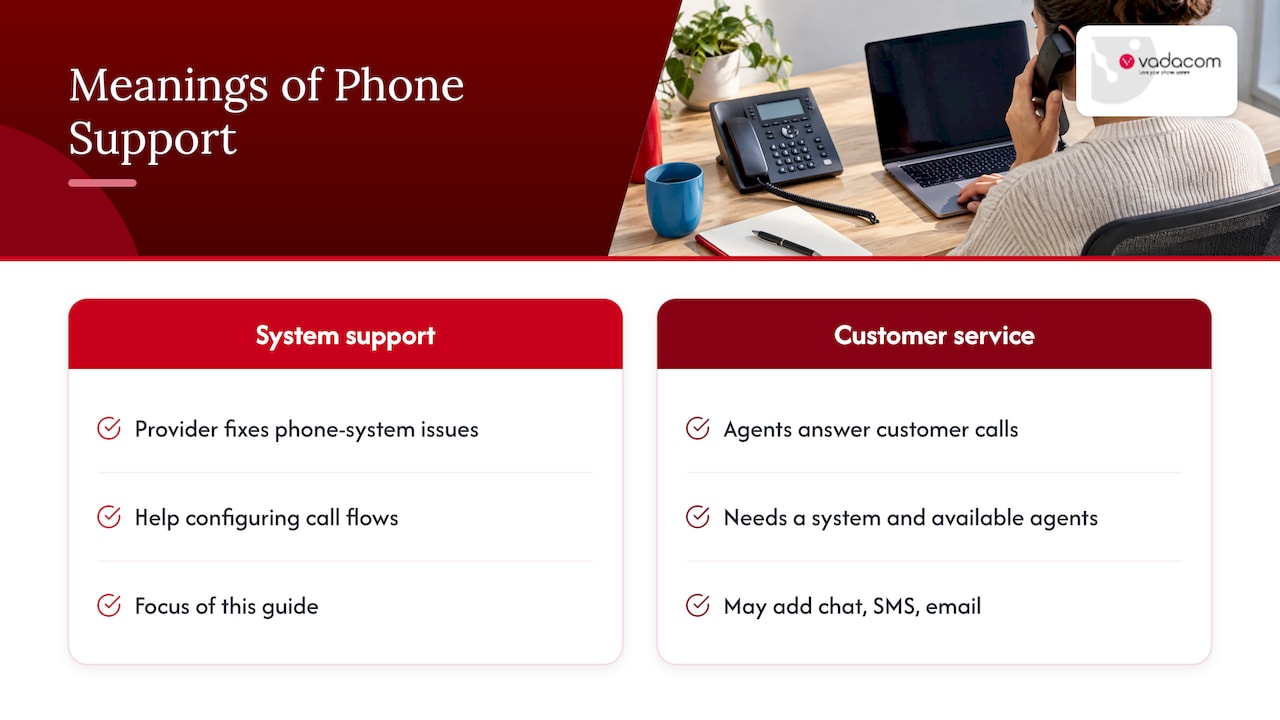
Support for your business phone system. Your phones stop ringing, a transfer drops callers, a new starter needs an extension, or you need to change what happens after hours. You want a provider who fixes it and helps you configure it. This is the meaning most owners, operations managers and IT managers have in mind, and it is the focus here.
Customer support delivered by phone. Your customers call you with questions, complaints or orders. Freshworks describes phone support as customers calling a company to speak directly with agents, and notes it is resource-intensive because it needs both a phone system and agents available to answer. Salesforce draws a line between a call centre, which handles service over the phone only, and a contact centre, which adds channels such as chat, SMS, email and social media.
The two connect. Your customer-facing phone support is only as good as the system underneath it. If calls land on the wrong desk, voicemail goes unchecked or nobody can transfer a caller properly, no amount of staff training fixes it. So the first question for most small and mid-sized organisations is whether the phone system and the people behind it are dependable.
What local phone support should mean
“Local” is easy to claim and worth testing. For an Australian or New Zealand business, it should cover five things.
- Your time zone. Australia spans several time zones, and New Zealand is a further step ahead. A provider working from another continent may be fast on paper and asleep when your Perth office opens or your Auckland team starts the day. Ask which hours a person answers the support line and where those people sit.
- Local numbers and carriers. Porting a number, setting up 1300 or 1800 numbers, or sorting out a carrier issue is quicker when the provider deals with local networks every day.
- Local rules. Emergency calling, number portability and consumer-facing obligations are set by local regulators. A provider that works in your market should be able to explain how emergency calls behave on a cloud service before you sign. Our guide to UCaaS versus VoIP and emergency call ownership explains what to ask.
- One accountable team. When a fault could sit with the platform, the carrier or your own network, someone has to own the investigation. Local support should mean you are not bounced between a reseller, an overseas help desk and a carrier.
- People who know your setup. A team that understands your call flows can fix a problem in one conversation instead of asking you to explain it again.
Vadacom has more than 20 years of local development, delivery and support across New Zealand and Australia. Hands-on local support is a core part of our positioning against global platforms, where support often runs through ticket queues and general help articles.
What a good provider supports on the system itself
Support quality depends partly on how much the system asks of you. A platform that focuses on the essential features is easier to run, easier to train staff on and easier to support. The everyday capabilities most businesses rely on are:
- Extension dialling, so staff reach each other with short numbers whether they are in the office or at home.
- Call transfer and announced transfer, where the person transferring tells the new recipient who is calling before connecting them. This is a small thing that customers notice. See call transfer methods for the options.
- Voicemail that reaches the right person.
- In-app call recording, useful for training, disputes and quality checks.
- Individual call-flow management, so you decide where calls go during the day, after hours and when a line is busy.
Cloud platforms generally suit distributed teams. Forbes Advisor’s cloud phone review notes that because the system lives in the cloud, remote staff can be added by purchasing a new subscription, and phone numbers can be assigned quickly. Its hosted PBX review found that hosted systems support remote, hybrid or in-person teams and that most include IVR menus, call queues and ring groups. IVR means the automated menu that says “press 1 for sales”.
Features that get calls to the right person are where support questions most often arise. Ring groups, call pickup and time-of-day routing are simple in principle and easy to misconfigure. Our call pickup groups checklist covers what an administrator should verify.
How to judge a provider’s support and reliability
A feature list tells you what a system can do. These five checks tell you how it will behave when you depend on it.
Reliability
Ask how the platform is built, not just what uptime is promised. NextVoice runs on a telco-grade cloud architecture on AWS and supports multiple availability zones, meaning the service is spread across separate data-centre locations rather than sitting in one. Ask any provider the same question and ask what happens to calls if one location fails. If call quality is the worry, read our five-step VoIP QoS guide. QoS, or quality of service, is how your network prioritises voice traffic so calls do not sound choppy.
Usability
Can a non-specialist add a user, change a call flow or set up a ring group without raising a ticket? Self-service administration reduces how often you need support at all. NextVoice lets customers manage users and communication settings as their needs change.
Security
Ask where the platform is hosted, how access is controlled and how recorded calls are stored. For recording, also confirm your own obligations to tell callers they are being recorded; your legal adviser can confirm what applies to your business.
Scalability
Adding ten staff next quarter, or a second site, should be an administrative task, not a project. Cloud subscriptions are built for that. Without on-premise hardware, there is no extra cabinet to buy and no engineer visit for each new extension.
Support itself
Before signing, ask these questions and get the answers in writing:
- Which hours is a person available, and in which time zone?
- Who answers: the provider’s own team or a third party?
- How is a fault escalated, and who tells you what is happening?
- Who handles number porting, and what happens to your existing service during the switch?
- Is onboarding included, and who trains your staff?
The same logic applies when a provider takes calls on your behalf. One outsourcing guide makes the point that the provider supplies people and process, but the business still owns its policies and customer promises, so it is worth checking identity-check procedures and who owns a callback when the first agent cannot finish the task.
What phone support costs
No single figure fits every business, and we do not publish NextVoice pricing on our site, so we will not quote one here. What you can do is list the cost lines and ask each provider to price them separately.
| Cost line | What to ask |
|---|---|
| Per-user subscription | What is included per user, and how does billing change when you add or remove people? |
| Number porting and setup | Is moving your existing numbers handled for you, and is there a charge? |
| Handsets or apps | Can staff use desk phones, a mobile or a browser-based app? |
| Calling | Which call types are included, and which are charged separately? |
| Support | Is support included, or tiered? What are the hours? |
| Optional extras | Call recording, AI features and extra call flows: which are add-ons? |
Cloud systems avoid much of the upfront cost of on-premise equipment. Our VoIP versus landline comparison and VoIP ROI guide show how to build the comparison against your current bills. Call forwarding to mobile is another line that often catches businesses out, so check how those calls are billed.
Adaptable billing is part of our positioning: a business whose headcount moves up and down should not be locked into a plan sized for last year.
When customers call you: support teams and phone systems
If your real question is how to run customer support by phone, the phone system sets the ceiling. A support team needs reliable routing, a queue that callers understand, recordings for coaching and a way to see what happened on a call. This after-hours call handling guide shows how defined workflows decide what happens to a call when nobody is at a desk. For wider context on how phone sits beside other channels, this overview of omnichannel customer experience is a good starting point.
A practical routine for a small team:
- Decide who owns each type of call: sales, service, accounts.
- Set a call flow for business hours, after hours and busy periods.
- Agree how a transfer works so callers never repeat themselves.
- Record calls for coaching and review them on a schedule.
- Decide in advance when a call must go to a person and who that person is.
If missed calls after hours are your problem, see how after-hours phone answering combines AI and human handling.
AI receptionists and voice tools: where they help
Many of our readers ask about AI receptionists and AI voice tools as part of the same decision. They fit into phone support in three ways.
Answering and routing. An AI answering service can greet callers, collect their details and route them or take a message when staff are busy or away. Our AI auto attendant guide covers how it works with a cloud phone system. For how the technology turns speech into completed tasks, read how AI voice agents work.
Analysing calls. AI Call Intelligence is optional and gives deeper insight from call recording and analysis. For summaries specifically, see AI call summaries and what to check first.
Improving internal systems. Recorded and analysed calls show which questions repeat, where callers drop out and which call flows need changing. That helps operations managers fix the process, not just the symptom.
Two principles keep these tools useful. First, define when a call hands off to a person, such as a complaint, an urgent request or a caller who asks for one. Second, start with a governed pilot on a limited set of calls before widening it; our call routing strategies guide explains the approach. We cannot promise any particular result, because outcomes depend on your call volumes, your call flows and how the tool is configured.
Our view
Most of the support calls we hear about are not really about faults. They are about a system that is harder to run than it needs to be: a menu nobody dares change, a transfer that drops callers, a new starter who waits days for an extension.
That is why we build NextVoice around the essentials: extension dialling, transfer and announced transfer, voicemail, in-app recording and call flows you can manage yourself. Fewer moving parts mean fewer things to go wrong and quicker fixes when something does.
We also think support should be local. Our team has delivered and supported communications across New Zealand and Australia for more than 20 years, and we would rather you reach someone who knows your setup than a general help desk.
On AI, our advice is to start small. Pick the calls where an answering service or call analysis adds value, keep a person one step away, and widen the scope as you learn what works.
Stuart
Moving to NextVoice
If your current system is ageing, hard to change or tied to hardware on site, NextVoice gives your team one platform for office, home and other locations, on the devices that suit how they work. It scales with your business without on-premise equipment or heavy upfront investment, and our local team supports it. If you want to understand where you stand first, our technical audit reviews your existing setup before you decide anything.
See NextVoice and NextMobile, the technical audit for older phone systems, or our AI answering service.
FAQ
What does business phone support usually include?
It typically covers fault fixing, user and number changes, call-flow configuration and help with porting numbers. Some providers also include onboarding and training. Ask for the hours, the response process and what is included in the subscription in writing.
Is local phone support really better for an Australian business?
It helps where your hours, carriers and rules differ from those of a distant help desk. A local team can answer during your working day and understands local numbers and emergency call arrangements. Vadacom supports businesses across New Zealand and Australia from a local team.
Can remote and hybrid staff use the same phone system?
Yes. A cloud phone system lets staff make and receive calls from any internet-connected device, so a home worker uses the same extension and call flows as the office. Forbes Advisor’s review notes that remote staff can be added by adding a subscription. Our remote work phone system checks list what to confirm.
Should an AI receptionist replace my reception team?
It is better treated as an extra layer that handles routine calls and gives your team time for the rest. Set clear rules for when a call passes to a person. Start with a limited pilot and review the results before widening it.
How do I know my phone system is reliable enough?
Ask how it is hosted, whether it spans multiple availability zones and how faults are escalated. Then test call quality on your own network. Our VoIP QoS guide shows how.
Sources
- Customer support: defined and explained
- What is a Call Center? Types, Benefits and More
- Cloud phone systems review
- Hosted PBX services review
- Customer support outsourcing: how to choose a provider
- After-hours call handling setup guide
- Omnichannel marketing and customer experience