

A VoIP ROI analysis compares what a cloud phone system costs you over its whole life with the savings and productivity gains it produces, then expresses the difference as a return and a payback period. Done properly, it takes an afternoon and a spreadsheet. The hard part is not the arithmetic. It is finding your real current phone costs, being honest about which benefits are measurable, and counting the work needed to make your network ready.
This guide walks through the method step by step, with a worked example you can copy, the costs people forget, and the factors that can shrink your return. It is written for New Zealand business owners, operations managers and IT managers who need to put a number in front of a decision maker.
TL;DR
- ROI for VoIP is total benefits minus total costs over a set period, divided by the costs. Payback is the time it takes for cumulative savings to cover what you spent.
- Use total cost of ownership, not the monthly subscription price. Include network preparation, handsets or apps, migration, training and the cost of the old system you are replacing.
- Separate hard savings (call charges, line rentals, admin time) from soft benefits (productivity, faster response). Put a dollar figure on soft benefits only with assumptions you can defend.
- Network readiness, outages and rushed migration are the main things that erode returns. Test before you commit.
- No analysis can guarantee a result. Treat your figures as a range and revisit them after six to twelve months.
Table of Contents
- What VoIP ROI actually measures
- Start with outcomes, then measure the technology
- Step 1: Establish your baseline
- Step 2: Count every cost over the whole life
- Step 3: Identify the savings and benefits
- Step 4: Work the numbers
- What can reduce your VoIP return
- Adding AI answering to the analysis
- Our perspective
- Get your own numbers
- FAQ
- Sources
What VoIP ROI actually measures
Return on investment is a simple ratio: (total benefits minus total costs) divided by total costs, over a period you choose, usually three to five years. A related measure, payback period, asks how many months of savings it takes to recover the up-front spend.
The TechTarget business-case guide for VoIP frames it as an investment decision: expected returns minus implementation cost, spread over the time required. It recommends starting with a spreadsheet of costs and returns, and adding time-value-of-money rows where the amounts are material. For most small and mid-sized businesses on a three-year view, a plain year-by-year table is enough.
A cost-benefit analysis is the same exercise with a wider lens. It lists every cost and every benefit, including ones that are hard to price, and asks whether the total favours the change. If a reader searches for “VoIP cost benefit analysis” or “return on investment”, this is what they are after: one table, two columns, honest numbers.
Start with outcomes, then measure the technology
Before you open the spreadsheet, write down what you want the phone system to do. NZBusiness Magazine’s guidance on unified communications is to begin with the outcomes you want, such as better customer interactions, worker productivity, lower costs and better information flow, and then judge the technology against them.
For a New Zealand SMB, typical outcomes look like this:
- Staff in the office, at home and on the road all answer the same business number.
- Calls reach a person or a sensible fallback rather than ringing out.
- Adding or removing a user takes minutes, not a technician visit.
- Phone costs are predictable and no longer tied to a box in a comms cupboard.
Each outcome should map to a line in your analysis. If an outcome cannot be tied to a cost or a measurable benefit, keep it as a note, not a number.
Step 1: Establish your baseline
The baseline is what your current phone setup costs today. It is the step most analyses get wrong. Management Magazine NZ has pointed out that the cost of an existing PBX is often buried in operational and infrastructure budgets, which makes the starting point hard to establish. The article is older, but the problem has not gone away.
Gather twelve months of data for each of these:
- Line rentals and call charges, by site, from your invoices.
- Mobile spend used for work calls, including forwarding from the office number to mobiles. Our guide on call forwarding to mobile explains where those fees creep in.
- PBX maintenance contracts, support call-outs and licence fees.
- Power, cooling and rack space used by on-premise equipment.
- Internal time spent on moves, adds and changes, such as a person relocating desks or a new starter needing an extension.
- Any planned hardware refresh in the next three to five years.
If an item is shared with other systems and you cannot split it out, estimate a percentage and write the assumption next to it. Someone reviewing your business case will ask where the figure came from.
Step 2: Count every cost over the whole life
The New Zealand Government’s procurement guidance on total cost of ownership is a useful frame, even for private firms. It defines TCO as the total cost of goods or services over their whole life: the purchase price plus other costs, less any income received. It also stresses that decisions should rest on whole-of-life value rather than the initial price. Its cost categories include initial equipment and installation, operating and maintenance costs, technology refresh, and disposal or resale value.
Applied to a cloud phone system, your cost list looks like this:
| Cost category | What to include | Typical timing |
|---|---|---|
| Subscription | Per-user or per-line fees, add-ons such as call recording or AI features | Monthly, recurring |
| Handsets and devices | Desk phones, headsets, or none if staff use apps on laptops and mobiles | One-off, then refresh |
| Network preparation | Switch or router upgrades, QoS configuration, Wi-Fi fixes, backup connection | One-off |
| Migration | Number porting, call flow design, testing, parallel running | One-off |
| Training and change | Staff time to learn the system, internal documentation | One-off |
| Admin | Time spent managing users and settings | Ongoing |
| Exit of old system | Early contract termination, disposal or resale of the PBX | One-off |
The Management Magazine piece noted that the largest implementation expense can be preparing the data network for reliable voice and integrating communications applications. Do not assume the network is ready. Our guides on VoIP bandwidth requirements and QoS for VoIP show how to test first, so that this line is a measured figure and not a surprise.
If video meetings are part of the plan, price them too. Our video conferencing cost breakdown shows how quickly licences, rooms and hardware add up when they are bought separately.
Step 3: Identify the savings and benefits
Split benefits into two groups, as the TechTarget guide suggests: hard cost savings and soft benefits such as productivity. Quantify the bottom-line savings first, and keep the two groups visibly apart in your table.
Hard savings
These show up on an invoice or a payroll line, so they are the ones a finance manager will accept:
- Call charges and line rentals. Consolidating lines and moving to bundled calling usually cuts these. Compare against your twelve-month baseline, not a list price.
- Maintenance and support contracts for on-premise equipment that you retire.
- Admin time. Self-service user management replaces technician call-outs for changes.
- Mobile and forwarding costs that fall away when staff use an app on the business number.
For scale, a Telecom estimate reported by the NZ Herald suggested businesses using VoIP could cut capital expenditure and call charges by 10 to 30 percent and phone administration costs by 90 percent. That was a 2006 projection, made when the technology and pricing were very different. Use it to see which cost lines tend to move, not as a figure for your business. Your own invoices are the evidence that matters.
For a side-by-side look at the cost of traditional lines against cloud calling, see our VoIP vs landline comparison.
Soft benefits
These are real but harder to price:
- Productivity. The same NZ Herald report said collaboration and conferencing could lift productivity. If you want to count it, state the assumption plainly: for example, 10 minutes saved per person per week on finding colleagues and transferring calls, multiplied by loaded hourly cost.
- Customer response. Better call routing can mean faster answers. Track answered-call rate and abandoned calls before and after, and only then attach a value.
- Resilience and continuity. If your office is unavailable, can calls still be answered elsewhere? Value this by what a day of missed calls costs you.
- Flexibility. Adding a temporary user or a new site without hardware.
A good rule: show your ROI twice, once on hard savings only and once including a conservative soft-benefit estimate. If the case works on hard savings alone, it is strong. If it only works with soft benefits, say so openly.
Step 4: Work the numbers
Here is an illustrative example. These are assumed figures to show the method, not Vadacom prices or results. Replace every number with your own.
A 25-person business, evaluated over three years:
| Item | Year 1 | Year 2 | Year 3 |
|---|---|---|---|
| Current costs avoided (lines, calls, PBX maintenance, mobile forwarding) | $30,000 | $30,000 | $30,000 |
| Admin time saved | $2,500 | $2,500 | $2,500 |
| Total benefits | $32,500 | $32,500 | $32,500 |
| Cloud subscription | $18,000 | $18,000 | $18,000 |
| Network preparation and migration | $9,000 | $0 | $0 |
| Headsets and training | $3,000 | $0 | $0 |
| Total costs | $30,000 | $18,000 | $18,000 |
| Net benefit | $2,500 | $14,500 | $14,500 |
Three-year benefits are $97,500 and three-year costs are $66,000. Net benefit is $31,500, so ROI is 31,500 divided by 66,000, about 48 percent over three years.
Payback: the cumulative net benefit turns positive in year one in this example, so payback is under twelve months. That only works because the example has meaningful current spend to remove. If your existing system is cheap and recently bought, payback will be much longer, and that is a valid finding.
Test the result
Run the same table three times:
- Cautious case. Benefits 25 percent lower, migration costs 25 percent higher.
- Expected case. Your best estimates.
- Upside case. Only if you can name what would make it happen.
If the cautious case still pays back inside your tolerance, the decision is robust. If it does not, find out which assumption drives the gap before going further. If amounts are large or spread over many years, add discounting as the TechTarget guide suggests.
What can reduce your VoIP return
Benefits only arrive if the system works well. These are the factors that most often cut returns.
Network readiness and call quality
Poor jitter, packet loss or congested Wi-Fi turns a cost saving into a complaint. Work through our VoIP jitter tests and the 30 ms benchmark and the HD voice codec guide before go-live, and budget for fixes. The TechTarget guide likewise treats network readiness as one of the main risks to weigh against returns.
Internet outages
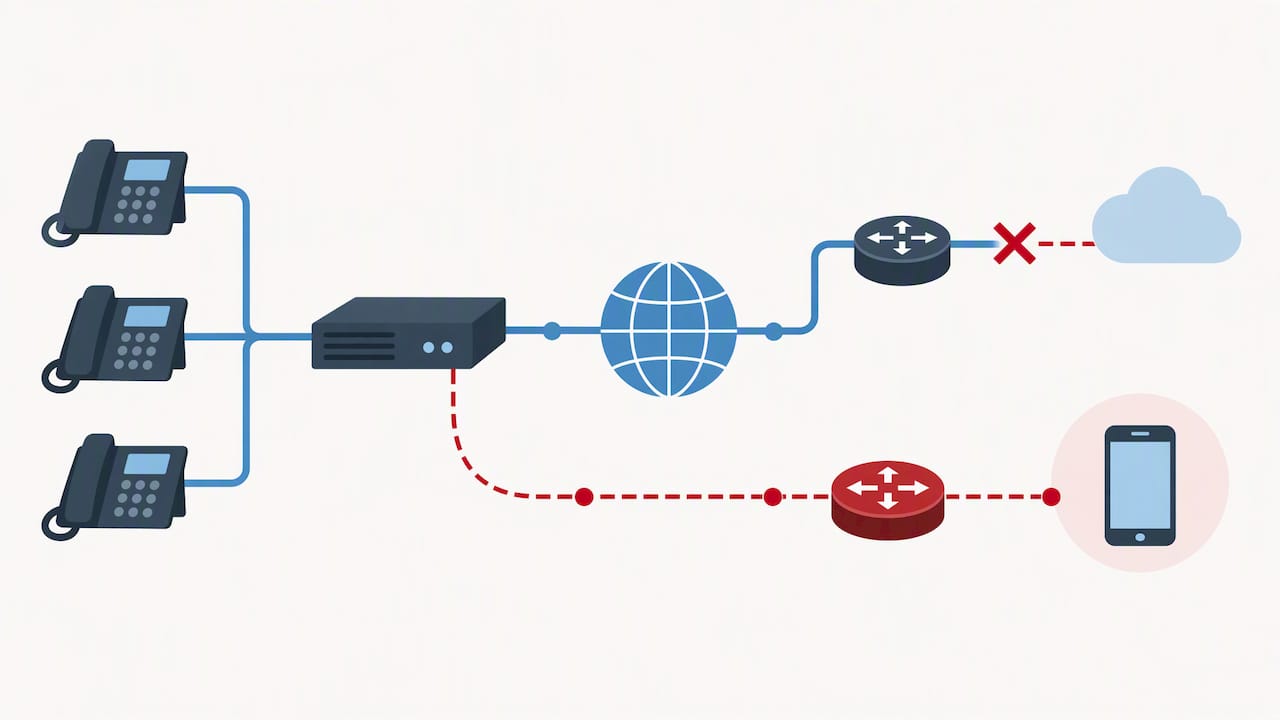
A VoIP phone depends on connectivity. When the connection fails, active calls drop and desk phones lose registration within seconds. Practical mitigations include mobile app access over cellular data and a second connection. The Commerce Commission’s 2025 monitoring report notes that making networks more resilient and restoring services faster has become an important focus for New Zealand network operators. In your analysis, add the cost of a backup link and a failover call flow, and decide where calls should go if the office goes offline.
Location and connectivity cost
The same Commerce Commission report says rural broadband customers pay about $13 more per month on average than urban ones. For a multi-site business, that difference belongs in the model for each location, as does the quality of the connection itself.
Migration risk
Number porting, emergency calling arrangements, and call flows that nobody mapped are where projects slip. Map your calls first with our call flow design guide, and read UCaaS vs VoIP to check resilience and emergency call responsibilities before signing.
Why VoIP rather than a mobile phone
A common objection is that staff already have mobiles. Mobiles work, but they tie the business number to a person and a SIM, give you no shared call flows, and leave you without central recording, extensions or reporting. Use VoIP where you need shared numbers, queues, transfers, and consistent coverage. Keep mobiles as a complement, ideally through an app on the same business number.
Adding AI answering to the analysis
Many New Zealand businesses now evaluate an AI receptionist alongside the phone system. The method is the same, but the cost and benefit lines differ.
Costs to count: the monthly or per-call fee, setup, any knowledge-base preparation, storage for call recordings, and the staff time to review how calls are handled. Benefits to count: calls answered that previously went to voicemail, leads captured after hours, and receptionist or overflow time freed for other work.
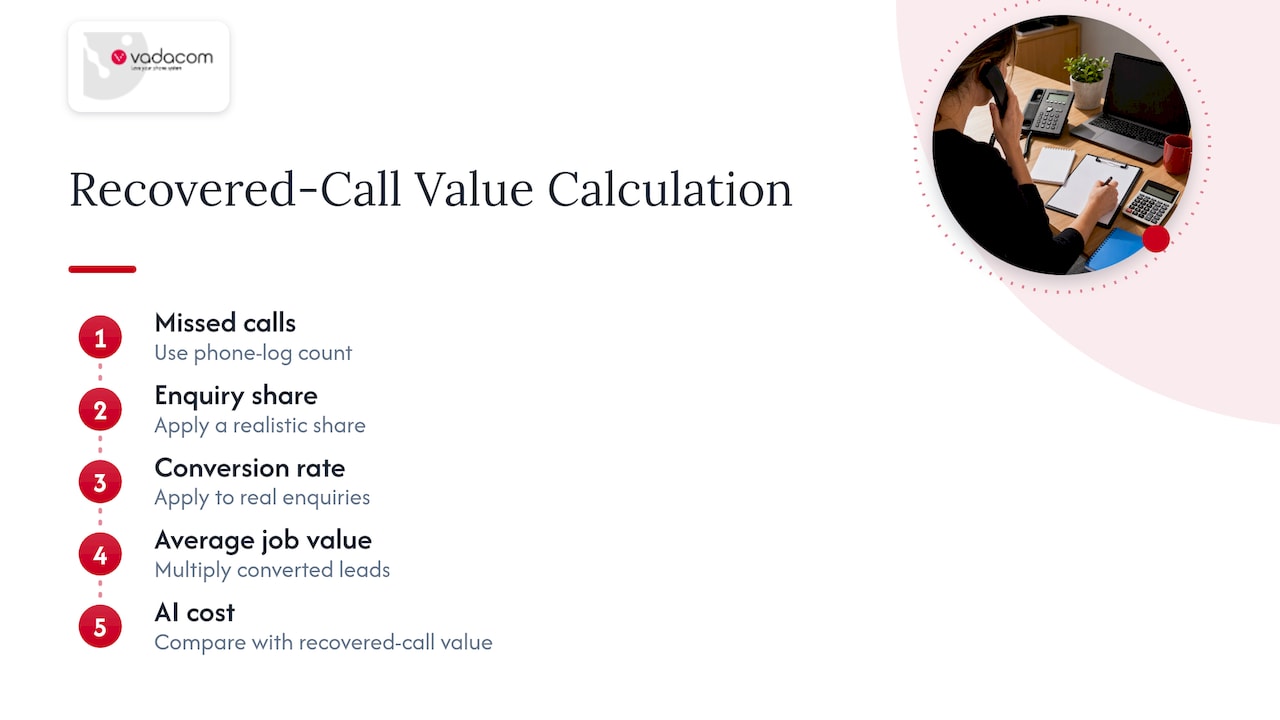
The value of recovered calls is the number that matters. Take your missed-call count from your phone logs, apply a realistic share that would be real enquiries, multiply by your conversion rate and average job value, and compare with the AI cost. For a broader view of the trade-offs between automated and human call handling, see this comparison of AI voice agents against human sales teams.
Be disciplined here. Pilot first with a limited call type, measure, then widen. Our piece on why AI should wait for a governed pilot sets out how, and our after-hours answering guide shows how AI and human handling can work together. The AI auto attendant page covers the routing side.
Our perspective
We have spent more than 20 years designing, delivering and supporting business communications in New Zealand and Australia, and the pattern in ROI conversations is consistent. The businesses that get a clean result are rarely the ones with the most optimistic spreadsheet. They are the ones that measured their baseline, tested their network, and chose a platform whose features matched how their people actually work.
That is why NextVoice focuses on the essentials: extension dialling, call transfer and announced transfer, voicemail, in-app recording and individual call-flow management, on a cloud architecture that spans multiple availability zones. Fewer features you never use means a lower cost to buy, learn and administer, and that flows directly into the TCO figure. Users and settings can be changed as the business changes, so you are not paying for tomorrow’s headcount today.
We would also say this plainly: if your current system is cheap, new and trouble-free, the financial case may be thin, and a technical audit is a better first step than a purchase. Where the case is strong, it usually rests on retiring on-premise equipment, giving remote and mobile staff a proper business line, and getting local people to call when something needs fixing.
— Stuart
Get your own numbers
If you want a second pair of eyes on your baseline, our technical audit reviews your existing phone setup and network before you commit to anything. When you are ready to see what the platform covers, start with NextVoice and NextMobile, or talk to us about AI call intelligence if you want deeper insight from recorded calls. We will not promise a result, but we will help you test the assumptions.
FAQ
How do I calculate VoIP ROI?
Add up all benefits over your chosen period, subtract all costs, and divide the result by the costs. Use real invoices for the baseline and include migration and network work on the cost side. Show payback in months alongside the percentage.
What is a realistic payback period for a VoIP system?
It depends on what you spend today and what you must spend to get ready. Businesses with high line, maintenance or mobile forwarding costs tend to recover the outlay sooner than those with cheap, modern setups. Run a cautious, expected and upside case rather than relying on a single figure.
What happens to VoIP calls when the internet is down?
Active calls drop and desk phones stop working until the connection returns. A mobile app on cellular data, a failover call flow to another number, or a second internet connection can keep you reachable. Plan and price these in advance.
Should I count productivity gains in the ROI?
Count them separately from hard savings, and only with stated assumptions, such as minutes saved per person per week. If the business case works on hard savings alone, productivity becomes a bonus rather than a dependency.
Sources
- TechTarget: Business case for VoIP
- NZBusiness: Unified communications, understanding the business value
- Management Magazine: Clearing the voice blocks
- NZ Government Procurement: Total Cost of Ownership guide
- NZ Herald: Virtual presence delivers productivity jolt
- Commerce Commission: Telecommunications Monitoring Report
- VoIPTest: What happens to phones when the internet goes down